AI 代理与系统连接的 MCP 入门(认证/授权篇)
Back to Top
为了覆盖更广泛的受众,这篇文章已从日语翻译而来。
您可以在这里找到原始版本。
前言
#本页面是“将 AI 代理与系统连接的 MCP 入门”的续篇。
这次,我们将介绍认证/授权。
在 MCP 规范中,授权功能为可选,但在 MCP 的实际运营中可以说是必备功能。
本文将涵盖以下内容。
- Streamable HTTP 中 MCP 的认证与授权流程
- PRM 与授权服务器的发现
- 使用 Keycloak 和令牌内省验证 MCP 服务器端
本文中展示的代码已在此处公开。
连载:将 AI 代理与系统连接的 MCP 入门
- 介绍
- stdio 实现篇
- Streamable HTTP 无状态实现篇
- Streamable HTTP 有状态实现篇
- 提示词篇
- 资源篇
- 认证/授权篇(本页)
本次使用的库等
#- npm@12.0.2
- node@26.6.0
- @modelcontextprotocol/express@2.0.0
- @modelcontextprotocol/node@2.0.0
- @modelcontextprotocol/server@2.0.0
- typescript@7.0.2
- zod@4.4.3
- Keycloak 26.3.4
- Docker compose
由于 @modelcontextprotocol v2 已发布,本文从此使用 v2。
同时使用最新的 Node 和 TypeScript。
关于 MCP 模块
在 v1 中使用了 @modelcontextprotocol/sdk。
由于 v2 对模块进行了拆分,因此使用 @modelcontextprotocol/server, express, node。
MCP 规范:认证/授权
#按传输方式的认证方法
#根据传输(通信方式),认证的实现指南会有所不同。
Streamable HTTP
授权为可选(OPTIONAL),但如要实现必须遵循 MCP 的授权规范。
stdio(标准输入输出)
不在 MCP 规范定义的认证规范范围内。
认证信息(如 API 密钥)将在子进程启动时从运行环境中直接获取并使用。
其他
遵循该协议中既定的最佳实践。
遵循标准
#为了确保安全性和互操作性的同时实现简化,采用了以下标准规范的子集。
- OAuth 2.1 (IETF 草案)
- OAuth 2.0 Bearer Token 用法 (RFC 6750)
- OAuth 2.0 授权服务器元数据 (RFC 8414)
- OAuth 2.0 动态客户端注册协议 (RFC 7591)
- OAuth 2.0 资源指示符 (RFC 8707)
- OAuth 2.0 受保护资源元数据 (RFC 9728)
- OAuth 客户端 ID 元数据文档 (CIMD)
角色
#定义了以下角色。
- MCP 服务器(OAuth 2.1 资源服务器):接收访问令牌并响应对受保护资源的请求。
- MCP 客户端(OAuth 2.1 客户端):代表资源所有者向受保护资源发起请求。
- 授权服务器:与用户交互并颁发访问令牌。可以与 MCP 服务器相同,也可独立部署。
认证流程
#以下是 MCP 官方文档中“Authorization Flow Steps”的部分中文翻译。
在 MCP 规范中,客户端需要获取 PRM 和授权服务器元数据,并使用 PKCE 的授权码流程(Authorization Code Flow)获取令牌。
本次验证代码主要针对资源服务器的行为进行验证,省略了客户端浏览器的认证流程。
- 使用在 Keycloak 事先获取的访问令牌,MCP 服务器接收 Bearer 令牌。
- 使用 Keycloak 的
Introspection endpoint验证令牌的有效性、受众(Audience)和作用域(Scope)。
sequenceDiagram
  autonumber

  participant B as User-Agent (Browser)
  participant C as MCP 客户端
  participant M as MCP 服务器
  participant A as 授权服务器

  Note over C: 发现授权服务器

  C->>M: MCP 请求(无令牌)
  M->>C: 401 Unauthorized(WWW-Authenticate header)

  Note over C: 发现资源元数据
  C->>M: PRM(Protected Resource Metadata)请求
  M->>C: PRM

  C->>A: 获取授权服务器元数据
  A-->>C: 授权服务器元数据

  Note over C: 客户端注册
  alt Client ID Metadata Documents
      A->>C: Fetch metadata from client_id URL
      C-->>A: JSON metadata document
  else Dynamic client registration
      C->>A: POST /register
      A->>C: Client Credentials
  else Pre-registered client
      Note over C: Use existing client_id
  end

  C->>B: Open browser with authorization URL + code_challenge + resource
  B->>A: Authorization request with resource parameter
  A->>B: Redirect to callback with authorization code + iss
  B->>C: Authorization code callback
  C->>A: Token request + code_verifier + resource
  A->>C: Access token (+ refresh token)

  C->>M: 向 MCP 发起请求(含令牌)
  M-->>C: MCP 响应
授权服务器的发现
#MCP 客户端通过以下步骤确定授权服务器的位置和功能。
-
发现资源元数据(RFC 9728)
当客户端收到401 Unauthorized响应时,必须获取resource_metadata(资源元数据)。优先级
WWW-Authenticate头中resource_metadata参数所指示的 URL- MCP 服务器端点下的 Well-Known URI(例如
/.well-known/oauth-protected-resource/path/to/mcp) - 域名根目录下的 Well-Known URI(例如
/.well-known/oauth-protected-resource)
-
获取授权服务器元数据(RFC 8414)
客户端根据从资源元数据中获得的 Issuer(发行者)URL 的格式来确定授权服务器的端点。优先级
- 当有路径组件时(例如:/tenant1)
- OAuth 2.0 方式(例如
/.well-known/oauth-authorization-server/tenant1) - OIDC 方式路径插入(例如
/.well-known/openid-configuration/tenant1) - OIDC 方式路径附加(例如
tenant1/.well-known/openid-configuration)
- OAuth 2.0 方式(例如
- 当无路径组件时
- OAuth 2.0 方式(例如
/.well-known/oauth-authorization-server) - OIDC 方式(例如
/.well-known/openid-configuration)
- OAuth 2.0 方式(例如
严格的验证规则
- 元数据文档中的 issuer 值必须与用于构建 Well-Known URL 的发行者标识符完全一致。
- 不一致时,客户端应视该元数据为不可用。
- 当有路径组件时(例如:/tenant1)
在验证代码中,使用了“有路径组件”下的“OAuth 2.0 方式”。
客户端注册
#在开始认证流程之前,客户端需要获取客户端 ID。
注册机制及优先级
- 预注册(Pre-registration):当客户端与服务器之间已存在关系时,使用静态认证信息。
- Client ID Metadata Documents (CIMD):当客户端与服务器之间无预先关系时,使用 HTTPS URL 作为客户端 ID。
- 动态客户端注册 (Dynamic Client Registration):为与不支持 CIMD 的服务器保持向后兼容性而保留,但不推荐使用,一般不选择。
- 用户输入:在没有其他手段时,让用户输入信息。
在验证代码中,使用了在 Keycloak 中预注册的静态认证信息(相当于 Pre-registration)。
验证代码解读
#验证代码规范
#以下使用如下验证代码进行说明。
依赖于 Keycloak 的处理集中在 keycloak.ts 中。
| 项目 | 内容 | 备注 |
|---|---|---|
| 传输方式 | Streamable HTTP(无状态) | |
| 授权服务器 | Keycloak | 在 8081 端口公开 |
| MCP 端点 | POST /mcp |
必须使用 Bearer 认证 |
| 令牌验证 | 令牌内省(Keycloak 的 Introspection endpoint) |
|
| 认证错误 | 401 Unauthorized + WWW-Authenticate |
当令牌无效或与预期 Audience 不匹配时抛出 |
| 授权错误 | 403 Forbidden + WWW-Authenticate |
即使令牌有效,但作用域不足时抛出 |
| PRM | GET /.well-known/oauth-protected-resource/mcp |
- 本次验证不涉及
- 浏览器的授权界面
- PKCE 参数生成
- 接收授权码的回调
- 从授权码交换令牌
- CIMD
- 动态客户端注册
Keycloak 配置
#使用 Docker Compose 启动时,使用随附的 Realm 配置进行自动生成。
这样,Keycloak 启动时就已配置好后续验证所需的所有 Realm。
- realm:
mcp-demo - Client Scope:
mcp:tools:aud=http://localhost:3000/mcpmcp:no-scope:aud=http://localhost:3000/mcpmcp:diff-audience:aud=http://localhost:3000/mcp-diff
- Client
- 用于内省:
mcp-server - 用于获取正常令牌:
mcp-demo-client(授予mcp:tools) - 用于作用域不足验证:
mcp-demo-no-scope-client(授予mcp:no-scope) - 用于无 Audience 验证:
mcp-demo-no-audience-client - 用于 Audience 不匹配验证:
mcp-demo-diff-audience-client(授予mcp:diff-audience)
- 用于内省:
- Audience:令牌面向哪个资源服务器
- Scope:在资源服务器上可以执行何种操作
PRM 的公开
#公开 MCP 客户端用来发现授权服务器的 PRM。公开由 mcpAuthMetadataRouter 负责。
当客户端在未认证的情况下访问 MCP 端点时,WWW-Authenticate 头中也会包含 PRM 的 URL。客户端可通过该 URL 获取 PRM,从而得知授权服务器的位置。
app.use(
  mcpAuthMetadataRouter({
    oauthMetadata,
    resourceServerUrl: mcpServerUrl,
    scopesSupported: [REQUIRED_SCOPE],
    resourceName: "MCP Auth Streamable HTTP",
  }),
);
PRM 示例
{
  "resource": "http://localhost:3000/mcp",
  "authorization_servers": ["http://localhost:8081/realms/mcp-demo"],
  "scopes_supported": ["mcp:tools"],
  "resource_name": "MCP Auth Streamable HTTP"
}
resource:受保护的 MCP 服务器标识符authorization_servers:授权服务器的 Issuer URLscopes_supported:MCP 服务器可用的 Scope 候选项resource_name:资源显示名
Bearer 认证中间件
#在 MCP 端点的前端进行 Bearer 认证。
requireBearerAuth 是在 MCP 端点启动之前执行的中间件。
如果 authMiddleware 检测到错误,会在此处中断处理,后续流程不会执行。
const authMiddleware = requireBearerAuth({
  // ※1
  verifier: tokenVerifier,
  // ※2
  requiredScopes: [REQUIRED_SCOPE],
  resourceMetadataUrl: getOAuthProtectedResourceMetadataUrl(mcpServerUrl),
});

//omit

app.post(MCP_PATH, authMiddleware, async (req, res) => {
  const server = createServer(); // 如果在 authMiddleware 中发生错误,此处将不会执行
  // omit
- ※1: 令牌验证(详细的验证内容后文说明)
- ※2: 作用域验证
- 验证令牌是否具有指定的作用域。
requireBearerAuth会比较令牌所持有的作用域与requiredScopes中设置的作用域。
使用 Keycloak 内省进行令牌验证
#MCP 服务器接收到的访问令牌通过 Keycloak 的 Introspection endpoint 进行验证。
这里需要注意,仅 HTTP 200 并不能证明令牌有效。
export function createTokenVerifier(mcpServerUrl: URL): OAuthTokenVerifier {
  return {
    verifyAccessToken: async (token) => {
      // 使用 Keycloak 的内省进行令牌验证 ※1
      const params = new URLSearchParams({token, client_id: OAUTH_CLIENT_ID});
      if (OAUTH_CLIENT_SECRET) params.set("client_secret", OAUTH_CLIENT_SECRET);
      const response = await fetch(KEYCLOAK_INTROSPECTION_ENDPOINT, {
        method: "POST",
        headers: { "Content-Type": "application/x-www-form-urlencoded" },
        body: params.toString(),
      });

      // 如果返回非 200 状态 ※2
      if (!response.ok) {
        const text = await response.text().catch(() => "");
        throw new OAuthError(OAuthErrorCode.InvalidToken, `Invalid or expired token: ${text}`);
      }

      // omit

      // 如果令牌无效或过期 ※3
      if (!data.active) throw new OAuthError(OAuthErrorCode.InvalidToken, "Inactive token");
- ※1
- token:要验证的令牌
OAUTH_CLIENT_ID,OAUTH_CLIENT_SECRET:不是 MCP 客户端的信息,而是 MCP 服务器向 Keycloak 发起内省请求时使用的认证信息
- ※2, 3
- 如果返回非 200,则视为无效或过期并返回
InvalidToken。 - 即使返回了 200,但如果
active为false,也因令牌无效同样返回InvalidToken。
- 如果返回非 200,则视为无效或过期并返回
Audience 验证
#令牌中设置的 aud 表示“令牌是发给哪个资源服务器的”。
即使令牌有效,也要验证 Audience,以避免接收为其他资源颁发的令牌。
      // 验证 Audience (aud) 声明
      if (OAUTH_STRICT) { // 如果启用了 OAUTH_STRICT,将执行验证
        // ※1
        if (!data.aud) throw new OAuthError(OAuthErrorCode.InvalidToken, "Resource indicator (aud) missing");
        const audiences = Array.isArray(data.aud) ? data.aud : [data.aud];
        const allowed = audiences.some((audience) =>
          checkResourceAllowed({ requestedResource: audience, configuredResource: mcpServerUrl }),
        );
        // ※2
        if (!allowed) throw new OAuthError(OAuthErrorCode.InvalidToken, `Expected audience compatible with ${mcpServerUrl}, got: ${audiences.join(",")}`);
      }
- ※1
- 如果 aud 不存在,则返回资源指示符缺失的错误
- ※2
- 如果 aud 与允许的值不匹配,则返回期望的 Audience 不一致错误
使用验证代码进行行为验证
#- 基本流程(验证授权流程的步骤)
- 在未设置 Authorization 头时发起请求(MCP Inspector)
- 在未设置 Authorization 头时发起请求(curl)
- PRM (Protected Resource Metadata) 请求
- 使用有效令牌进行正常访问
- 异常流程
- 在 Authorization 头中设置格式错误的值发起请求
- 在 Authorization 头中设置无效令牌发起请求
- 使用作用域不足的客户端发起请求
- 使用缺少 Audience 的客户端发起请求
- 使用设置了不同 Audience 的客户端发起请求
1. 在未设置 Authorization 头时发起请求(MCP Inspector)
#在未设置 Authorization 头的情况下,从 MCP Inspector 连接到 MCP 服务器。
界面上的弹窗消息
OAuth Authorization Failed
Policy 'Allowed Client Scopes' rejected request to client-registration service. Details: Not Permitted to use specified clientScope
控制台输出的日志
Error from MCP server: StreamableHTTPError: Streamable HTTP error: Error POSTing to endpoint: {"error":"invalid_token","error_description":"Missing Authorization header"}
    at StreamableHTTPClientTransport.send (file:///xxx/node_modules/@modelcontextprotocol/sdk/dist/esm/client/streamableHttp.js:364:23)
    at process.processTicksAndRejections (node:internal/process/task_queues:104:5) {
  code: 401
}
由于无法确认响应头,使用 curl 重新验证。
2. 在未设置 Authorization 头时发起请求(使用 curl 重新验证)
#同样在未设置 Authorization 头的情况下,使用 curl 调用 tools/list。
curl -i -X POST http://localhost:3000/mcp \
  -H "Accept: application/json, text/event-stream" \
  -H "Content-Type: application/json" \
  -d '{"jsonrpc":"2.0","id":1,"method":"tools/list","params":{}}'

HTTP/1.1 401 Unauthorized
WWW-Authenticate: Bearer error="invalid_token", error_description="Missing Authorization header", scope="mcp:tools", resource_metadata="http://localhost:3000/.well-known/oauth-protected-resource/mcp"
结果
- 返回了 HTTP 状态
401 Unauthorized。 error表示“令牌无效”。error_description表示“找不到 Authorization 头”。resource_metadata包含了 PRM 端点的 URL。
3. 验证 PRM (Protected Resource Metadata)
#访问 resource_metadata 中的 URL,确认认证所需的元数据。
curl -s http://localhost:3000/.well-known/oauth-protected-resource/mcp

{
  "resource":"http://localhost:3000/mcp",
  "authorization_servers":["http://localhost:8081/realms/mcp-demo"],
  "scopes_supported":["mcp:tools"],
  "resource_name":"MCP Auth Streamable HTTP"
}
在 MCP Inspector 中
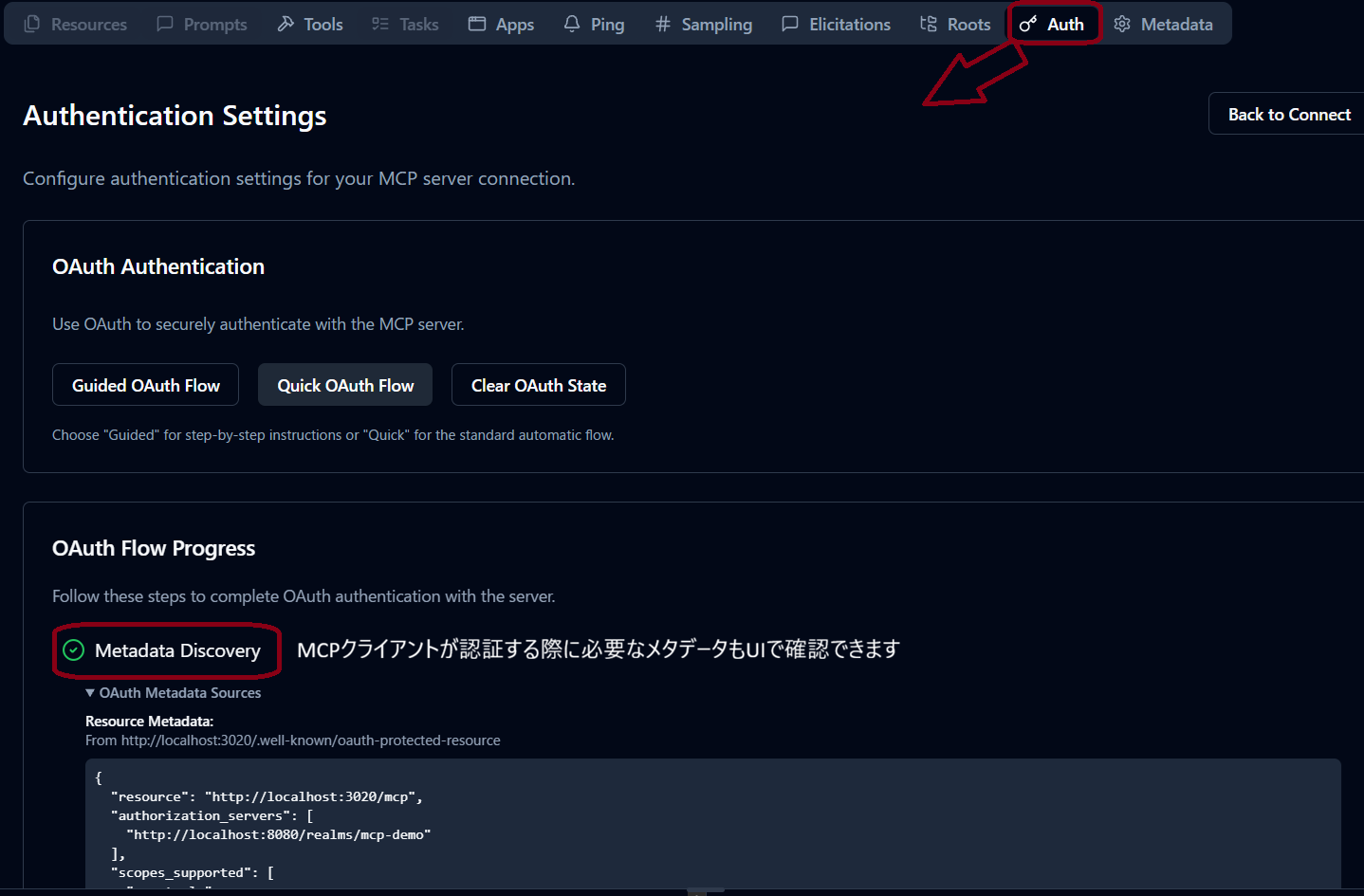
结果
返回了 PRM。
- resource:用于识别受保护资源的 URL
- authorization_servers:授权服务器的 Issuer URL
- scopes_supported:可用的授权 Scope
4. 使用有效令牌进行正常访问
#先进行认证并获取有效令牌,然后调用 tools/list。
- 获取令牌
从 Keycloak 获取访问令牌。
curl -s -X POST http://localhost:8081/realms/mcp-demo/protocol/openid-connect/token \
-H "Content-Type: application/x-www-form-urlencoded" \
-d "grant_type=client_credentials" \
-d "client_id=mcp-demo-client" \
-d "client_secret=mcp-demo-client-secret"

{
  "access_token":"<valid_token>",
  "expires_in":300,
  "refresh_expires_in":0,
  "token_type":"Bearer",
  "not-before-policy":0,
  "scope":"mcp:tools"
}
- 访问 MCP 服务器
使用从 Keycloak 获取的access_token访问 MCP。
curl -s -X POST http://localhost:3000/mcp \
  -H "Accept: application/json, text/event-stream" \
  -H "Authorization: Bearer <valid_token>" \
  -H "Content-Type: application/json" \
  -d '{"jsonrpc":"2.0","id":1,"method":"tools/list","params":{}}'

event: message
data: {"result":{"tools":[{"name":"sum_numbers","title":"sum_numbers","description":"Sum two numbers","inputSchema":{"type":"object","$schema":"https://json-schema.org/draft/2020-12/schema","properties":{"a":{"type":"number","description":"first number"},"b":{"type":"number","description":"second number"}},"required":["a","b"]},"outputSchema":{"$schema":"https://json-schema.org/draft/2020-12/schema","type":"object","properties":{"result":{"type":"number","description":"sum result"}},"required":["result"],"additionalProperties":false}},{"name":"get_server_policy","title":"get_server_policy","description":"Return simple authorization policy for demo","inputSchema":{"type":"object","properties":{}},"outputSchema":{"$schema":"https://json-schema.org/draft/2020-12/schema","type":"object","properties":{"resource":{"type":"string","description":"resource server url"},"requiredScope":{"type":"string","description":"required scope"}},"required":["resource","requiredScope"],"additionalProperties":false}}]},"jsonrpc":"2.0","id":1}
结果
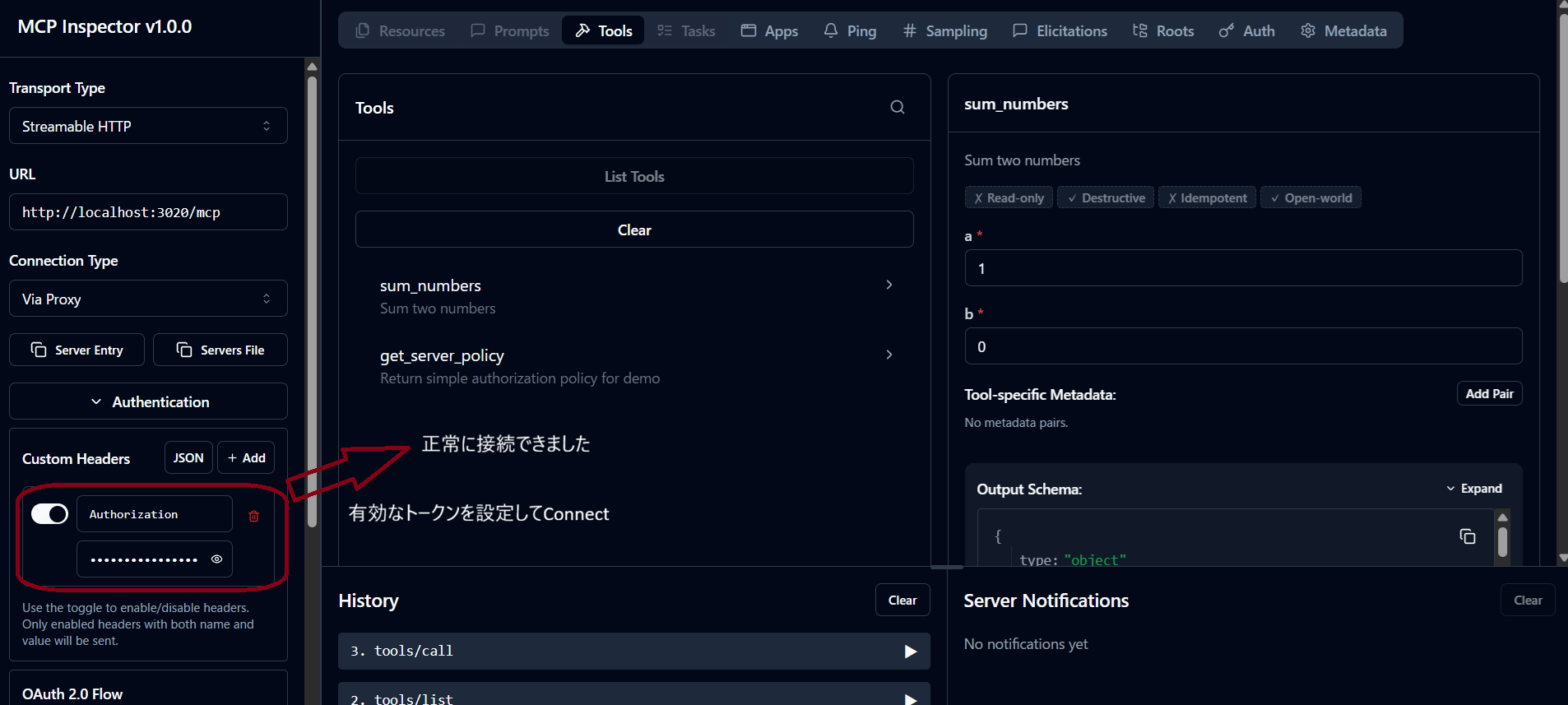
正常访问成功,可查看 tools/list 的结果。
该响应中包含了在 2026-07-28 RC 中支持的 JSON 模式(2020-12)的 $schema。
关于 RC 的变更内容,请参阅MCP 2026-07-28 RC 解读。
在 MCP Inspector 连接时
5.1. 在 Authorization 头中设置格式错误的值并发起请求
#以下是假设在 Authorization 头中设置了“格式不正确的令牌(不以 Bearer 开头的值)”并发起请求的场景,以验证异常处理。
curl -i -X POST http://localhost:3000/mcp \
  -H "Accept: application/json, text/event-stream" \
  -H "Content-Type: application/json" \
  -H "Authorization: bad_format_token" \
  -d '{"jsonrpc":"2.0","id":1,"method":"tools/list","params":{}}'

HTTP/1.1 401 Unauthorized
WWW-Authenticate: Bearer error="invalid_token", error_description="Invalid Authorization header format, expected 'Bearer TOKEN'", scope="mcp:tools", resource_metadata="http://localhost:3000/.well-known/oauth-protected-resource/mcp"

{
  "error":"invalid_token",
  "error_description":"Invalid Authorization header format, expected 'Bearer TOKEN'"
}
结果
- 返回 HTTP 状态
401 Unauthorized。 error_description表示“格式无效”。
5.2. 在 Authorization 头中设置无效令牌并发起请求
#以下是假设在 Authorization 头中设置了格式正确但“不存在的令牌”的值并发起请求的场景,以验证异常处理。
curl -i -X POST http://localhost:3000/mcp \
  -H "Accept: application/json, text/event-stream" \
  -H "Content-Type: application/json" \
  -H "Authorization: Bearer unknown_token" \
  -d '{"jsonrpc":"2.0","id":1,"method":"tools/list","params":{}}'

HTTP/1.1 401 Unauthorized
WWW-Authenticate: Bearer error="invalid_token", error_description="Inactive token", scope="mcp:tools", resource_metadata="http://localhost:3000/.well-known/oauth-protected-resource/mcp"

{
  "error":"invalid_token",
  "error_description":"Inactive token"
}
结果
- 返回 HTTP 状态
401 Unauthorized。 error_description表示“令牌无效”。
5.3. 使用作用域不足的客户端发起请求
#以下是假设使用权限不足的令牌(在未设置所需客户端作用域的客户端认证)发起请求的场景,以验证异常处理。
- 获取令牌
curl -s -X POST http://localhost:8081/realms/mcp-demo/protocol/openid-connect/token \
  -H "Content-Type: application/x-www-form-urlencoded" \
  -d "grant_type=client_credentials" \
  -d "client_id=mcp-demo-no-scope-client" \
  -d "client_secret=mcp-demo-no-scope-client-secret"

{"access_token":"<valid_token>","expires_in":300,"refresh_expires_in":0,"token_type":"Bearer","not-before-policy":0,"scope":"mcp:no-scope"}
- 访问 MCP 服务器
curl -i -X POST http://localhost:3000/mcp \
  -H "Accept: application/json, text/event-stream" \
  -H "Authorization: Bearer <valid_token>" \
  -H "Content-Type: application/json" \
  -d '{"jsonrpc":"2.0","id":1,"method":"tools/list","params":{}}'

HTTP/1.1 403 Forbidden
WWW-Authenticate: Bearer error="insufficient_scope", error_description="Insufficient scope", scope="mcp:tools", resource_metadata="http://localhost:3000/.well-known/oauth-protected-resource/mcp"

{"error":"insufficient_scope","error_description":"Insufficient scope"}
结果
- 返回 HTTP 状态
403 Forbidden。 error表示“作用域不足”。error_description表示“作用域不足”。
5.4. 使用未设置 Audience 的客户端发起请求
#以下是假设使用未设置预期 Audience 的令牌(在未设置所需 Audience 的客户端认证)发起请求的场景,以验证异常处理。
- 获取令牌
curl -s -X POST http://localhost:8081/realms/mcp-demo/protocol/openid-connect/token \
  -H "Content-Type: application/x-www-form-urlencoded" \
  -d "grant_type=client_credentials" \
  -d "client_id=mcp-demo-no-audience-client" \
  -d "client_secret=mcp-demo-no-audience-client-secret"
{"access_token":"<valid_token>","expires_in":300,"refresh_expires_in":0,"token_type":"Bearer","not-before-policy":0,"scope":""}
- 访问 MCP 服务器
curl -i -X POST http://localhost:3000/mcp \
  -H "Accept: application/json, text/event-stream" \
  -H "Authorization: Bearer <valid_token>" \
  -H "Content-Type: application/json" \
  -d '{"jsonrpc":"2.0","id":1,"method":"tools/list","params":{}}'

HTTP/1.1 401 Unauthorized
WWW-Authenticate: Bearer error="invalid_token", error_description="Resource indicator (aud) missing", scope="mcp:tools", resource_metadata="http://localhost:3000/.well-known/oauth-protected-resource/mcp"

{"error":"invalid_token","error_description":"Resource indicator (aud) missing"}
结果
- 返回 HTTP 状态
401 Unauthorized。 error_description表示“找不到资源指示符”。
5.5. 使用设置了不同 Audience 的客户端发起请求
#以下是假设使用面向其他资源的令牌(在客户端中设置了与预期 Audience 不同的值)发起请求的场景,以验证异常处理。
- 获取令牌
curl -s -X POST http://localhost:8081/realms/mcp-demo/protocol/openid-connect/token \
  -H "Content-Type: application/x-www-form-urlencoded" \
  -d "grant_type=client_credentials" \
  -d "client_id=mcp-demo-diff-audience-client" \
  -d "client_secret=mcp-demo-diff-audience-client-secret"
{"access_token":"<valid_token>","expires_in":300,"refresh_expires_in":0,"token_type":"Bearer","not-before-policy":0,"scope":"mcp:diff-audience"}
- 访问 MCP 服务器
curl -i -X POST http://localhost:3000/mcp \
  -H "Accept: application/json, text/event-stream" \
  -H "Authorization: Bearer <valid_token>" \
  -H "Content-Type: application/json" \
  -d '{"jsonrpc":"2.0","id":1,"method":"tools/list","params":{}}'

HTTP/1.1 401 Unauthorized
WWW-Authenticate: Bearer error="invalid_token", error_description="Expected audience compatible with http://localhost:3000/mcp, got: http://localhost:3000/mcp-diff", scope="mcp:tools", resource_metadata="http://localhost:3000/.well-known/oauth-protected-resource/mcp"

{"error":"invalid_token","error_description":"Expected audience compatible with http://localhost:3000/mcp, got: http://localhost:3000/mcp-diff"}
结果
- 返回 HTTP 状态
401 Unauthorized。 error_description表示“与预期的 Audience 不符”。
总结
#在 Streamable HTTP 中,可以利用基于 MCP 规范的认证与授权机制。
MCP 客户端通过 401 响应中的 WWW-Authenticate 头或 PRM 发现授权服务器并获取访问令牌。
MCP 服务器验证接收到的 Bearer 令牌,并决定允许或拒绝对受保护资源的访问。
本次验证代码使用了 Keycloak 和令牌内省,验证了 MCP 服务器端的认证与授权处理流程。
确认了对未设置 Authorization 头、格式不正确、无效令牌、Audience 不符合的情况返回 401,对作用域不足的情况返回 403。
在实际发布 MCP 服务器时,应为各用户和客户端定义所需的 Scope,并根据受保护资源验证相应的 Audience。