MCP Primer: Connecting AI Agents and Systems (Authentication/Authorization Edition)
Back to Top
To reach a broader audience, this article has been translated from Japanese.
You can find the original version here.
Introduction
#This page is a follow-up to "MCP Primer: Connecting AI Agents and Systems". This time, we explain authentication/authorization.
In the MCP specification, authorization is treated as OPTIONAL, but when running MCP in production, it can be considered a required feature. In this article, we cover:
- The flow of authentication and authorization in MCP over Streamable HTTP
- Discovery of PRM and the authorization server
- Server-side validation on the MCP server using Keycloak and token introspection
The code examples in this article are published here: [https://github.com/ubata-mamezou/developer-site-article-examples/tree/main/mcp-auth].
Series: MCP Primer Connecting AI Agents and Systems
- Introduction
- stdio Implementation
- Streamable HTTP Stateless Implementation
- Streamable HTTP Stateful Implementation
- Prompt Edition
- Resource Edition
- Authentication/Authorization Edition (this page)
Libraries and Tools Used This Time
#- npm@12.0.2
- node@26.6.0
- @modelcontextprotocol/express@2.0.0
- @modelcontextprotocol/node@2.0.0
- @modelcontextprotocol/server@2.0.0
- typescript@7.0.2
- zod@4.4.3
- Keycloak 26.3.4
- Docker compose
Since v2 of @modelcontextprotocol has been released, this article uses v2. We also use the latest versions of Node and TypeScript.
About the MCP modules
In v1, we used @modelcontextprotocol/sdk. In v2, the modules have been split, so we use @modelcontextprotocol/server, express, and node.
MCP Specification: Authentication/Authorization
#Authentication Approaches by Transport
#The implementation guidelines for authentication differ depending on the transport (communication method).
Streamable HTTP
Authorization is OPTIONAL, but if implemented, it must comply with the MCP authorization specification.
stdio (standard input/output)
This transport is outside the authentication scope defined by the MCP specification. Authentication information (e.g., API keys) must be obtained directly from the execution environment at subprocess startup.
Others
Follow the established best practices for that protocol.
Standards Compliance
#To ensure security and interoperability while simplifying, the following subset of standards is adopted:
- OAuth 2.1 (IETF Draft)
- OAuth 2.0 Bearer Token Usage (RFC 6750)
- OAuth 2.0 Authorization Server Metadata (RFC 8414)
- OAuth 2.0 Dynamic Client Registration Protocol (RFC 7591)
- Resource Indicators for OAuth 2.0 (RFC 8707)
- OAuth 2.0 Protected Resource Metadata (RFC 9728)
- OAuth Client ID Metadata Documents (CIMD)
Roles
#The following roles are defined:
- MCP Server (OAuth 2.1 Resource Server): Accepts access tokens and responds to requests for protected resources.
- MCP Client (OAuth 2.1 Client): Requests protected resources on behalf of the resource owner.
- Authorization Server: Interacts with the user and issues access tokens. It can be the same as the MCP Server or configured separately.
Authentication Flow
#A partial translation of the "Authorization Flow Steps" from the official MCP documentation:
In the MCP specification, the client retrieves PRM and authorization server metadata, then obtains tokens via the Authorization Code Flow using PKCE.
In the sample code for this article, we focus on testing the resource server side and omit the client-side browser authentication flow.
- The MCP Server receives a Bearer token using a pre-acquired access token from Keycloak.
- The MCP Server validates the token's validity, Audience, and Scope at Keycloak's
Introspection endpoint.
sequenceDiagram
  autonumber

  participant B as User-Agent (Browser)
  participant C as MCP Client
  participant M as MCP Server
  participant A as Authorization Server

  Note over C: Discover authorization server

  C->>M: MCP request (no token)
  M->>C: 401 Unauthorized (WWW-Authenticate header)

  Note over C: Discover resource metadata
  C->>M: PRM (Protected Resource Metadata) request
  M->>C: PRM

  C->>A: Fetch authorization server metadata
  A-->>C: Authorization server metadata

  Note over C: Client registration
  alt Client ID Metadata Documents
      A->>C: Fetch metadata from client_id URL
      C-->>A: JSON metadata document
  else Dynamic client registration
      C->>A: POST /register
      A->>C: Client Credentials
  else Pre-registered client
      Note over C: Use existing client_id
  end

  C->>B: Open browser with authorization URL + code_challenge + resource
  B->>A: Authorization request with resource parameter
  A->>B: Redirect to callback with authorization code + iss
  B->>C: Authorization code callback
  C->>A: Token request + code_verifier + resource
  A->>C: Access token (+ refresh token)

  C->>M: MCP request (with token)
  M-->>C: MCP response
Discovering the Authorization Server
#The MCP Client discovers the location and capabilities of the authorization server with these steps:
-
Discover resource metadata (RFC 9728)
When the client receives a
401 Unauthorizedresponse, it must retrieve theresource_metadata.Priority:
- The URL indicated by the
resource_metadataparameter in theWWW-Authenticateheader - Well-known URI under the MCP Server endpoint (e.g.,
/.well-known/oauth-protected-resource/path/to/mcp) - Well-known URI at the domain root (e.g.,
/.well-known/oauth-protected-resource)
- The URL indicated by the
-
Fetch authorization server metadata (RFC 8414)
The client determines the authorization server endpoint based on the Issuer URL from the resource metadata.
Priority:
- If there is a path component (e.g.,
/tenant1):- OAuth 2.0 style (e.g.,
/.well-known/oauth-authorization-server/tenant1) - OIDC style with path insertion (e.g.,
/.well-known/openid-configuration/tenant1) - OIDC style with path addition (e.g.,
tenant1/.well-known/openid-configuration)
- OAuth 2.0 style (e.g.,
- If there is no path component:
- OAuth 2.0 style (e.g.,
/.well-known/oauth-authorization-server) - OIDC style (e.g.,
/.well-known/openid-configuration)
- OAuth 2.0 style (e.g.,
Strict validation rules:
- The
issuervalue in the metadata document must exactly match the issuer identifier used to construct the Well-Known URL. - If they do not match, the client must reject the metadata.
- If there is a path component (e.g.,
In the sample code, we use the OAuth 2.0 style with a path component.
Client Registration
#Before starting the authentication flow, the client needs to obtain a client ID.
Registration mechanisms and priority:
- Pre-registration: Use static credentials when there is an existing relationship between the client and server.
- Client ID Metadata Documents (CIMD): Use an HTTPS URL as the client ID when there is no prior relationship.
- Dynamic Client Registration: Maintained for backward compatibility but deprecated, so generally not chosen.
- User input: Ask the user to input information if no other means are available.
In the sample code, we use static credentials pre-registered in Keycloak (Pre-registration).
Explanation of the Sample Code
#Sample Code Specifications
#We use the following sample code to explain. Keycloak-dependent processes are centralized in keycloak.ts.
| Item | Description | Notes |
|---|---|---|
| Transport | Streamable HTTP (Stateless) | |
| Authorization Server | Keycloak | Exposed on port 8081 |
| MCP endpoint | POST /mcp |
Bearer authentication required |
| Token validation | Token introspection (Keycloak's Introspection endpoint) |
|
| Authentication errors | 401 Unauthorized + WWW-Authenticate |
Thrown when the token is invalid or the audience does not match |
| Authorization errors | 403 Forbidden + WWW-Authenticate |
Thrown when the token is valid but lacks required scopes |
| PRM | GET /.well-known/oauth-protected-resource/mcp |
- Not covered in this sample:
- Browser consent screens
- PKCE parameter generation
- Callback to receive the authorization code
- Exchange of authorization code for tokens
- CIMD
- Dynamic Client Registration
Keycloak Setup
#When starting with Docker Compose, we automatically generate the Realm settings included in this project. This ensures that Keycloak starts with all the Realms necessary for the subsequent functional tests.
- realm:
mcp-demo - Client Scopes:
mcp:tools: aud=http://localhost:3000/mcpmcp:no-scope: aud=http://localhost:3000/mcpmcp:diff-audience: aud=http://localhost:3000/mcp-diff
- Clients:
- For introspection:
mcp-server - For obtaining valid tokens:
mcp-demo-client(withmcp:toolsscope) - For testing insufficient scope:
mcp-demo-no-scope-client(withmcp:no-scopescope) - For testing missing audience:
mcp-demo-no-audience-client - For testing mismatched audience:
mcp-demo-diff-audience-client(withmcp:diff-audiencescope)
- For introspection:
- Audience: Which resource server the token is intended for
- Scope: What actions can be performed on the resource server
Publishing PRM
#PRM is published so that the MCP Client can discover the authorization server. The mcpAuthMetadataRouter handles this publication. When a client accesses the MCP endpoint without authentication, the WWW-Authenticate header also includes the PRM URL. The client retrieves the PRM from that URL to learn the authorization server location.
app.use(
  mcpAuthMetadataRouter({
    oauthMetadata,
    resourceServerUrl: mcpServerUrl,
    scopesSupported: [REQUIRED_SCOPE],
    resourceName: "MCP Auth Streamable HTTP",
  }),
);
PRM example
{
  "resource": "http://localhost:3000/mcp",
  "authorization_servers": ["http://localhost:8081/realms/mcp-demo"],
  "scopes_supported": ["mcp:tools"],
  "resource_name": "MCP Auth Streamable HTTP"
}
resource: Identifier for the protected MCP serverauthorization_servers: Issuer URL(s) of the authorization serverscopes_supported: Candidate scopes used by the MCP serverresource_name: Display name of the resource
Bearer Authentication Middleware
#Bearer authentication is performed before the MCP endpoint. requireBearerAuth is middleware that runs before the MCP endpoint. If authMiddleware detects an error, it terminates processing, and subsequent logic is not executed.
const authMiddleware = requireBearerAuth({
  // ※1
  verifier: tokenVerifier,
  // ※2
  requiredScopes: [REQUIRED_SCOPE],
  resourceMetadataUrl: getOAuthProtectedResourceMetadataUrl(mcpServerUrl),
});

//omit

app.post(MCP_PATH, authMiddleware, async (req, res) => {
  const server = createServer(); // This line is not reached if authMiddleware throws an error
  // omit
- ※1: Token validation (details below)
- ※2: Scope validation
- Verifies that the token has the specified scopes.
requireBearerAuthcompares the token's scopes againstrequiredScopes.
Token Validation with Keycloak Introspection
#The MCP Server validates received access tokens using Keycloak's Introspection endpoint. It is important to note that an HTTP 200 response alone does not indicate that the token is valid.
export function createTokenVerifier(mcpServerUrl: URL): OAuthTokenVerifier {
  return {
    verifyAccessToken: async (token) => {
      // Validate token via Keycloak introspection ※1
      const params = new URLSearchParams({token, client_id: OAUTH_CLIENT_ID});
      if (OAUTH_CLIENT_SECRET) params.set("client_secret", OAUTH_CLIENT_SECRET);
      const response = await fetch(KEYCLOAK_INTROSPECTION_ENDPOINT, {
        method: "POST",
        headers: { "Content-Type": "application/x-www-form-urlencoded" },
        body: params.toString(),
      });

      // If response status is not 200 ※2
      if (!response.ok) {
        const text = await response.text().catch(() => "");
        throw new OAuthError(OAuthErrorCode.InvalidToken, `Invalid or expired token: ${text}`);
      }

      // omit

      // If the token is inactive or expired ※3
      if (!data.active) throw new OAuthError(OAuthErrorCode.InvalidToken, "Inactive token");
- ※1
token: The token to validateOAUTH_CLIENT_ID,OAUTH_CLIENT_SECRET: Credentials that the MCP Server uses to request introspection, not the MCP Client's credentials
- ※2, 3
- If a non-200 status is returned, it is treated as invalid or expired, returning
InvalidToken. - Even if status is 200, if
activeisfalse, the token is invalid, also returningInvalidToken.
- If a non-200 status is returned, it is treated as invalid or expired, returning
Audience Validation
#The aud claim in the token indicates which resource server the token is issued for. Even if a token is otherwise valid, we must reject tokens issued for other resources by validating the audience.
      // Validate Audience (aud) claim
      if (OAUTH_STRICT) { // Perform validation if OAUTH_STRICT is enabled
        // ※1
        if (!data.aud) throw new OAuthError(OAuthErrorCode.InvalidToken, "Resource indicator (aud) missing");
        const audiences = Array.isArray(data.aud) ? data.aud : [data.aud];
        const allowed = audiences.some((audience) =>
          checkResourceAllowed({ requestedResource: audience, configuredResource: mcpServerUrl }),
        );
        // ※2
        if (!allowed) throw new OAuthError(OAuthErrorCode.InvalidToken, `Expected audience compatible with ${mcpServerUrl}, got: ${audiences.join(",")}`);
      }
- ※1
- Throws an error if
audis missing, indicating the resource indicator is missing.
- Throws an error if
- ※2
- Throws an error if none of the
audvalues match an allowed audience, indicating a mismatch.
- Throws an error if none of the
Functional Testing with the Sample Code
#- Basic flow (verifying the authorization flow)
- Request without Authorization header (MCP Inspector)
- Request without Authorization header (curl)
- PRM (Protected Resource Metadata) request
- Successful access with a valid token
- Exception flow
- Request with incorrectly formatted Authorization header
- Request with an invalid token
- Request using a client with insufficient scope
- Request using a client with missing audience
- Request using a client with a different audience
1. Request without Authorization header (MCP Inspector)
#Connect to the MCP Server from MCP Inspector without setting an Authorization header.
UI popup message
OAuth Authorization Failed
Policy 'Allowed Client Scopes' rejected request to client-registration service. Details: Not Permitted to use specified clientScope
Console log output
Error from MCP server: StreamableHTTPError: Streamable HTTP error: Error POSTing to endpoint: {"error":"invalid_token","error_description":"Missing Authorization header"}
    at StreamableHTTPClientTransport.send (file:///xxx/node_modules/@modelcontextprotocol/sdk/dist/esm/client/streamableHttp.js:364:23)
    at process.processTicksAndRejections (node:internal/process/task_queues:104:5) {
  code: 401
}
Since response headers could not be confirmed, we re-test with curl.
2. Request without Authorization header (re-test with curl)
#As before, call tools/list without setting an Authorization header using curl.
curl -i -X POST http://localhost:3000/mcp \
  -H "Accept: application/json, text/event-stream" \
  -H "Content-Type: application/json" \
  -d '{"jsonrpc":"2.0","id":1,"method":"tools/list","params":{}}'

HTTP/1.1 401 Unauthorized
WWW-Authenticate: Bearer error="invalid_token", error_description="Missing Authorization header", scope="mcp:tools", resource_metadata="http://localhost:3000/.well-known/oauth-protected-resource/mcp"
Result
401 Unauthorizedis returned.errorindicates "invalid_token".error_descriptionindicates "Missing Authorization header".resource_metadataprovides the PRM endpoint URL.
3. Checking PRM (Protected Resource Metadata)
#Access the URL provided in resource_metadata to inspect the metadata needed for authentication.
curl -s http://localhost:3000/.well-known/oauth-protected-resource/mcp

{
  "resource":"http://localhost:3000/mcp",
  "authorization_servers":["http://localhost:8081/realms/mcp-demo"],
  "scopes_supported":["mcp:tools"],
  "resource_name":"MCP Auth Streamable HTTP"
}
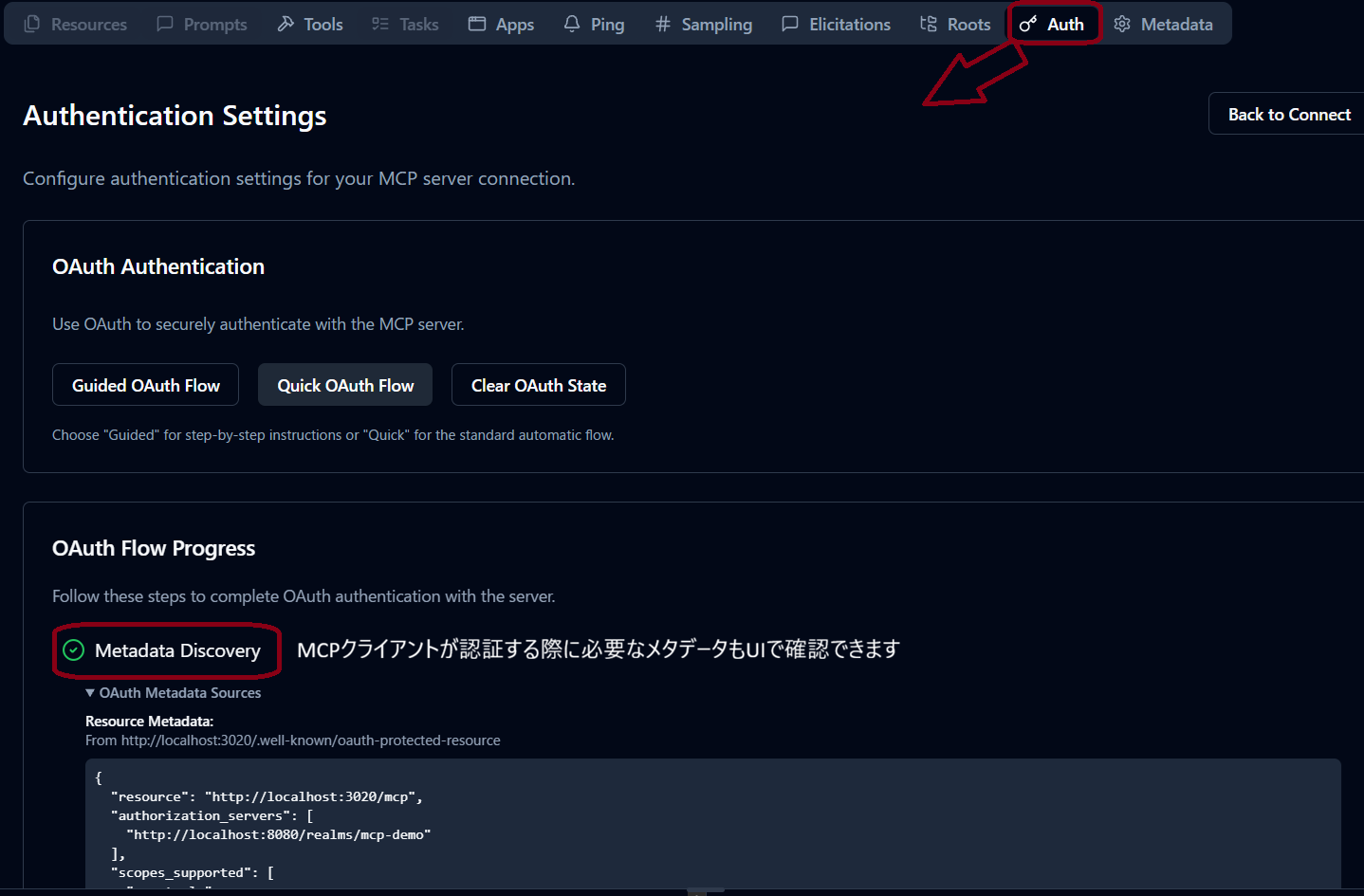
In MCP Inspector
Result
PRM is returned.
resource: URL identifying the protected resourceauthorization_servers: Issuer URL(s) of the authorization serverscopes_supported: Available authorization scopes
4. Successful Access with a Valid Token
#Obtain a valid token via authentication, then call tools/list.
- Obtain token
Acquire an access token from Keycloak:
curl -s -X POST http://localhost:8081/realms/mcp-demo/protocol/openid-connect/token \
-H "Content-Type: application/x-www-form-urlencoded" \
-d "grant_type=client_credentials" \
-d "client_id=mcp-demo-client" \
-d "client_secret=mcp-demo-client-secret"

{
  "access_token":"<valid_token>",
  "expires_in":300,
  "refresh_expires_in":0,
  "token_type":"Bearer",
  "not-before-policy":0,
  "scope":"mcp:tools"
}
- Access the MCP Server
Use the access_token from Keycloak to access the MCP endpoint:
curl -s -X POST http://localhost:3000/mcp \
  -H "Accept: application/json, text/event-stream" \
  -H "Authorization: Bearer <valid_token>" \
  -H "Content-Type: application/json" \
  -d '{"jsonrpc":"2.0","id":1,"method":"tools/list","params":{}}'

event: message
data: {"result":{"tools":[{"name":"sum_numbers","title":"sum_numbers","description":"Sum two numbers","inputSchema":{"type":"object","$schema":"https://json-schema.org/draft/2020-12/schema","properties":{"a":{"type":"number","description":"first number"},"b":{"type":"number","description":"second number"}},"required":["a","b"]},"outputSchema":{"$schema":"https://json-schema.org/draft/2020-12/schema","type":"object","properties":{"result":{"type":"number","description":"sum result"}},"required":["result"],"additionalProperties":false}},{"name":"get_server_policy","title":"get_server_policy","description":"Return simple authorization policy for demo","inputSchema":{"type":"object","properties":{}},"outputSchema":{"$schema":"https://json-schema.org/draft/2020-12/schema","type":"object","properties":{"resource":{"type":"string","description":"resource server url"},"requiredScope":{"type":"string","description":"required scope"}},"required":["resource","requiredScope"],"additionalProperties":false}}]},"jsonrpc":"2.0","id":1}
Result
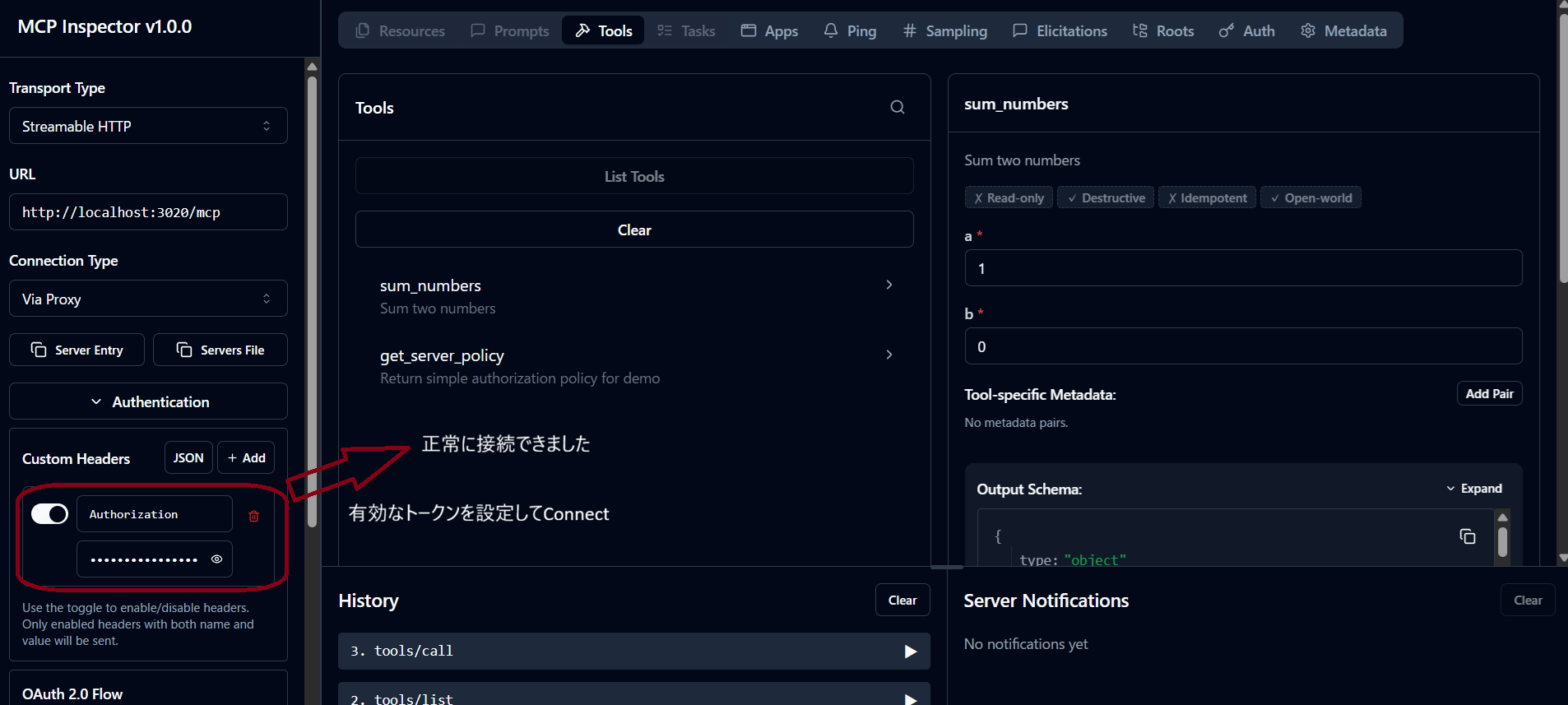
Access is successful, and the tools/list result is returned.
This response includes the JSON schema $schema (2020-12) introduced in the 2026-07-28 RC.
Details on the RC changes are explained in Explaining MCP 2026-07-28 RC.
When connecting with MCP Inspector
5.1. Request with Incorrect Authorization Header Format
#Simulate a request where the Authorization header has an invalid format (value not starting with "Bearer ").
curl -i -X POST http://localhost:3000/mcp \
  -H "Accept: application/json, text/event-stream" \
  -H "Content-Type: application/json" \
  -H "Authorization: bad_format_token" \
  -d '{"jsonrpc":"2.0","id":1,"method":"tools/list","params":{}}'

HTTP/1.1 401 Unauthorized
WWW-Authenticate: Bearer error="invalid_token", error_description="Invalid Authorization header format, expected 'Bearer TOKEN'", scope="mcp:tools", resource_metadata="http://localhost:3000/.well-known/oauth-protected-resource/mcp"

{
  "error":"invalid_token",
  "error_description":"Invalid Authorization header format, expected 'Bearer TOKEN'"
}
Result
401 Unauthorizedis returned.error_descriptionindicates the header has an invalid format.
5.2. Request with an Invalid Token
#Simulate a request where the format is correct but the token does not exist.
curl -i -X POST http://localhost:3000/mcp \
  -H "Accept: application/json, text/event-stream" \
  -H "Content-Type: application/json" \
  -H "Authorization: Bearer unknown_token" \
  -d '{"jsonrpc":"2.0","id":1,"method":"tools/list","params":{}}'

HTTP/1.1 401 Unauthorized
WWW-Authenticate: Bearer error="invalid_token", error_description="Inactive token", scope="mcp:tools", resource_metadata="http://localhost:3000/.well-known/oauth-protected-resource/mcp"

{
  "error":"invalid_token",
  "error_description":"Inactive token"
}
Result
401 Unauthorizedis returned.error_descriptionindicates the token is invalid.
5.3. Request Using a Client with Insufficient Scope
#Simulate a request using a token from a client lacking the required scope.
- Obtain token
curl -s -X POST http://localhost:8081/realms/mcp-demo/protocol/openid-connect/token \
  -H "Content-Type: application/x-www-form-urlencoded" \
  -d "grant_type=client_credentials" \
  -d "client_id=mcp-demo-no-scope-client" \
  -d "client_secret=mcp-demo-no-scope-client-secret"

{"access_token":"<valid_token>","expires_in":300,"refresh_expires_in":0,"token_type":"Bearer","not-before-policy":0,"scope":"mcp:no-scope"}
- Access the MCP Server
curl -i -X POST http://localhost:3000/mcp \
  -H "Accept: application/json, text/event-stream" \
  -H "Authorization: Bearer <valid_token>" \
  -H "Content-Type: application/json" \
  -d '{"jsonrpc":"2.0","id":1,"method":"tools/list","params":{}}'

HTTP/1.1 403 Forbidden
WWW-Authenticate: Bearer error="insufficient_scope", error_description="Insufficient scope", scope="mcp:tools", resource_metadata="http://localhost:3000/.well-known/oauth-protected-resource/mcp"

{"error":"insufficient_scope","error_description":"Insufficient scope"}
Result
403 Forbiddenis returned.erroranderror_descriptionboth indicate insufficient scope.
5.4. Request Using a Client with Missing Audience
#Simulate a request using a token with no audience set.
- Obtain token
curl -s -X POST http://localhost:8081/realms/mcp-demo/protocol/openid-connect/token \
  -H "Content-Type: application/x-www-form-urlencoded" \
  -d "grant_type=client_credentials" \
  -d "client_id=mcp-demo-no-audience-client" \
  -d "client_secret=mcp-demo-no-audience-client-secret"
{"access_token":"<valid_token>","expires_in":300,"refresh_expires_in":0,"token_type":"Bearer","not-before-policy":0,"scope":""}
- Access the MCP Server
curl -i -X POST http://localhost:3000/mcp \
  -H "Accept: application/json, text/event-stream" \
  -H "Authorization: Bearer <valid_token>" \
  -H "Content-Type: application/json" \
  -d '{"jsonrpc":"2.0","id":1,"method":"tools/list","params":{}}'

HTTP/1.1 401 Unauthorized
WWW-Authenticate: Bearer error="invalid_token", error_description="Resource indicator (aud) missing", scope="mcp:tools", resource_metadata="http://localhost:3000/.well-known/oauth-protected-resource/mcp"

{"error":"invalid_token","error_description":"Resource indicator (aud) missing"}
Result
401 Unauthorizedis returned.error_descriptionindicates the resource indicator is missing.
5.5. Request Using a Client with a Different Audience
#Simulate a request using a token issued for a different resource.
- Obtain token
curl -s -X POST http://localhost:8081/realms/mcp-demo/protocol/openid-connect/token \
  -H "Content-Type: application/x-www-form-urlencoded" \
  -d "grant_type=client_credentials" \
  -d "client_id=mcp-demo-diff-audience-client" \
  -d "client_secret=mcp-demo-diff-audience-client-secret"
{"access_token":"<valid_token>","expires_in":300,"refresh_expires_in":0,"token_type":"Bearer","not-before-policy":0,"scope":"mcp:diff-audience"}
- Access the MCP Server
curl -i -X POST http://localhost:3000/mcp \
  -H "Accept: application/json, text/event-stream" \
  -H "Authorization: Bearer <valid_token>" \
  -H "Content-Type: application/json" \
  -d '{"jsonrpc":"2.0","id":1,"method":"tools/list","params":{}}'

HTTP/1.1 401 Unauthorized
WWW-Authenticate: Bearer error="invalid_token", error_description="Expected audience compatible with http://localhost:3000/mcp, got: http://localhost:3000/mcp-diff", scope="mcp:tools", resource_metadata="http://localhost:3000/.well-known/oauth-protected-resource/mcp"

{"error":"invalid_token","error_description":"Expected audience compatible with http://localhost:3000/mcp, got: http://localhost:3000/mcp-diff"}
Result
401 Unauthorizedis returned.error_descriptionindicates the expected audience differs.
Conclusion
#With Streamable HTTP, you can use the authentication and authorization mechanisms defined by the MCP specification.
The MCP Client discovers the authorization server from the WWW-Authenticate header or PRM in 401 responses and obtains an access token. The MCP Server validates the received Bearer token and grants or denies access to protected resources.
In this sample code, we used Keycloak and token introspection to verify the MCP Server's authentication and authorization logic. We confirmed that missing or malformed Authorization headers, invalid tokens, and audience issues result in 401 responses, and insufficient scope results in 403 responses.
When deploying an MCP Server in production, it is important to define the necessary scopes for each user or client and validate the audience according to the protected resources.