Introduction to MCP Connecting AI Agents and Systems (Resources)
Back to Top
To reach a broader audience, this article has been translated from Japanese.
You can find the original version here.
Introduction
#This page is the continuation of "Introduction to MCP Connecting AI Agents and Systems".
This time, we explain resources.
MCP resources are a feature that provides contextual information (files, guides, specifications, etc.) for the AI model to reference when generating responses.
While tools are executed by "AI model decision" and prompts are selected by "user intent", resources decide their inclusion in an "application-driven" manner.
The code shown in this article is available here.
Series: Introduction to MCP Connecting AI Agents and Systems
- Introduction
- stdio Implementation
- StreamableHTTP Stateless Implementation
- StreamableHTTP Stateful Implementation
- Prompt Section
- Resources Section (This Article)
Libraries and Tools Used
#- npm@11.11.1
- node@22.22.0
- typescript@6.0.3
- @modelcontextprotocol/sdk@1.29.0
- zod@4.3.6
Use Cases
#- Sharing development guides: resource-ize coding guidelines and design policies to provide them as premise information during AI generation
- Referencing specification fragments: publish excerpts of API specifications, error code definitions, input constraints, etc. as resources to improve code generation accuracy
- Providing information that switches based on dynamic parameters: using URI templates, provide resources whose content changes based on variable parameters
Differences Between Tools, Prompts, and Resources
#Having covered the main elements of tools, prompts, and resources in previous features, let's recap their roles:
| Element | Main Role | Controlling Entity | Identification Method |
|---|---|---|---|
| Resource | Providing data/context (static knowledge) | Application-driven | Resource URI |
| Prompt | Message/workflow template | User-driven | Prompt name |
| Tool | Execution of concrete functions (active actions) | Executed by AI model | Tool name |
Types of Resources
#MCP resources are divided into two types based on how the URI is provided:
| Type | Description | Use Case |
|---|---|---|
| Static Resource | A resource uniquely identified by a fixed URI | Guides, fixed specifications, configuration info, etc. |
| Resource Template | A resource parameterized with a URI template (RFC 6570) | Information that changes based on variable elements like ID or name |
Protocol Messages
#There are six messages related to MCP resources:
| Message | Direction | Description |
|---|---|---|
resources/list |
Client → Server | Retrieve the list of available resources (supports pagination) |
resources/templates/list |
Client → Server | Retrieve the list of resource templates |
resources/read |
Client → Server | Retrieve resource content by specifying the URI |
resources/subscribe |
Client → Server | Subscribe to change notifications for a specified resource URI (requires capability subscribe: true) |
notifications/resources/updated |
Server → Client | Notify that a subscribed resource has been updated |
notifications/resources/list_changed |
Server → Client | Notify that the resource list has changed (requires capability listChanged: true) |
※ Note: To verify notifications, you need to set up a separate source for the resources and detect changes on the source side; therefore, it is not included in this sample.
sequenceDiagram
  actor client as MCP Client
  participant server as MCP Server

  client ->> server: Retrieve resource list (resources/list)
  server -->> client: Resource list
  client ->> server: Retrieve resource (resources/read)
  server -->> client: Resource
Data Structures (Data Types)
#- Resource Content
uri: A URI that uniquely identifies the resourcename: Resource nametitle: Display titledescription(optional): Description of the resourceicons(optional): List of iconsmimeType(optional): MIME type of the content. Can specify text or binary (requires Base64 encoding).size(optional): Size in bytes
- Annotations: Hints to the client
audience: Indicates the intended recipient of the resource. Can specifyuser,assistant, or both.priority: Importance level indicated by a number between 0.0 and 1.0 (1.0 is highest)lastModified: Last modification date (ISO 8601 timestamp)
URI Schemes
#Choose the URI scheme for resources according to the purpose:
| Scheme | Use Case | Notes |
|---|---|---|
https:// |
Refer to resources on the web | Use when the client can access it directly. When retrieving via the server, consider using a custom scheme. |
file:// |
Resources representing a filesystem-like structure | Mapping to an actual filesystem is not required; the source of the value can be anything (DB, external API, etc.) |
git:// |
Git resources | Represent Git-specific structures such as commits, branches, paths, etc. |
| Custom | Any resource using a custom scheme | Must comply with RFC 3986. The sample's memory:// and orders:// fall into this category. |
The server must validate all resource URIs
This is omitted in the sample, but you must prevent unintended access such as path traversal.
When representing directories with file
It is recommended to specify inode/directory (XDG standard) for the mimeType.
Implementation Sample
#See the full code here.
Registering Static Resources
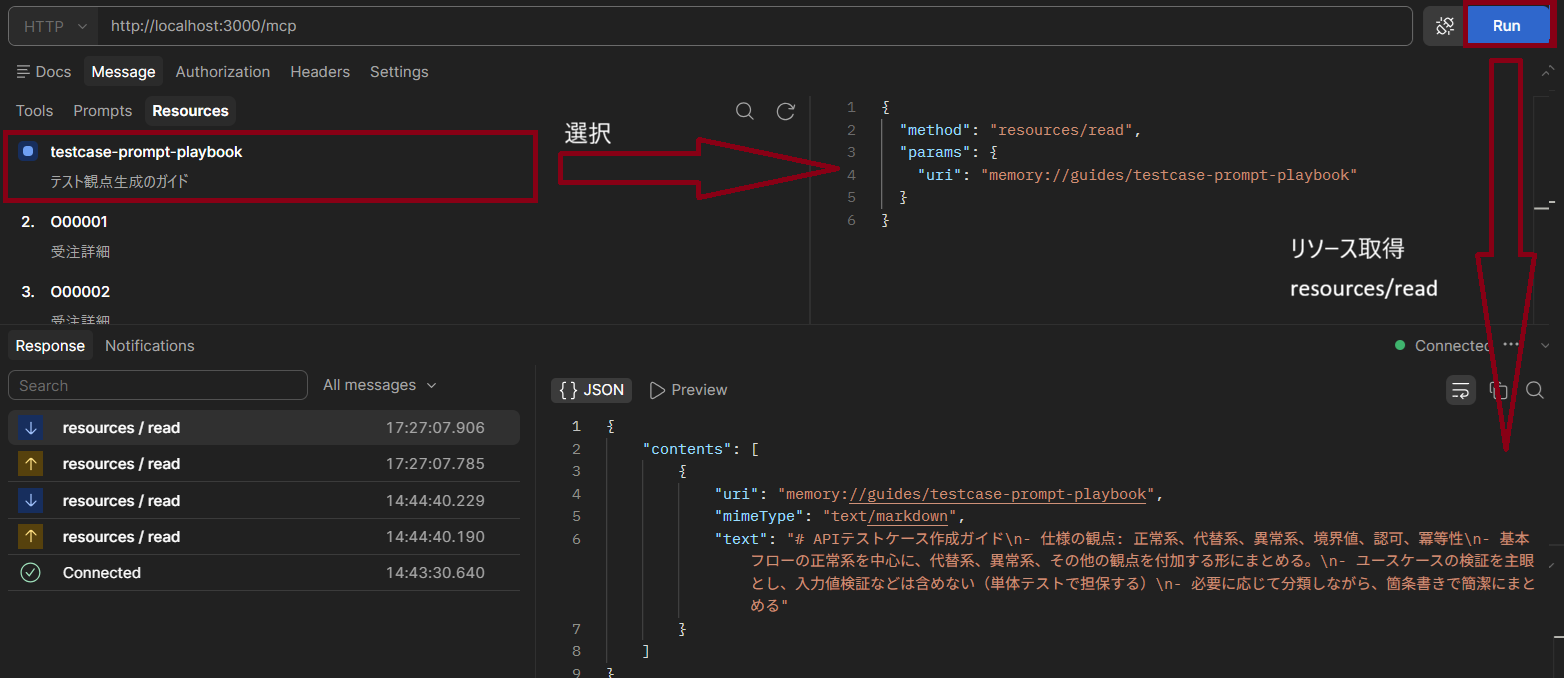
#Example of publishing a resource with a fixed URI.
Passing a URI string as the second argument to registerResource makes it a static resource.
  // Resource: Static resource with annotations (text content)
  const testGuideUri = "memory://guides/testcase-prompt-playbook";
  server.registerResource(
    "testcase-prompt-playbook",
    testGuideUri,
    {
      mimeType: "text/markdown",
      description: "Guide for generating test considerations",
      annotations: {
        audience: ["assistant"],       // Positioned as reference information for AI
        priority: 0.8,                 // Importance (relatively high)
        lastModified: "2026-06-28T00:00:00Z",
      },
    },
    async () => ({
      contents: [{
        uri: testGuideUri, mimeType: "text/markdown",
        text: [
          // In practice, more detailed instructions would be necessary, but these are kept minimal to reduce line count
          "# API Test Case Creation Guide",
          "- Specification perspectives: happy path, alternative paths, error cases, boundary values, authorization, idempotency",
          "- Focus on the happy path of the main flow, then add alternative paths, error cases, and other perspectives.",
          "- Emphasize use case validation; exclude input validation (covered by unit tests).",
          "- Summarize concisely using bullet points, categorizing as needed.",
        ].join("\n")
      }]
    }),
  );
- Verification: Confirm using Postman where
resources/readcan be tested
Example of Specifying Binary Content
For binary content (such as images), set the Base64-encoded string in blob.
// Resource: Example of binary content (image)
server.registerResource(
  "company-logo",
  "file://assets/logo.png",
  { mimeType: "image/png", description: "Company logo image" },
  async () => ({
    contents: [{ uri: "file://assets/logo.png", mimeType: "image/png", blob: "<Base64-encoded data>" }],
  }),
);
Registering Resource Templates
#Using the ResourceTemplate class, you can publish resources parameterized with URI templates (RFC 6570).
Placeholders like {orderId} are expanded at request time.
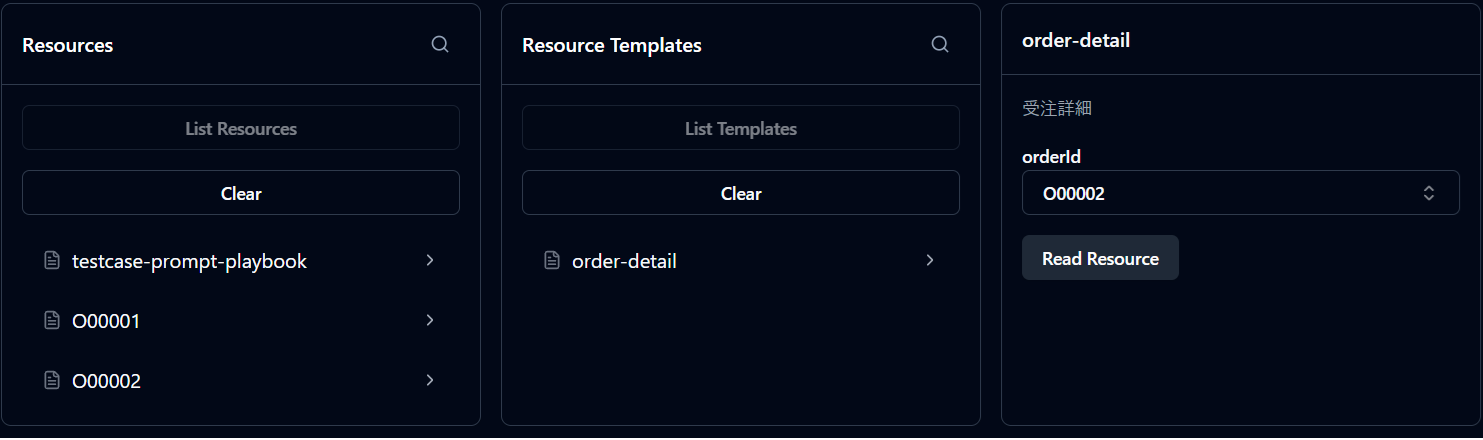
The list callback defines the list of candidates returned by resources/list (required; pass undefined if not needed).
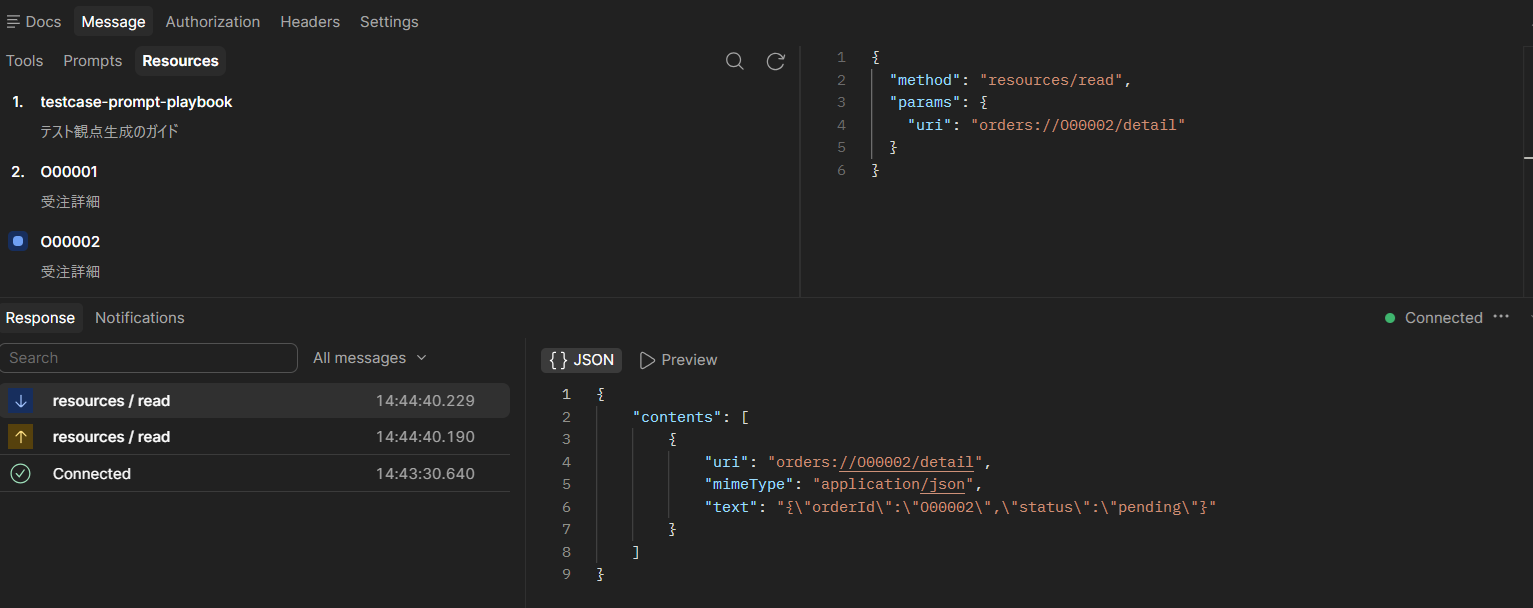
When making a resources/read request, the client specifies the expanded URI, such as orders://O00001/detail.
On the server side, the {orderId} part is parsed as a variable and passed to the handler.
  // Resource template: dynamic resource whose content changes based on URI parameters
  server.registerResource(
    "order-detail",
    new ResourceTemplate("orders://{orderId}/detail", {
      list: async () => ({
        resources: [
          { uri: "orders://O00001/detail", name: "O00001", mimeType: "application/json" },
          { uri: "orders://O00002/detail", name: "O00002", mimeType: "application/json" },
        ],
      }),
    }),
    { mimeType: "application/json", description: "Order details" },
    async (uri, { orderId }) => ({
      contents: [{ uri: uri.href, mimeType: "application/json", text: JSON.stringify({ orderId, status: "pending" }) }],
    }),
  );
- Verification
- Template verification: Check
resources/templates/listusing MCP Inspector
- Execution verification: Check
resources/readusing Postman
- Template verification: Check
Summary
#- Resources are useful when you want to explicitly manage reference information for AI.
- Static resources are suited for fixed information (guides, specifications, etc.), while resource templates are suitable for variable information (ID-based details, etc.).
- By setting annotations, the client can select and prioritize resources appropriately.
- When combined with prompts, you can standardize both generation instructions and reference information.
