Introduction to MCP Connecting AI Agents and Systems (Prompt Edition)
Back to Top
To reach a broader audience, this article has been translated from Japanese.
You can find the original version here.
Introduction
#This page is a continuation of "Introduction to connecting AI agents and systems with MCP". In this installment, we explain prompts.
MCP prompts provide templated messages and workflows for MCP clients. They are useful when you want to template and reuse things like generation instructions or workflows that define the order of tool usage.
The code shown in this article is available here.
Series: Introduction to connecting AI agents and systems with MCP
- Introduction
- stdio Implementation
- Streamable HTTP Stateless Implementation
- Streamable HTTP Stateful Implementation
- Prompt Edition (this page)
Libraries and tools used in this tutorial
#- npm@11.11.1
- node@22.22.0
- typescript@6.0.3
- @modelcontextprotocol/sdk@1.29.0
- zod@4.3.6
Use cases
#- Templating routine tasks: By templating frequently used instructions (e.g., for code generation or review), you can eliminate the need for clients to create instructions.
- Applying personas and rules: Apply role and output format constraints as part of the context.
- Templating workflows: Define the order of tool usage to guide a sequence of steps.
Sample implementation
#See the full code here.
Templating routine tasks
#This is an example implementation that templates a routine task—code review instructions. In real use you might omit the role, but it's explicitly shown here for clarity.
- argsSchema (argument schema): defines the variable parts of the prompt
- messages: an array of messages composed of role and content
- role: identifier for the message speaker; set to either user or assistant
- user: represents human input. Write the AI instructions (prompt body) here.
- assistant: represents AI responses.When response formats vary with just prompt instructions
By placing example outputs ("few-shot") as AI's own responses in advance, you can obtain more precise results.
- content: the message body. This sample uses only text, but you can also handle binary (images, audio, embedded resources).
- text: plain-text messages, the common type for natural language exchanges
- image: messages containing visual information
- audio: messages containing audio information
- resource: embed server resources (documents, code samples, etc.) in the conversation
When handling binariesEncode with Base64 and set the appropriate MIME type.
- role: identifier for the message speaker; set to either user or assistant
// Prompt: Template for code review instructions
server.registerPrompt(
  "code-review-prompt",
  {
    title: "code-review-prompt",
    description: "Code review instructions",
    // Definition of the arguments schema: displayed as input form in MCP clients like MCP Inspector UI and passed to the server-side function.
    argsSchema: {
      specPath: z.string().describe("Specification document path"),
      codePath: z.string().describe("Target code path"),
    },
  },
  async ({ specPath, codePath }) => {
    return {
      messages: [
        // user: Prompt body
        {
          role: "user",
          content: {
            type: "text",
            // In actual work, more detailed instructions are needed, but kept minimal here for brevity
            text: [
              "Code review instructions",
              "You are a Node.js/TypeScript backend development specialist.",
              "* Prioritized aspects: specification consistency, exception design, authorization control, transaction control, performance, maintainability, security.",
              "* Prohibitions: do not fill in specifications by guesswork. Do not make assertions without grounds.",
              "* Assign severity levels to findings as High (must address) / Medium (generally address) / Low (address if possible).",
              "* Present each finding in one line with 'Issue', 'Location', 'Suggested fix'.",
              "* Limit output to a maximum of 10 items and consolidate duplicate findings.",
              "* If improved code is needed, propose it with minimal diffs.",
              `* Specification document path: ${specPath}`,
              `* Target code path: ${codePath}`,
            ].join("\n"),
          },
        },
        // assistant: Example
        {
          role: "assistant",
          content: {
            type: "text",
            text: [
              "(Example output of code review findings)",
              "1. High: [Issue] There is an API endpoint that is not documented in the specification. [Location] The getUser function in src/api/user.ts. [Suggested fix] Remove the endpoint if it is unnecessary, or update the specification to match if it is outdated.",
              // omit
            ].join("\n"),
          },
        },
      ],
    };
  },
);
- Verification (MCP Inspector)
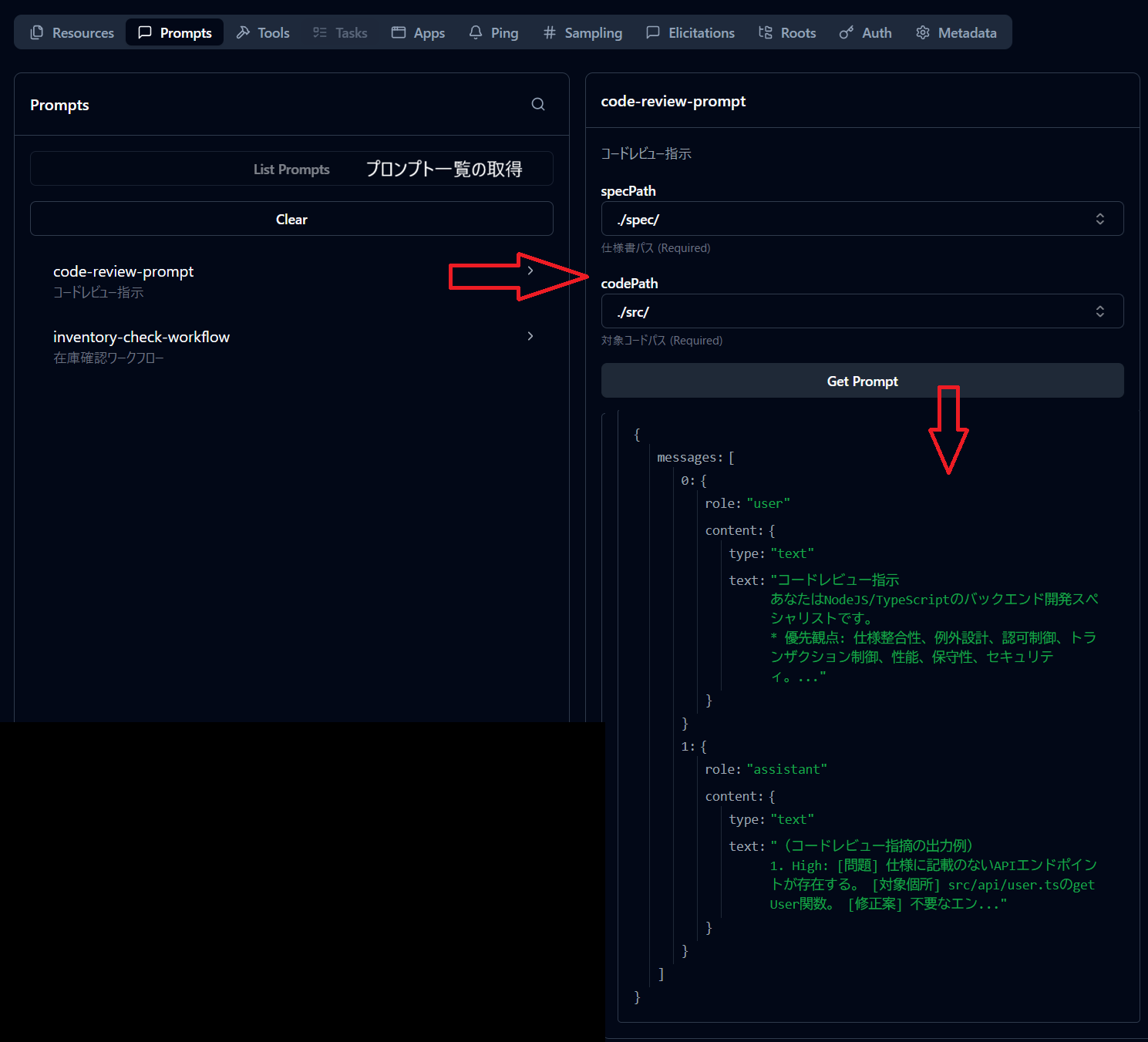
Templating workflows
#This is an example implementation that templates the order of tool execution.
// Prompt: Template for instructions and workflows
server.registerPrompt(
  "inventory-check-workflow",
  {
    title: "inventory-check-workflow",
    description: "In-stock check workflow",
    argsSchema: {
      orderNo: z.string().describe("Order number"),
    },
  },
  async ({ orderNo }) => {
    const prompt = [
      "Inventory check workflow",
      `1. Execute get-order via tools/call (argument orderNo: "${orderNo}").`,
      "2. Execute check-attached-inventory via tools/call (arguments: orderId: the orderId from step 1 response, quantity: the total quantity from step 1 response).",
      "3. If the available field in step 2's response is true, return 'Inventory allocated'; if false, return 'Out of stock'.",
    ].join("\n");
    return { messages: [{ role: "user", content: { type: "text", text: prompt } }] };
  },
);
server.registerTool(
  "get-order",
// omit: For this example, implementations just return fixed values.
);
server.registerTool(
  "check-attached-inventory",
// omit: For this example, implementations just return fixed values.
);
- Verification (MCP Inspector)
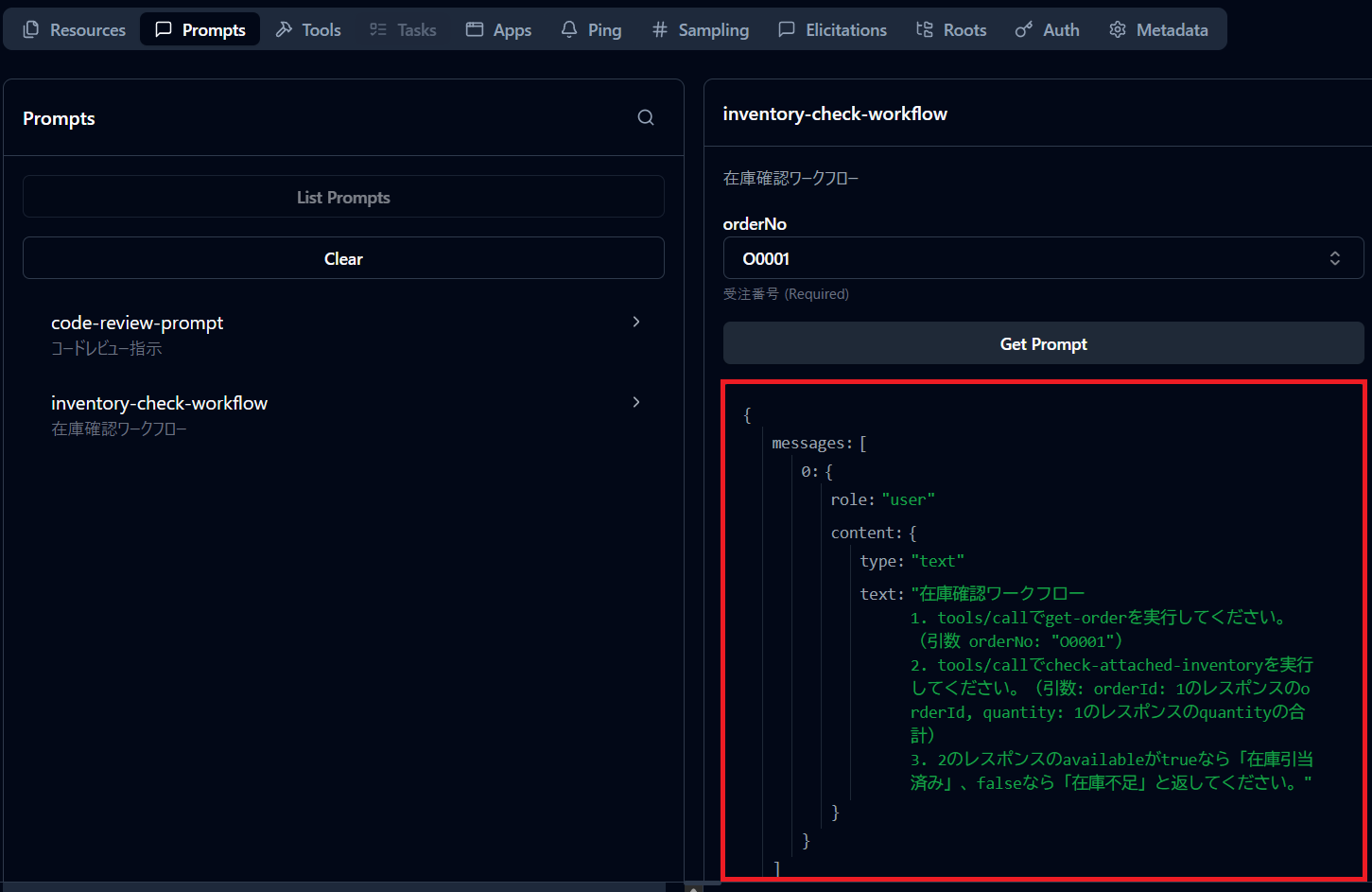
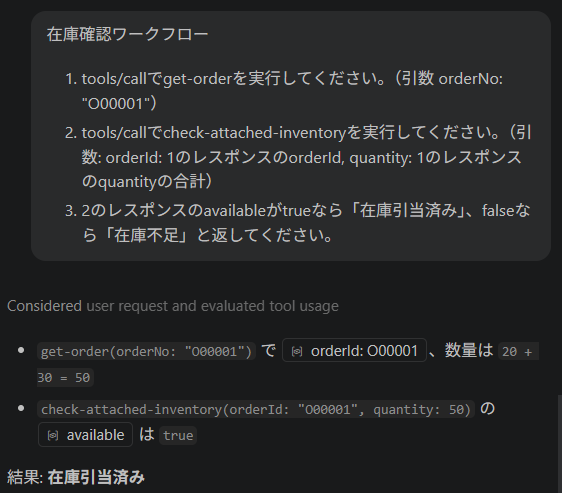
- Using the prompt (VS Code)
Actually use the prompt to instruct the execution of tools and verify operation.
The tools were executed in the order specified by the prompt, and the results were returned as instructed.
Conclusion
#- Prompts are effective when you want to standardize routine tasks.
- By instructing the order of tool calls within the prompt and preparing those tools in the same server with
registerTool, the LLM can autonomously call the tools according to the instructions and complete the workflow automatically. - In the next installment, we will cover resources.
