AI智能代理与系统连接的MCP入门(stdio实现篇)
Back to Top
|
7 min read
Author:
masato-ubata

Information
为了覆盖更广泛的受众,这篇文章已从日语翻译而来。
您可以在这里找到原始版本。
前言
#本页是“AI智能代理与系统连接的MCP入门”的续篇。
本次将说明通过 stdio 通信的 MCP 服务器的实现。我们将查看利用标准输入输出(stdin/stdout)构建 MCP 服务器的步骤,以及 stdio 特有的注意点。
本页所示代码在此处已公开。
本次使用的库等
#- npm@11.11.1
- node@22.22.0
- typescript@6.0.3
- @modelcontextprotocol/sdk@1.29.0
- zod@4.3.6
实现一个简单的服务器
#简单实现一个 MCP 服务器并进行运行验证。
服务器的实现
#生成服务器实例
设置服务器名和版本,生成 MCP 服务器实例。
注册工具
在 MCP 服务器中注册工具(公开的行为)。
在此注册的工具可以被 MCP 客户端调用。
工具需要实现以下内容:
- 工具名称
- 输入模式(inputSchema):工具接收的数据结构
- 输出模式(outputSchema):工具返回的数据结构,仅在需要返回结构化数据时定义
- 请求处理器:工具的内部处理逻辑。必须返回 content。
启动处理
MCP 服务器的启动处理。
此次使用 stdio,因此在 connect 的参数中设置 StdioServerTransport 实例。
index.ts
import { McpServer } from "@modelcontextprotocol/sdk/server/mcp.js";
import { StdioServerTransport } from "@modelcontextprotocol/sdk/server/stdio.js";
import { z } from "zod";

// 实例化服务器
const server = new McpServer({
  name: "hello-world-server",
  version: "1.0.0",
});

// 注册工具
server.registerTool(
  "hello",
  {
    title: "hello, world!",
    inputSchema: { name: z.string().describe("附加到消息的名称") }, // 定义输入模式
    outputSchema: { message: z.string().describe("消息") }, // 定义输出模式
  },
  async ({ name }) => {
    return {
      content: [{ type: "text", text: `Hello, ${name}!` }], // 默认响应
      structuredContent: { message: `Hello, ${name}!` }, // 基于输出模式的响应
    };
  },
);

// 启动处理
async function boot() {
  const transport = new StdioServerTransport();
  await server.connect(transport);
  console.error("MCP Hello World Server (Modern) running on stdio"); // 因为向标准输出写入日志会出错,所以使用 `console.error`
}

try {
  await boot();
} catch (error) {
  console.error("Fatal error:", error);
  process.exit(1);
}
验证服务器运行
#在控制台中确认
在控制台启动服务器并确认其运行情况。
- 启动
服务器的构建与启动
npx tsc node dist/index.js - 获取工具列表
执行tools/list来获取列表。工具列表获取及结果// 在标准输入输出中输入以下内容 {"jsonrpc":"2.0", "id":"1", "method":"tools/list", "params":{}} // 工具列表如下 ※ 响应已部分格式化 {"result":{"tools":[ { "name":"hello", "title":"hello, world!", "inputSchema":{"$schema":"http://json-schema.org/draft-07/schema#","type":"object","properties":{"name":{"type":"string","description":"附加到消息的名称"}},"required":["name"]}, "execution":{"taskSupport":"forbidden"}, "outputSchema":{"$schema":"http://json-schema.org/draft-07/schema#","type":"object","properties":{"message":{"type":"string","description":"消息"}},"required":["message"],"additionalProperties":false} } ]},"jsonrpc":"2.0","id":"1"} - 调用工具
使用tools/call执行hello。工具调用及结果// 在标准输入输出中输入以下内容 {"jsonrpc":"2.0", "id":"1", "method": "tools/call", "params": { "name": "hello", "arguments": { "name": "MCP" }}} // 工具执行结果如下 ※ 响应已部分格式化 {"result":{ "content":[{"type":"text","text":"Hello, MCP!"}], "structuredContent":{"message":"Hello, MCP!"}}, "jsonrpc":"2.0","id":"1"}
使用 MCP Inspector 确认
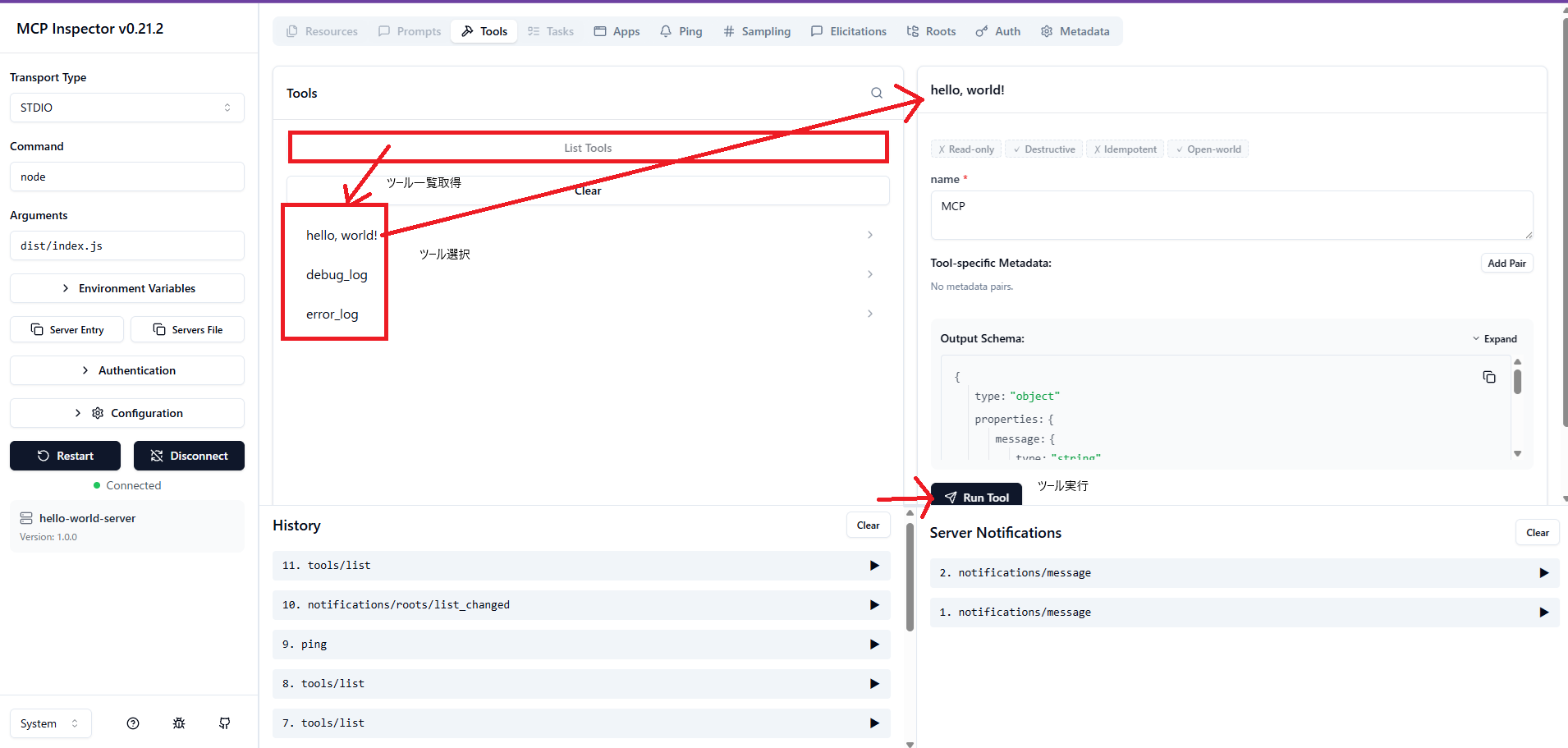
使用 MCP Inspector 来确认相同的运行情况。
验证输出调试日志时的行为
#尝试验证在用于通信的标准输出中输出非 JSON 格式字符串时的行为。
通常,标准错误输出与协议主体是分离的,因此也一并确认其行为。
添加工具实现
#额外实现一个将日志输出到标准输出(stdout)和标准错误(stderr)的工具。
index.ts
server.registerTool(
  `output_log`,
  { title: 'output_log' },
  async () => {
    console.log('debug log'); // to stdout
    console.info('info log'); // to stdout
    console.warn('warn log'); // to stderr
    console.error('error log'); // to stderr
    return { content: [{ type: "text", text: 'output log tool' }] };
  },
);
验证新增工具的运行情况
#执行新增的工具进行验证。
基本上,stdio 将标准输出专用于 JSON-RPC 消息,日志分离到标准错误输出。
一旦在标准输出中混入非 JSON 格式字符串,就会产生解析错误。
虽然在标准错误输出中也有相同输出,但由于二者是分离的,因此不会发生错误。(前提是不要污染标准输出)
在运行 MCP Inspector 的控制台
Received POST message for sessionId xxxxxxxx-xxxx-xxxx-xxxx-xxxxxxxxx1xx
Error from MCP server: SyntaxError: Unexpected token 'd', "debug log" is not valid JSON
    at JSON.parse (<anonymous>)
    at deserializeMessage (file:///C:/Users/~/shared/stdio.js:26:44)
    at ReadBuffer.readMessage (file:///C:/Users/~/shared/stdio.js:19:16)
    at StdioClientTransport.processReadBuffer (file:///C:/Users/~/client/stdio.js:126:50)
    at Socket.<anonymous> (file:///C:/Users/~/client/stdio.js:92:22)
    at Socket.emit (node:events:519:28)
    at addChunk (node:internal/streams/readable:561:12)
    at readableAddChunkPushByteMode (node:internal/streams/readable:512:3)
    at Readable.push (node:internal/streams/readable:392:5)
    at Pipe.onStreamRead (node:internal/stream_base_commons:189:23)
Error from MCP server: SyntaxError: Unexpected token 'i', "info log" is not valid JSON
    at JSON.parse (<anonymous>)
    at deserializeMessage (file:///C:/Users/~/shared/stdio.js:26:44)
    at ReadBuffer.readMessage (file:///C:/Users/~/shared/stdio.js:19:16)
    at StdioClientTransport.processReadBuffer (file:///C:/Users/~/client/stdio.js:126:50)
    at Socket.<anonymous> (file:///C:/Users/~/client/stdio.js:92:22)
    at Socket.emit (node:events:519:28)
    at addChunk (node:internal/streams/readable:561:12)
    at readableAddChunkPushByteMode (node:internal/streams/readable:512:3)
    at Readable.push (node:internal/streams/readable:392:5)
    at Pipe.onStreamRead (node:internal/stream_base_commons:189:23)
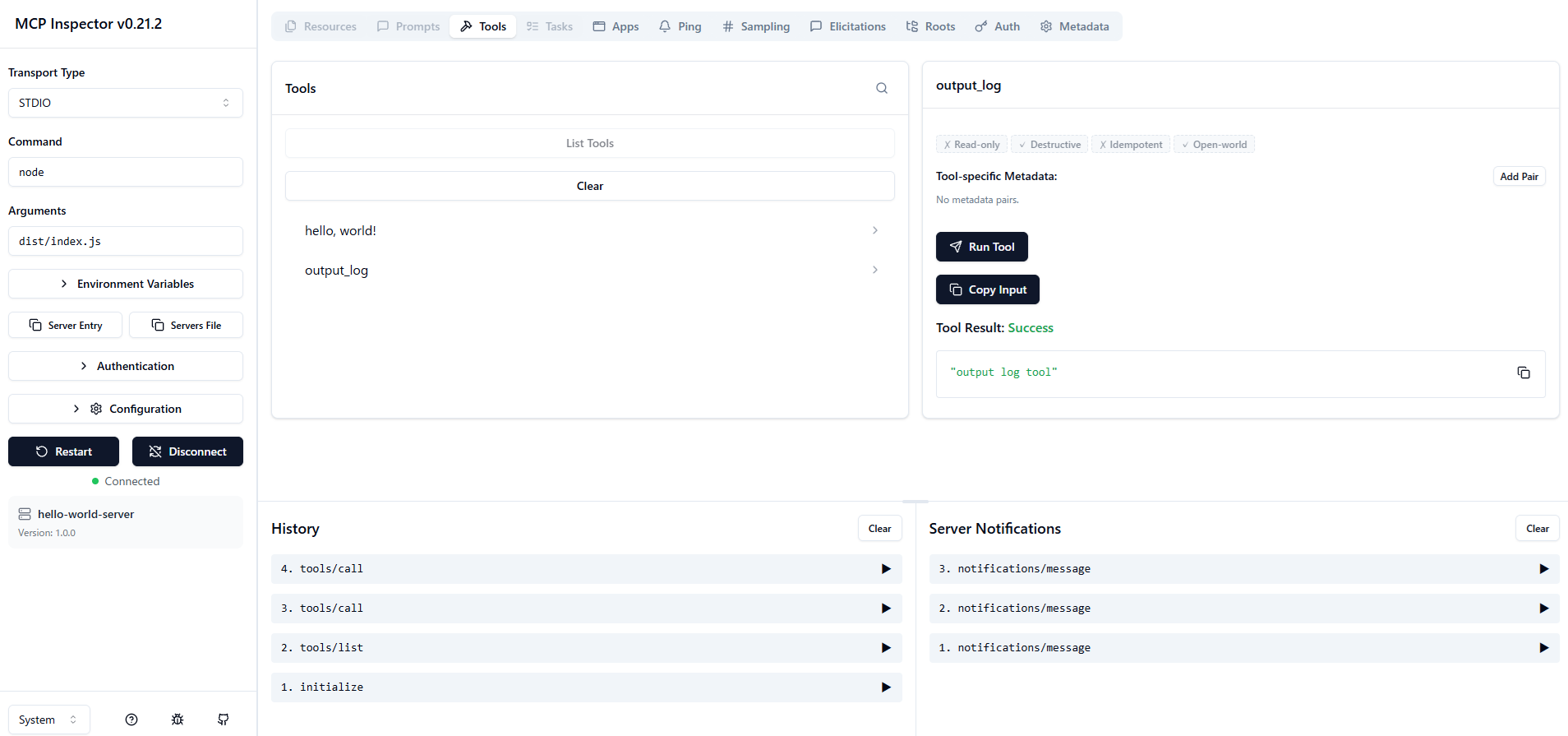
MCP Inspector 显示
如上所示,控制台上出现了解析错误。
此次使用的 Inspector 可以捕获后续的正确 JSON 消息,因此在 UI 上看起来仍然成功。
总结
#- 在 stdio 中将标准输出专用于 JSON-RPC 消息,日志分离到标准错误输出。
- 如果在标准输出中混入非 JSON 字符串,客户端侧容易发生解析错误。
