MCP Primer for Connecting AI Agents and Systems (stdio Implementation)
Back to Top
To reach a broader audience, this article has been translated from Japanese.
You can find the original version here.
Introduction
#This page is a sequel to "Introduction to MCP for Connecting AI Agents and Systems." This time, we will explain the implementation of an MCP server that communicates over stdio. We will cover the steps to build an MCP server using standard input/output (stdin/stdout) and the stdio-specific considerations. The code published on this page is available here.
Series: MCP Primer for Connecting AI Agents and Systems
- Introduction
- stdio Implementation (this page)
Libraries Used
#- npm@11.11.1
- node@22.22.0
- typescript@6.0.3
- @modelcontextprotocol/sdk@1.29.0
- zod@4.3.6
Implementing a Simple Server
#Let's quickly implement an MCP server and verify its operation.
Implementing the Server
#Creating the Server Instance
Set the server name and version, and create an instance of the MCP server.
Registering Tools
Register tools (behaviors to expose) with the MCP server. The tools registered here can be called from the MCP client. Each tool implementation includes the following elements:
- Tool name
- Input schema: structure of data that the tool receives
- Output schema: structure of data that the tool returns. Define only if you want to return structured data.
- Request handler: internal processing of the tool. Returning content is mandatory.
Startup Process
Starting up the MCP server. Since this uses stdio, set an instance of StdioServerTransport as the argument to connect.
import { McpServer } from "@modelcontextprotocol/sdk/server/mcp.js";
import { StdioServerTransport } from "@modelcontextprotocol/sdk/server/stdio.js";
import { z } from "zod";

// Instantiating the server
const server = new McpServer({
  name: "hello-world-server",
  version: "1.0.0",
});

// Registering a tool
server.registerTool(
  "hello",
  {
    title: "hello, world!",
    inputSchema: { name: z.string().describe("Name to add to the message") }, // Define input schema
    outputSchema: { message: z.string().describe("Message") }, // Define output schema
  },
  async ({ name }) => {
    return {
      content: [{ type: "text", text: `Hello, ${name}!` }], // Default response
      structuredContent: { message: `Hello, ${name}!` }, // Response based on the output schema
    };
  },
);

// Boot process
async function boot() {
  const transport = new StdioServerTransport();
  await server.connect(transport);
  console.error("MCP Hello World Server (Modern) running on stdio"); // Using console.error because logging to stdout would cause an error
}

try {
  await boot();
} catch (error) {
  console.error("Fatal error:", error);
  process.exit(1);
}
Verifying Server Operation
#Verifying in the Console
Start the server in the console and verify its operation.
- Start
Building and starting the server
npx tsc node dist/index.js - Retrieve Tool List
Executetools/listto get the list.Retrieving tool list and result// Input the following to stdin {"jsonrpc":"2.0", "id":"1", "method":"tools/list", "params":{}} // The tool list was displayed. *The response has been partially formatted* {"result":{"tools":[ { "name":"hello", "title":"hello, world!", "inputSchema":{"$schema":"http://json-schema.org/draft-07/schema#","type":"object","properties":{"name":{"type":"string","description":"Name to add to the message"}},"required":["name"]}, "execution":{"taskSupport":"forbidden"}, "outputSchema":{"$schema":"http://json-schema.org/draft-07/schema#","type":"object","properties":{"message":{"type":"string","description":"Message"}},"required":["message"],"additionalProperties":false} } ]},"jsonrpc":"2.0","id":"1"} - Invoke Tool
Executehellowithtools/call.Invoking tool and result// Input the following to stdin {"jsonrpc":"2.0", "id":"1", "method": "tools/call", "params": { "name": "hello", "arguments": { "name": "MCP" }}} // The tool execution result was displayed. *The response has been partially formatted* {"result":{ "content":[{"type":"text","text":"Hello, MCP!"}], "structuredContent":{"message":"Hello, MCP!"}}, "jsonrpc":"2.0","id":"1"}
Verifying with MCP Inspector
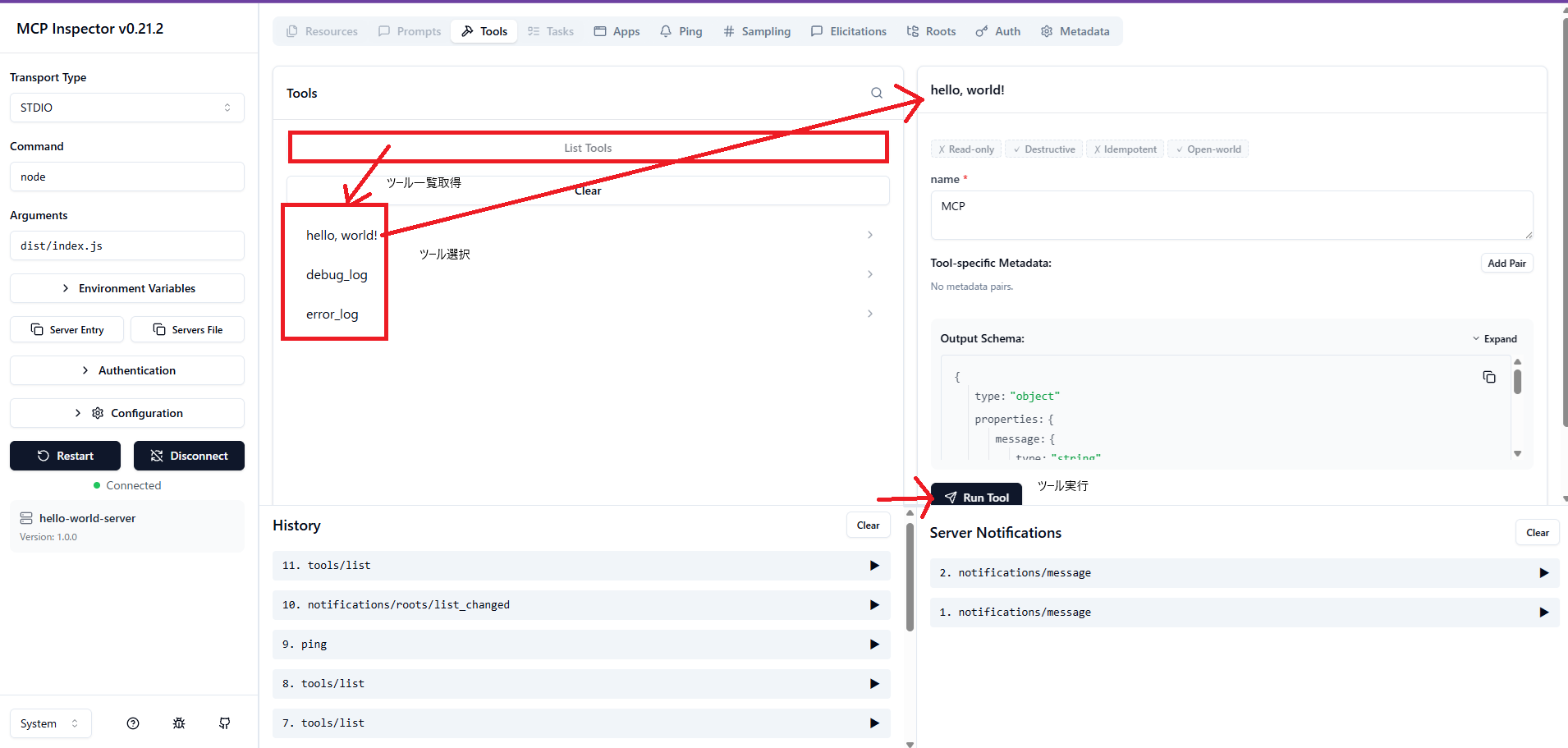
Use MCP Inspector to verify the same behavior.
Investigating What Happens When Debug Logs Are Output
#Let's examine the behavior when non-JSON strings are output to standard output used for communication.
Since standard error output is normally separated from the protocol messages themselves, we will check its behavior too.
Adding a Tool Implementation
#We'll add and implement a tool that outputs logs to standard output (stdout) and standard error (stderr).
server.registerTool(
  `output_log`,
  { title: 'output_log' },
  async () => {
    console.log('debug log'); // to stdout
    console.info('info log'); // to stdout
    console.warn('warn log'); // to stderr
    console.error('error log'); // to stderr
    return { content: [{ type: "text", text: 'output log tool' }] };
  },
);
Verifying the Added Tool
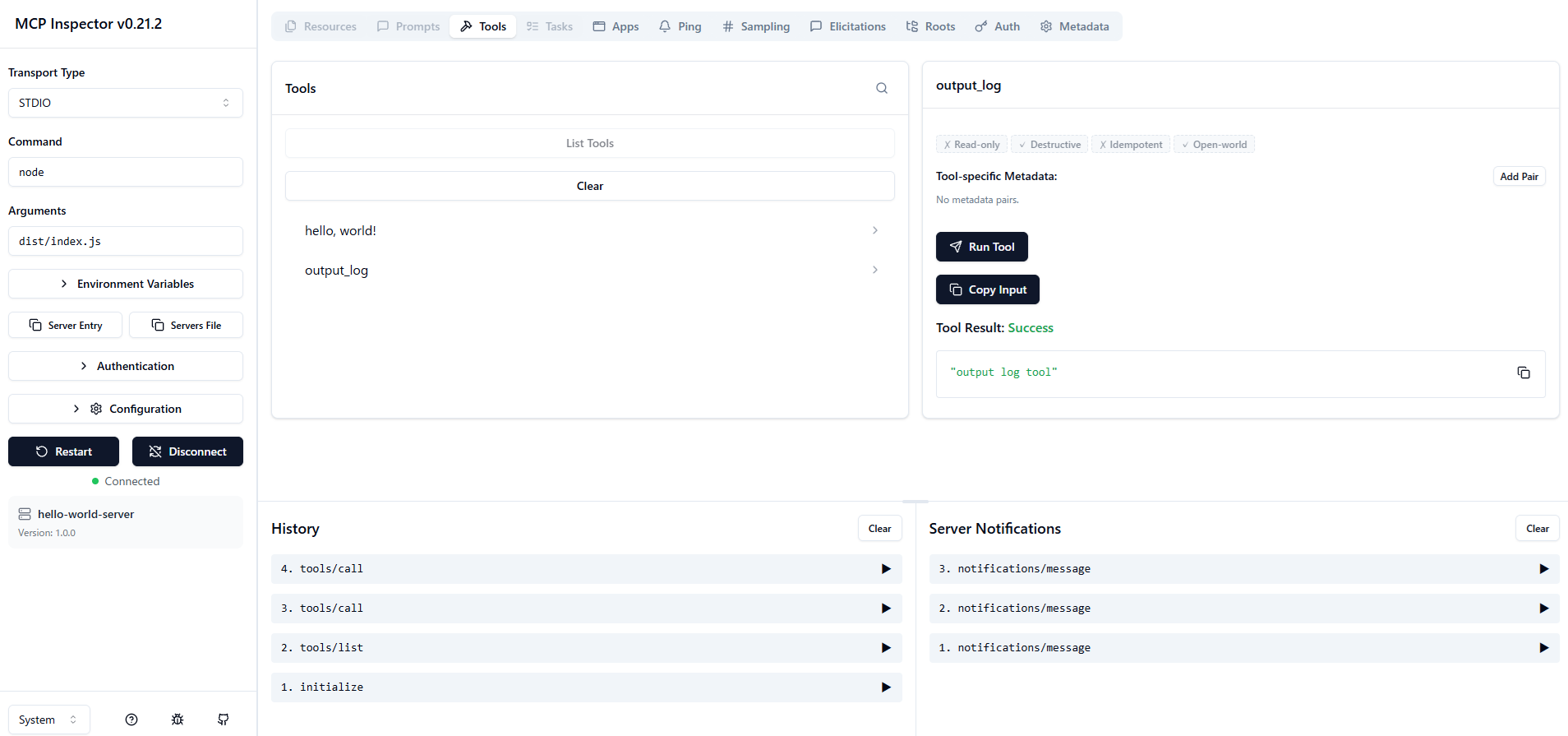
#Let's run the added tool.
Basically, stdio dedicates standard output to JSON-RPC messages and separates logs to standard error output.
When a non-JSON string was mixed into the standard output, a parse error occurred.
The same output appears on standard error output, but since it's separated, no error occurs. (Provided that standard output remains clean.)
Received POST message for sessionId xxxxxxxx-xxxx-xxxx-xxxx-xxxxxxxxx1xx
Error from MCP server: SyntaxError: Unexpected token 'd', "debug log" is not valid JSON
    at JSON.parse (<anonymous>)
    at deserializeMessage (file:///C:/Users/~/shared/stdio.js:26:44)
    at ReadBuffer.readMessage (file:///C:/Users/~/shared/stdio.js:19:16)
    at StdioClientTransport.processReadBuffer (file:///C:/Users/~/client/stdio.js:126:50)
    at Socket.<anonymous> (file:///C:/Users/~/client/stdio.js:92:22)
    at Socket.emit (node:events:519:28)
    at addChunk (node:internal/streams/readable:561:12)
    at readableAddChunkPushByteMode (node:internal/streams/readable:512:3)
    at Readable.push (node:internal/streams/readable:392:5)
    at Pipe.onStreamRead (node:internal/stream_base_commons:189:23)
Error from MCP server: SyntaxError: Unexpected token 'i', "info log" is not valid JSON
    at JSON.parse (<anonymous>)
    at deserializeMessage (file:///C:/Users/~/shared/stdio.js:26:44)
    at ReadBuffer.readMessage (file:///C:/Users/~/shared/stdio.js:19:16)
    at StdioClientTransport.processReadBuffer (file:///C:/Users/~/client/stdio.js:126:50)
    at Socket.<anonymous> (file:///C:/Users/~/client/stdio.js:92:22)
    at Socket.emit (node:events:519:28)
    at addChunk (node:internal/streams/readable:561:12)
    at readableAddChunkPushByteMode (node:internal/streams/readable:512:3)
    at Readable.push (node:internal/streams/readable:392:5)
    at Pipe.onStreamRead (node:internal/stream_base_commons:189:23)
As shown above, a parse error occurred in the console. The Inspector we used picked up the subsequent correct JSON messages, so it appears successful in the UI.
Summary
#- In stdio, dedicate standard output to JSON-RPC messages and separate logs to standard error output.
- If non-JSON strings mix into standard output, parse errors are likely on the client side.
