GitHub Actions workflow steps can now run in parallel
Back to Top
To reach a broader audience, this article has been translated from Japanese.
You can find the original version here.
Introduction
#Recently, GitHub announced that a background feature has been implemented in GitHub Actions workflows, allowing steps within a single workflow to run in parallel.
Until now, you could achieve parallel processing across multiple runners using a strategy matrix, but this new feature adds support for parallel execution on a single runner.
The official documentation includes a sample showing how to run backend and frontend builds in parallel.
steps:
  - name: Build frontend
    id: build-frontend
    run: npm run build:frontend
    background: true

  - name: Build backend
    id: build-backend
    run: npm run build:backend
    background: true

  - name: Run linter while builds run
    run: npm run lint

  - name: Wait for both builds to finish
    wait: [build-frontend, build-backend]

  - name: Run tests
    run: npm test
Trying Parallel Execution (background version)
#This is the method of specifying background: true for each step. Steps with this attribute return control to the foreground immediately after starting execution.
name: Background Hello World

on:
  workflow_dispatch:

jobs:
  hello-background:
    runs-on: ubuntu-latest
    steps:
      - name: Background hello 1 #1
        id: hello1
        run: |
          echo "hello1 start: $(date -u +%H:%M:%S)"
          sleep 4
          echo "hello1 end:   $(date -u +%H:%M:%S)"
        background: true

      - name: Background hello 2 #2
        id: hello2
        run: |
          echo "hello2 start: $(date -u +%H:%M:%S)"
          sleep 3
          echo "hello2 end:   $(date -u +%H:%M:%S)"
        background: true

      - name: Foreground step (runs while background steps are active) #3
        run: |
          echo "foreground start: $(date -u +%H:%M:%S)"
          sleep 1
          echo "foreground end:   $(date -u +%H:%M:%S)"

      - name: Wait for background steps #4
        wait: [hello1, hello2]

      - name: Done
        run: echo "Both background steps have completed."
- The step that runs in the background. It displays the time at the start and end of a 4-second sleep by echoing the time. We specify
background: true. - The second step running in the background. It performs the same process as the first one, but with a 3-second sleep.
- A step that runs in the foreground while the background steps are active. It sleeps for 1 second.
- A step that waits for the two background steps. You simply specify the step IDs as an array with
wait.
Here are the execution results.
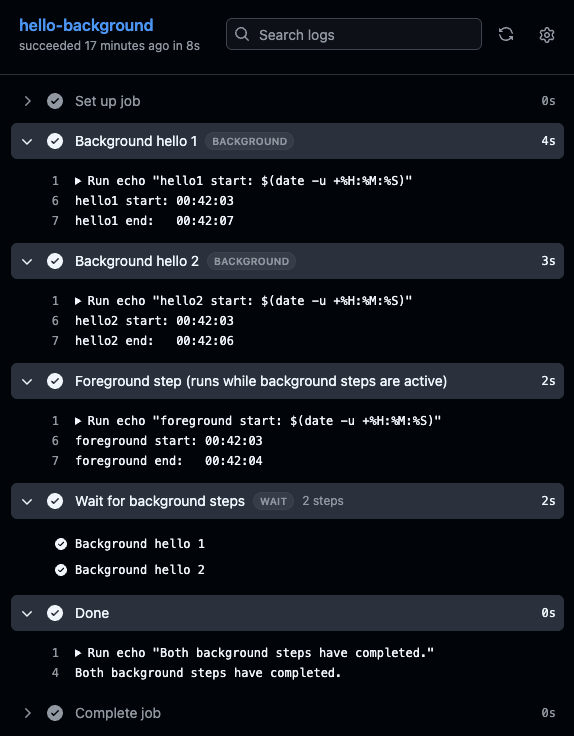
- hello1 and hello2 start at the same time and finish with a 1-second difference.
- The foreground step also starts at the same time as the two background steps.
- The wait step waits for the two background steps to complete.
In the sample above, we are simply running sleep and echo commands in the background and then waiting with wait, but in real CI/CD pipelines there’s often a use case where you want to use the results of a server or process started in the background later on. In such cases, you need to write the output to a temporary file and then read it in the step after waiting.
Trying Parallel Execution (parallel version)
#You can parallelize by placing steps under the parallel keyword. The parallel block finishes when it exits, so there is no need to wait explicitly.
name: Parallel Hello World

on:
  workflow_dispatch:

jobs:
  hello-parallel:
    runs-on: ubuntu-latest
    steps:
      - parallel: #1
          - name: Parallel hello 1
            run: |
              echo "parallel-1 start: $(date -u +%H:%M:%S)"
              sleep 4
              echo "parallel-1 end:   $(date -u +%H:%M:%S)"

          - name: Parallel hello 2
            run: |
              echo "parallel-2 start: $(date -u +%H:%M:%S)"
              sleep 3
              echo "parallel-2 end:   $(date -u +%H:%M:%S)"

          - name: Parallel hello 3
            run: |
              echo "parallel-3 start: $(date -u +%H:%M:%S)"
              sleep 2
              echo "parallel-3 end:   $(date -u +%H:%M:%S)"

      - name: Done after all parallel steps #2
        run: |
          echo "done step start: $(date -u +%H:%M:%S)"
          echo "All parallel steps have completed."
          echo "done step end:   $(date -u +%H:%M:%S)"
- Place three steps under the parallel section. They have sleeps of 4, 3, and 2 seconds, respectively.
- A regular step that runs after the parallel steps complete.
Here are the execution results.
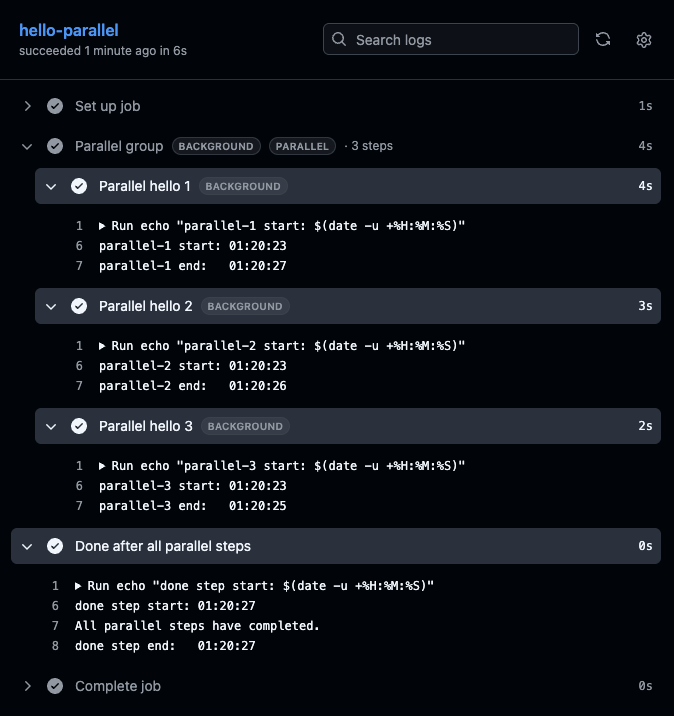
- hello1, hello2, and hello3 all start at the same time. They take 4, 3, and 2 seconds respectively, as specified.
- The final step starts after the parallel steps have completed.
Using It for Cross-Compilation
#As an application, one immediate idea is to run binary generation for multiple platforms in parallel via cross-compilation. For example, in Go you can cross-compile binaries for Linux, macOS, and Windows.
    - name: Build
      run: |
        GOOS=linux GOARCH=amd64 go build -o build/linux-amd64/sb2md main.go
        GOOS=linux GOARCH=arm64 go build -o build/linux-arm64/sb2md main.go
        GOOS=windows GOARCH=amd64 go build -o build/windows/sb2md.exe main.go
        GOOS=darwin GOARCH=amd64 go build -o build/macos/sb2md main.go
        GOOS=darwin GOARCH=arm64 go build -o build/macos_arm/sb2md main.go
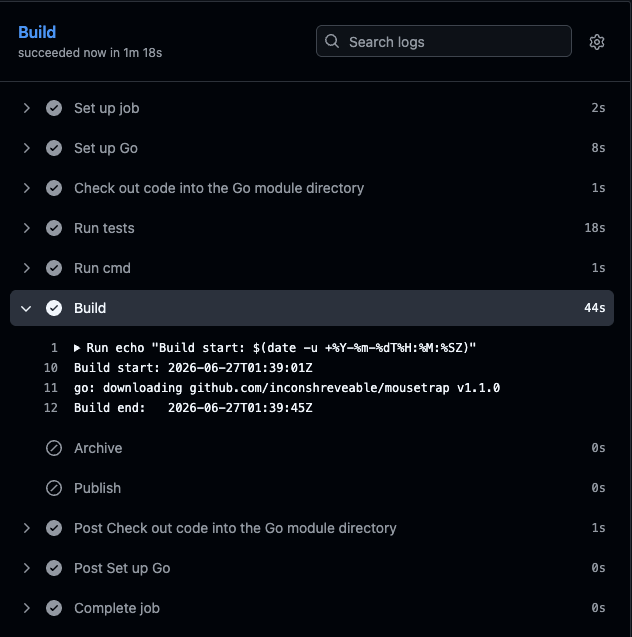
Here are the build results before parallelization. It took 44 seconds to generate five binaries.
Now we apply parallelization. Instead of writing multiple commands in a single run, we split them into separate steps and placed them under parallel.
    - parallel:
        - name: Build linux amd64
          run: GOOS=linux GOARCH=amd64 go build -o build/linux-amd64/sb2md main.go

        - name: Build linux arm64
          run: GOOS=linux GOARCH=arm64 go build -o build/linux-arm64/sb2md main.go

        - name: Build windows amd64
          run: GOOS=windows GOARCH=amd64 go build -o build/windows/sb2md.exe main.go

        - name: Build darwin amd64
          run: GOOS=darwin GOARCH=amd64 go build -o build/macos/sb2md main.go

        - name: Build darwin arm64
          run: GOOS=darwin GOARCH=arm64 go build -o build/macos_arm/sb2md main.go
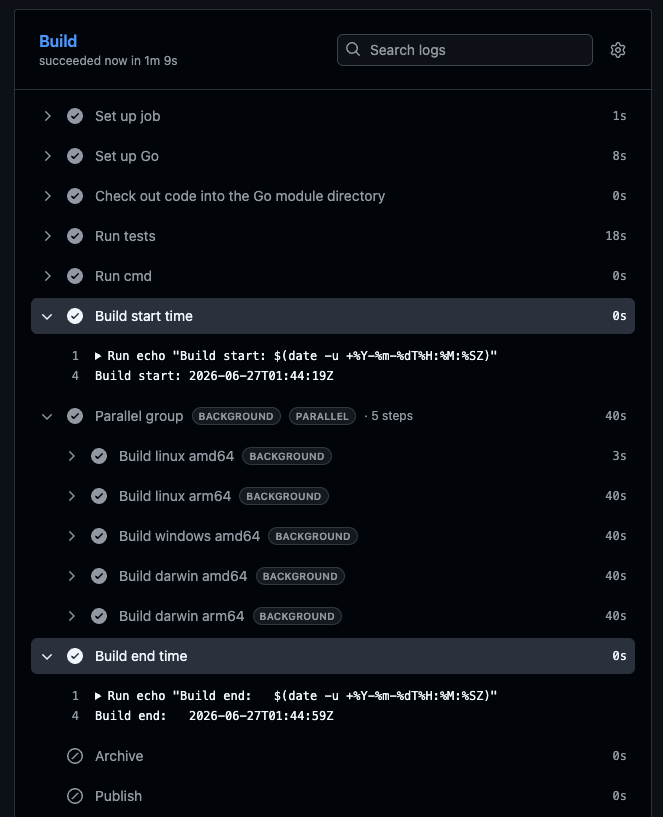
The total time was 40 seconds. The Linux amd64 build finished in 3 seconds, but the builds for the other platforms each took 40 seconds. The speedup was not as much as expected. Possible causes include the CPU core count of the runner:
- Since the runner (ubuntu-latest) has 2 vCPUs, the degree of concurrency did not increase
- Five processes contended for two cores, causing a lot of context switching
- The runner’s architecture is itself Linux amd64, so generating a native binary completed almost instantly
Using a larger runner with more CPU cores might reduce the time further, but if it only goes from 40 seconds to around 3 seconds, the cost performance is not great. It seems this use case doesn’t fit well.
Conclusion
#We’ve tried out parallel step execution in GitHub Actions workflows. For CPU-heavy, independent tasks like the Go cross-compilation example, it’s likely still faster to use a strategy matrix to spin up separate runners (even though it’s more expensive). On the other hand, this parallel step execution feature shines in scenarios where you want to efficiently utilize idle resources on a single runner (such as I/O wait times), like running backend and frontend builds in parallel or linting concurrently with tests.
