Introduction to MCP Connecting AI Agents and Systems (StreamableHTTP Stateful Implementation)
Back to Top
To reach a broader audience, this article has been translated from Japanese.
You can find the original version here.
Introduction
#This page is a continuation of "Introduction to MCP Connecting AI Agents and Systems".
In this article, we explain the stateful implementation of an MCP server communicating over StreamableHTTP.
A stateful configuration is useful when you want to treat consecutive operations by the same user as a single session.
For example, it's used for "passing the results of a tool invocation to the next invocation", "holding temporary state per session", or "maintaining contextual information during a connection".
In this article, we focus on the differences from the stateless implementation and outline the key points for a stateful setup.
The code examples are available here.
Series: Introduction to MCP Connecting AI Agents and Systems
- Introduction
- stdio Implementation
- StreamableHTTP Stateless Implementation
- StreamableHTTP Stateful Implementation (this page)
Libraries Used in This Article
#- npm@11.11.1
- node@22.22.0
- typescript@6.0.3
- @modelcontextprotocol/sdk@1.29.0
- zod@4.3.6
Differences from Stateless
#First, let's outline the differences in implementation strategies.
| Aspect | Stateless | Stateful |
|---|---|---|
| Server and transport lifecycle | Created and destroyed per request | Created as a connection context per session and reused |
| Session ID | Not used by default | Determined and managed per transport via sessionIdGenerator |
| Connection handling | Per request | Once at the first request of a session |
| Termination handling | After response | All sessions together on SIGINT, etc. |
If you imagine a single server using one transport to manage multiple sessions, you might be confused when implementing session management.
In the version used here, McpServer can only connect to a single transport at a time, and StreamableHTTPServerTransport can only hold a single sessionId. Therefore, this sample manages the server and transport per session.
SIGINT is an interrupt signal.
It is sent to a process when you press Ctrl + C in the terminal, and in Node.js you can implement pre-exit handling with process.on("SIGINT", ...).
Here, it is used to discard connections and state held by the server.
Server Implementation
#We will briefly implement the MCP server and explain the differences from the stateless version.
For the full code, see here.
sequenceDiagram
  participant Client as MCP Client
  participant Server as MCP Server

  Client->>+Server: POST /mcp ※initial request
  Server->>Server: create new session
  Server->>Server: connect transport
  Server->>Server: execute tool
  Server-->>Client: 200 OK + MCP-Session-Id

  alt On subsequent requests
    Client->>+Server: POST /mcp ※with MCP-Session-Id
    Server->>Server: retrieve existing session (sessionId)
    Server->>Server: execute tool
    Server-->>Client: 200 OK
  end

  par On process termination
    Server->>Server: close all sessions
  end
Difference 1: Maintaining Session Context
#In the stateless version, a new context was created for each request. In the stateful version, the connection context is retained using the session ID as the key. Here, SessionContext does not refer to the MCP server process itself, but rather to the session-level implementation context aligned with the SDK's connection model.
type SessionContext = {
  server: McpServer;
  transport: StreamableHTTPServerTransport;
};

const sessions = new Map<string, SessionContext>();
For simplicity, this example manages state in memory. In a real-world scenario, it is safer to consider using an external store such as NoSQL to prevent memory leaks and to support operations in a distributed environment.
Difference 2: Routing Requests by Session
#If there is an existing session ID, the corresponding context is used; otherwise, a new session context is created.
-
sessionIdGenerator
Despite what the name might suggest, this is not a generic numbering strategy. It is a callback to determine the session ID tied to the transport at initialization. -
MCP-Session-Id
Issued on the first request and received by the client. For subsequent requests, it is included in theMCP-Session-Idheader and reused.
async function createSessionContext() {
  const transport = new StreamableHTTPServerTransport({
    sessionIdGenerator: () => randomUUID(),
  });
  const server = createServer(() => transport.sessionId);
  await server.connect(refineTransport(server, transport));
  return { server, transport };
}

app.post("/mcp", async (req, res) => {
  const sessionId = req.headers["mcp-session-id"] as string | undefined;
  let context: SessionContext | undefined;

  if (sessionId) {
    context = sessions.get(sessionId);
  } else {
    context = await createSessionContext();
  }

  await context.transport.handleRequest(req, res, req.body);

  // After initialization, store the context keyed by the sessionId set on the transport.
  const issuedSessionId = context.transport.sessionId;
  if (issuedSessionId) {
    sessions.set(issuedSessionId, context);
  }
});
Difference 3: Closing All Sessions on Process Termination
#Since the server and transport are held per session, all sessions must be explicitly closed on termination.
process.on("SIGINT", async () => {
  for (const context of sessions.values()) {
    await context.transport.close();
    await context.server.close();
  }
  process.exit(0);
});
In this sample, all sessions are closed together when the process terminates. In a production environment, it is also important to automatically discard sessions that have been idle for a certain period or provide a mechanism for clients to explicitly end sessions.
Verifying Session Management
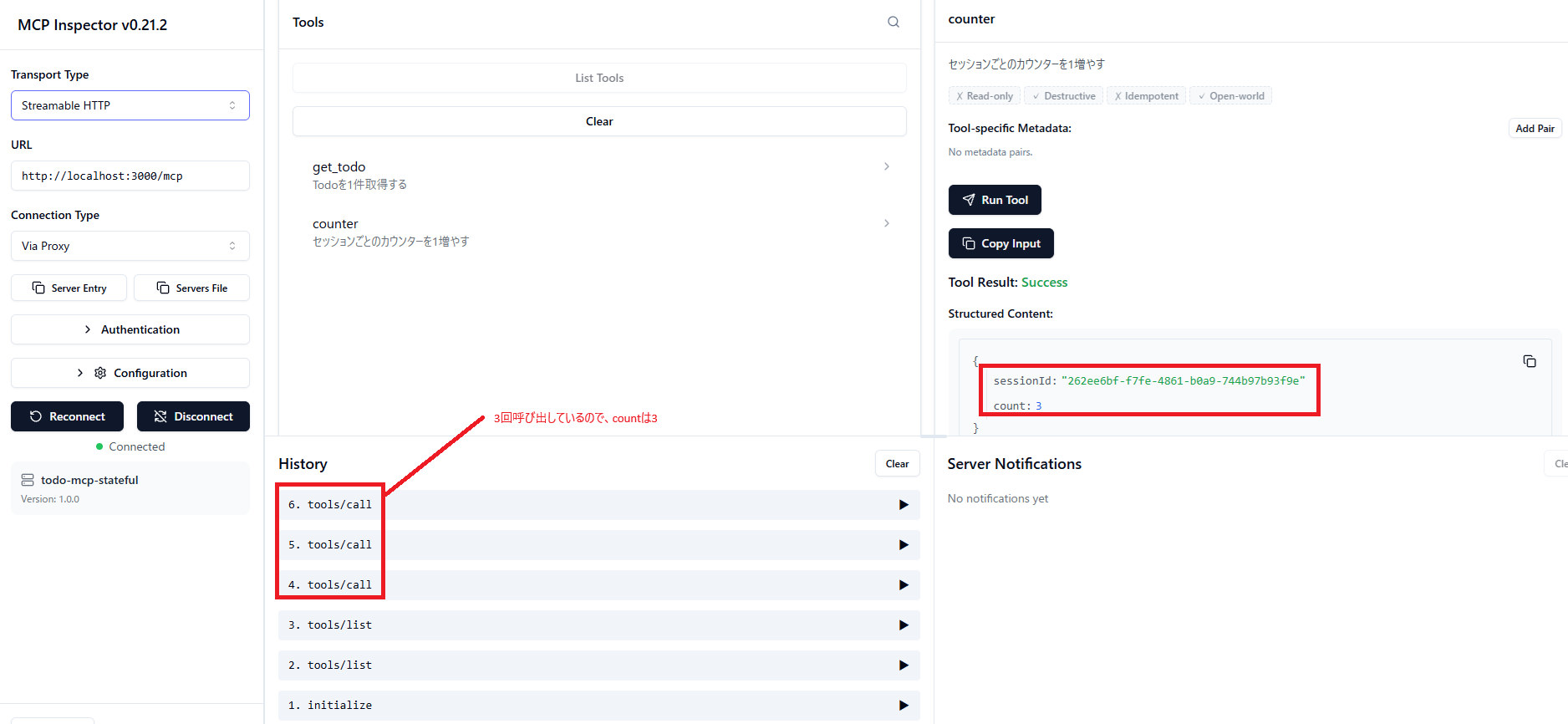
#We add a counter tool that retains a value per session to verify that the values are kept per session. Since this verification requires multiple sessions, we use both the MCP Inspector and Postman.
- MCP Inspector results
- Postman results
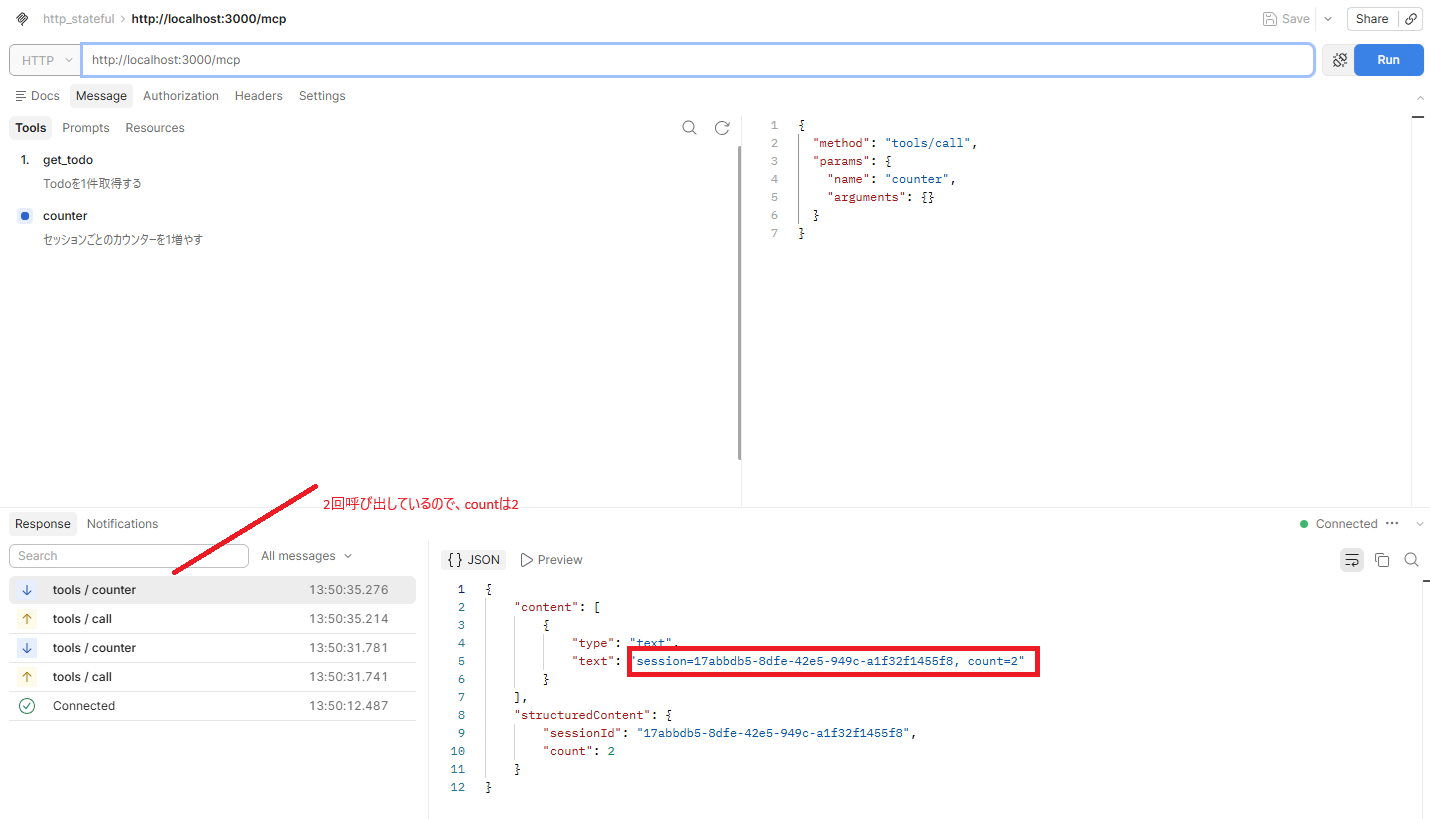
These are the results of running the tool 3 times from MCP Inspector and 2 times from Postman.
As you can see in the figures, different session IDs are issued, and the incremented values for the counter are managed per session.
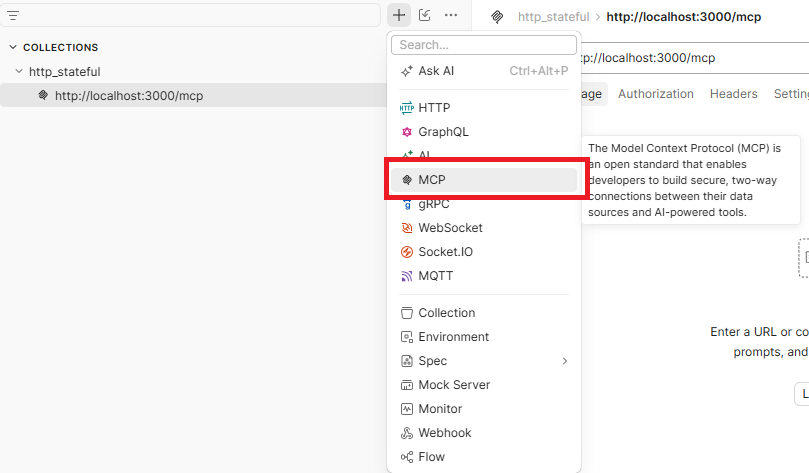
Since I was using Postman after a while and was unsure where to add the MCP collection, I'll show the location here.
Verifying Session Switching
#Restart the MCP server and verify that the session switches.
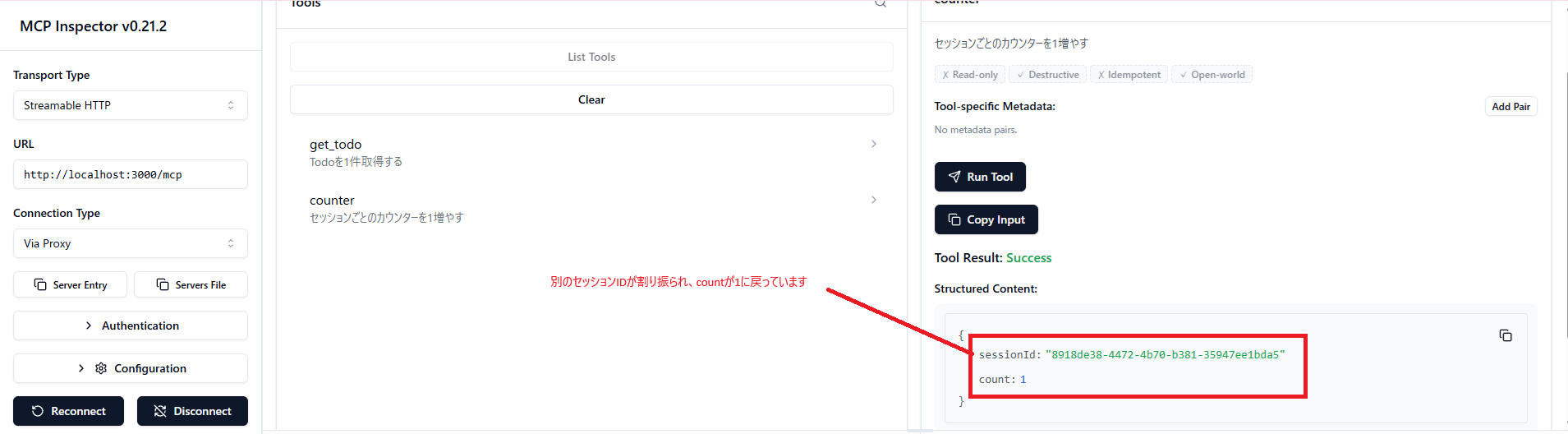
You can see that a different session ID has been assigned and the count has reset to 1.
Conclusion
#- Stateful allows you to maintain state across requests within the same session.
- On the other hand, making it stateful increases operational responsibilities such as closing on exit and session management. While you would want to use stateful when the order of tool invocations matters, if you prioritize simplicity, choosing stateless is a more realistic decision.
