Introduction to MCP Connecting AI Agents and Systems (StreamableHTTP Stateless Implementation)
Back to Top
To reach a broader audience, this article has been translated from Japanese.
You can find the original version here.
Introduction
#This page is a continuation of "Introduction to MCP Connecting AI Agents and Systems". This time, we will explain the implementation of a stateless MCP server that communicates via StreamableHTTP.
The previous stdio-based implementation was a setup in which the MCP client ran as a subprocess locally. StreamableHTTP publishes the MCP server over HTTP, making it available to multiple MCP clients. It is suitable for cases where the MCP server calls a Web API and allows the MCP client to reference the latest data. Additionally, statelessness features a straightforward lifecycle because each request is processed independently.
Since the content has become extensive, we will explain stateless and stateful implementations separately. The code presented on this page is published here.
Series: Introduction to MCP Connecting AI Agents and Systems
- Introduction
- Stdio Implementation
- StreamableHTTP Stateless Implementation (This Page)
Libraries and Tools Used
#- npm@11.11.1
- node@22.22.0
- typescript@6.0.3
- @modelcontextprotocol/sdk@1.29.0
- zod@4.3.6
Implement a Simple Server
#Let's quickly implement an MCP server and verify its operation.
Server Implementation
#As mentioned in the stdio version, the basic elements ("creating the server instance", "registering tools", "startup process") are the same. Here, we will explain the distinctive "startup process" compared to stdio.
Startup Process
- Define the accepted endpoint
Define transport settings, register tools, and post-response processing- Because this is StreamableHTTP, set an instance of
StreamableHTTPServerTransportas the argument toconnect. - Since this is stateless, there is no session ID issuance.
- Because this is StreamableHTTP, set an instance of
app.post("/mcp", async (req, res) => {
  const server = createServer();
  const transport = new StreamableHTTPServerTransport();

  try {
    // 1: Refer to the column below
    await server.connect(refineTransport(server, transport));
    await transport.handleRequest(req, res, req.body);
  } catch (error) {
    console.error("Error handling MCP request:", error);
    if (!res.headersSent) {
      res.status(500).json({ jsonrpc: "2.0", error: { code: -32603, message: "Internal server error" }, id: null });
    }
  } finally {
    await transport.close();
    await server.close();
  }
});
StreamableHTTPServerTransport implements Transport.
However, in the version used here, there is a discrepancy between the behavior defined by Transport and the definition of StreamableHTTPServerTransport. (onclose is one example)
// transport.d.ts
export interface Transport {
  onclose?: () => void;
}
// streamableHttp.d.ts
export declare class StreamableHTTPServerTransport implements Transport {
    set onclose(handler: (() => void) | undefined);
    get onclose(): (() => void) | undefined;
}
server.connect expects a Transport as its argument type, but because the structures don't match, we adjust with a type assertion.
export const refineTransport = (server: McpServer, transport: StreamableHTTPServerTransport) => {
  return transport as Parameters<typeof server.connect>[0];
};
- Define endpoints to reject
For endpoints you want to block, define responses such as 405.
app.get("/mcp", (_req, res) => {
    res.writeHead(405).end(JSON.stringify({jsonrpc: "2.0", error: {code: -32000, message: "Method not allowed."}, id: null}));
});
- Bind to the port
app.listen(MCP_PORT, (error?: Error) => {
    //omit
});
- Full code
import { McpServer } from "@modelcontextprotocol/sdk/server/mcp.js";
import { createMcpExpressApp } from "@modelcontextprotocol/sdk/server/express.js";
import { StreamableHTTPServerTransport } from "@modelcontextprotocol/sdk/server/streamableHttp.js";
import { z } from "zod";
import { refineTransport } from "./transport.util.js";
import { ApplicationError } from "./application.error.js";

const PORT = Number(process.env.PORT ?? "3000");
const WEB_API_BASE_URL = process.env.WEB_API_BASE_URL ?? "http://localhost:3001";
const WEB_API_CALL_FAILED_MESSAGE = "WebAPI call failed";

function createServer() {
  // Create server instance
  const server = new McpServer({
    name: "todo-mcp-stateless",
    version: "1.0.0",
  });

  // Register tools
  server.registerTool(
    "get_todo",
    {
      title: "get_todo",
      description: "Retrieve one todo item",
      inputSchema: {
        id: z.number().describe("ID of the todo"),
      },
    },
    async ({ id }) => {
      const endpoint = `${WEB_API_BASE_URL}/todos/${id}`;
      try {
        const response = await fetch(endpoint, {
          method: "GET",
          headers: { "Content-Type": "application/json" },
          signal: AbortSignal.timeout(10_000),
        });
        // Response validation is omitted here since registration is omitted.
        const body = await response.json();
        return { content: [{ type: "text", text: JSON.stringify(body) }] };
      } catch (error) {
        const message = error instanceof ApplicationError ? error.message : WEB_API_CALL_FAILED_MESSAGE;
        throw new ApplicationError(message);
      }
    },
  );

  return server;
}

const app = createMcpExpressApp();

// Startup process
async function boot() {

  // Endpoint that accepts POST requests
  app.post("/mcp", async (req, res) => {
    const server = createServer();
    const transport = new StreamableHTTPServerTransport();

    try {
      await server.connect(refineTransport(server, transport));
      await transport.handleRequest(req, res, req.body);
    } catch (error) {
      console.error("Error handling MCP request:", error);
      if (!res.headersSent) {
        res.status(500).json({ jsonrpc: "2.0", error: { code: -32603, message: "Internal server error" }, id: null });
      }
    } finally {
      await transport.close();
      await server.close();
    }
  });

  // Suppress GET requests
  app.get("/mcp", (_req, res) => {
    res.writeHead(405).end(JSON.stringify({jsonrpc: "2.0", error: {code: -32000, message: "Method not allowed."}, id: null}));
  });

  // Suppress DELETE requests
  app.delete("/mcp", (_req, res) => {
    res.writeHead(405).end(JSON.stringify({jsonrpc: "2.0", error: {code: -32000, message: "Method not allowed."}, id: null}));
  });

  // Bind to the port
  app.listen(PORT, (error?: Error) => {
    if (error) {
      console.error("Failed to start stateless server:", error);
      process.exit(1);
    }
    console.error(`Stateless MCP endpoint: http://localhost:${PORT}/mcp`);
  });
}

await boot();
Verifying Server Operation
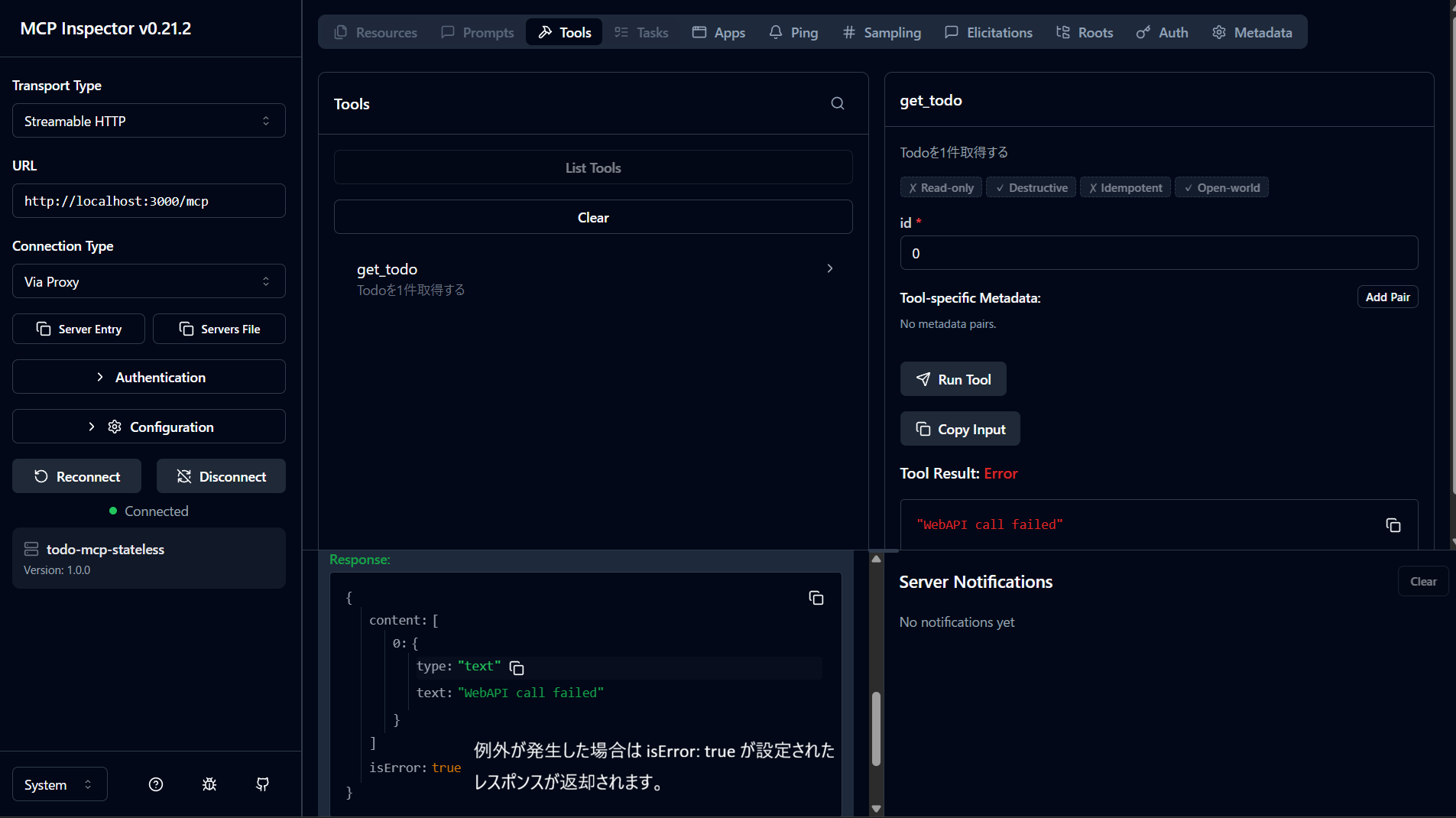
#Use MCP Inspector to verify the same behavior.
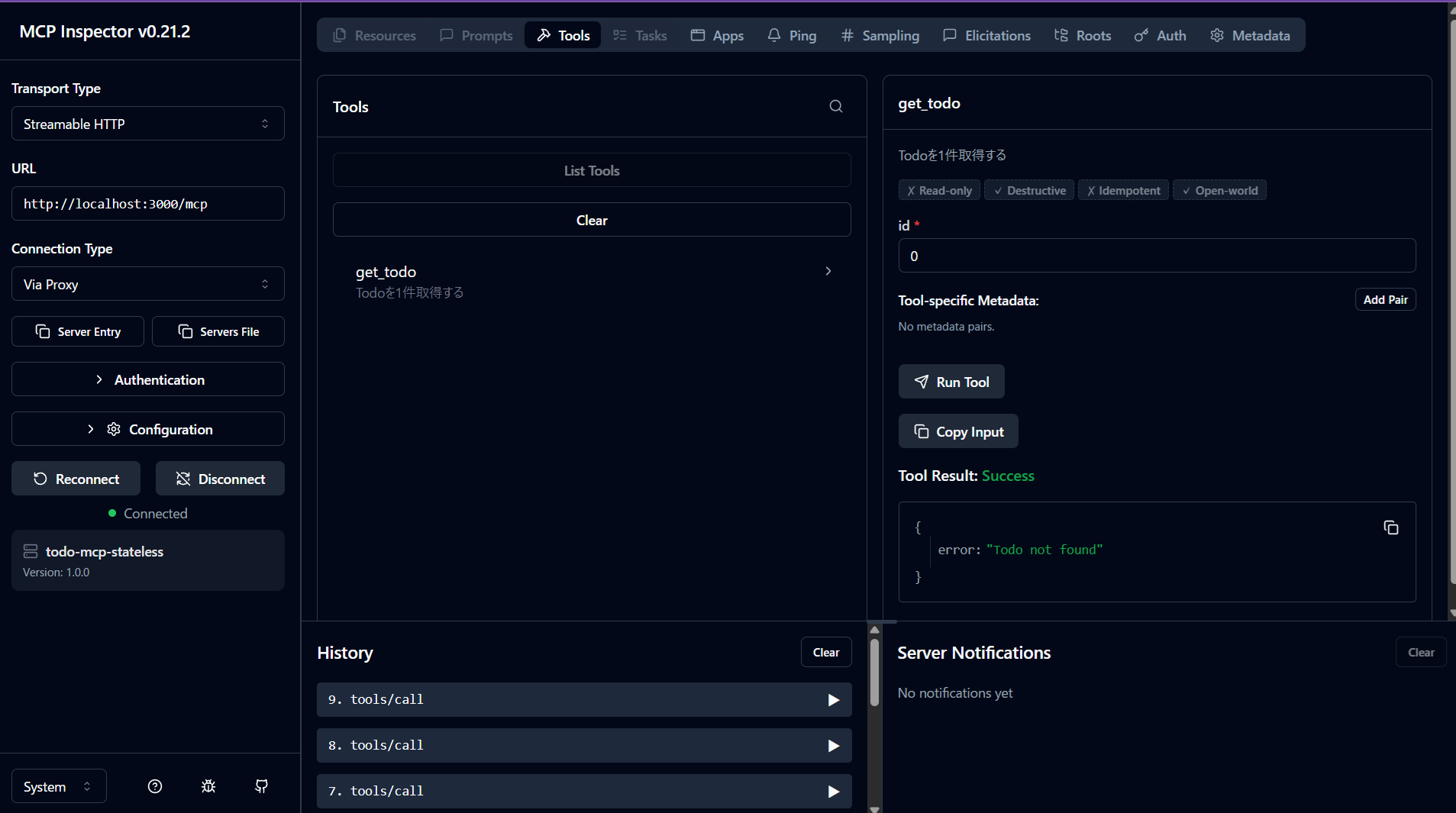
Stop the target API server, run the tool, and check the display
Summary
#- In the StreamableHTTP stateless implementation, you can maintain a simple lifecycle by creating an McpServer and Transport for each request and closing them after processing.
- Since the MCP SDK can be affected by changes in type definitions or behavior even in minor version updates, it is safest to fix dependency versions and prepare verification procedures to progressively confirm behavior when updating.
- In this article, we confirmed the stateless flow with a minimal configuration. A sample implementation covering full CRUD operations of the API is also published here, so please refer to it as needed.
- In the next installment, we will cover the differences with the stateful configuration (session management and server lifecycle).
