Updating My Homemade VS Code Extension Again After 3 Years: How My Past Self and AI Helped Me
Back to Top
To reach a broader audience, this article has been translated from Japanese.
You can find the original version here.
Introduction
#A little over three years ago, I wrote an article about updating my homemade VS Code extension. To publish a VS Code extension on the Marketplace, you need to issue a PAT (Personal Access Token) in an Azure DevOps project that you normally never use, and the procedure was incredibly difficult to understand, so I left it as a memo for myself.
The VS Code extension I publish helps with writing ChangeLogs.
Here is the GitHub repository.
As I also wrote in the previous article, this handles the ChangeLog format supported by Emacs and others (which existed before Markdown), rather than Markdown's CHANGELOG.md. It is an extension for using ChangeLogs as logs and notes for daily work.
My First Feature Enhancement Requests
#Three enhancement issues were recently registered for this minor extension, which has no stars on the Marketplace and has only been downloaded around 620 times over five years.
- auto-complete / go to filenames · Issue #27 · kondoumh/changelog-support
- setting language "none" to not insert weekday · Issue #28 · kondoumh/changelog-support
- add outline · Issue #29 · kondoumh/changelog-support
auto-complete / go to filenames · Issue #27
The request was: “While entering a ChangeLog item, I would like filenames to be completed, and I would also like assistance entering symbols (tokens) such as functions within files. In addition, I would like a feature to jump to the relevant file.” I would not use this in my own use case, but it is a feature commonly found in IDEs and seemed interesting, so I decided to implement it. Enumerating and parsing files in directories seemed likely to be the key part of the implementation. To implement this in a VS Code extension, it appears necessary to provide this information to a CompletionProvider and DefinitionProvider.
setting language "none" to not insert weekday · Issue #28
changelog-support has a feature for outputting date entries, and it allowed you to choose whether weekdays were displayed in Japanese or English by switching the dayOfWeekLang option between en/ja.
For en:
2026-10-23 Fri <kondoumh@local>
For ja:
2026-10-23 (金) <kondoumh@local>
The request was to add none to the dayOfWeekLang options, allowing weekdays to be omitted. Since this was straightforward, I decided to implement it.
add outline · Issue #29
The request was to display the outline structure of the ChangeLog in VS Code's built-in Outline widget. It seems that outlines are implemented using DocumentSymbolProvider. Since this would also make the extension feel more feature-rich, I decided to implement this as well.
Results
##27 Filename token completion and jumping
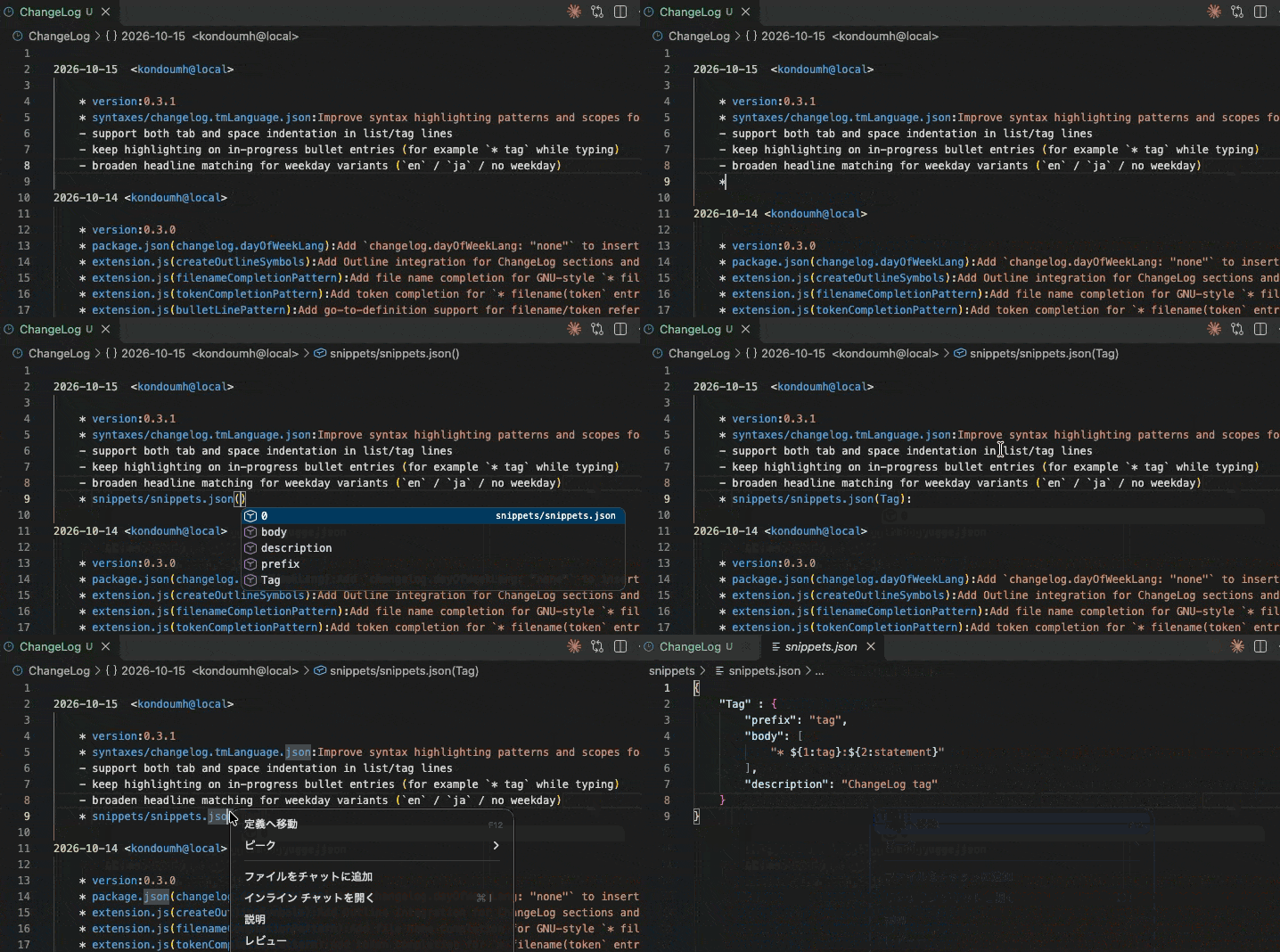
#While entering a ChangeLog item such as * hoge:, files matching the item being entered are listed from files at paths relative to the ChangeLog file within the directory, and the selected file is used for completion. Furthermore, when input such as * hoge() is detected, the file is parsed and its symbols are listed. You can now also jump to files by right-clicking an item. I will not use it myself, but it seems useful ☺️
#28 Added an option to omit weekdays from date entries
#This is a simple feature, so I will skip the details.
#29 Outline display
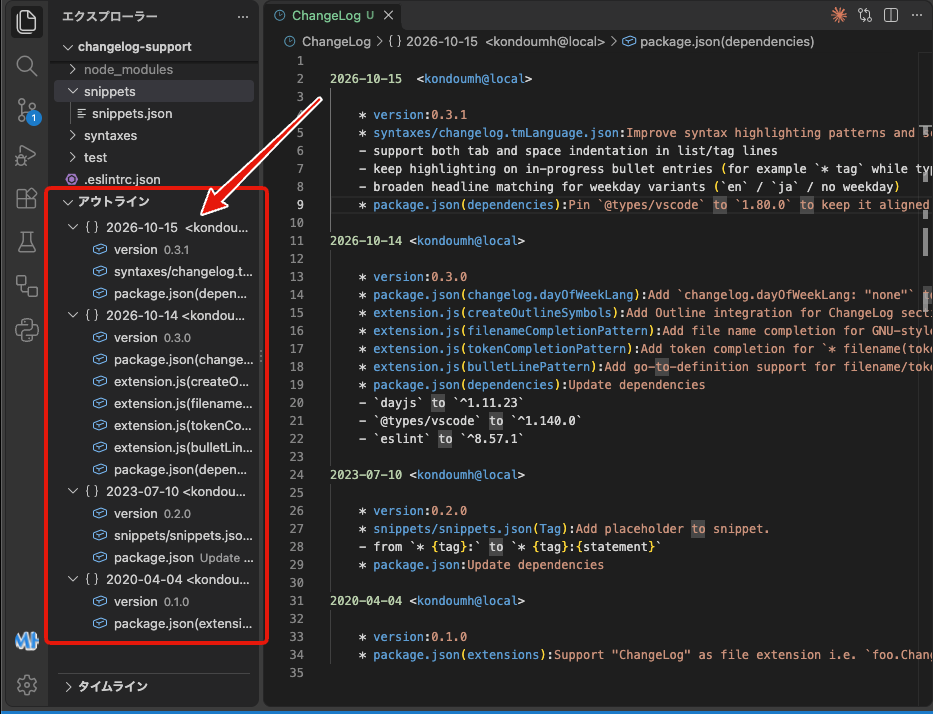
#The contents of the ChangeLog can now be displayed as an outline. It feels very extension-like and looks cool 😄
The person who registered the enhancement issues also registered an issue requesting, “While you're at it, please publish it to the VSX Registry too.” It is probably useful to make it easily available on VSX when access to the Marketplace is blocked or when you want to install extensions in a VS Code-compatible Web IDE.
FR: please co-publish on Open VSX Registry · Issue #34 · kondoumh/changelog-support
I would like to address this in the next release.
Updated Procedure for Publishing to the Marketplace
#Using almost the same procedure as in the previous article, I issued a Personal Access Token for publishing in an Azure DevOps project. The UI had changed somewhat, but I was able to get there without getting lost.
Last time, I globally installed the vsce command with npm, but it was smarter to quickly run it with npx.
npx @vscode/vsce login <publisher-name>

npx @vscode/vsce publish
This time, I bumped the version to 0.3.0 and 0.3.1 using npm's version subcommand.
npm version 0.3.0
It updates package.json (+ the lockfile), creates a commit, and creates a tag all at once. I did not know such a convenient command existed (Copilot told me about it).
I have been using Node.js for how many years now? But well, that's how it goes.
I did not realize that the version of engines.vscode in package.json (1.80.0 in the example below) must be consistent with the version of @types/vscode in devDependencies, and I got stuck on an error during publishing. A newer version is not necessarily better for this version specification; it specifies the oldest version of VS Code that you support, so you need to be careful.
{
  "name": "changelog-support",
  "description": "Extension to support writing ChangeLog.",
  "version": "0.3.1",
  "publisher": "kondoumh",
  "engines": {
    "vscode": "^1.80.0"
  },
  :
  "devDependencies": {
    "@types/vscode": "1.80.0",
  },
Conclusion
#Thanks to the previous article, I was able to avoid feeling like Rip Van Winkle when publishing to the Marketplace. After all, it is a good idea to write blog posts as records for yourself too.
Getting feature enhancement requests from enthusiastic users? definitely increases my motivation as the author.
This time, the amount of code increased substantially for things like parsing files and building the outline structure, but since AI can understand the existing code as well, addressing all three issues—including understanding the requirements and testing—was completed in about two hours.
Even for individually developed OSS, this can shorten the lead time from receiving an issue to releasing a fix.