How Do I Develop with Claude Code? — I Wrote Out the Entire Current Workflow
Back to Top
To reach a broader audience, this article has been translated from Japanese.
You can find the original version here.
Introduction
#The approach to personal development using Claude Code has recently settled into a consistent form.
Having rebuilt it many times, I think the current form is also a stepping stone. Even so, when asked "How are you developing with Claude Code?", I wanted something I could hand over, so I have written out the current structure in full.
This article is not a proposal for "you should build it this way." It is merely a record of how I run things.
Structure of This Article
#This article is structured as follows:
- Overall Picture: Shows the entire development cycle in a single diagram and explains how to read it
- The Constitution of This Project: Explains the three rules that underpin the diagram—"What to record and where", "How to enforce via types", and "Where a human makes decisions"
- [Part 1] Until One Feature Is Completed: Follows one actual cycle of
Plan → TDD → Review → Verify → Commit → CIalong with the four Gates, from left to right - [Part 2] Where to Place Each Piece of Information: Describes what’s written in rules, skills, sub-agents, scripts, etc., and why each location was chosen
- Conclusion: Notes that the current form is a stepping stone and outlines unresolved challenges
If you only want to know the overall design, read the first two sections; if you want the actual operational flow, read through Part 1; if you want to dive into asset placement, read through Part 2.
Overall Picture
#First, here’s the one-page view. This shows the entirety of what is currently running.
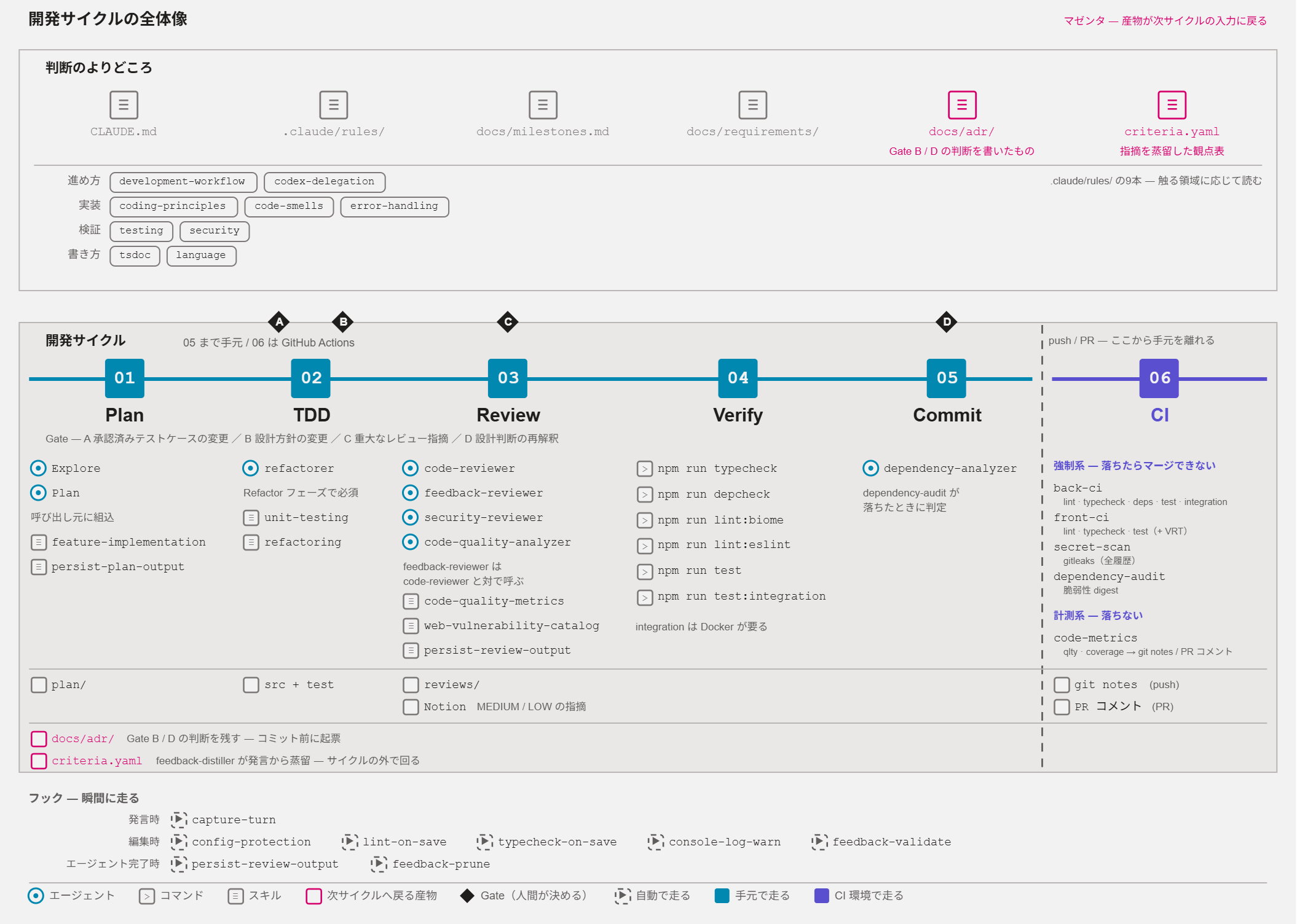
Here’s how to read this diagram:
- The top frame is Inputs. These are documents that humans and Claude Code repeatedly read during development, such as
docs/adr/,.claude/rules/, etc. - The bottom frame is Execution. Time flows from left to right, from
01 Planto06 CI.- Up through
05 Commitis the local environment; from06 CIonward is GitHub Actions. The execution environment changes, so the color changes and it’s divided by a dashed line. - The black diamonds A–D are points where I make decisions.
- Up through
- The two magenta
docs/adr//criteria.yamlboxes above and below are actually the same thing. Decisions and feedback are recorded there and return as inputs for the next development cycle.
In this article, I’ll first walk through this diagram from left to right, then explain in detail the parts that couldn’t be shown.
The Constitution of This Project
#There are three rules that underpin the diagram.
| Rule | Overview |
|---|---|
| Decide the destination before writing anything down | Use a four-stage filter to sort into ADR, code, design document, or none |
| Make violations impossible to write rather than writing rules to enforce them | Prioritize making violations unrepresentable in the type system |
| Designate where I make decisions | Embed four fixed decision points in the workflow |
Decide the destination before writing anything down
#When implementing, things you want to record outside of code keep coming up: “Why did we choose this approach?”, “How does the system fit together?”, “What’s the upper limit for this value?”, “How do we run deployments?”, and so on.
Previously, I added all of these to the design document. As a result, around the time the authentication-related design document exceeded 3,000 lines, the code and the design document started to diverge. It became unclear which one was correct, and fixing it required updating both places. Eventually, we stopped referring to the design document.
So now, whenever something should be recorded, I decide where it goes first. The media by role are as follows:
| Role | Medium |
|---|---|
| WHAT (What to build) | Requirements specification |
| WHY (Why it’s built that way) | ADR |
| HOW (How to build it) | Source code (types, functions, zod schema) |
| VERIFY (How to verify correctness) | Test code |
| OVERVIEW (High-level view/integration) | Design document |
However, this table alone doesn’t settle it. For example, “Error handling is centralized in middleware” is both the reason behind the decision (WHY) and part of the overall architecture (OVERVIEW). The same content could go into an ADR or a design document.
The dividing line is whether you’re capturing a single decision or summarizing whole-system consistency. ADRs grow one file per decision—you currently have 124 ADRs. Design documents have a fixed set of pages (e.g., system overview, deployment procedures) and expand as decisions accumulate.
So if it’s “why we chose this approach,” it goes in an ADR; if it’s “how everything fits together,” it goes in the design document.
Then, for each thing you want to record, you ask four questions in order and send it to the first “YES” destination.
| Question | YES Destination |
|---|---|
| Q1. Is this a “decision”? (Are there alternatives/trade-offs?) | ADR (one file per decision) |
| Q2. Can it be regenerated by reading code/types/tests/OpenAPI? | Code is the single source of truth; just reference it in docs |
| Q3. Does it change every time the code changes (i.e., is it volatile)? | Don’t write it in docs; keep it in code or generate it automatically |
| Q4. Is it stable AND not visible from any single place in code? | Design document |
Applying these to the four examples mentioned earlier: “Why we chose this approach” goes to ADR at Q1; “What’s the upper limit for this value?” goes to code at Q2; “How the system fits together” and “How to run deployments” go to the design document at Q4.
Sorted by these questions, what survives to Q4 falls into four categories:
- Integrated Overview (system architecture diagrams)
- Cross-Cutting Conventions (naming, logging field standards)
- Operational Knowledge (deployment procedures, runbooks)
- Domain Language (glossaries, context maps)
All of these occupy the intersection of “true for months across multiple files” and “not visible from any single place in code.”
As a result, we don’t write detailed design documents. By “detailed design document,” I mean the waterfall-style deliverable where you decide class structures, function signatures, field definitions, validation rules, and process sequences in prose before writing code. Signatures and field definitions can be regenerated from types (Q2), and class structures and process sequences change every time code changes (Q3).
Make violations impossible to write rather than writing rules to enforce them
#There are several ways to enforce conventions, but the top priority is to make violations unrepresentable in the type system. Instead of writing in documentation “please do it this way” and relying on people to follow it, make it impossible to write violations.
Here are two examples.
Preventing ID forgery with types and lint
Identifiers like user IDs are not plain strings but branded types.
export const UserIdSchema = z
  .string()
  .min(1)
  .max(128)
  .regex(/^[A-Za-z0-9_-]+$/)
  .brand<"UserId">();

export type UserId = z.infer<typeof UserIdSchema>;

export const userId = (raw: string): UserId =>
  enforceInvariant(UserIdSchema, raw, "UserId");
Because of .brand<"UserId">(), passing a raw string to a parameter of type UserId results in a compile error. To create a UserId, you must go through userId(), where length and character checks are performed. Values that haven’t passed validation cannot exist at the type level.
However, there is a loophole: casting "anything" as UserId lets you claim the UserId type without validation. To block this, we added an ESLint rule.
// eslint.config.mjs
const noAsBrandedScalarVo = {
  selector:
    "TSAsExpression[typeAnnotation.typeName.name=/^(UserId|BudgetId|SpendingQuadrant|BudgetQuadrant)$/]",
  message:
    "An 'as' cast to a branded scalar or enum VO is a loophole for type forgery. Instances must be created only via the VO factory.",
};
As soon as you write as UserId, the lint rule fails. Instead of documenting “always create IDs via userId(),” we block it with types and close the loophole with lint.
Turning missing lookup entries into compile errors
We use lookup tables that map each member of a literal union to a corresponding value.
type Status = "todo" | "doing" | "done";

const STATUS_SLUG = {
  todo: "to-do",
  doing: "in-progress",
  done: "done",
} as const satisfies Record<Status, string>;
The trailing satisfies Record<Status, string> ensures a type error if any union members are missing. As soon as you add a new member to Status, a missing update in this table fails at build time. You don’t need to catch it in review.
What both examples have in common is that a human never has to verify compliance. Violations fail at compile or lint time and never make it to review.
Designate where I make decisions
#Even with conventions and types enforcing rules, there will always be moments during implementation that require a human decision. So I placed four points in the workflow where I take over decision-making: the black diamonds A–D in the diagram.
| Gate | My Decision |
|---|---|
| A | Whether to change an approved test case |
| B | How to change the design policy discovered during implementation |
| C | Whether to fix a major review finding now or defer it |
| D | How to interpret discrepancies between ADRs and code |
[Part 1] Until One Feature Is Completed
#In this chapter, we’ll trace how the three rules from the previous section operate while building a single feature. We’ll follow the bottom frame of the diagram from left to right, explaining for each stage “what’s done and where it stops.”
Plan → TDD → Review → Verify → Commit → CI
       A B     C                 D
The A–D under the chain are the Gates. Decisions return to me twice during TDD, and once each during Review and Commit.
The steps for each stage are summarized in the feature-implementation skill, which Claude Code reads before writing the first file.
1. Plan
#First, we have Claude Code read the ADRs related to the area we’re about to touch. There are 124 ADRs at the time of writing, so we can’t pass them all each time. Instead, we maintain an index in CLAUDE.md.
| Area | Required ADR | Related Design Document |
|---|---|---|
| Authentication / Authorization | 0030, 0031, 0032, 0042 | authentication-design.md |
| Logging / Audit Logs | 0009, 0033 §1.3, 0037 §3, 0042 | logging-monitoring.md |
| Hono Middleware | 0037, 0038 | middleware-architecture.md |
| Error Strategy | 0035, 0041, 0042, 0043, 0045, 0047 | error-handling-architecture.md |
Before starting, Claude Code looks up this table and reads only the relevant ADRs.
Next, if the area is unfamiliar, we use the Explore agent to look for precedents. This aims to find existing implementation patterns to prevent inconsistencies.
For example, if you’re about to create xxxConfig.ts and authConfig.ts already exists with the same structure, you should follow it. If left unchecked, the agent will devise a “good design” from scratch each time, introducing slightly different conventions.
If you touch three or more files, change the architecture, or discover two conflicting precedents during exploration, you invoke the Plan agent.
The plan—whether or not you used the Plan agent—is saved as a snapshot under .claude/docs/plan/. These snapshots are stored with the assumption they will become outdated. As implementation progresses, the plan will diverge, so we don’t try to keep them up to date. They serve only as a record of how things were planned at the time. If you try to make this a document that is always accurate, you end up with double maintenance.
Note that Explore and Plan are agents built into Claude Code, not defined by this project.
Although we document the conditions for invoking Explore and Plan as described above, the agents don’t always follow them exactly. It’s possible that even when the conditions match, the agent skips Explore and starts writing. What’s written here is “we instruct it to do so,” not “it will always happen.”
2. Write tests first
#The rules for writing tests are in testing.md, which the agent follows.
Always follow a two-phase approach: define test cases → review → implement. Never implement tests before the user approves the test case list.
The procedure is to write only the skeleton of the test cases first and submit them for review. In practice, something like this is provided:
describe("BudgetAmount", () => {
  // Normal cases
  test("can be generated from a positive integer", () => {});
  test("can be generated at the exact upper limit", () => {});

  // Error cases
  test("cannot be generated for values less than or equal to 0", () => {});
  test("cannot be generated for amounts exceeding the upper limit", () => {});
  test("cannot be generated for values containing decimals", () => {});

  // Boundary
  test("cannot be generated for upper limit + 1", () => {});
});
The body is empty, and only test descriptions are written. At this point, you’re asked, “Does this cover the right perspectives?”
Any changes to the approved test cases require my approval. This is Gate A. When changes could be made without approval, people sometimes deleted entire test cases and blamed framework behavior for failures. To prevent this, modifications to approved test cases are blocked unless accompanied by an explanation.
After turning green, we invoke the refactorer agent. This sub-agent reads the code implemented by Claude Code, detects code smells, and performs refactoring. Since it’s hard to spot issues in your own code, we have a separate agent review it immediately after implementation.
3. Submit for review
#We divide the review across agents based on focus areas.
| Agent | Invocation Criteria |
|---|---|
code-reviewer |
Changes to 3 or more files, or 100 or more lines |
feedback-reviewer |
Always invoked alongside code-reviewer |
security-reviewer |
When touching authentication/authorization, APIs, user input, sensitive data, DB queries, file uploads, payments, log output, or error handling |
code-quality-analyzer |
Changes to 5 or more files, or 300 or more lines, or when code-reviewer raises structural concerns |
feedback-reviewer is different: instead of general code quality, it checks diffs against perspectives I’ve pointed out in the past. I’ll explain where these perspectives come from in Part 2.
The results of these agents’ reviews are automatically saved. When a review agent completes, the PostToolUse hook fires, causing persist-review-output.py to write the full output to .claude/docs/reviews/.
Of the review comments, MEDIUM and LOW severities are added to our Notion backlog. HIGH and CRITICAL severities are handled at the next Gate C.
Gate—Where a human decides
#Here’s where each of the four Gates fires:
| Gate | Stage | Trigger | My Decision |
|---|---|---|---|
| A | TDD | Attempting to change an approved test case | Whether to allow the change |
| B | TDD | Discovering a need to change the design policy during implementation | Whether to change the policy; if so, write an ADR before proceeding |
| C | Review | Review reports HIGH/CRITICAL issues | Fix now / defer with rationale / accept the risk |
| D | Just before Commit | Code contradicts an existing ADR | Decide how to interpret and write an ADR before commit |
The ADR said “Perform error handling via errorMiddleware.” This middleware, inserted into the request processing chain, was intended to catch exceptions thrown by handlers. However, upon implementation we discovered that in Hono, a try/catch within middleware does not catch handler exceptions; the framework handles exceptions internally. To catch them, we needed to use Hono’s separate registration point, app.onError().
One could reinterpret the ADR’s “errorMiddleware” to mean “the app.onError mechanism” and proceed. But that would leave an ADR referring to a non-existent mechanism. Instead, we wrote a new ADR documenting this technical constraint and recording that, going forward, “errorMiddleware” should be read as the handler registered via app.onError. We did not alter the original ADR’s text.
4. Verify
#Before committing, we run these checks on the affected packages:
npm run typecheck
npm run depcheck
npm run lint:biome
npm run lint:eslint
npm run test
npm run test:integration
The mechanisms described in the second rule of the constitution actually fail here. The as UserId cast is caught by lint, and missing lookup table entries are caught by typecheck. Even if an agent overlooks a convention, violations are blocked at this stage.
5. Commit
#We don’t commit just once per feature; we commit at every logical breakpoint. We run /commit each time to generate Conventional Commits–style messages.
If a design decision was made at Gate B or D, the ADR reflecting that decision is written before the commit containing the change. That’s why the diagram annotates docs/adr/ with “issue before commit.” ADRs are treated as prerequisites for commits, not artifacts of them.
6. Push and hand off to CI
#Here the execution environment changes, as indicated by the color change in the diagram.
CI workflows are divided into those that must pass before merging and those that are informative.
| Category | Workflow | Contents | Behavior |
|---|---|---|---|
| Mandatory | back-ci |
lint / typecheck / dependency checks / unit tests / integration tests | Fails the build |
front-ci |
lint / typecheck / tests (including VRT) | Fails the build | |
secret-scan |
gitleaks full-history secret scan | Fails the build | |
dependency-audit |
Detect missing vulnerability judgments and outdated decisions in dependencies | Fails the build | |
| Metrics | code-metrics |
qlty metrics / coverage | Does not fail; accumulates data in git notes and PR comments |
When dependency-audit fails, we invoke the dependency-analyzer agent locally. It’s a sub-agent that judges the two points machines cannot decide: whether the vulnerable function is actually reachable and whether we should accept the risk.
Automatic hooks running between stages
#Separate from the stages above, there are processes that run automatically at certain moments.
| Moment | Hook | Action |
|---|---|---|
| When I speak | capture-turn |
Index my utterance verbatim (used in Part 2) |
| When a file is edited | config-protection |
Block edits to lint/formatter config files |
lint-on-save / typecheck-on-save |
Format and type-check the edited file | |
console-log-warn |
Warn about leftover console.log statements |
|
feedback-validate |
Detect manual edits to the perspective table (see Part 2) | |
| When an agent completes | persist-review-output |
Save the review output |
feedback-prune |
Remove unused perspectives from the table (see Part 2) |
These aren’t processes that agents decide to run; they’re triggered automatically when the moment arrives.
Note that config-protection is different: the others perform recording or formatting, but this one blocks the edit itself. Since relaxing a lint rule could eliminate a convention violation, we made it impossible to use that workaround from the outset.
[Part 2] Where to Place Each Piece of Information
#Up to here covers the scope of the diagram at the beginning. The diagram depicts “what exists.” From here on, I’ll explain what’s written in each place and why that location was chosen.
There’s a limit to how much Claude Code can always read. If you write everything into CLAUDE.md or the rules, reading alone will fill the context and bury important instructions. So we decide when each piece of information should be read and separate their locations.
| Location | When It’s Read | Contents |
|---|---|---|
CLAUDE.md / .claude/rules/ |
Always | Indexes, always-applicable constraints and facts |
.claude/skills/ |
Only when performing the relevant task | Procedures, project-specific methodologies |
| Lint / Dependency Checks | Always by machines | Conventions to enforce |
docs/ |
Only when referenced via the index | ADRs, design documents, requirements, milestones, technical notes |
.claude/agents/ |
When the agent is invoked | Roles, invariants, output formats |
| Scripts | When agents read results | Computation |
criteria.yaml |
During reviews | My past feedback |
Hooks are also a location, but since they were covered in Part 1, they’re omitted here.
In the first rule of the constitution, we used four questions to sort items into ADR / code / design documents / none. We apply the same questions to assets for Claude Code. Therefore, we don’t write things that can be reconstructed from code or types, nor things that change whenever code changes.
Always-active assets—CLAUDE.md and .claude/rules/
#CLAUDE.md is 149 lines, centered on the “Area → Required ADR” index from Part 1. It doesn’t contain ADR content itself, only how to reference them. It also documents boundaries that must not be crossed in any task, such as production environments and the location of sensitive data.
.claude/rules/ contains nine files, each 16–75 lines long.
| File | Contains |
|---|---|
development-workflow.md |
The order of stages and constraints that apply at any stage |
coding-principles.md |
Principles that apply to all files (e.g., mandatory return type annotations) |
code-smells.md |
Seven code smells that were frequently pointed out in past reviews |
error-handling.md |
Five scenarios where throwing exceptions is allowed (otherwise return via result) |
security.md |
Security guardrails always to be observed when writing code, such as verifying resource ownership |
testing.md |
Prohibitions on production code and facts about the test environment |
tsdoc.md |
Aspects of comment writing not determined by existing code (e.g., not using internal symbols in ADR documents) |
language.md |
Which language to use for identifiers, strings, and comments |
codex-delegation.md |
Conditions under which it’s appropriate to consult Codex (rarely used nowadays) |
We put the following in rules:
- Facts
- Prohibitions
- Directions to the single source of truth
Everything else is left to its respective location.
| Things not written in rules | Location | Example |
|---|---|---|
| Procedures | Skills | Workflow steps (feature-implementation) |
| Things documented in ADRs | ADRs | Complexity thresholds by layer |
| Things deducible from code | Actual code (single source) | Error type construction, comment formatting |
For items treated as the single source of truth, we have Claude Code mimic nearby files.
Assets loaded only for relevant tasks—.claude/skills/
#Skills are loaded only when the task described in their description applies. They’re not always loaded, so lengthy content like step-by-step procedures is placed here.
They fall into two categories:
| Type | Contains | Mainly Used By | Examples |
|---|---|---|---|
| Procedures | Steps for tasks that always follow the same process | Claude Code core | feature-implementation, persist-plan-output, persist-review-output, notion-task, extract-learning, consulting-codex, observe-metrics |
| Methodologies | Only project-specific overrides of general principles | Sub-agents | refactoring, unit-testing, web-vulnerability-catalog |
How to decide between rules and skills
#Sometimes it’s unclear whether to put a convention in rules or in a skill. For example, test-related conventions might seem natural to put in a test skill. However, they load at different times, and if you place something in the wrong location, Claude Code won’t see it when needed.
| Type | Loaded When | Example |
|---|---|---|
| Rules | Always, regardless of the task | testing.md |
| Skills | Only when the task described in the skill’s description applies | unit-testing (when writing tests) |
To decide, we ask three questions:
- Can you write it the same way by mimicking nearby files? → If yes, write nowhere.
- Will the convention be violated during a task when the skill is loaded? → If not, put it in rules.
- Even if it’s violated, will tests or lint not catch it? → If not caught, put it in rules.
Applying these to two test conventions yields:
| Convention | When It’s Violated | Is the test skill loaded then? | Location |
|---|---|---|---|
| Don’t add code branches for test convenience in production code | While writing production code | No | Rules (testing.md) |
| Don’t assert on error message text | While writing tests | Yes | Skills (unit-testing) |
Shifting to automated checks instead of documentation
#Things that lint or dependency checks can catch aren’t written in the rules; they’re configured as part of the checks. This extends the “make it impossible to write” principle to things that can’t be expressed in types.
Dependency directions—dependency-cruiser (15 rules)
| Rule | Prohibition |
|---|---|
domain-no-infrastructure |
Dependency on Infrastructure from Domain |
application-no-infrastructure |
Dependency on Infrastructure from Application |
hono-only-in-interface-http |
Using Hono outside the HTTP interface layer |
no-cross-context-domain |
Cross-context Domain references |
There are 15 rules in total, including cycle detection, orphaned files, Port-layer dependency constraints, etc. They enforce the layer structure defined in ADR 0002.
Return type enforcement—custom ESLint rule
We check that the return types of UseCases and Ports (repository interfaces) are Result. Since no existing ESLint rule limits return types to a specific type, we wrote our own.
Both the dependency-direction checks and return-type enforcement checks fail the build when violated, regardless of whether Claude Code loaded the rules or skills. Therefore, there’s no need to duplicate these conventions in a rules file.
Assets referenced via index—docs/
#docs/ is not read by Claude Code all the time; it’s opened when needed via the index in CLAUDE.md. It’s subdivided into five areas:
| Location | Contents | Referenced From |
|---|---|---|
docs/adr/ |
Records of decisions | Index’s “Area → Required ADR” |
docs/design/ |
Design documents (system overview, deploy procedures) | Index’s “Related Design Documents” |
docs/requirements/ |
Requirements specification | When confirming what to build |
docs/milestones.md |
Phase definitions and progress | Index’s “Current Phase” |
docs/learning/ |
Technical learning notes | Directly named by agent definitions or skills |
What to write in ADRs and design documents is defined by the first rule of the constitution. Here, I’ll talk about docs/learning/.
docs/learning/ was originally intended as a repository of learning notes for technical mechanisms I understood while working with Claude Code, so I could review them later. Among these, Fowler’s refactoring catalog is also referenced by the refactorer agent when it verifies smell names or technique steps. Since Claude already knows smell names and procedures as general knowledge, it only opens this file when a required name or procedure doesn’t appear in context.
For methodologies that apply as general principles, we borrow from books and the like. They are placed either in learning notes or in skills, with sources as follows:
| Knowledge | Source |
|---|---|
docs/learning/refactoring-smells-and-techniques.md |
Martin Fowler『リファクタリング(第2版): 既存のコードを安全に改善する』オーム社 |
unit-testing |
Vladimir Khorikov『単体テストの考え方/使い方』 |
web-vulnerability-catalog |
IPA「安全なウェブサイトの作り方 改訂第7版」(2021-03-31) |
Assets active only when invoked—sub-agents
#Here, “agents” refers to sub-agents called by Claude Code core. The ones defined in this project are:
| Agent | Responsibility | Referenced Methodologies |
|---|---|---|
code-reviewer |
Quality, type safety, maintainability | unit-testing / code-quality-metrics / refactoring |
feedback-reviewer |
Check against perspectives I’ve pointed out in the past | criteria.yaml (perspective table) |
security-reviewer |
Vulnerability detection | web-vulnerability-catalog |
code-quality-analyzer |
Quantitative analysis, prioritization | scripts/metrics-digest.py (metrics script) |
refactorer |
Behavior-preserving structural improvements | refactoring / simplify / catalogs in docs/learning/ |
dependency-analyzer |
Assess dependency vulnerability reachability and acceptance | Output from scripts/audit-digest.mjs |
As shown, agent definitions themselves don’t include methodology details. For example, the refactorer definition begins:
The classification of smells and steps of techniques are general knowledge and in
docs/learning/refactoring-smells-and-techniques.md; any parts of that general knowledge that aren’t acceptable for this project are held in therefactoringskill.
Agent definitions contain “role,” “procedure,” and “forbidden actions”; the how-to knowledge is extracted to skills and catalogs. Invocation criteria (e.g., number of file changes) are written only in the agent’s description, not duplicated in rules.
Example ① — What code-reviewer looks at
The code-reviewer references several locations during review. Its definition includes a mapping of decision subjects to lookup locations:
| Decision Subject | Location |
|---|---|
| Function or file complexity thresholds | ADRs (thresholds by layer) |
| Error handling (exceptions vs. return values) | ADR |
| Avoid personal data in logs or error messages | Rules (security.md) |
| Comment style | Actual nearby files and rules (tsdoc.md) |
We follow two principles:
- Don’t copy values like thresholds into the agent definition; instead, cite the source. Copying would desynchronize when the ADR is updated.
- If sources conflict, prioritize ADR → code comments → rules.
The sub-agent loads skills as needed:
| Skill | Load Condition |
|---|---|
unit-testing |
Diff includes test files |
code-quality-metrics |
Feedback requires numerical backing |
refactoring |
Just before writing fixes for major issues |
Items lint detects comprehensively (use of any, unused imports, etc.) are excluded from the checklist and handled by machines.
Example ② — What dependency-analyzer does not take on
This agent runs when CI’s dependency-audit fails. Its definition begins:
Your role is not to detect vulnerabilities. Detection and mechanically derivable interpretations (dependency paths, dev/prod, CVSS breakdown, remediation methods) have been handled by
scripts/audit-digest.mjs. You are responsible only for the two points the digest cannot answer:
- Reachability — can the vulnerable function actually be reached from this codebase?
- Acceptance — should we fix it, accept it, or defer it?
Reachability is checked in this order:
- Check whether the dependency’s entry point is for dev or prod.
- If it’s for production, grep to see if our code directly uses that dependency.
- Read the code path to see if the affected functionality is traversed (e.g., for “ReDoS in Hono’s CORS middleware,” check if CORS middleware is used).
We also explicitly do not:
- Recompute the script’s output ourselves.
- Write to the decision ledger ourselves—only return text that can be pasted.
- Check reachability for vulnerabilities that can be fixed; if it’s fixable, remediation is sufficient.
The details in Examples ① and ② are instructions written in the agent definitions. They are not enforced by hooks, so technically dependency-analyzer could write to the ledger if it wanted.
Offloading computation to scripts
#Calculations and mechanically derivable information are handled by scripts. For example, code-quality-analyzer reads the output of scripts/metrics-digest.py, and dependency-analyzer reads the vulnerabilities list from scripts/audit-digest.mjs.
We put these tasks in scripts so we can write tests to verify their output mechanically. The script produces the data, and the agent judges what the data means.
Capturing my feedback—perspective table
#The “perspectives” feedback-reviewer uses during the Review stage come from the perspective table at .claude/feedback/criteria.yaml. It distills patterns from feedback I’ve given to agents in the past. For example:
- id: corrections:260816-115935-1
  pattern: Do not propagate changed terms/values/commands/procedures to other materials (other ADRs / plans / CLAUDE.md / rules / config files) that describe the same, leaving the old description intact
  scope: docs/**/*.md, .claude/**/*.md, CLAUDE.md
  detection_hint: Search with rg for replaced terms, numbers, or command strings across the repository and verify whether matching files include the same diff
  occurrence: 10
The process from my utterance becoming an entry, to use in review, to eventual removal is:
- The
capture-turnhook indexes my utterance verbatim. - The
feedback-distilleragent reads accumulated utterances, extracts feedback, and classifies whether it matches an existing entry. - It presents promotion candidates to me, and approved ones are written to the perspective table.
feedback-reviewerchecks code diffs against the table during Review.- Entries with no detected violations after repeated checks are removed by the
feedback-prunehook.
Note this distillation doesn’t run within the development cycle. It runs in batch when the feedback-nudge hook at the start of a session notifies of un-distilled utterances.
If ADRs and rules preserve “what was decided,” this mechanism preserves “what was said but not followed.”
Conclusion
#As stated in the introduction, I think this form is also a stepping stone. In fact, I reviewed the Gates described in Part 1 while writing this article. Tasks repeatedly stalled waiting for my decisions. This article describes the workflow before those revisions.
There are other unresolved issues:
- I am a bottleneck in the task flow: For learning purposes, I review every deliverable, causing tasks to stop at my desk.
- There is no mechanism for team development: The system described here assumes solo development. I feel that mechanisms for multi-person collaborative development are still lacking.
- The process from requirements to implementation is not seamless: This article covers the development process after requirements are set. I feel that mechanisms for connecting upstream activities—organizing customer requests into development requirements, designing, and implementing—still need development.
None of these have immediate answers, so I plan to continue refining them gradually through my own trial and error.