Agile FAQ #4: How to Estimate Modernization Projects Without Finalizing All Features?
Back to Top
To reach a broader audience, this article has been translated from Japanese.
You can find the original version here.
Thank you for reading this article. I am Tomohiro Fujii of the Agile Group.
This is the second installment in which we address the “guarantee of existing functionality” in modernization projects by dividing it into three sub-themes. In the previous article (Part 3), we saw that there are three realities behind what is called “existing,” and we ended by questioning the premise of “finalization.” In this article, we will consider how to create an “overall picture” that can be agreed upon with the client.
Question
# When I proposed an Agile approach for a modernization project of an existing system, the client asked, “Please provide a feature list as the basis for your estimate.” When I explained, “Agile is a way of proceeding without finalizing everything upfront,” they responded, “Then what are we paying for and how much?” and the discussion stopped there.
How can we create an estimate that will pass internal approval and promises that can be exchanged in the contract, without finalizing all features?
Answer
# If you are asked for an overall picture as the basis for an estimate… you can provide it. The key is choosing the right level of granularity. By selecting the granularity, you can produce a list in the form the client is accustomed to and derive a sense of scale from it. However, that does not mean that all development details are fixed from the start.
At the end of Part 3, we replaced the question from “Can we finalize or not?” to “To what extent do we subject items to heavy-weight procedures, and from where do we leave room for changes without formal procedures?” The feature list you submit will likely be treated as finalized—subject to heavy-weight procedures. If so, choose a granularity that can still be maintained on that side, and leave flexibility inside.
Providing an overall picture and preserving flexibility can both be achieved by selecting the appropriate granularity.
“Wanting to see the overall picture” is a natural request—but the term “feature” carries different granularities for the client and the vendor
#What I often sense when supporting projects on-site is that while both the client and the vendor use the word “feature,” they may imagine different granularities. The Agile team on the vendor side thinks of “stories”—the units we learned in training that must be completed with testing in one sprint (1–2 weeks). On the other hand, the client thinks of the feature list used to secure the budget—a granularity considerably larger than a story, written in units of screens or reports. This gap in granularity rarely comes up in discussion. As a result, when a feature is dropped for budget or schedule reasons, it’s not uncommon for the client and vendor to have divergent perceptions of the magnitude of the loss.
In addition to differences in perceived granularity, the lack of opportunities in training to learn the “context of modernization projects” makes the problem more complex.
Most Agile textbooks and case studies are set in the context of new development—especially online services where you don’t know what will be accepted until release. In that context, “not finalizing everything upfront” is a rational decision.
But what about modernization projects? Operations are already running, the primary value of the new system lies in coverage—if anything is missing, operations stop—and the goal is determined from the start. To assemble it incrementally, you must view the whole and choose “how far to go this time.” When the client says, “Show me the overall picture,” it is a natural request because they want to confirm whether operations will run. Importing the logic from the online service context—“not finalizing everything”—directly into that discussion inevitably leads to misunderstanding.
Why use use cases—because the structure of granularity is predefined
# The image of “Agile means user stories” is well established, but the Agile world also has mechanisms for organizing granularity. By adding types like Epics and Features, you can change granularity from large categories to small units and organize what to focus on at each level—business objectives or user behavior. However, how these types are handled differs by methodology, and since teams often decide their own granularity design, it can be a significant burden for inexperienced teams.
Therefore, in this article, we introduce use cases, whose granularity structure is predefined (as one choice, in line with this series’ goal of “presenting options”). We refer to Ivar Jacobson et al.’s “Use-Case 3.0” (Jacobson, Spence, de Mendonça, 2024)—a guide that reorganizes use cases into a lightweight practice to drive Agile development, assuming co-usage with user stories.
I will show a concrete example later. First, let’s confirm the basics.
A use case can be defined as “all the ways the system is used to achieve the goal of a particular user.” It has three components:
- Actor (who)
- Use Case (for what purpose, what must be possible)
- Flow (how)—bundles of Basic Flow (the simplest path to the goal) and branching Alternative Flows (other paths, exceptions, failure handling)
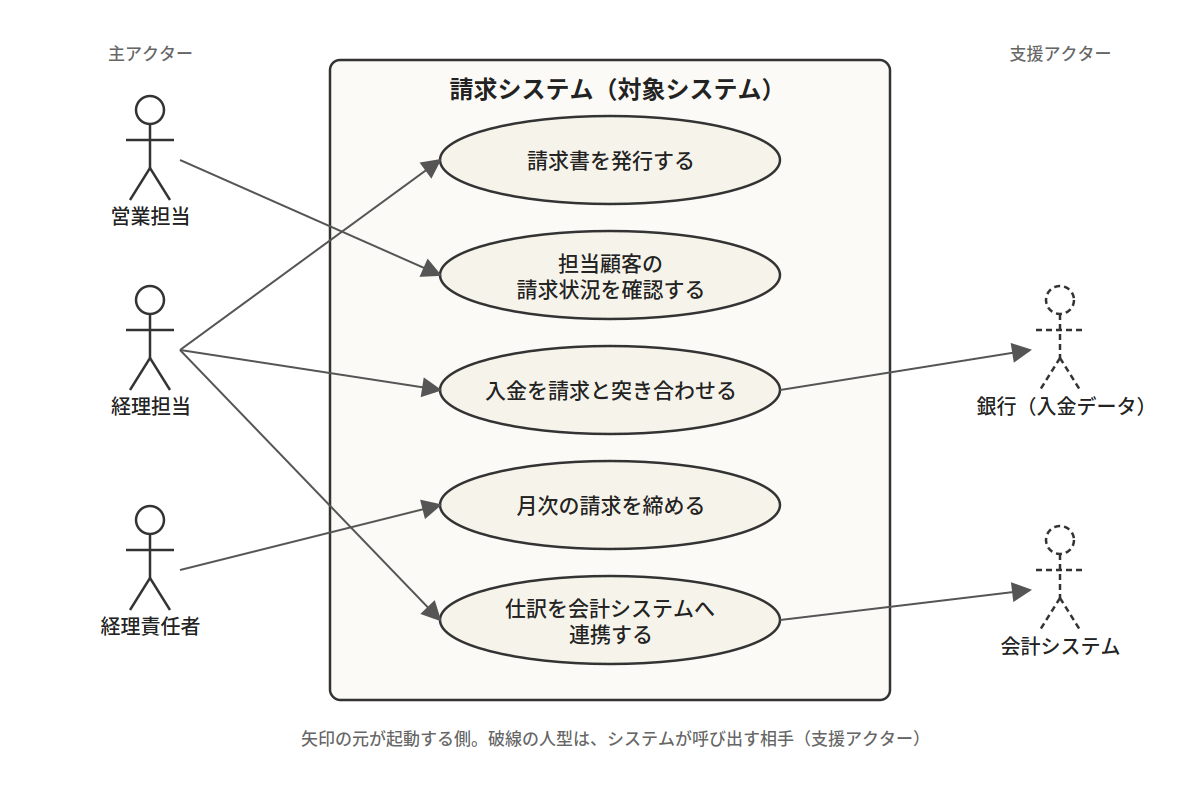
Figure 1: Use Case Diagram
 。
。
Figure 1 is a use case diagram showing the relationship between actors and use cases. It allows you to view who uses the system and for what purpose at a glance.
Within each use case, the user actually interacts with the system, and the flow outlines the rough steps.
We will look at the relationship between the Basic Flow and Alternative Flows in the upcoming sample (Figure 2).
Thus, use cases incorporate both a level for viewing the whole (actors and use cases) and a level for examining individual details (flows) as built-in tools. This is what “predefined structure” means.
Now let’s deepen our understanding by looking at an actual example.
Example: Billing operations—4 steps and the concepts used
#From here on, using billing operations as an example, we will trace the four steps of structuring a modernization project with use cases and define the concepts used at each step. This example is just one instance; the steps and concepts apply to any business. If you prefer to use Epics/Features/Stories, map use cases to the closest level (Epic or Feature) in your methodology, and interpret slices as bundles of stories.
(1) Create a list—count by purpose, not by screen
Use existing specifications or system artifacts to create lists of current screens, reports, and interfaces. Organize each item from the perspective of “who uses it for what purpose.”
For billing operations, you get a table like this:
| Use Case (Actor + Purpose) | Corresponding Current Screens, Reports, and Interfaces |
|---|---|
| Accountant issues invoices | Invoice Issuance Screen, Invoice List Screen, Invoice PDF, Monthly Bulk Issuance Batch, Invoice Cancellation Screen |
| Sales representative checks the billing status of assigned customers | Invoice List Screen |
| Accountant reconciles payments against invoices | Payment Reconciliation Screen, Bank Payment Interface |
| Accounting manager closes monthly billing | Monthly Closing Process Screen |
| Accountant sends journal entries to the accounting system | Accounting Integration Interface (nightly batch) |
Two points stand out. The Invoice Cancellation Screen has no independent purpose; it is a step within the larger goal of “Issue invoices” and is incorporated as an Alternative Flow (cancel issued invoice) in the use case. Conversely, the Invoice List Screen is used by both the accountant and the sales representative for different purposes, so it spans two use cases. Items not easily visible from existing artifacts, such as manually triggered batches, are uncovered through interviews.
Counting by purpose rather than by screen is because whether operations continue depends on whether the set of purposes covers the business. While information is gathered at the existing screen level, the goal is not to replicate screens. In a new system, it is common to redesign screens from scratch; the number and arrangement can change. What remains constant is who uses what for what purpose—that is, the purpose.
Plotting these five use cases against actors on a single diagram gives you the use case diagram (Figure 1). You can view who uses the system and for what purpose at a glance, grasping a high-level overall picture. By performing the same work by business domain, you create a list for the entire project. This list is the skeleton of the overall picture. To use it as the basis for estimates, complete steps (2) and (3) for all use cases targeted for migration.
(2) Write an outline for each use case—make explicit the currently understood scope
Next, for each use case to be migrated, write a one-sheet outline. List the Basic Flow as bullet points, then enumerate the main Alternative Flows branching from it, as far as currently known. Stop at the bullet list; do not dive into screen fields or process details. For “Issue invoice,” it looks like this:
Use Case: Issue Invoice
Actor: Accountant Purpose: Issue and send invoices for closed transactions
Basic Flow: 1. Display list of closed transactions → 2. Select invoicee → 3. Confirm invoice details → 4. Issue invoice → 5. Send invoice
Alternative Flow: A1 Combine multiple transactions into one invoice / A2 Bulk issuance at the beginning of the month / A3 Cancel issued invoice / A4 Invoicee is on credit hold / A5 Recipient not registered
Figure 2: Use case outline (user operation flow and variations)
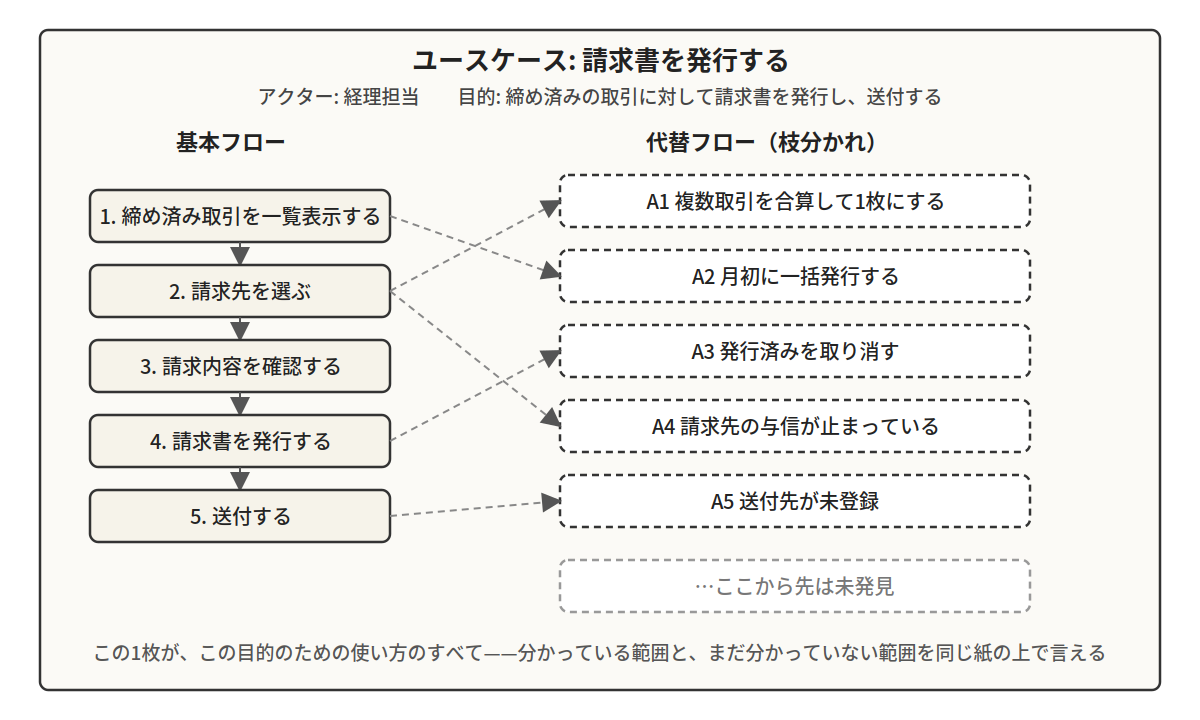
This one sheet represents the whole of how the system is used for that purpose. A1 through A5 are the Alternative Flows currently known. The power of this sheet is that it shows there are undiscovered paths beyond those, and you can say that the next path would be “after A5.” With use cases, you can express what you know and what you don’t know on the same sheet. An overall sense does not mean knowing everything, but knowing where the unknown parts are. Use-Case 3.0 also states that an outline of this level is necessary to gauge a use case’s size and complexity. Use cases determined to be out of scope only need their names left on the list.
(3) Define the minimum set—draw the line that keeps operations running
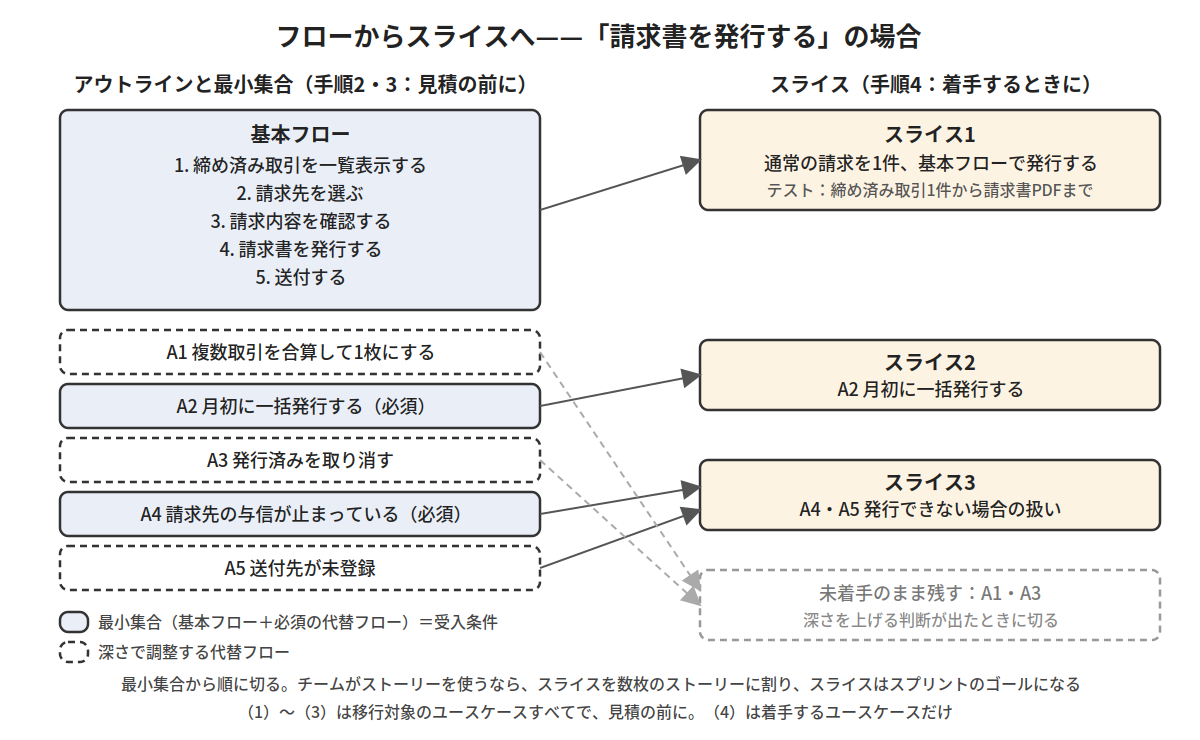
If the Basic Flow succeeds, operations will not stop. However, some Alternative Flows, if removed, will halt operations. For “Issue invoice,” A2 (bulk issuance at the beginning of the month) is essential if manual processes cannot handle start-of-month billing. A4 (credit hold) also cannot be removed if credit management is mandated by law or internal regulations. After discussion with the accounting department, you might decide on “Basic Flow + A2 + A4.”
This “Basic Flow + required Alternative Flows” is the minimum set for each use case, and it becomes the acceptance criteria. The remaining A1, A3, and A5 will be handled by adjusting the depth, which we will cover later. Unless you define the minimum set with the business division, you’ll face the problem of “You said operations would run, but they didn’t.” Decide the minimum set for each use case targeted for migration before estimating.
(4) Slice it—units to complete in a sprint
From here, focus only on use cases to be started in a given sprint. The development unit is a slice cut from the sheet—a path from the start to the end of a use case, sliced into one or more test cases—that can be verified within one sprint. For “Issue invoice,” the first slice might be “Issue a standard invoice via the Basic Flow”—the test case spans from a closed transaction to generating the invoice PDF. Next is “A2: Bulk issuance at the beginning of the month,” and then “A4 & A5: Handling cases where invoices cannot be issued,” grouped together. You slice items out of the minimum set in order. A1 and A3 remain on the sheet until a decision is made to increase depth.
If the team uses user stories, break slices into several stories within the sprint (for the first slice: “Display list,” “Select invoicee,” etc.). A slice functions as the sprint goal.
Figure 3:
Three levels of granularity—what counts as “one item”
After following the four steps, granularity is organized into three levels:
- Business domain: categories such as “Billing operations” or “Inventory management”
- Use case (equivalent to the client’s “feature”): the combination of actor and purpose. Listed, agreed upon as the overall picture, and used as the unit for estimation
- Slice (equivalent to a sprint goal): the unit in the backlog. If the team uses stories, each slice is broken into several stories for implementation
Figure 4:
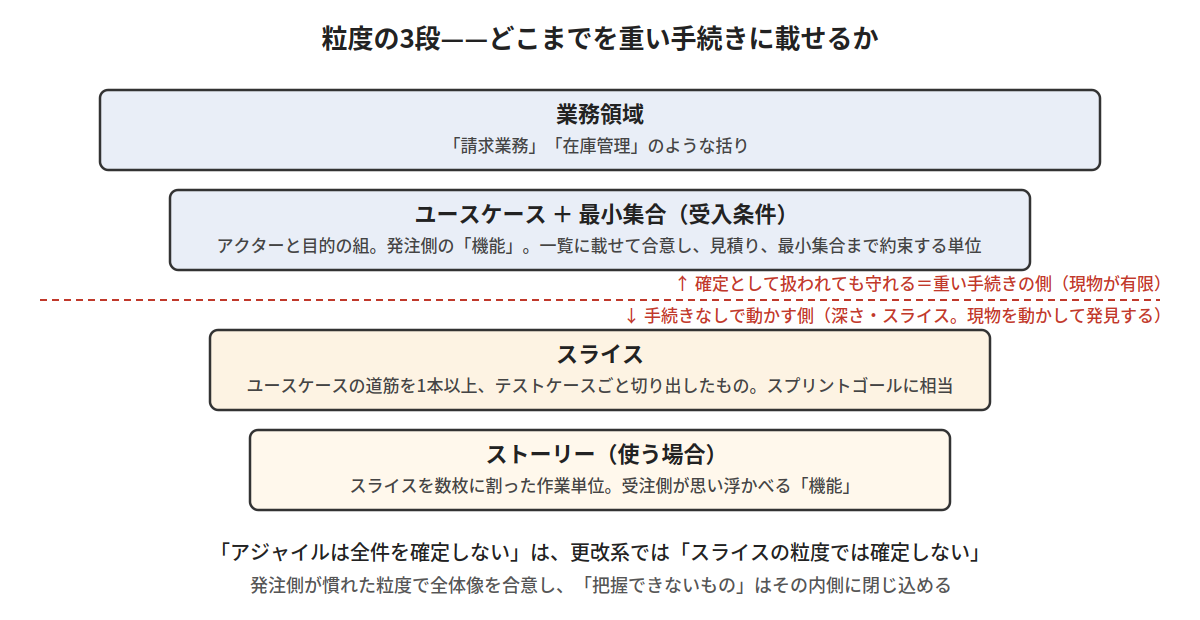
This is the answer to the question “what counts as one item?” that we left open in Part 3. You cannot capture everything at the slice level, but you can capture all items at the use case granularity (including flows) from existing artifacts. This also allows the client to discuss the overall picture at the familiar granularity by proceeding from screens. Anything “not yet understood at that point” is handled at the slice level or below. “Agile does not finalize everything” in the context of modernization means “not finalizing at the slice level.” With the list and the minimum set, the artifacts are finite, so even if treated as finalized—placed on the heavy-weight side—they can be maintained. Depth and slices remain inside, where they can be changed without formal procedures and are not included in the agreement wording (the line drawn in Part 3).
The use case list serves as a kind of map. You verify the most impactful operations on the actual system first, and by adding discovered paths as Alternative Flows, you gradually build out the map.
Prescription—make the overall picture a tool for estimation and agreement
#What to promise and what to adjust
By separating granularity, you assign promises and adjustments to different levels. The contractual promise of “everything” is made at use case granularity—include all use cases in the list, and for those deemed for migration, deliver at least the minimum set. The adjustment mechanism is not the number but the depth of verification for each use case—depth to the minimum set (L1), to the main Alternative Flows (L2), or to all identified flows (L3). Swapping and reprioritization of slices are done routinely by the Product Owner (PO) and the development team, not subject to formal approval procedures (though records are kept). Decisions to include or exclude use cases (e.g., excluding those without usage history) are treated as changes to confirmed items and explicitly decided by the client. Deciding in advance who decides at which granularity makes issues like “They changed it without permission” or “They said they would do everything” less likely. Presenting the verified list as a “Use Case × Depth” table makes progress and remaining risks immediately readable by the client.
Figure 5:
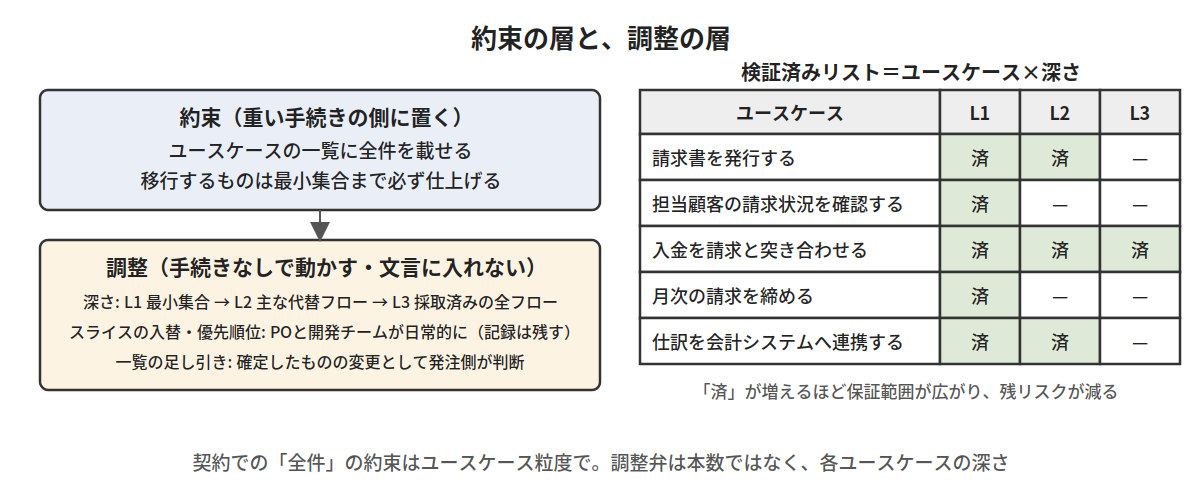
When you reduce depth—i.e., remove Alternative Flows outside the minimum set—what changes is how “easily and under how many conditions” operations can run. The removed parts become manual business procedures, shifting the burden to the business division, so agreement on those alternative procedures should accompany the removal decision. Returning to the “three realities of specifications” from Part 3, removing an Alternative Flow means deliberately defining “the work that people do.” Much of the manual work currently performed is the trace of someone implicitly removing Alternative Flows during the last modernization; this time, the difference is recording the decision when making the removal.
Estimate for approval—number of items × size
At the approval stage, what you write for each use case is what you created in steps (1)–(3)—a sentence stating the actor and purpose, bullet lists of the Basic Flow and main Alternative Flows, and the minimum set—plus notes on the main inputs/outputs and integration points. Details that would be solidified in a waterfall basic design—screen field definitions, process logic, full enumeration of exceptions—are deferred to the discovery and verification of Alternative Flows.
The volume is expressed as number of items × size. The number is the count from the list; by attaching a “Use Case × Screen” mapping, it can be reinterpreted as a screen list. Size is the relative size of each use case, not by the number of screen fields but by the “thickness” of the chunk determined by how many Alternative Flows hang off it—“Issue invoice” is thick; “Maintain staff master” is thin—measured in points (e.g., S = 1, M = 3, L = 8). On top of this is the initial depth setting (L1–L3); the more you keep at L1, the smaller the total volume; the more you raise to L3, the larger it becomes. Use existing usage data (number of uses, number of departments) as the basis for initial priorities and depth.
The format resembles a waterfall estimate of “Feature list × size,” so it fits directly into approval documentation. However, at this stage it is only volume, not effort or cost. Converting volume into duration and cost is based on actual team metrics; that process will be summarized next time.
Questions to decide in advance
How detailed should the minimum set be written? What procedure will change depth? Who will assume the risks that remain after verification? What will serve as the acceptance basis instead of paper? The answers vary by project and organization, so we do not decide them here. The important part is starting to discuss these questions together around the same table. Preparing estimates for approval and deciding in advance the scope of adjustments that do not require approval are not textbook Scrum. We are crafting them to operate within your company’s existing processes.
Caution—The moment use cases revert to “paper”
Be on guard against the temptation to “go beyond the outline and fill in full use case descriptions for all use cases before starting work.” Doing so returns to the structure we saw in Part 3, where only paper stands in for everything. Whether they become mere paper or serve as discovery tools is not a matter of format, but a matter of when and how much you choose to write.
Why has this question been repeated for 30 years?
#Development standards, contract templates, and Agile textbooks have all used the word “feature” as a single term. As long as differences in granularity remain hidden in the language, each side will feel that the other has broken a promise, and that feeling is passed down across generations.
The three levels of granularity in this article are not a “cure,” but rather tools to restart the stalled dialogue. They transform the conversation from ending at “you can’t finalize everything” to the concrete question of “at what granularity do we draw the line?” Both “Agile means stories” and “We use feature breakdown, so Agile is impossible” are mental blocks caused by confusing tools with processes. Speak in the granularity of the actual project, not in standard terms. That alone may change the form of a conversation that has been stuck for 30 years.
What remains is how to discover the unknowns at the slice level and turn them into verified items, and how to structure and allocate the budget to absorb those discoveries. We will treat that as a separate question in the next article.
I have written articles for various publications before, but never have I felt as if “I’m standing with both feet on a minefield” as I have while writing this three-part series. In the next article, we will step onto this minefield further to explore “what to treat as the specification for verification” and bring all three installments to a close.
Next article: "Current Systems with Unreliable Documentation: What Should We Treat as 'Specifications' for Verification?"