Introduction to Building Your Own Text Editor
Back to Top
To reach a broader audience, this article has been translated from Japanese.
You can find the original version here.
Text Editor Refugees
#Which text editor do you use?
These days it's probably VS Code, right? It feels like absolutely everyone uses it. But I just can't bring myself to like VS Code—it's too cluttered.
So I used Sublime Text as my main editor, but I had some complaints: its handling of Japanese was a bit off, and it was slow to open huge files. I ended up living a refugee life, switching between various text editors depending on the situation.
For coding I can just use an IDE, so what I really wanted was a simple editor that would let me do everyday text editing without stress. Specifically, something like this:
- Taking notes in Markdown
- I want syntax highlighting in code fences
- I want to paste tables as Markdown tables (especially tables from PowerPoint, which are famously impossible to paste)
- Viewing massive log files
- I want to open them quickly and filter out error sections
- I want to grep through them for investigation
- Manipulating SQL or JSON
- I want to edit with multiple cursors
- I want to format indentation
- Editing huge CSV files
- I want to operate with columns aligned
- Multi-platform
- I want the same key bindings across different environments
- I want to use it out of the box without fiddling with settings or plugins
- Displaying full-width spaces and tabs
- I want to show them only on the line with the caret
- Session saving
- I want to restore the previous content even if I close without saving
Escaping the Refugee Life
#When I grew tired of the refugee life, I thought, “Wouldn’t it be faster to just quickly build one myself?” So I made up my mind, wrote my own text editor, and now I’ve finally escaped the refugee life.
However, it was far from “quick and easy”—it turned out to be more work than I expected.
Looking back, the initial commit was on Sep 12, 2022.
Simple text editing worked relatively quickly, but I feel it took over a year to reach a level where I could use it daily. And I’m still making changes.
Because I ended up working in fragmented sessions of just a few tens of minutes at night, I’d often forget the next day what I’d done or how far I'd gotten. Including keeping my motivation up, my impression is that without a decent block of focused time, progress just doesn’t happen.
I wouldn’t recommend doing this at my age—maybe if you had the free time of a student. But since I can add features I want right away, I tell myself I now have an editor that I can customize exactly as I please.
So in this article, I’ll write about the things I wish I’d known when I started building a text editor.
Text Buffers
#When you set out to build your own text editor, the first thing you need to consider is what data structure you’ll use to handle the sequence of characters.
Most text editors out there are based on one of the following data structures—Gap Buffer, Linked List, Rope, or Piece Table—with their own custom optimizations. Let’s take a look at each.
Array
#Let’s start with the simplest example: treating the character sequence as an array.
Consider handling the character sequence simply as a byte array:
byte[] bytes = Files.readAllBytes(path);
At this point, the character sequence This is apple. is allocated in a contiguous memory layout like this:
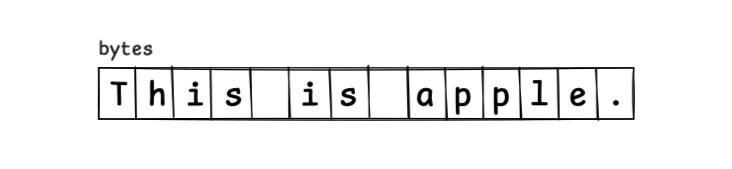
To insert the string an , you have to reallocate an array that is 3 bytes larger, copy the characters into the new array, and set it up:
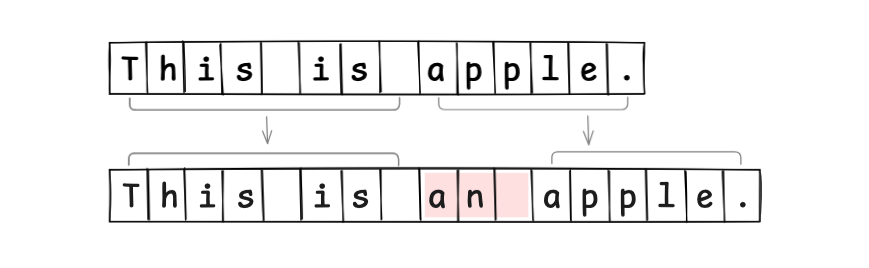
As you might expect, since you have to reallocate new memory on every edit, this approach is very inefficient.
So let’s think about allocating extra memory upfront and using it as a buffer.
Buffer
#Since reallocating memory on every text edit is clearly inefficient, we prepare some unused buffer space within the memory region.
Conceptually, we can think of a Buffer like this:
class Buffer {
    byte[] bytes;
    int length;
}
If we allocate an unused region of 5 elements (hatched area) as a buffer, it looks like this:
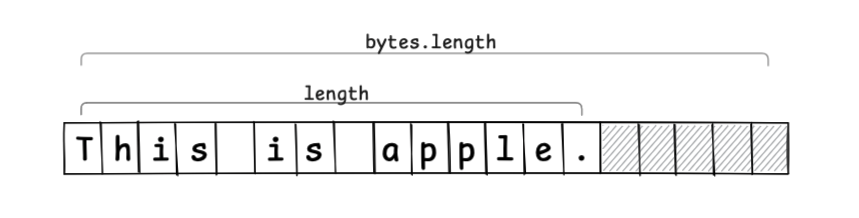
When inserting a string, the edit operation is completed just by setting and moving values, without creating a new array (if the buffer is insufficient, you need to allocate a new memory region and copy):
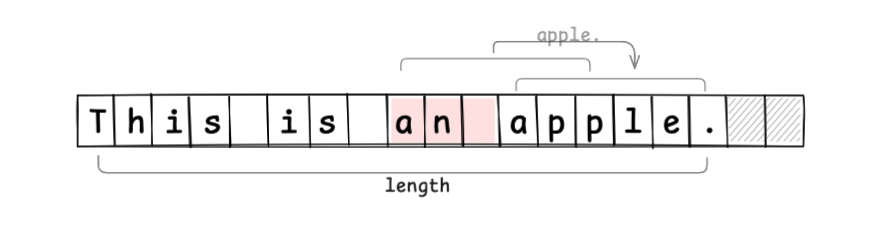
By absorbing edits into the buffer region, we reduce extra memory allocations.
However, you still have to move values from the edit position to the end, so there’s room for further optimization.
Gap Buffer
#The Gap Buffer takes advantage of the fact that most text editing operations occur at the cursor position.
In the previous example, we placed the buffer at the end of the memory. With a Gap Buffer, we place the gap at the cursor (caret) position.
Conceptually, we can think of a GapBuffer like this:
class GapBuffer {
    byte[] bytes;
    int gapIndex;
    int gapLength;
}
If the current cursor position is at the orange arrow, and we allocate an unused region of 5 elements as the gap, it looks like this:
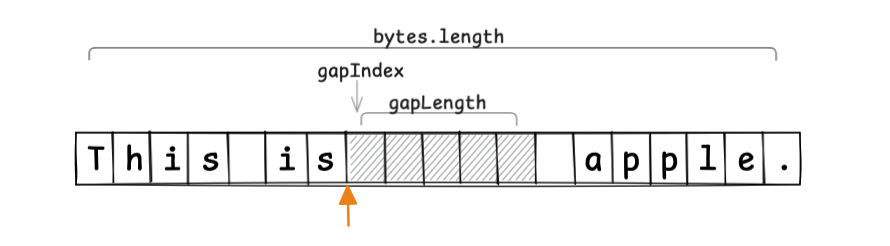
When moving the cursor, we move the gap to follow that movement:
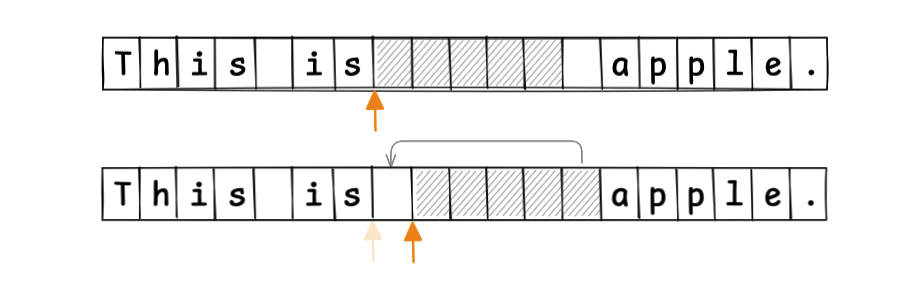
This allows text edits to always occur at the gap position. The shifting of values after the edit point, seen in the previous example, is no longer necessary:

Since the start position and length of the gap are known, random access by index is also easy to implement. The Gap Buffer is an efficient text buffer method, and it’s even used by Emacs.
So far, we’ve treated the character sequence as a single block. Next, let’s consider splitting it into multiple smaller blocks.
Linked List
#Instead of managing the character sequence as one contiguous region, if we split it into small chunks, we can localize editing operations.
The first idea is to treat the character sequence as nodes split into fixed-size chunks, and manage them in a linked list.
Conceptually, we’d have classes like this:
class LinkedList {
    Node head;
    Node tail;
}
class Node {
    byte[] chunk;
    Node next;
    Node prev;
}
For example, if we treat the sequence in word-sized chunks, the structure looks like this:
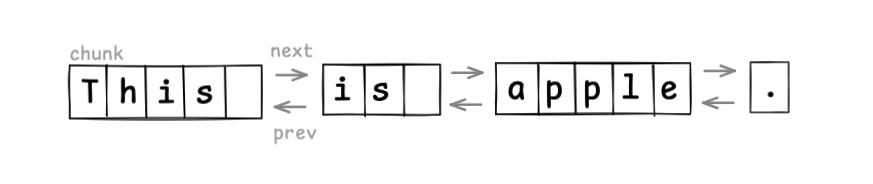
Text editing is efficient, since you only create a new node and relink pointers:

Here we used word-sized chunks for demonstration, but if you make chunks too small, the overhead of link pointers becomes significant. In practice, implementations usually treat each line as a chunk (splitting a node on newline insertion, merging on line deletion).
Treating the sequence as a linked list is simple to implement, but random access to elements is slow. For index access, you have to traverse from the head, which is inefficient for large files. You normally need tricks like cursor-based access.
Can we split into chunks and still perform efficient random access by index? That’s where Rope comes in.
Rope
#Rope splits the character sequence into chunks and uses a binary tree to support index access. It’s like strengthening a String into a Rope.
Conceptually:
class Rope {
    Node root;
}

interface Node {
    int weight();
    int totalLength();
}

record Branch(Node left, Node right, int weight) implements Node {
    Branch(Node left, Node right) {
        this(left, right, left.totalLength());
    }
    public int totalLength() {
        return left.totalLength() + right.totalLength();
    }
}

record Leaf(String text) implements Node {
    public int weight() { return text.length(); }
    public int totalLength() { return weight(); }
}
Here, weight is the total length of the left node’s string. Leaf nodes hold text chunks; Branch nodes track weight.
If we use word-sized chunks, the tree looks like this:
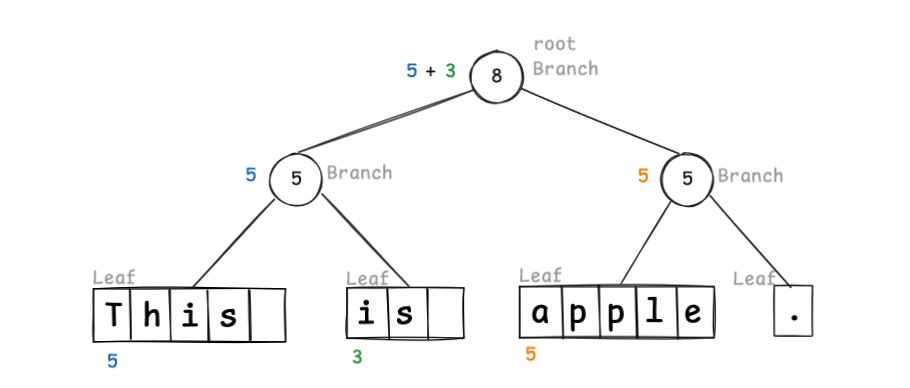
Because weight marks the split index, to find index 10 you traverse the tree:
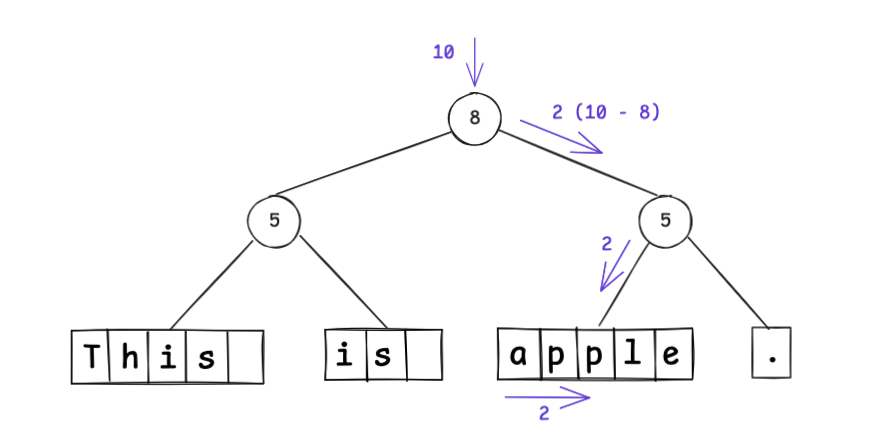
The root splits “this is ” on the left and “apple.” on the right, so index 10 is in the right subtree at position 2; since 2 < 5, it’s in that node’s left child. You can see random access efficiency is improved over linked lists.
To insert an , you update the tree:
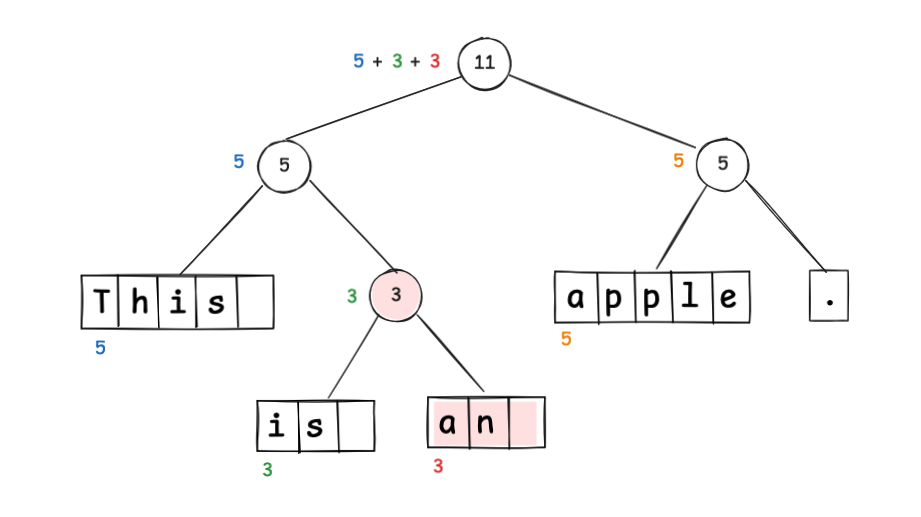
Notice that weight updates only on the path from the changed node up to the root; the node containing “apple.” is unaffected.
By relinking only those nodes, you represent the updated sequence immutably:
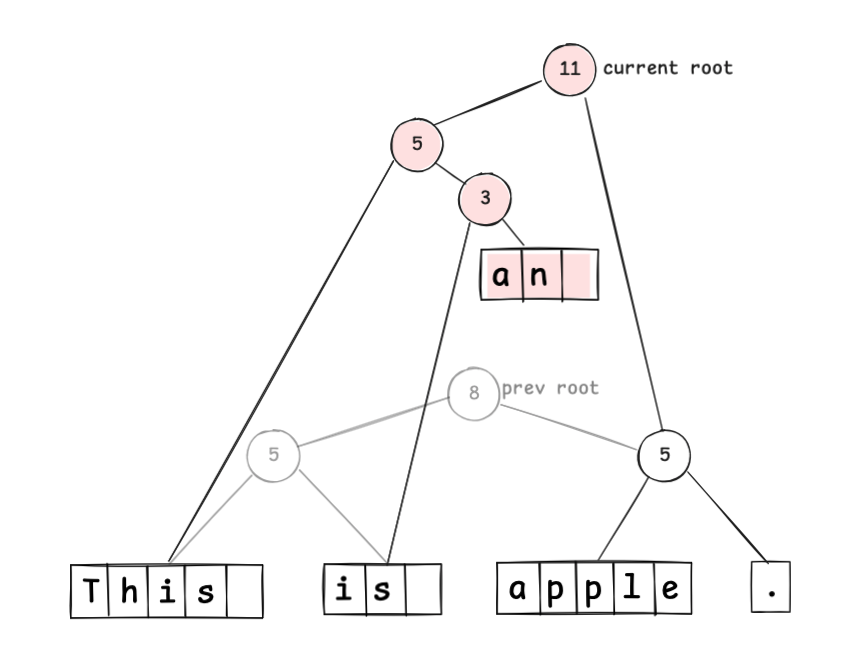
Undo can be implemented by reverting to the previous root node.
Rope is powerful, but it has overhead for maintaining and balancing the tree, and it takes time to build the tree when opening very large files.
Is there a data structure that can efficiently edit huge files? That’s the Piece Table.
Piece Table
#Piece Table tracks text modifications by appending. You keep the original sequence in a read-only buffer, append changes in an append-only buffer, and manage buffer indices in a table.
Right after opening a file containing This is apple., you have:
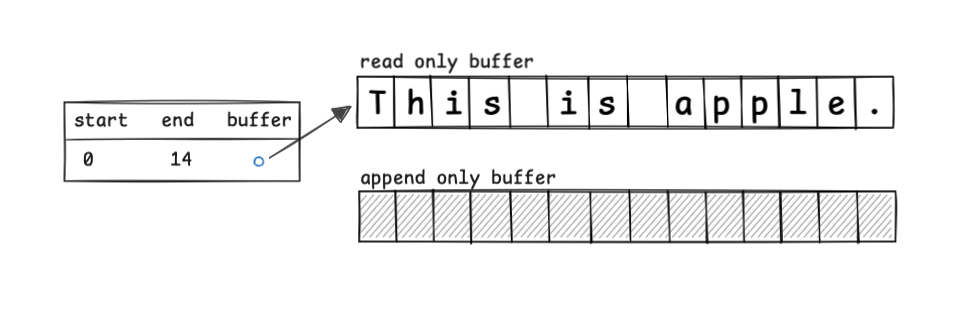
If you insert an at index 8, you update the table:
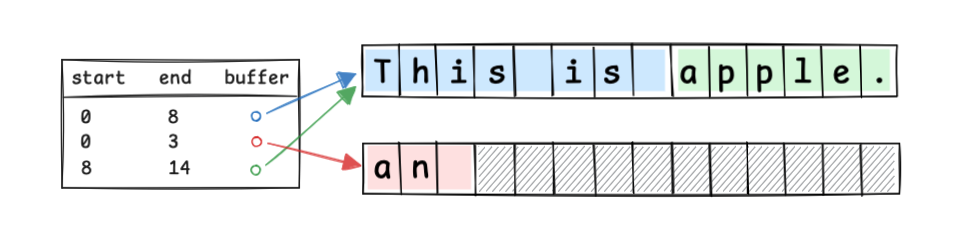
Conceptually:
record Piece(Buffer target, int index, int length) {
    int end() { return index + length; }
}

class PieceTable {
    List<Piece> pieces;
    Buffer appendBuffer;
    PieceTable(Buffer readBuffer) {
        this.pieces = new ArrayList<>();
        this.pieces.add(new Piece(readBuffer, 0, readBuffer.length()));
        this.appendBuffer = AppendBuffer.of();
    }
}
Even if the original file is huge, you can treat the read-only buffer as a direct file or memory-mapped file with almost no memory allocation. You only manage the Pieces for edits.
However, repeated edits increase the number of Pieces and can fragment the append-only buffer.
Summary of Text Buffer Data Structures
#Here’s a summary of what we’ve seen:
| Data Structure | Characteristics |
|---|---|
| Gap Buffer | Extremely simple to implement Input at the cursor position is very fast ( O(1))Large cursor movements or multi-cursor operations can cause delays Buffer exhaustion requires memory reallocation Used by Emacs |
| Linked List | Insertion and deletion after locating the position are constant time (O(1))Random access is O(N), so tricks like cursor-based access are neededSimple implementation, often used in early editors |
| Rope | Insertion and random access are O(log N)Overhead from building and balancing the binary tree Allows editing to be immutable Used by Zed Editor |
| Piece Table | Memory-efficient Insertion and deletion are append-based and thus fast ( O(1))Performance degrades as the number of Pieces increases Used by VS Code (uses a tree like Rope for index access) |
Each has its pros and cons; there’s no one-size-fits-all best solution. I chose Piece Table to handle huge files.
Pick the data structure that fits your use case.
There's More Than Just Data Structures
#Even after choosing your data structure and starting to build your text editor, you’ll face various tricky points. Let’s look at a few representative ones.
Determining Scroll Positions
#A text editor usually displays a vertical and a horizontal scrollbar.
To show the vertical scrollbar, you need to know the total number of lines in the file and how many lines are currently visible.
To show the horizontal scrollbar, you need to know the longest line in the file and the current screen width.
The tricky part is the horizontal scrollbar: the longest line can change with each edit, so you’d have to find the longest line after every edit.
In my case, I gave up on perfect tracking and only search for the longest line among the lines currently visible on screen.
Wrapping Display
#Most text editors can logically wrap a line at the window width.
However, deciding where to wrap is tricky because you need to calculate character widths based on the glyphs on screen.
Character widths vary, and to make things worse there are combining characters and ligatures, which merge multiple characters into a single glyph. You have to recalculate widths every time.
If you try to do it rigorously, you must compute the on-screen width for every line and find the wrap points, which is very expensive.
You can cut corners by calculating wrapping only for the visible portion, but then your scrollbar lengths won’t match reality.
A practical compromise is to limit wrapping to files under a certain size or treat character width calculations as rough approximations to balance performance.
Random Access to Character Sequences
#In the data structure summary, we said random access can be O(1), but in reality there are complications.
If everything were ASCII with one byte per character, life would be easy. But real-world text isn’t that cooperative.
UTF-8 is a variable-length encoding of 1–4 bytes per code point, so accessing the Nth character means you can’t directly index—you must scan byte lengths one by one.
Even if you load the text into memory, many language runtimes internally represent strings as UTF-16 (1–2 bytes per code unit), so you still have to account for variable-length encoding. Holding text as UTF-32 would make random access easy, but at the cost of much more memory.
For example, if you use a UTF-8 file directly as a read-only buffer in a Piece Table, and you click on the Nth character on screen, you’d have to translate that to the index in UTF-16 in the runtime, then translate that to the index in UTF-8 in the file, and only then access the file position. Clearly inefficient.
Considering scrollbars and wrapping, you also need to handle metadata like line and character counts, mapping to the text buffer, and display information like glyph widths. You must carefully implement to balance performance and memory efficiency.
This is where the true depth of text editor implementation lies.
