Business Diary with a Slack App (Part 1) - Basic Operations -
Back to Top
To reach a broader audience, this article has been translated from Japanese.
You can find the original version here.
1. Introduction
#The other day, I wrote a post about business diaries here.
However,
- since this is a technical blog, just an article feels incomplete.
- I’m an engineer, so I figured I might as well build something.
With that in mind, I created an app centered around a business diary.
(It’s just a sample app for learning purposes, though.)
Also, I recently learned about requirements definition, design, and technical writing in internal training, so I practiced those as well.
Therefore, in this article I’ll mainly introduce how I organized the requirements definition through design using the business diary app as a case study. I hope to share the process, not the quality of the design, for engineers like me who are building an app. Note that I will omit the actual implemented app here and publish it in a separate article.
2. Developing the App
#- First, our goal this time is to develop only the minimum necessary features for an app that creates business diaries.
- Since I mentioned in my previous blog that I create business diaries using Slack, this time I’ll try building a Slack app (the technical elements will be detailed below).
- Development will proceed in the following steps.
- Requirements Definition
- Design
- Implementation & Testing (details omitted in this blog)
2-1. Requirements Definition
#- This is the main focus of the article, and it’s a bit lengthy, but I’d appreciate it if you could follow along 😓
- In requirements definition, we’ll proceed in the order of requests → demands → requirements → specifications.
2-1-1. Writing Down the Requests
#First, requests are the things we want the system (in this case, the app) to achieve. For now, let’s jot down everything that the business diary app might be able to do.
- Automatically create business diaries.
Handwriting is cumbersome, so I want the app to auto-generate them. - Automatically report business diaries.
I want to automate reporting, such as posting to a Slack channel. - Create and report business diaries at scheduled times.
I want the app to create and report diaries based on a schedule, e.g., before quitting time. - Adjust the formatting of business diaries.
I want to create a template to standardize the diary’s layout. - Register tasks on the fly.
I want to record tasks during work rather than think of them only when creating the diary (it’s inefficient). - Track the status of tasks.
I want to be able to see each task’s status. - Store registered tasks.
I want tasks to be retrievable even after stopping and restarting the app. - Store created business diaries.
I want diaries to be retrievable even after stopping and restarting the app. - Summarize business diaries.
I want to summarize multiple days of diaries into weekly reports, monthly reports, or materials for performance reviews. - Get feedback.
I want feedback on the content of created diaries (e.g., have an AI review them).
2-1-2. Writing Down the Demands
#Next, demands are the subset of requests chosen for implementation. This time, we’ll select only the minimum necessary requests for the business diary app as demands. Therefore, the demands are as follows.
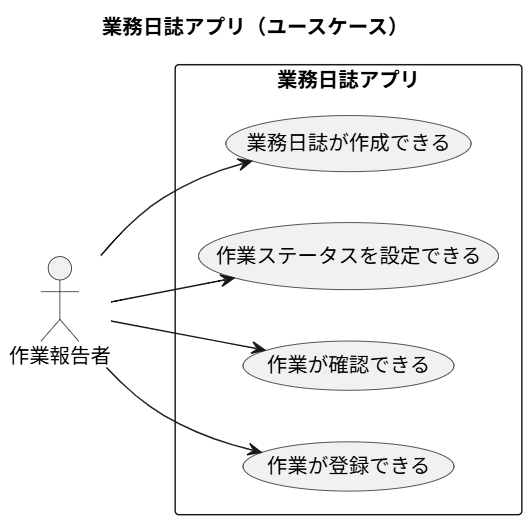
- Register tasks.
Allow users to register tasks performed during work. - View registered tasks.
Allow users to view tasks they have registered. - Set the status of tasks.
Allow users to set a status on registered tasks. The statuses are:- Not Started
- In Progress
- Completed
- Create business diaries.
Generate a diary from registered tasks. The diary includes a list of tasks performed today and a list of tasks planned for tomorrow. - Persist registered tasks.
Ensure registered tasks are not lost. - Persist created business diaries.
Ensure created diaries are not lost.
Items 1–4 seem fine. Items 5 and 6 feel a bit redundant, but let’s accept them for now. Registration and persistence usually go together, so we might merge them later.
2-1-3. Requests Not Included in the Demands
#Here are the requests we won’t include as demands.
- Automatic diary generation
While diary generation is a feature, triggering it will be manual. - Automatic diary reporting
Reporting will be manual. - Scheduled diary generation
Not a required feature, so excluded. - Diary templates
We’ll use a fixed template for this iteration. - Diary summarization
Not a required feature, so excluded. - Diary feedback
Not a required feature, so excluded.
2-1-4. Writing Down the Requirements
#Next, let’s define the requirements based on the demands above. Requirements specify what the completed system must achieve.
- The user must be able to register tasks from the app interface.
- The user must be able to view a list of registered tasks in the app interface.
- The user must be able to set predefined task statuses on registered tasks via the app interface.
- The user must be able to instruct the app to create a business diary. The app must generate the diary based on registered tasks and present its contents to the user.
- Even if the user stops and restarts the app, previously registered tasks must remain accessible.
- Even if the user stops and restarts the app, previously created business diaries must remain accessible.
2-1-5. Writing Down the Specifications
#Finally, let’s define the specifications. Specifications are a comprehensive description of the requirements.
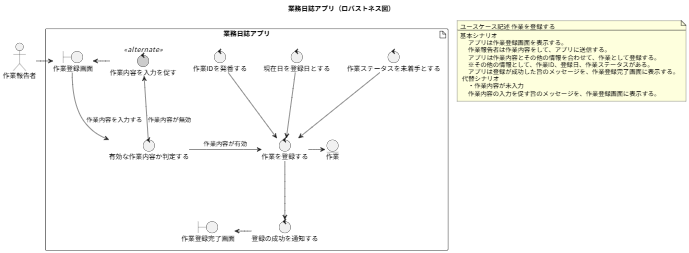
- Task registration
- The user inputs task details via the interface.
- In addition to the user’s input, the app registers the following information:
- Task ID
- Registration date
- Task status
- The Task ID is a unique identifier.
- The registration date is the current date at registration time, in yyyy/MM/dd format.
- The registration date is based on Japan Standard Time (JST) at the moment of registration.
- The task status is set to Not Started initially.
- Task details are required; if the trimmed input is an empty string, it is invalid.
- If no task details are provided, the app displays a failure message and aborts.
- The maximum length for task details is 100 characters; count each character as one, regardless of full-width or half-width.
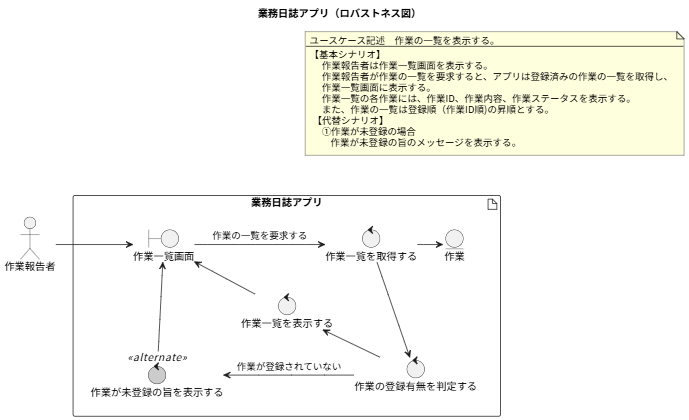
- Viewing the task list
- The user instructs the app to display the list of registered tasks.
- The app displays the list on the screen.
- The list is ordered ascending by registration (Task ID).
- The list shows task details, registration date, and task status.
- Changing task status
- The user specifies the target task and changes its status.
- Task statuses are Not Started, In Progress, and Completed.
- If the user attempts to update a non-existent task (Task ID), the app displays a failure message and aborts.
- If the user attempts to set a status outside the defined statuses, the app displays a failure message and aborts.
- The app updates the status of the task identified by the provided Task ID to the user-selected status.
- There are no restrictions on status transitions. The app always sets the status specified by the user.
- Generating business diaries
- The user instructs the app to generate a business diary via the interface.
- The app, upon receiving the instruction, creates the diary from registered tasks.
- A business diary consists of:
- Generation date
- List of tasks performed today
- List of tasks planned for tomorrow
- The generation date displays the current date when the diary is generated.
- The display format for the generation date is yyyy年MM月dd日(WeekDay)
※WeekDay refers to the weekday, with values like Mon, Tue, Wed… - The generation date is based on Japan Standard Time (JST) at the time of creation.
- Include in the “tasks performed today” list all tasks meeting both conditions:
- The task status was updated today.
- The task status is In Progress or Completed.
- Include in the “tasks planned for tomorrow” list all tasks with status Not Started or In Progress.
- Persisting tasks
- When the user registers a task, the app persists it.
- When the user views the task list, the app generates the list from persisted tasks.
- When the user sets a task status, the app updates the status in the persisted tasks.
- Persisting business diaries
- When the app generates a diary, it persists the created diary.
2-2. Design
#2-2-1. Architectural Design
Here I describe the overall design policy of the app. Since this is the design phase, I will include specific technology elements.
- The application will be implemented as a Slack app.
- A UI is needed, but creating a desktop app seemed overkill.
- We use Slack at work, so creating diaries in Slack allows creation and reporting in one place.
- We’ll use the Bolt for JavaScript framework.
- To persist data, we will use a DB; we will adopt SQLite.
- Since this is a locally running sample, a lightweight in-memory database is sufficient.
- We’ll adopt Drizzle ORM as the O/R mapper for the persistence layer.
- https://orm.drizzle.team/
- This is a personal preference.
- The development language will be TypeScript (JavaScript).
- Bolt supports Python and JavaScript, but I’m not good with Python, so I’ll use JavaScript.
- We will not use Deno. While Bolt for JavaScript supports Deno and I don’t dislike Deno, I’m not sure how widespread it is, so I’ll postpone using it this time.
2-2-2. Functional Design
We’ll merge specifications 5 and 6 (persistence of tasks and diaries) into functions 1 and 4 respectively. As a result, we have four main functions to describe.
- Register tasks
- Input task details
- Users input task details via a DM to the app.
- Validate task details
- If task details are missing, display an error message as a reply from the app.
- If task details exceed 100 characters, display an error message as a reply from the app.
- Register task details
- Task registration is triggered by executing a Slack app command.
- Save the task details to the DB: input content, registration date, and initial status (Not Started).
- Input task details
- View tasks
- Display the task list
- Executing a command will display the task list. Each item includes task details, status, and a Set button. The status is displayed as a select box to allow changes. The initial value is the registered status. The list is ordered ascending by registration (ID).
- If no tasks are registered, display an error message as a reply from the app.
- Display the task list
- Set task status
- Update task status
- By pressing the Set button displayed in the task list, the task status is updated to the selected value.
- Update task status
- Generate business diaries
- Generate the diary.
The diary is plain text and includes lists of tasks performed today and tasks planned for tomorrow. Tasks performed today are those with status In Progress or Completed. Tasks planned for tomorrow are those with status Not Started or In Progress. If no tasks match, include the text "No tasks available" instead of a list. Executing the command triggers diary generation. The generated diary is displayed as a reply from the app. - Save the diary.
The generated diary is saved to the DB. The saved fields are Diary ID, creation date, and the diary content.
- Generate the diary.
2-3. Diagrams
#As part of the design practice, I also created diagrams.
2-3-1. Use Case Diagram
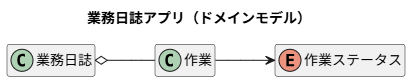
2-3-2. Domain Model
2-3-4. Robustness Diagram
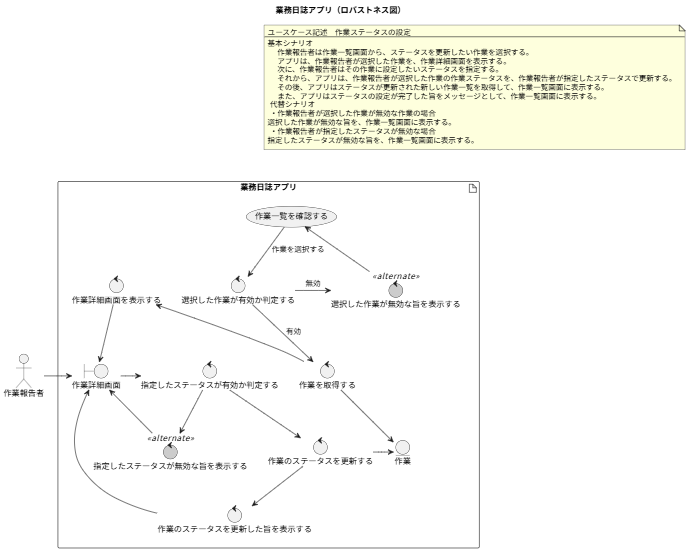
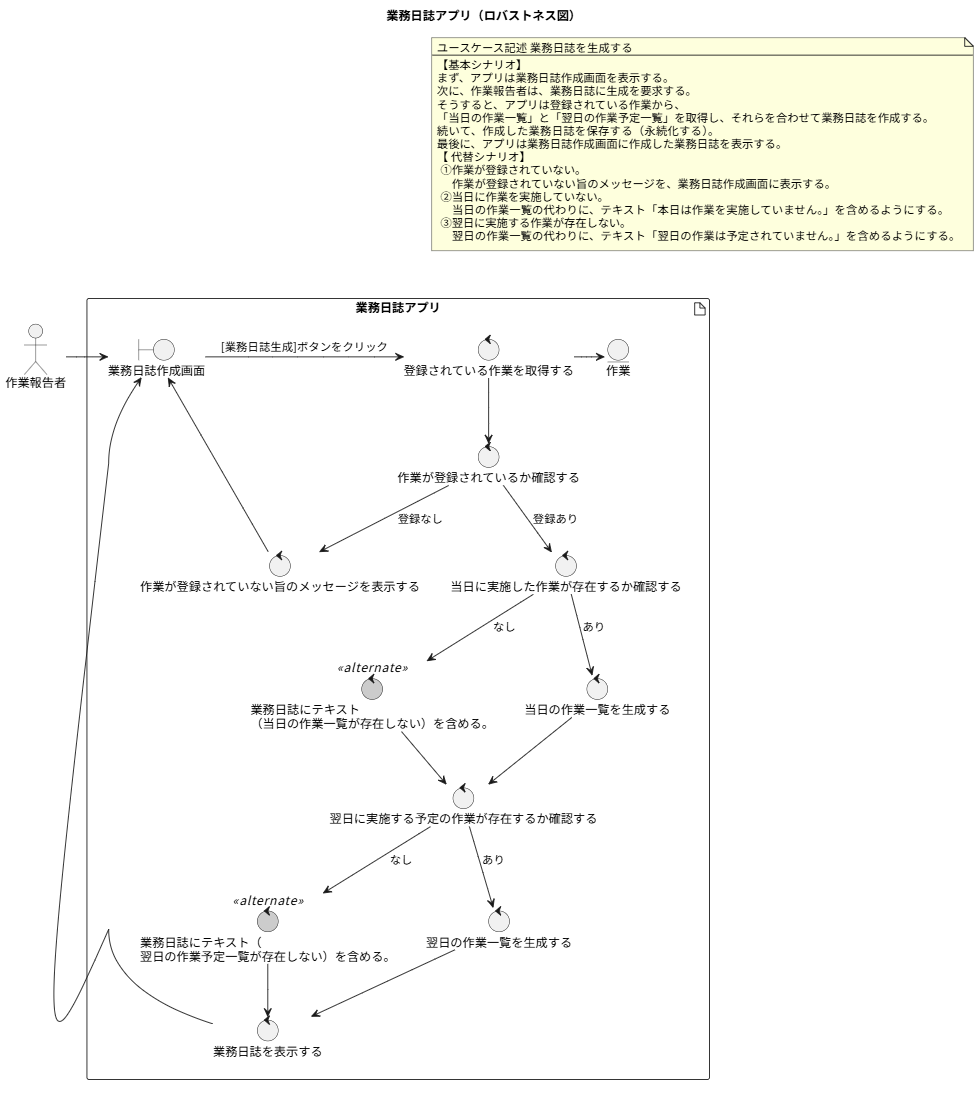
3. About the Created App
#I created the app, so here I’ll only show the results.
Note: I plan to cover the app itself in another article.
3-1. Functionality Verification
#3-1-1. Registering a Task
#First, register a task by sending the /task_add command with the task details as an argument.

If registration succeeds, a message is returned.

3-1-2. Viewing Tasks
#Next, display the registered tasks with the /task_list command. This command takes no arguments.
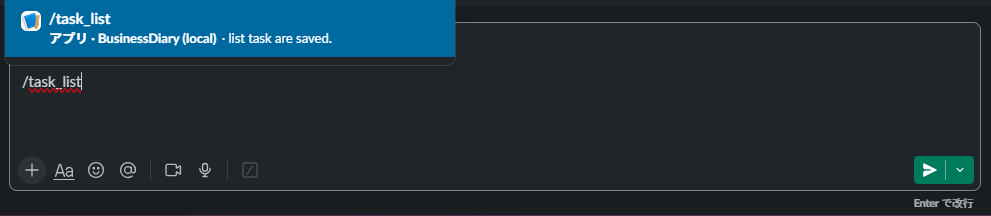
The list is displayed in registration order. The status is shown as a select box for updating, with an update button.
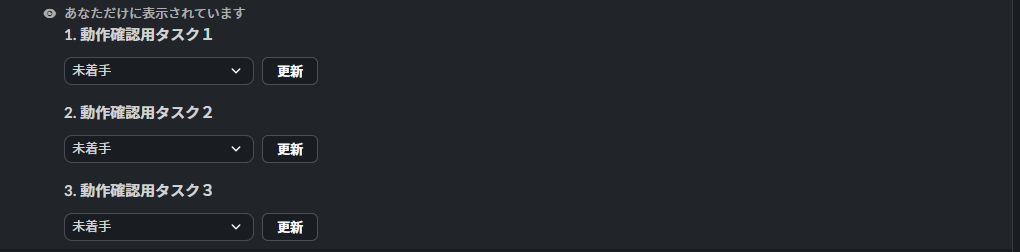
I registered three tasks for testing.
3-1-3. Setting Task Status
#Now let’s change statuses. Change one of the three tasks to In Progress and another to Completed.
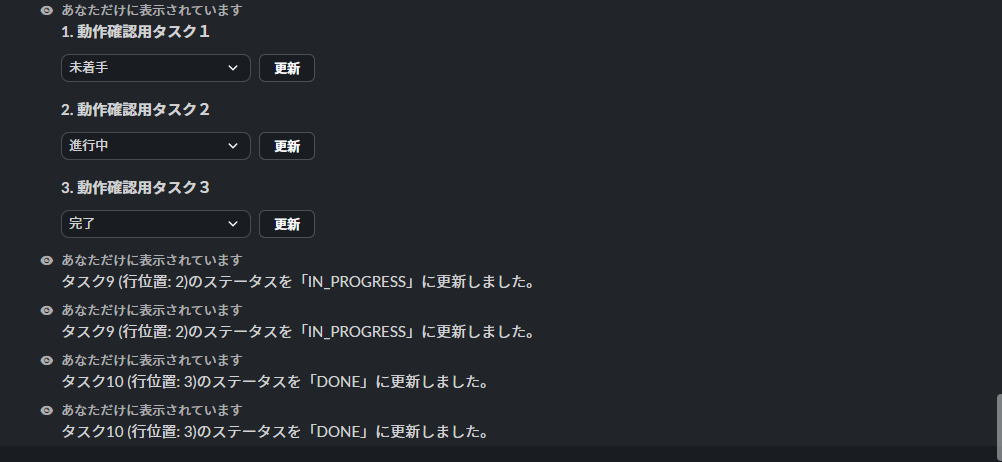
When you change the status and click the update button, the status updates and a message is returned.
3-1-4. Creating a Business Diary
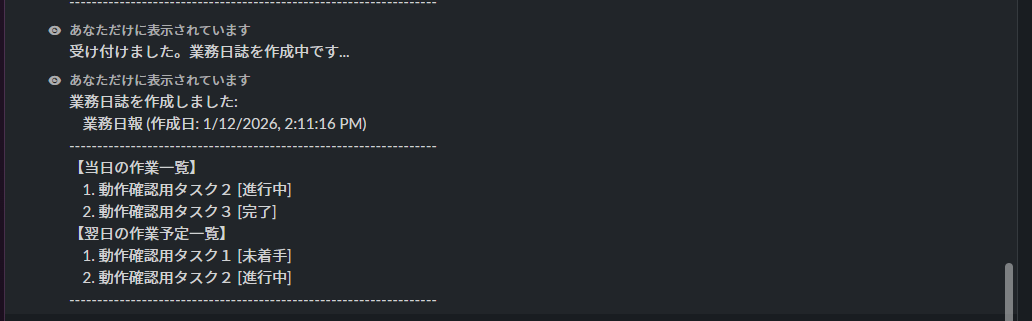
#Finally, generate the diary with the /businessDiary_create command.

After acknowledging the command, the generated diary appears. The list of tasks performed today shows tasks In Progress or Completed. The list of tasks planned for tomorrow shows tasks Not Started or In Progress.
4. Conclusion
#In this article, I went through requirements definition, design, and implementation using a business diary as the theme. This is a personal learning exercise, but I hope it helps others struggling with design while building apps.
My impressions after actually working on this are as follows:
- Since this was extracurricular, I took some shortcuts here and there, but even setting that aside, there are still many shortcomings. I hope exercises like this help improve my skills.
- Also, even for a sample app like this, going through requirements definition and design became quite substantial in volume.
- However, the app development itself felt fairly smooth, so I believe the requirements definition and design process is not a waste.
- Previously, when I used low-code tools, I often skipped design due to the tool’s philosophy that “generated artifacts (code) = design document.” However, working through the process of design → implementation like this, even without low-code, I feel that planning out the design before coding makes development more efficient. I believe this is because documenting the design in advance leads to a better understanding of the specifications than trial-and-error during implementation.
I plan to extend the business diary app with additional features as I learn more technologies. I also hope to publish separate articles on the technical elements I’ve adopted.
