Demystifying the Black Box: A Deep Dive into AWS Control Tower Account Factory & AFC
Back to Top
 アドベントカレンダー2025
To reach a broader audience, this article has been translated from Japanese.
You can find the original version here.
This is the 22nd article of the Mamezou Developer Site Advent Calendar 2025.
Hello, everyone exploring the world of AWS. Quick question: are you using AWS Control Tower?
In a project I'm currently involved in, we introduced AWS Control Tower (hereafter Control Tower) for account operations. Since it's a service that individuals rarely have the opportunity to use, I decided to take this opportunity to document the behaviors I discovered while using it.
What exactly is Control Tower in the first place? Briefly, AWS Control Tower is a service that automatically sets up a multi-account environment (landing zone) based on AWS best practices and provides continuous governance.
In this article, I will mainly cover the behavior of account creation using Control Tower’s “Account Factory” and “Account Factory Customization” (hereafter AFC).
In the project, there was a need to realize the Account Factory process via direct AWS CLI commands, so by tracing the AWS CloudTrail (hereafter CloudTrail) event history of the processes running behind the scenes when account creation is executed from the AWS Management Console (hereafter the Console), we clarified how to achieve it with AWS CLI commands.
In the following sections, I will outline the detailed processing flows of “Account Factory” and “AFC.” I will also cover how AWS CLI commands cannot replicate exactly the same behavior as console operations.
Prerequisites
#I covered the scope of this article at the start, but I won't go into detail on the following points. Therefore, this article is aimed at those who are already somewhat familiar with AWS and have an understanding of account and user management services such as AWS Organizations (hereafter Organizations) and AWS Identity Center (hereafter Identity Center), along with the related terminology. I will intersperse notes, reference links, and brief explanations where appropriate, so please bear with me.
- How to set up and operate Control Tower, and its related terms
- Features and operations of Organizations and Identity Center, and related terms
- AWS Service Catalog features, operations, and related terminology
Additionally, for this evaluation, the article assumes that the following items have already been configured or provisioned, and that you are working within an organizational account structure integrating Organizations and Identity Center.
-
Identity Center has been enabled from the AWS root account, and a user with administrative permissions to the AWS root account has been configured
Reference: Create a user with administrative access -
The Control Tower landing zone is already set up
- Access control integration between the Identity Center enabled on the AWS root account and Control Tower is in place
- The AWS Service Catalog (hereafter Service Catalog) product “AWS Control Tower Account Factory” exists
-
A hub account for the blueprint[1] required to use AFC exists
Reference: Configuration for customization
1. Account Factory Is a Service Catalog Product
#If you're familiar with Control Tower or have used it before, you know that you perform account creation via the “Account Factory” section in the Control Tower console. Under the hood, this isn't a Control Tower–specific feature; it's actually a wrapper around the service Service Catalog.
What Is It Doing, in Broad Terms?
#Open the Service Catalog console in the Control Tower management account (the account that initiated the landing zone). In the “Products” list, you should see a product called “AWS Control Tower Account Factory”.
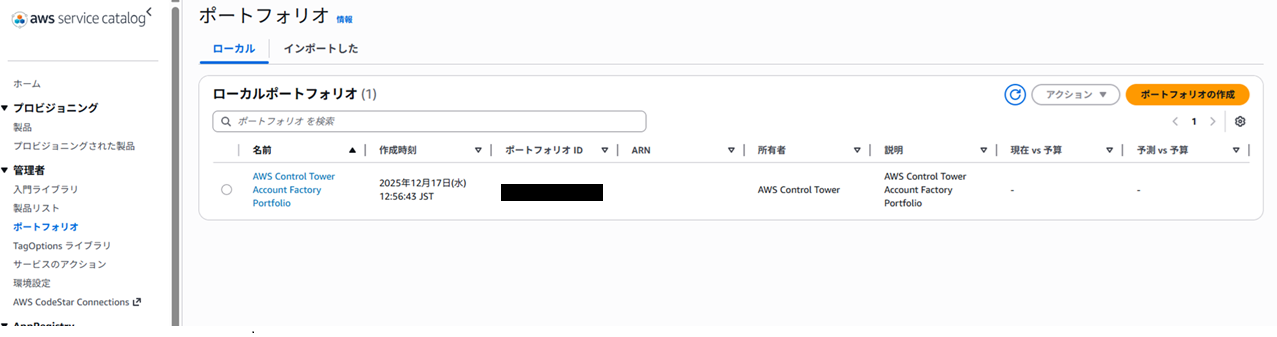
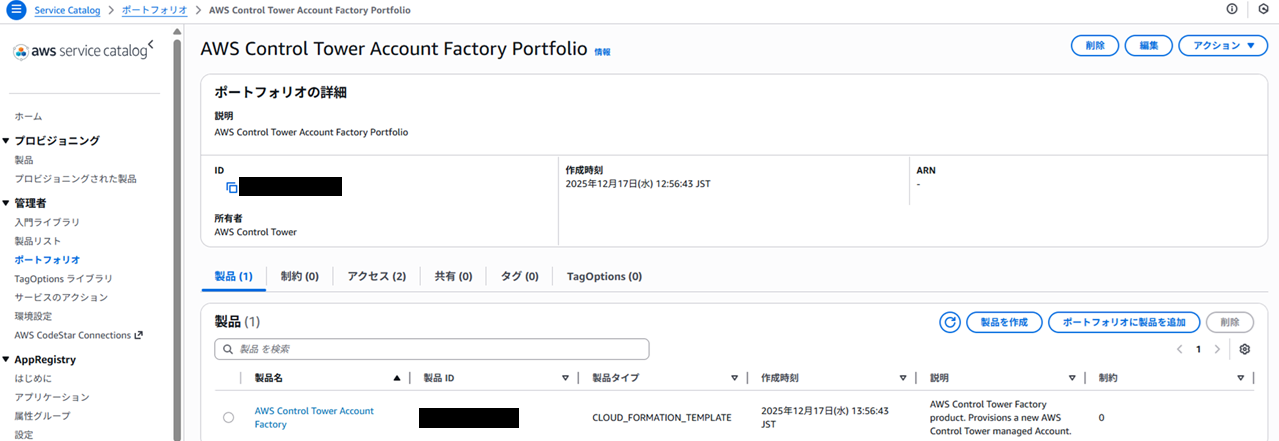
Clicking the “Create account” button in the Control Tower console is effectively the same as launching the “AWS Control Tower Account Factory” product in Service Catalog behind the scenes. I'll explain this in more detail later.
Why Service Catalog?
#You might be wondering why we go through Service Catalog from Control Tower to create accounts. Couldn't we just create accounts directly through Organizations? There are benefits to creating accounts this way. (Otherwise, there would be no point in providing it as a service...)
Separation of privileges
Generally, account creation and IAM configuration require strong permissions (equivalent to AdministratorAccess). However, you don't want to hand that much power to an accountant or each project leader, do you?
By using Service Catalog, you can grant users just the permission to use this “Account Factory product.” (More precisely, it suffices to grant them permission to operate Control Tower.)
In other words, you don't need to grant users who log into the management account permission to operate Organizations or Identity Center.
Applying controls and baselines
When you go through Control Tower, you don't just create an account; you provision it as a “governed” account under organizational management. This is an indispensable element for companies to operate multiple accounts safely and efficiently.
Specifically, during account creation, security and logging settings known as “controls” (formerly guardrails)[2] and “baselines”[3] are automatically applied. This saves administrators the effort of reviewing individual account configurations and ensures that they always remain compliant with policies (security standards based on AWS best practices).
2. Behind-the-Scenes Workflow During Account Creation
#Let's examine the exact workflow that runs behind the scenes when you click the account creation button, using CloudTrail event history as a reference.
These processes primarily use STS (Security Token Service) to switch to temporary powerful credentials. Also, checks for resource creation (Describe and List commands) are performed concurrently throughout.
STEP 0: Configuration and Product Verification
#First, DescribeAccountFactoryConfig is executed to retrieve the current Account Factory configuration in Control Tower. Based on this, the following steps are performed to verify the Service Catalog product.
-
SearchProductsAsAdmin
Search for the Service Catalog product whose owner is “AWS Control Tower.” -
DescribeProduct
Retrieve the details of the product (Account Factory) found in the search.
If the product's contents (AWS CloudFormation template, hereafter CloudFormation template) have a new version,CreateProvisioningArtifactis executed and the product update process may run.
STEP 1: Launching the Account Factory Product (ProvisionProduct)
#ProvisionProduct, which is the actual operation for account creation in Control Tower, is executed. This initiates the launch of the “AWS Control Tower Account Factory” product.
STEP 2: Registration under the Management Account (CreateManagedAccount)
#As part of the product launch, the CreateManagedAccount process runs to place the newly created account under Control Tower's management. This registers the account not just as an Organizations account, but as a “Managed Account” monitored and governed by Control Tower (it is registered under the OU specified at creation).
STEP 3: User and Group Setup (CreateUser)
#In Identity Center, processes such as creating users and adding them to groups for accessing the newly created account are performed.
STEP 4: Applying Baselines and Controls
#AWS CloudFormation StackSets (hereafter CloudFormation StackSets) are triggered, and the baselines and controls (various security and logging settings) confirmed in STEP 0 are deployed to the account.
STEP 5: Assigning Access Permissions (CreateAccountAssignment)
#Finally, Identity Center permission sets and user (or group) assignments are applied to the new account, making it possible for users to log in.
These are the steps that make the actual “Account Factory” process progress. I've kept it concise to avoid overcomplication, but I hope you can see that the process—from launching the Service Catalog product to applying baselines—is carried out consistently.
3. Account Factory Customization (AFC)
#Next, let's look at the flow of AFC, which can be considered an extended version of Account Factory.
AFC, or Account Factory Customization, answers requests like, “The standard Control Tower settings aren't enough! We want IAM roles and other necessary AWS resources deployed right from the start when we create an account!” It allows you to apply custom configurations in addition to the resources deployed by AWS's default Service Catalog product during account creation.
You can think of Account Factory as an AWS-managed process and AFC as a customer-managed process. (Strictly speaking, it's not exactly that, but it's the general idea.)
How AFC Works: Service Catalog on Service Catalog
#With AFC, you can specify additional custom blueprints separate from the default blueprint used during an Account Factory execution.
Note: During Account Factory execution, AWS internally uses the default blueprint. For contrast, here we call the blueprints used during AFC executions “custom blueprints.” The official reference is inconsistent—sometimes referring to “blueprint” as the default blueprint, and other times as the custom blueprint—so we're distinguishing them clearly here.
These “blueprints” are actually CloudFormation templates registered as Service Catalog products.
It applies custom blueprints stored in the management account, or the “hub account,” after executing the default blueprint.
In other words, you can retain the resources that Control Tower creates by default when provisioning a new account, while also injecting your own additional resources. Note: Custom blueprints are officially recommended to be placed in the “hub account.”
Behind the Scenes of AFC Execution
#Now, let's trace the behind-the-scenes behavior here as well. It behaves a bit differently from the standard Account Factory. Up through STEP 0 (configuration verification) it's the same as usual, but the subsequent steps have distinct characteristics.
-
Execution of CreateManagedAccount
In the case of AFC, the usualProvisionProductis not executed; instead,CreateManagedAccountis run.
This request parameter includes, in addition to the standard Account Factory information, the “blueprints” (the Service Catalog product information for the custom blueprints previously created in the hub account). -
Identity Center User–Related Processing
As usual, processes such as creating Identity Center users for accessing the newly created account run. -
Applying Baselines and Custom Blueprints
CloudFormation StackSets apply the standard controls and baselines (default blueprint).
Although this is speculative, I theorize that the specified custom blueprints are applied at this timing.
I explain why this remains an assumption in the “Black Box Areas” section below. -
Assignment of Access Permissions
Finally, access permissions are assigned to users and groups.
Black Box Areas
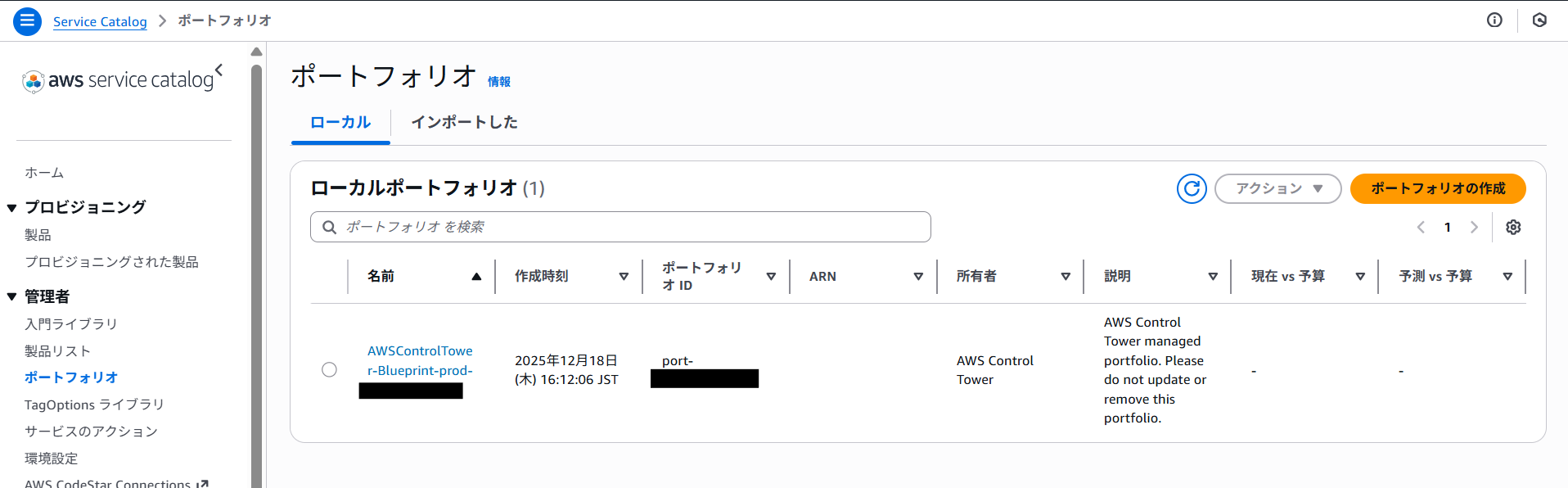
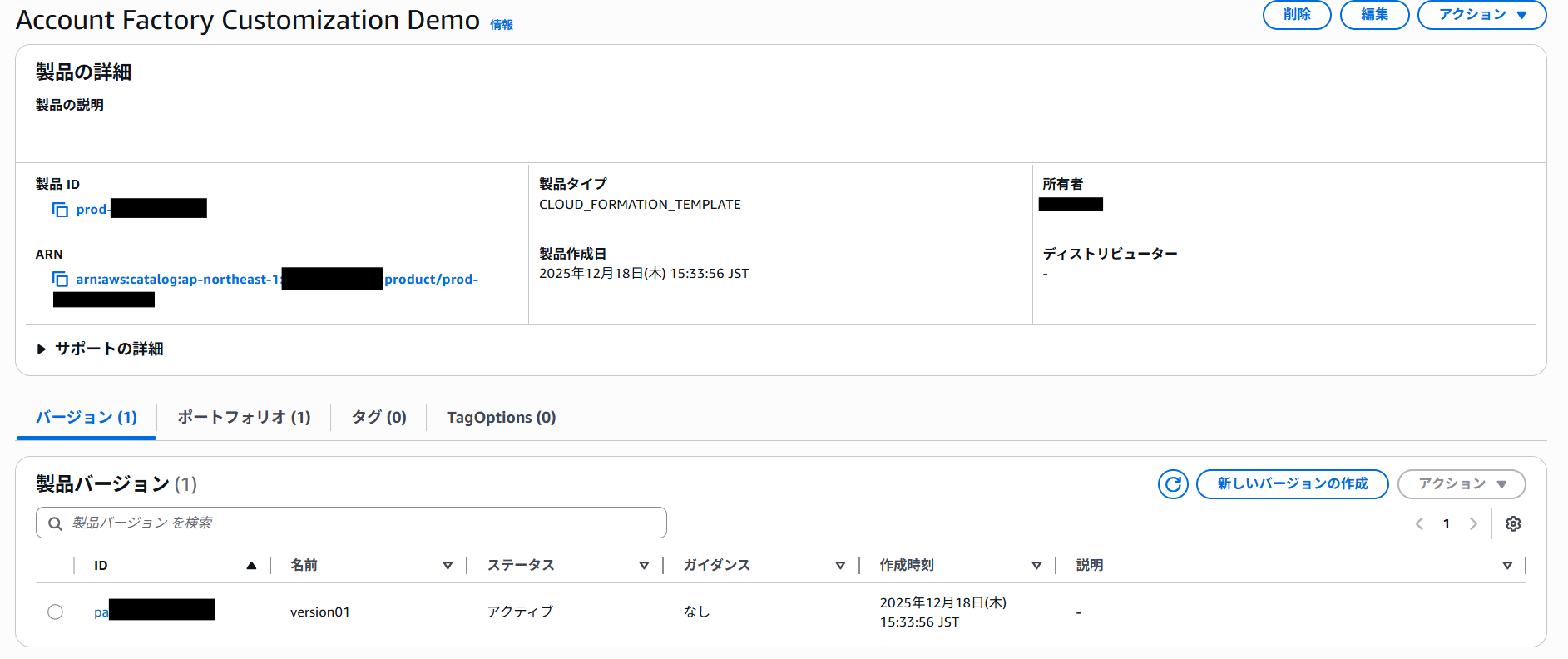
An interesting point is that we couldn't see any explicit API calls related to applying custom blueprints (e.g., retrieving the product from the hub account) in CloudTrail.
However, in reality, evidence shows in the Service Catalog of the hub account that the custom blueprint product was executed. Therefore, I inferred that another process (such as fetching the product) runs behind the CreateManagedAccount invocation, and that the custom blueprints are applied after the default blueprints.
I tried several times and couldn't confirm it directly, so I'm hypothesizing this workflow based on the CloudTrail event chronology.
4. Real-World Example from the Project and Challenges Faced
#From here, I'll discuss the challenges we faced in the actual project and their solutions. In this project, there was a requirement to create accounts using the AFC functionality from an AWS account (Account B) separate from the Control Tower management account (Account A) that initiated Control Tower.
What We Tried
#At first, we naively thought, “There must be an API for this, so we can just switch roles via STS and run the commands cross-account.” However, reality turned out to be less sweet...
-
No CLI Command for Executing AFC
First, there is no CLI command equivalent to the AFC workflow, such asCreateManagedAccount. We searched the Control Tower API Reference but couldn't find a corresponding command. -
Limitations of the Service Catalog Command
You can use theservicecatalog provision-productcommand to run Account Factory from the CLI. However, this command only allows you to specify oneproduct-id(product ID). In other words, if you specify the standard “AWS Control Tower Account Factory” product, you cannot simultaneously pass the product ID of the custom blueprint you want to use with AFC.
As a result, you can't reproduce the linked behavior of “apply default blueprint → apply custom blueprint.”
You might think, “What if I first apply the default blueprint and then run the command again specifying the custom blueprint?” But in that case, since the newly created account information isn't linked, the custom blueprint content will simply be executed in Account B without associating it with the new account. -
Cross-Account Constraints
Furthermore, when running cross-account, there was a limitation where you couldn't retrieve the Service Catalog product (custom blueprint) information that existed in the hub account.
We tried sharing the custom blueprint product from the hub account to the management account (technically, sharing the portfolio that manages the product), but this also didn't work. (In the first place, the shared product wasn't even recognized in the management account when using the SearchProductsAsAdmin CLI command.)
The Solution We Arrived At
#Ultimately, to meet the requirements via API (CLI), we adopted the following approach:
-
Create the Account with the Standard Account Factory
First, use theprovision-productcommand to launch the standard Account Factory product and create the account under Control Tower management. This alone can be executed from Account B. -
Apply Customizations via CloudFormation StackSets
After account creation is complete, use CloudFormation StackSets separately to apply the custom resources (such as IAM roles) that you wanted to deploy with AFC to the new account.
We couldn't execute AFC in one shot, but by splitting the procedures, we were able to create an “account governed under Control Tower” that also has “customizations applied,” all via API.
5. Benefits of Control Tower and Its "Untouchable" Parts
#Up to now, we've delved into the behavior and customization of Account Factory. Control Tower is an incredibly powerful service that allows you to easily build and maintain an environment in line with security best practices. It's fantastic to get an account with log aggregation and access controls in place at the push of a button (or the execution of a single command).
However, the flip side of that “automation” and “standardization” is that there are parts that are untouchable.
Limitations of Control Tower (Settings You Can't Change)
Among the resources automatically created and managed by Control Tower, there are some that users cannot (or should not) modify. I won't list them all, but here are two things I personally attempted to change but couldn't:
-
CloudTrail S3 Bucket Settings
You cannot freely modify the lifecycle policy of the S3 bucket created in the log archive account for CloudTrail. If you want to change the log retention period to meet requirements, it can be difficult to do so flexibly. -
AWS Config Aggregator
The aggregator that consolidates Config rules across the organization is also auto-generated, but users find it difficult to customize this configuration freely. I once tried deleting the auto-generated aggregator, but drift detection kicked in and constantly generated warnings, which was somewhat annoying.
In general, it's probably best not to tamper with the resources deployed by the CloudFormation templates that Control Tower creates and manages.
Understanding these “untouchable parts” and deciding how far to rely on Control Tower's standard functionality—and where to supplement with custom implementations (for example, creating separate S3 buckets or adding your own Config rules)—is, I think, the key to working effectively with Control Tower.
Conclusion
#In this article, we've explained the processing flows behind the execution of AWS Control Tower's Account Factory and AFC features.
The substance of Account Factory is provided as a Service Catalog product, and account creation requests go through Service Catalog and integrate with AWS Organizations and AWS CloudFormation StackSets. This sequence of processes automates everything from account creation to the application of security settings (controls and baselines) and user registration in Identity Center.
Similarly, Account Factory Customization (AFC) provides a mechanism to automatically deploy custom resources in addition to the standard configuration by using (custom) blueprints registered as Service Catalog products.
Control Tower may seem like a black box at first glance, but under the hood it leverages fundamental AWS services such as IAM (including Identity Center), CloudFormation, and Service Catalog. Understanding this architecture should greatly enhance your ability to troubleshoot errors and handle more advanced customizations when needed.
Control Tower is frequently updated, and I expect the flexibility of operations via API to gradually improve. Especially for the AFC feature, there are currently some API integration limitations, but I hope that in the future more seamless automation through the CLI and SDK will become possible. I will continue to watch the latest developments and aim for more efficient multi-account operations!
Notes
#Blueprint: A preconfigured template used to build or customize AWS accounts (typically CloudFormation templates). ↩︎
Controls: Governance rules applied across an AWS environment (at the OU level), formerly known as guardrails. There are preventive controls (SCP) and detective controls (Config/AWS Lambda), among others. ↩︎
Baseline: A group of resources and their settings applied to a target such as an OU. ↩︎
