Getting Started with Google Cloud in AWS Terms
Back to Top
 アドベントカレンダー2025
To reach a broader audience, this article has been translated from Japanese.
You can find the original version here.
This is the Day 12 article of the Mamezou Developer Site Advent Calendar 2025.
Introduction
#I’m Tsukano from the Business Solutions Division. On the project I’m currently assigned to, we are using Google Cloud as our public cloud. I originally used AWS for both work and personal development, and my infrastructure architecture and service selection have been based on the AWS way of thinking. However, when I was assigned to this project, I began studying Google Cloud in depth and realized that its design philosophy and network model differ significantly from AWS.
While getting up to speed, I experienced confusion by applying AWS conventions directly to Google Cloud, and I strongly felt the need for systematic, side-by-side comparison materials.
Therefore, in this article, using a simple demo application prepared on AWS as an example, and from the perspective of “How would you implement the same architecture on Google Cloud?”, I will introduce Google Cloud’s products and design philosophy while comparing them to AWS. Additionally, since this article is aimed at AWS users and intended to serve as a guide for AWS users to understand Google Cloud, I will not explain AWS services here.
Demo App Architecture
#In this article, the demo application is assumed to be a simple ToDo app. It’s a typical three-tier web application with the addition of object storage for unstructured data.
The frontend uses Next/Nuxt SSR (Server-Side Rendering), allowing the frontend and backend API to be hosted on the same server.
- Frontend: A web UI built with Next/Nuxt, server-side rendered via SSR
- Backend API: REST API providing CRUD operations for tasks
- Persistence layer: RDBMS (data such as users, tasks, projects)
- File storage: Stores user-uploaded icon images and attachments
For the purposes of comparing AWS and Google Cloud, we use a very simple application. Therefore, we do not include advanced machine learning (though this is one of Google Cloud’s strengths), messaging, DNS, or event-driven architectures. Instead, we focus on foundational cloud elements:
- Networking
- Computing
- Database
- Object storage
We also do not consider production-level redundancy configurations such as multi-AZ (multi-zone) or multi-region setups.
AWS Architecture
#First, the demo app architecture on AWS:
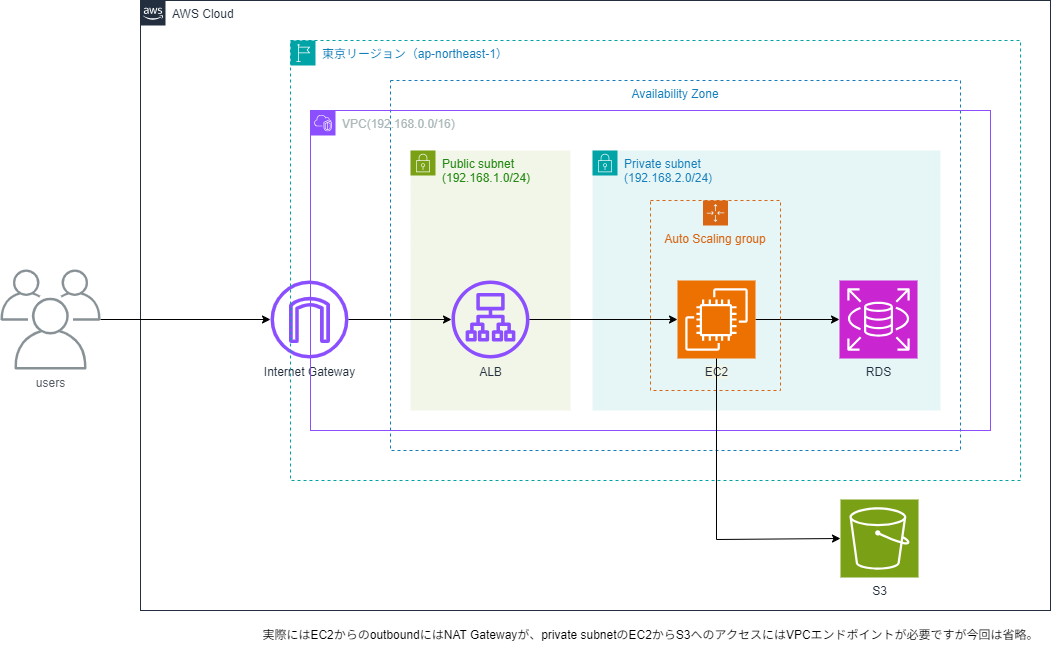
We choose the Tokyo region (ap-northeast-1). Within that region, we create one VPC, which includes one Availability Zone. Inside that AZ, we place a public subnet and a private subnet. As the compute service for hosting Next/Nuxt SSR and the backend API, we deploy EC2 instances in the private subnet and configure them in an Auto Scaling group.
In the public subnet, we place an Application Load Balancer (ALB) to route internet traffic to the Auto Scaling group. For persistence, we deploy Amazon RDS (MySQL/PostgreSQL) in the same private subnet as the EC2 instances.
User-uploaded files are stored in an Amazon S3 bucket, accessed from EC2 instances in the private subnet.
In reality, the following network configurations are also needed:
- A NAT Gateway for outbound communication from EC2
- A VPC endpoint (Gateway Endpoint for S3) for secure access from EC2 to S3
However, we omit these from the diagram to keep the architecture simple. Also, since NAT Gateways can be costly for personal use, placing EC2 instances in a public subnet is realistic. To make the AWS vs Google Cloud comparison clear, this article uses a configuration where EC2 instances reside in a private subnet.
Google Cloud Architecture
#Next, let’s look at the same demo application on Google Cloud:
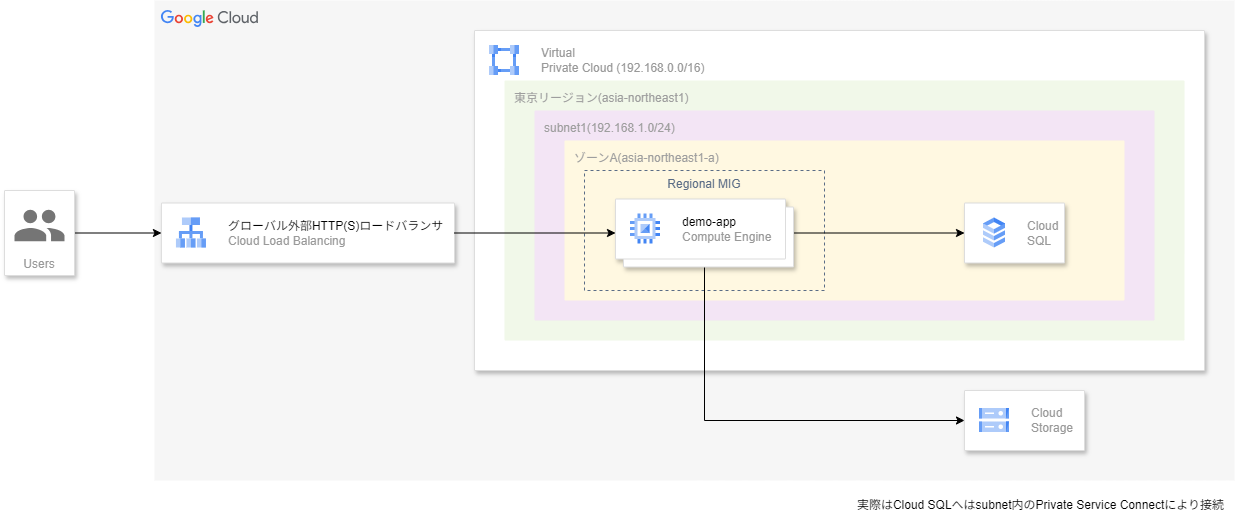
It looks cleaner than the AWS setup. While familiar resource names like VPC and load balancer appear in Google Cloud as well, you might notice some “hmm?” moments when looking at how they’re arranged.
These differences are precisely the philosophical distinctions between AWS and Google Cloud. In the following sections, we’ll compare the roles and design characteristics of these resources in detail.
Networking
#First, let’s look at networking resources. Here we cover:
- VPC
- Subnets and zones
- Load balancer
VPC
#The biggest difference between AWS and Google Cloud is the scope of the VPC. In AWS, a VPC is a regional resource tied to a single region. You can span multiple AZs, but you cannot have one VPC across multiple regions. In Google Cloud, however, VPCs are global resources. A single VPC can include multiple regions, making it easy to build a multi-region network compared to AWS.
Google Cloud’s design philosophy assumes global resources from the start. You create one global VPC, then partition it into regions and zones (the equivalents of AWS AZs) in a top-down approach. AWS, by contrast, uses a bottom-up model: you create VPCs per region and, if needed, connect them for multi-region setups. This difference in approach is exactly what confuses AWS users when they first encounter Google Cloud.
Subnets and Zones
#Next, let’s look at subnets and zones. In Google Cloud, you add subnets to a VPC, but unlike AWS, subnets are regional resources—not tied to individual AZs. Google Cloud subnets do not have an inherent public/private distinction; the public or private nature is determined by the routes assigned (whether the default route goes to the internet gateway) and by firewall rules. “Zones” in Google Cloud correspond to AWS AZs as the smallest data center grouping. They function similarly to AZs, but whereas in AWS a subnet is created per AZ, in Google Cloud zones exist within a subnet.
In summary:
- Subnets span an entire region, making them available to all zones in that region
- You choose the specific zone within a subnet to deploy your resources
- Public/private distinctions are controlled by routing and firewall rules
Compared to AWS’s model of creating subnets per AZ for redundancy, Google Cloud’s subnet model is simpler and makes zone-level redundancy easier to achieve.
Load Balancer
#Load balancer design philosophies also differ between AWS and Google Cloud. Here we focus on L7 load balancers. In AWS, the L7 LB is the ALB, which is a regional resource with separate endpoints per region. To publish globally, you must combine it with Route 53 or CloudFront. In Google Cloud, the L7 LB is the External HTTP(S) Load Balancer, which by default is a global resource[1]. In AWS, building a global LB requires multiple services, but in Google Cloud you can expose a single LB globally—a major difference.
Internet connectivity handling also differs. In AWS, to expose a VPC externally you explicitly create an Internet Gateway (IGW), attach it to the VPC, and associate it with the route table of a public subnet. In Google Cloud, you don’t directly deal with an IGW; when you create an external resource like an External HTTP(S) Load Balancer, Google’s edge network automatically functions as the internet ingress.
Therefore, Google Cloud rarely requires you to specify “what to expose to the internet” in fine-grained network configurations, resulting in a higher level of abstraction compared to AWS.
Networking Summary
#Based on the above, the demo app’s network architecture on Google Cloud is:
- Create one global VPC that includes the Tokyo region (asia-northeast1)
- Create a regional subnet within the Tokyo region
- Deploy compute and database resources in a specific zone within that subnet (in this case, zone A)
- Place the L7 LB as a global resource
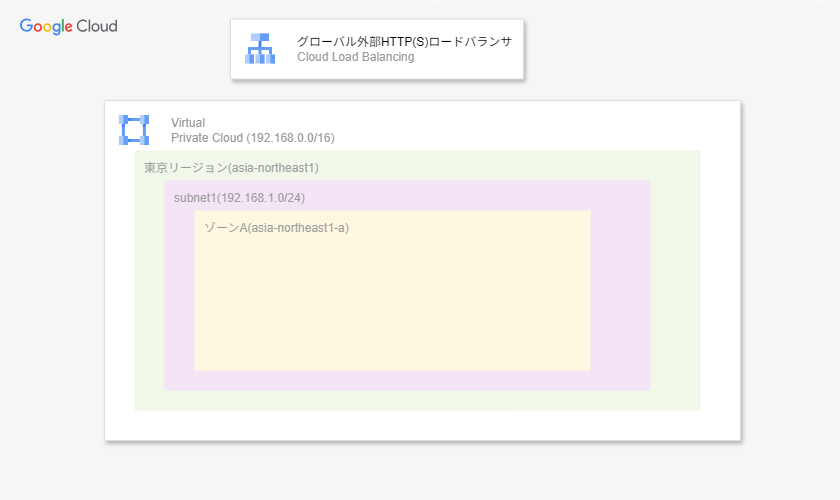
Google Cloud network architecture diagram
| Resource | AWS Scope | Google Cloud Scope |
|---|---|---|
| VPC | Region-level | Global resource |
| Subnet | AZ-level | Region-level |
| Zone (AZ equivalent) | Multiple AZs per region; 1:1 with subnets | Exists within subnets; subnets span zones |
| Load Balancer (LB) | ALB/NLB are region-level | External HTTP(S) LB is global by default |
| Internet connectivity | Attach an IGW to the VPC and control via route tables | Use Google’s external edge network (via LB) as ingress |
Computing
#Next, let's look at computing services. How you make your application servers redundant and scalable is a major comparison point between AWS and Google Cloud.
In AWS, you host frontend and backend servers on EC2 instances and place them in an Auto Scaling group, allowing the number of instances to automatically adjust based on defined conditions.
In Google Cloud, the equivalent of EC2 is Google Compute Engine (GCE). Like EC2, GCE lets you host applications on virtual machines, but the scaling and redundancy mechanisms differ. By grouping GCE instances into a Managed Instance Group (MIG), you can automate scale-in/scale-out and self-healing. A key difference is that you can create MIGs at the regional level. Similar to how AWS Auto Scaling groups achieve high availability by spanning multiple AZs, a regional MIG automatically distributes compute resources across multiple zones within the region. This ties back to Google Cloud’s network design, where subnets are regional.
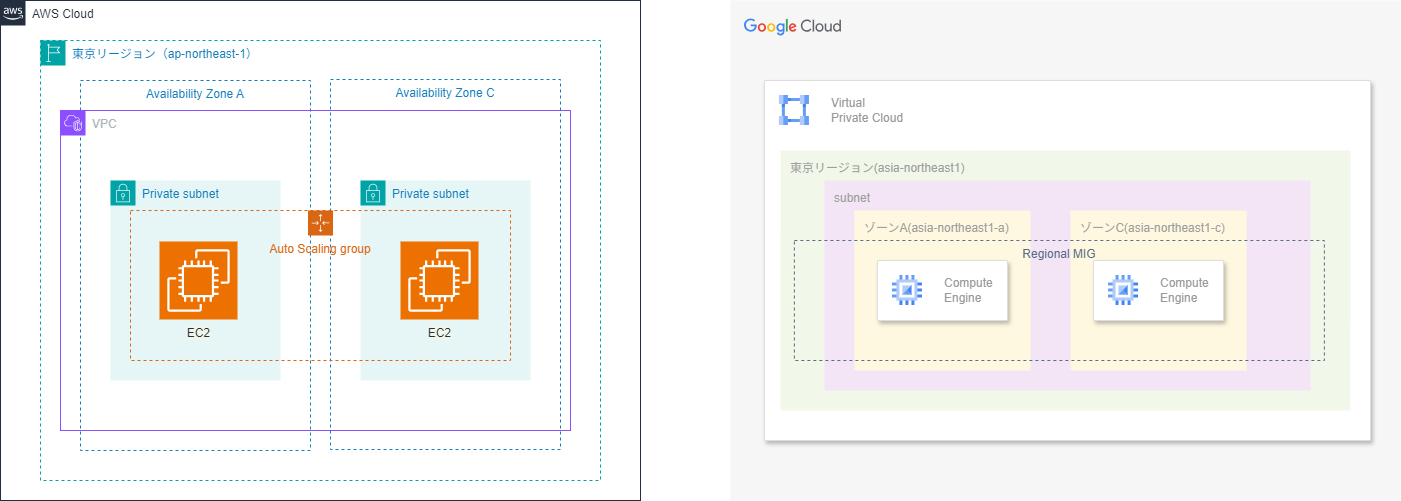
AWS Auto Scaling groups can span AZs (left), whereas Google Cloud regional MIGs can be created at the regional level (right)
In this demo, for simplicity, we deploy GCE instances in one zone (e.g., asia-northeast1-a) within asia-northeast1. In production, however, the standard is to use regional MIGs to span multiple zones and provide tolerance against single-zone failures.
Moreover, unlike AWS Auto Scaling groups, Google Cloud MIGs include features like instance template versioning and rolling updates out of the box. Thus, MIGs are not just a scaling mechanism but also abstract part of infrastructure management.
Database and Storage
#Next, let's look at the database and storage used by the demo app.
The app uses an RDB for storing users and tasks, and object storage for user-uploaded images and other files. In AWS, we use Amazon RDS for the RDB and Amazon S3 for storage. The application on EC2 connects to RDS from within the private subnet, and user-uploaded files are saved to S3.
On Google Cloud, the corresponding products are Cloud SQL and Cloud Storage. Cloud SQL is a managed MySQL/PostgreSQL service[2], and Cloud Storage is object storage similar to S3. Up to this point, there's not much difference from AWS, but diving into the network configuration reveals Google Cloud’s distinctive characteristics.
First, DB services: whereas RDS instances reside within subnets in a VPC, Cloud SQL instances do not exist inside your VPC. Cloud SQL runs within Google’s managed network, and access from resources like GCE is performed via Private Service Connect (PSC). Cloud SQL itself has no subnet; PSC creates only a private-access endpoint in your VPC. In other words, it’s abstracted so that it appears as if the instance is in your subnet. For redundancy setups like RDS, you only specify the region; Google handles redundancy and replica placement without requiring detailed network planning such as which subnet to place replicas in.
Cloud SQL’s hidden internal structure and abstracted redundancy are somewhat akin to Amazon Aurora. However, for personal or small-scale applications, RDS is often the first choice for cost reasons, and Aurora’s additional features place it outside a pure RDB service comparison, so this article focuses on RDS.
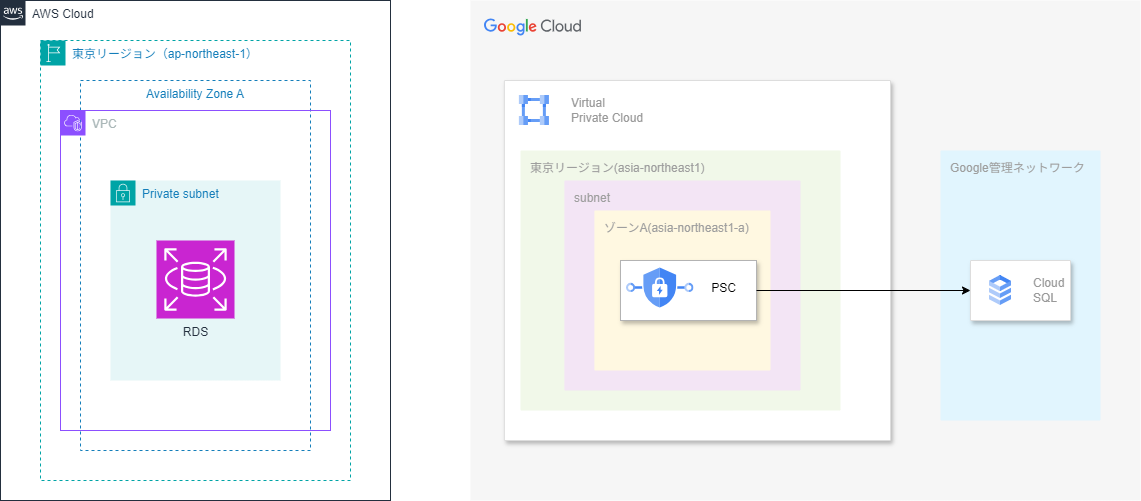
Amazon RDS is deployed in subnets (left), while Cloud SQL instances do not reside in subnets and are managed by Google (right)
Object storage shows a similar pattern. In AWS, if your EC2 instances are in a private subnet, you must explicitly configure a NAT Gateway or an S3 VPC endpoint (Gateway Endpoint) to manage outbound traffic. In Google Cloud, Cloud Storage provides private connectivity from your VPC without special configuration. Internally, communication is completed over Google’s backbone network, enabling secure, high-speed access without traversing the public internet.
These differences highlight the distinct network design philosophies of AWS and Google Cloud. AWS assumes that users will explicitly specify network paths and security, requiring resources like VPCs, subnets, NAT, and VPC endpoints. Google Cloud, by leveraging its global network, abstracts these details so that safe and efficient communication occurs without user involvement. As a result, application developers can focus more on “which service to use” rather than “which network path to take.”
Conclusion
#In this article, we compared the architectures of AWS and Google Cloud using the same demo app.
Google Cloud is a cloud platform built on global networks and abstraction, where resources like VPCs and load balancers are global. Many services, such as Cloud SQL, hide internal structures and can be used safely with minimal configuration, resulting in a cleaner architecture compared to AWS. However, strong abstraction can sometimes make it difficult to intuitively understand “where your design responsibility lies.”
AWS, on the other hand, features clear network boundaries—VPCs, subnets, AZs—and encourages a bottom-up architecture approach. Its explicit options for internet connectivity and private access enable fine-grained control according to requirements, which is a significant advantage. I find this “visible scope structure” easy to understand and reassuring from a design perspective.
This isn’t about which is superior; Google Cloud offers a simple, abstracted model, and AWS offers a clear, controllable model. Each cloud has its strengths, and the optimal solution varies based on application scale and requirements. I hope this article helps AWS users gain a foothold in understanding Google Cloud.
There are further distinctions, such as whether to place it as a global or regional resource and whether it balances public internet traffic or internal Google Cloud traffic. There are also multiple types for L3/4 load balancers, which can be confusing. If you’re wondering what this is all about, this article explains load balancers in detail (Understanding the World of Google Cloud Load Balancers from the AWS Perspective). How did it come to be like this? ↩︎
As managed RDBMS services, there is also Cloud Spanner, but it tends to be overkill for personal or small-scale development, so we choose Cloud SQL here. Similarly to Amazon Aurora, Google Cloud also offers its own database, AlloyDB, which is only compatible with PostgreSQL. ↩︎
