Tried a PoC to Port an Electron App to Tauri 2.0
Back to Top
 アドベントカレンダー2025
To reach a broader audience, this article has been translated from Japanese.
You can find the original version here.
This is the article for Day 1 of the Mamezou Developer Site Advent Calendar 2025.
Introduction
#I tried out the RC of Tauri 2.0 last September and wrote an article about it.
At that time, it had also been about two years since I last touched Tauri, and now more than a year has passed again. Time really flies.
Tauri 2.0 was officially released last October, and the current version is 2.9.3. I thought it was about time it matured, so I came up with the idea of doing a PoC porting an Electron app.
The App to Port
#Up until now, I've only run somewhat trivial SPA-like apps, so I thought I'd try something more practical. As usual, I'll use my own Electron-based unofficial Cosense (Scrapbox) app as the subject.
Here's a screenshot showing the sbe operation. It features a tab UI that allows you to open, view, and edit Cosense pages in tabs, as well as use a custom management screen and project page list UI.
Since this is an app I've been maintaining for years, its codebase is surprisingly large and its functionality extensive. I'm attempting to implement pinpoint features to really appreciate the differences with Electron.
Here's a screenshot of the result of this PoC port:
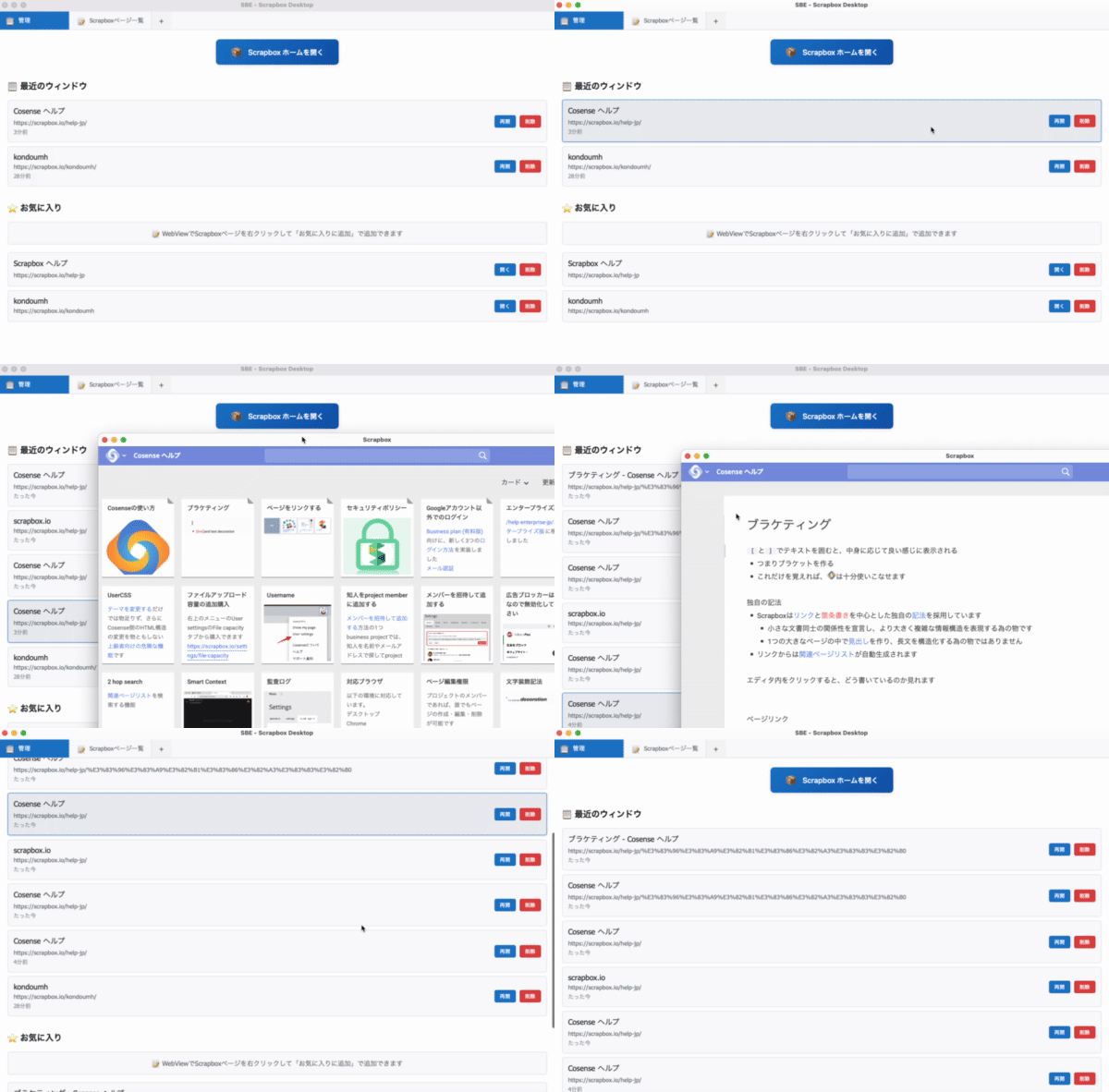
In the first tab, the history and favorites of the opened pages are displayed, and in the next tab, the page list opens. Here you can display the page list of any Cosense project. Clicking on a link in history or favorites opens the page in a separate window. As I’ll mention later, I couldn't display Cosense pages within the tabs, so for the PoC I compromised by opening them in separate windows. Adding to favorites is possible via a context menu.
Since presenting the entire code would be overwhelming, I'll link to the repository at the end of the article. Hopefully the code snippets throughout the article will give you the gist.
Software Versions Used
#For this PoC, I used the following setup:
- Rust 1.19.1
- Tauri 2.9.3
- Vite 6.0.3
- Vue 3.5.13
sbe used Vuetify, but to keep things simple this time I built it using only Vue and CSS. I created the project with the vanilla template first, and then installed what I needed later.
mkdir sbe-tauri-poc && cd sbe-tauri-poc
npm create tauri-app@latest . --template vanilla-ts
Multi-View Tab UI
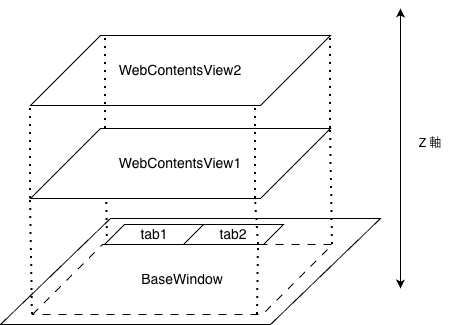
#In sbe, multiple Cosense pages and custom screens are displayed in a tab UI. Specifically, Scrapbox pages are shown in Electron's WebContentsView, and multiple WebContentsViews are switched via tabs implemented in Vue (Vuetify), as shown below.
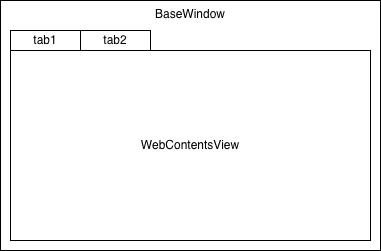
WebContentsView is embedded into a BaseWindow. Multiple WebContentsViews can be stacked or tiled, and their Z-axis order can be changed via the API. Tab switching is achieved by notifying the main process of the tab click event in the renderer process (Vuetify) and swapping the Z order of the WebContentsViews.
I have published a simple sample of Electron's WebContentsView in the mamezou-tech organization on GitHub.
For the structure of an app using WebContentsView, see the following article:
In reality, sbe is implemented with BrowserWindow + BrowserView, not BaseWindow + WebContentsView. Since BrowserView is currently provided as a SIM for WebContentsView, it's effectively an implementation using WebContentsView.
On the other hand, Tauri’s WebView does not support embedding; it can only be shown as an independent window. To implement a UI like sbe's, one idea is to display the site in an iframe within a standalone WebView.
When you try to display the Cosense site in an iframe, you get the following error:
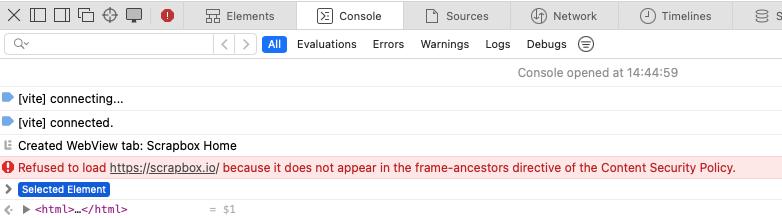
Refused to load https://scrapbox.io/ because it does not appear in the frame-ancestors directive of the Content Security Policy.
It seems that Cosense restricts iframe display via a Content Security Policy (CSP). Therefore, I gave up on displaying Cosense itself within a tab and decided to launch each page in its own WebView window. However, UIs like the management screen and project page list implemented in sbe are displayed in the main WebView’s tabs.
I created a command on the Rust side to display a WebView in a window.
#[tauri::command]
async fn create_webview_window(app: tauri::AppHandle, url: String, label: String) -> Result<(), String> {
    let webview_url = WebviewUrl::External(url.parse().map_err(|e| format!("Invalid URL: {}", e))?);

    let window = WebviewWindowBuilder::new(&app, &label, webview_url)
        .title("Scrapbox")
        .inner_size(1200.0, 800.0)
        .min_inner_size(800.0, 600.0)
        .center()
        .resizable(true)
        .visible(false)
        .build()
        .map_err(|e| e.to_string())?;

    // Show window after it's fully initialized
    window.show().map_err(|e| e.to_string())?;

    Ok(())
}
This is called from the Vue UI via invoke.
const reopenWindow = async (window: RecentWindow) => {
  try {
    const windowId = `reopen-${Date.now()}`;
    await invoke('create_webview_window', {
      url: window.url,
      label: windowId
    });
    errorMessage.value = "";
  } catch (error) {
    console.error('Failed to reopen window:', error);
    errorMessage.value = `Failed to reopen window: ${error}`;
  }
};
Your desktop will be full of windows, but at least the foundation for the multi-view app is in place.
Detecting Navigation in WebView and Rust → Frontend Notification
#In sbe, I record a history of the Cosense pages visited by capturing Electron webContents events. In-site navigation on the Cosense site can be captured with the did-navigate-in-page event.
function handleLinkEvent(view) {
  view.webContents.on('will-navigate', (e, url) => {
    // handle opening links
  });
  view.webContents.on('did-start-navigation', async (e, url, isInPlace) => {
    const currentUrl = view.webContents.getURL();
    // handle navigation start
  });
  view.webContents.on('did-navigate-in-page', async (e, url) => {
    // handle in-site navigation (e.g., saving to history)
  });
  view.webContents.on('update-target-url', (e, url) => {
    // handle link mouse-over
  });
}
The Rust API in Tauri provides methods like on_navigation and on_page_load that capture the start of a page load and completion. However, these handlers cannot detect in-site page navigation. To capture in-page navigation in real time on the Cosense site, you need to inject JavaScript into the WebView to track events. Therefore, when launching the WebView, you embed the tracking script via initialization_script.
#[tauri::command]
async fn create_webview_window(app: tauri::AppHandle, url: String, label: String) -> Result<(), String> {
    let webview_url = WebviewUrl::External(url.parse().map_err(|e| format!("Invalid URL: {}", e))?);
    let window = WebviewWindowBuilder::new(&app, &label, webview_url)
        .title("Scrapbox")
        .inner_size(1200.0, 800.0)
        .min_inner_size(800.0, 600.0)
        .center()
        .resizable(true)
        .visible(false)
        .initialization_script(include_str!("../scripts/navigation-tracker.js"))
        .build()
        .map_err(|e| e.to_string())?;

    window.show().map_err(|e| e.to_string())?;
    Ok(())
}
You can write a short script inline in initialization_script, but for readability and IDE workflow efficiency, it's better to create and load it from a separate file.
In the script below, we define the trackNavigation function and send changes to the Rust side via Tauri's invoke command when detected. We listen for browser forward/back events and notify. We capture history.pushState and history.replaceState to notify SPA navigation. We also use a MutationObserver to detect title changes. This enables tracking of modern SPA transitions like those in Cosense.
let currentUrl = window.location.href;
let currentTitle = document.title || window.location.hostname || 'Untitled';

// Function to track navigation
function trackNavigation(source = 'unknown') {
    const url = window.location.href;
    const title = document.title || window.location.hostname || 'Untitled';

    // Skip if no change
    if (url === currentUrl && title === currentTitle) return;

    console.log('Navigation tracked (' + source + '):', title, '→', url);

    // Update state
    currentUrl = url;
    currentTitle = title;

    // invoke Tauri command
    if (window.__TAURI__ && window.__TAURI__.core) {
        window.__TAURI__.core.invoke('track_navigation', {
            windowLabel: window.navigationTrackerLabel,
            url: url,
            title: title
        }).then(result => {
            console.log('Track navigation success:', result);
        }).catch(err => {
            console.error('Failed to track navigation:', err);
        });
    } else {
        console.error('Tauri API not available');
    }
}

// Track initial page load
trackNavigation('initialization');

// Listen for forward/back event
window.addEventListener('popstate', () => trackNavigation('popstate'));
window.addEventListener('hashchange', () => trackNavigation('hashchange'));

// Handle SPA navigation
const originalPushState = history.pushState;
const originalReplaceState = history.replaceState;

history.pushState = function(...args) {
    originalPushState.apply(this, args);
    trackNavigation('pushState');
};

history.replaceState = function(...args) {
    originalReplaceState.apply(this, args);
    trackNavigation('replaceState');
};

// Monitor title changes (for dynamic title updates)
let titleObserver;
if (document.querySelector('title')) {
    titleObserver = new MutationObserver(() => trackNavigation('titleChange'));
    titleObserver.observe(document.querySelector('title'), { childList: true });
}
The Rust track_navigation command invoked from the WebView emits an add-to-recent event to the Vue side.
#[tauri::command]
async fn track_navigation(app: tauri::AppHandle, window_label: String, url: String, title: String) -> Result<(), String> {
    println!("Navigation tracked: {} -> {} ({})", window_label, url, title);

    // Emit event to main window for history tracking
    app.emit("add-to-recent", NavigationEvent {
        window_label,
        url,
        title,
    }).map_err(|e| e.to_string())?;

    Ok(())
}
On the Vue side, we listen for the add-to-recent event, update the list, remove duplicates, and write to localStorage.
// Listen for navigation events from WebView windows
navigationUnlisten = await listen('add-to-recent', (event: any) => {
  const { window_label, url, title } = event.payload;

  addToRecent({
    id: `${window_label}-${Date.now()}`,
    title: title || new URL(url).hostname,
    url,
    lastAccessed: new Date()
  });

  console.log(`Navigation tracked: ${title} (${url})`);
});


// Recent windows functions
const addToRecent = (window: RecentWindow) => {
  recentWindows.value = recentWindows.value.filter(w => w.id !== window.id);
  recentWindows.value.unshift(window);
  saveToStorage();
};

// Data persistence
const saveToStorage = () => {
  localStorage.setItem('sbe-recent', JSON.stringify(recentWindows.value.map(w => ({
    ...w,
    lastAccessed: w.lastAccessed.toISOString()
  }))));
  localStorage.setItem('sbe-favorites', JSON.stringify(favorites.value));
};
In this case, I stored data on the frontend using localStorage, but if you implement save/load on the Rust side using a JSON file, you could carry your history across machines.
Electron provided fine-grained in-page navigation events, so the Tauri approach felt quite cumbersome. Because Electron bundles Chrome, developers can easily capture detailed events. Tauri, on the other hand, uses the OS-installed WebView, so it cannot provide the same low-level WebView events. Thus we needed the somewhat hacky approach of injecting the initialization_script. This is due to Tauri's loose coupling with WebView, which also makes Tauri apps lightweight and memory-efficient.
API Calls and JSON Parsing for the Cosense Page List Screen
#I created the Cosense project page list in Vue and display it within a tab. To do this, you need to fetch the corresponding project's page list via the Cosense API. In sbe, the main process fetches the page list from the Cosense API roughly as follows.
async function fetchPageInfo(url) {
  const sid = await getSid();
  const res = await fetch(url, { headers: { cookie: sid } });
  const data = await res.json();
  return data;
}

async function getSid() {
  const cookies = await session.defaultSession.cookies.get({ name: 'connect.sid' });
  return cookies[0].value;
}
To allow fetching from private Cosense projects, it retrieves cookies from the session and embeds them in the request header.
In Tauri, it’s also recommended to fetch data on the Rust side. Especially, you shouldn’t expose API keys on the frontend.
Since we're implementing API calls on the Rust side, processing the response—which was straightforward in Electron's main process (JavaScript)—becomes a bit more involved. I defined the type information for the API response as follows.
// API Response
#[derive(Serialize, Deserialize)]
struct ScrapboxPagesResponse {
    #[serde(rename = "projectName")]
    project_name: String,
    skip: i32,
    limit: i32,
    count: i32,
    pages: Vec<ScrapboxPage>,
}

// Cosense page
#[derive(Serialize, Deserialize, Clone)]
struct ScrapboxPage {
    id: String,
    title: String,
    image: Option<String>,
    descriptions: Vec<String>,
    #[serde(rename = "lastUpdateUser")]
    last_update_user: Option<ScrapboxUser>,
    // ... omitted ...
    #[serde(rename = "charsCount")]
    chars_count: Option<i32>,
    helpfeels: Option<Vec<String>>,
}

// Cosense user
#[derive(Serialize, Deserialize, Clone)]
struct ScrapboxUser {
    id: String,
}
Here's the fetch_scrapbox_pages command that calls the Cosense API. Since it handles pagination parameters for the Cosense API, it’s a bit long, but retrieving cookies from the window via the cookies_for_url method and embedding them in the header follows the same flow as Electron. It stores the API response in the ScrapboxPagesResponse defined above.
// Command to fetch Scrapbox pages with authentication (supports both public and private projects)
#[tauri::command]
async fn fetch_scrapbox_pages(
    app: tauri::AppHandle,
    project: String,
    skip: Option<i32>,
    limit: Option<i32>,
    sort: Option<String>
) -> Result<ScrapboxPagesResponse, String> {
    let skip = skip.unwrap_or(0);
    let limit = limit.unwrap_or(20);
    let sort = sort.unwrap_or_else(|| "updated".to_string());

    let api_url = format!(
        "https://scrapbox.io/api/pages/{}?skip={}&limit={}&sort={}",
        project, skip, limit, sort
    );

    let scrapbox_url = Url::parse("https://scrapbox.io").map_err(|e| format!("Invalid URL: {}", e))?;

    // Try to get cookies from main window's webview
    let cookies = if let Some(main_window) = app.get_webview_window("main") {
        main_window.cookies_for_url(scrapbox_url.clone())
            .map_err(|e| format!("Failed to get cookies: {}", e))?
    };

    let client = reqwest::Client::new();
    let mut request_builder = client.get(&api_url);

    // Add cookies if available
    if !cookies.is_empty() {
        let cookie_header = build_cookie_header(cookies);
        println!("Using cookies for authentication: {} cookies", cookie_header.matches(';').count() + 1);
        request_builder = request_builder.header("Cookie", cookie_header);
    }

    let response = request_builder
        .send()
        .await
        .map_err(|e| format!("Failed to fetch pages: {}", e))?;

    if !response.status().is_success() {
        return Err(format!("API request failed with status: {} - This might be a private project requiring authentication", response.status()));
    }

    let pages_data: ScrapboxPagesResponse = response
        .json()
        .await
        .map_err(|e| format!("Failed to parse JSON: {}", e))?;

    Ok(pages_data)
}
On the Vue side, we invoke the Rust fetch_scrapbox_pages and display the retrieved list.
// Scrapbox pages functions
const fetchScrapboxPages = async () => {
  scrapboxLoading.value = true;
  scrapboxError.value = '';

  try {
    const result = await invoke('fetch_scrapbox_pages', {
      project: scrapboxProject.value,
      skip: scrapboxSkip.value,
      limit: scrapboxLimit.value,
      sort: scrapboxSort.value
    }) as { pages: ScrapboxPage[], count: number, skip: number };

    scrapboxPages.value = result.pages;
    console.log(`Fetched ${result.pages.length} pages from ${scrapboxProject.value}`);
  } catch (error) {
    console.error('Failed to fetch Scrapbox pages:', error);
    scrapboxError.value = `Failed to fetch Scrapbox pages: ${error}`;
  } finally {
    scrapboxLoading.value = false;
  }
};
With Electron, you can also write the main process in JavaScript, so JSON handling was easy. In Tauri (Rust), you gain benefits such as compile-time error detection through type safety, as you do in TypeScript. In large-scale development, I think code generators handle these things.
Handling Context Menus
#Now let's implement adding Cosense pages displayed in the WebView window to favorites. It’s natural to show a context menu on the WebView to add them. In a previous article, I was packaging an SPA as an app, so I used Tauri’s JavaScript API to easily implement a context menu. When displaying a website in a WebView like this, you still need to inject a script to handle context menus. You could inject Tauri API code for the context menu, but this time I added the context menu via DOM manipulation. Since the context menu added with the Tauri API is OS-native, if you want a look and feel similar to the site displayed in the WebView, creating a menu by DOM manipulation is also an option.
function showContextMenu(x, y) {
    // Remove existing context menu if any
    const existingMenu = document.getElementById('tauri-context-menu');
    if (existingMenu) {
        existingMenu.remove();
    }

    // Create context menu
    const menu = document.createElement('div');
    menu.id = 'tauri-context-menu';
    menu.style.cssText = `
        position: fixed;
        left: ${x}px;
        top: ${y}px;
        box-shadow: 0 2px 8px rgba(0,0,0,0.15);
        z-index: 10000;
        min-width: 180px;
        font-size: 14px;
    `;

    // Add menu item
    const menuItem = document.createElement('div');
    menuItem.textContent = '⭐ Add to Favorites';
    menuItem.style.cssText = `
        padding: 8px 16px;
        cursor: pointer;
        border-radius: 4px;
        transition: background-color 0.2s;
    `;

    menuItem.addEventListener('click', () => {
        addToFavorites();
        menu.remove();
    });

    menu.appendChild(menuItem);
    document.body.appendChild(menu);

    document.addEventListener('click', function removeMenu() {
        menu.remove();
        document.removeEventListener('click', removeMenu);
    });
}
This script is injected into the WebView just like navigation-tracker.js.
The context menu click calls the addToFavorites function, which invokes add_to_favorites_from_webview. On the Rust side, the add_to_favorites_from_webview command executes and emits an add-to-favorites event to the Vue side.
// Command to add to favorites from WebView
#[tauri::command]
async fn add_to_favorites_from_webview(app: tauri::AppHandle, url: String, title: String) -> Result<(), String> {
    // Emit event to main window to add to favorites
    app.emit("add-to-favorites", FavoriteEvent {
        url,
        title,
    }).map_err(|e| e.to_string())?;

    Ok(())
}
On the Vue side, you handle the add-to-favorites logic based on the event sent from Rust.
const addFavoriteFromWebView = async (url: string, title: string) => {
  try {
    // Check if already exists
    const existingFavorite = favorites.value.find(f => f.url === url);
    if (existingFavorite) {
      errorMessage.value = "Already added to favorites";
      setTimeout(() => {
        errorMessage.value = "";
      }, 2000);
      return;
    }

    const favorite: Favorite = {
      id: `fav-${Date.now()}`,
      title,
      url
    };

    favorites.value.unshift(favorite);
    saveToStorage();
    errorMessage.value = `Added to favorites: ${title}`;

    setTimeout(() => {
      errorMessage.value = "";
    }, 3000);
  } catch (error) {
    console.error('Failed to add favorite from WebView:', error);
    errorMessage.value = `Failed to add to favorites: ${error}`;
  }
};
Generating Platform-Specific Installers with a GitHub Actions Workflow
#With a working Tauri version of the Cosense app ready, let's generate macOS and Windows installers in CI.
Tauri uses the OS WebView, so cross-compilation is not possible. You need to provide a build environment for each OS. This is similar to Electron, which bundles a per-OS Chrome, so it also requires an OS-specific build environment.
I defined a workflow that uses GitHub Actions' strategy matrix to build macOS and Windows installers and save them as artifacts.
name: Build Installers

on:
  workflow_dispatch:

jobs:
  build:
    strategy:
      matrix:
        include:
          - os: macos-latest
            name: macos-installer
            path: |
              src-tauri/target/release/bundle/dmg/*.dmg
              src-tauri/target/release/bundle/macos/*.app
          - os: windows-latest
            name: windows-installer
            path: |
              src-tauri/target/release/bundle/msi/*.msi
              src-tauri/target/release/bundle/nsis/*.exe

    runs-on: ${{ matrix.os }}

    steps:
    - name: Checkout repository
      uses: actions/checkout@v4

    - name: Setup Node.js
      uses: actions/setup-node@v4
      with:
        node-version: '20'
        cache: 'npm'

    - name: Setup Rust
      uses: dtolnay/rust-toolchain@stable

    - name: Install dependencies
      run: npm install

    - name: Build Tauri app
      run: npm run tauri build

    - name: Upload artifacts
      uses: actions/upload-artifact@v4
      with:
        name: ${{ matrix.name }}
        path: ${{ matrix.path }}
        retention-days: 30
Running this workflow produces Tauri app installers of about 5–7 MB, with installed binaries of about 3–4 MB.
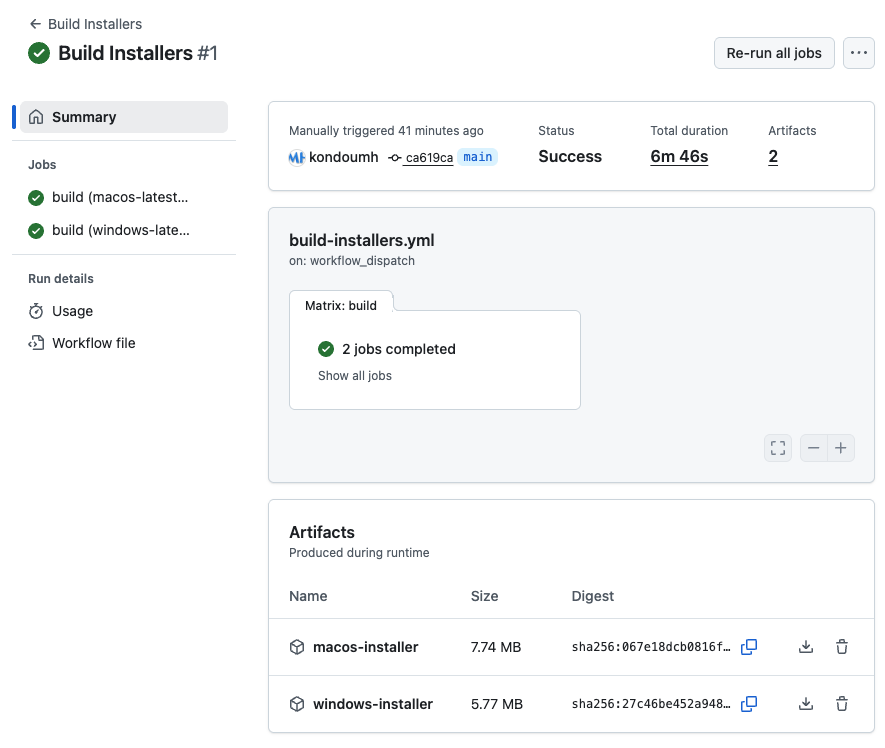
The sbe installer is around 100 MB, and the macOS universal installer is nearly 200 MB.
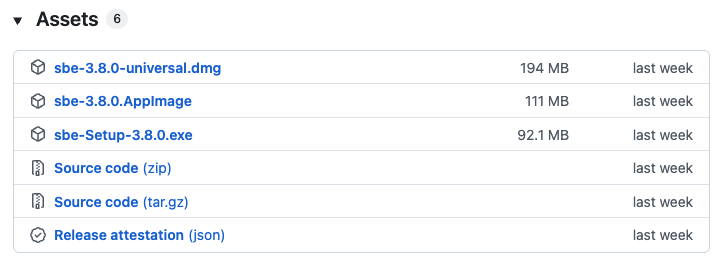
The lightweight footprint of Tauri apps is attractive. They start quickly and the app responses are snappy.
Source Code Repository
#The results of this PoC are available in the following repository:
I had Copilot write the README, so please forgive the slightly exaggerated wording 😅.
Conclusion
#That concludes the introduction to a PoC of porting an Electron app to Tauri 2.0. In this example, Electron’s functionality and convenience were actually emphasized by contrast, but the generation of lightweight, high-speed binaries, the Rust/Tauri ecosystem, and the development experience afforded by type safety are very appealing.
Tauri also supports .NET Blazor.
Blazor was covered in last year's Advent Calendar.
Tauri 2.0 uses the OS WebView, but there's a project called Verso that develops a Servo-based cross-platform WebView.
NLnet; Servo improvements for Tauri
With Verso, differences between each OS WebView are absorbed, bringing a consistent experience across major desktop and mobile platforms. APIs for navigation, which felt cumbersome this time, may become easier to use.
If Verso's results are eventually integrated into Tauri, WebView would be bundled, making the binary size larger. Therefore, there might be an option to switch between the traditional OS WebView and the Verso WebView.
