Behind the Scenes of the Food Plating Robot Bizen® Development: gRPC and Real-Time Communication Connecting UI and Core
Back to Top
To reach a broader audience, this article has been translated from Japanese.
You can find the original version here.
Introduction
#In robot and manufacturing equipment software, the design of the user interface and device control logic is of paramount importance. Especially, the equipment’s operation panel needs to clearly display the system’s status and provide a safe interface for operation.
The food plating robot Bizen® is a robotic system designed with end-user operation in manufacturing environments in mind. The Bizen® main unit comes with a dedicated control panel for operating the system.
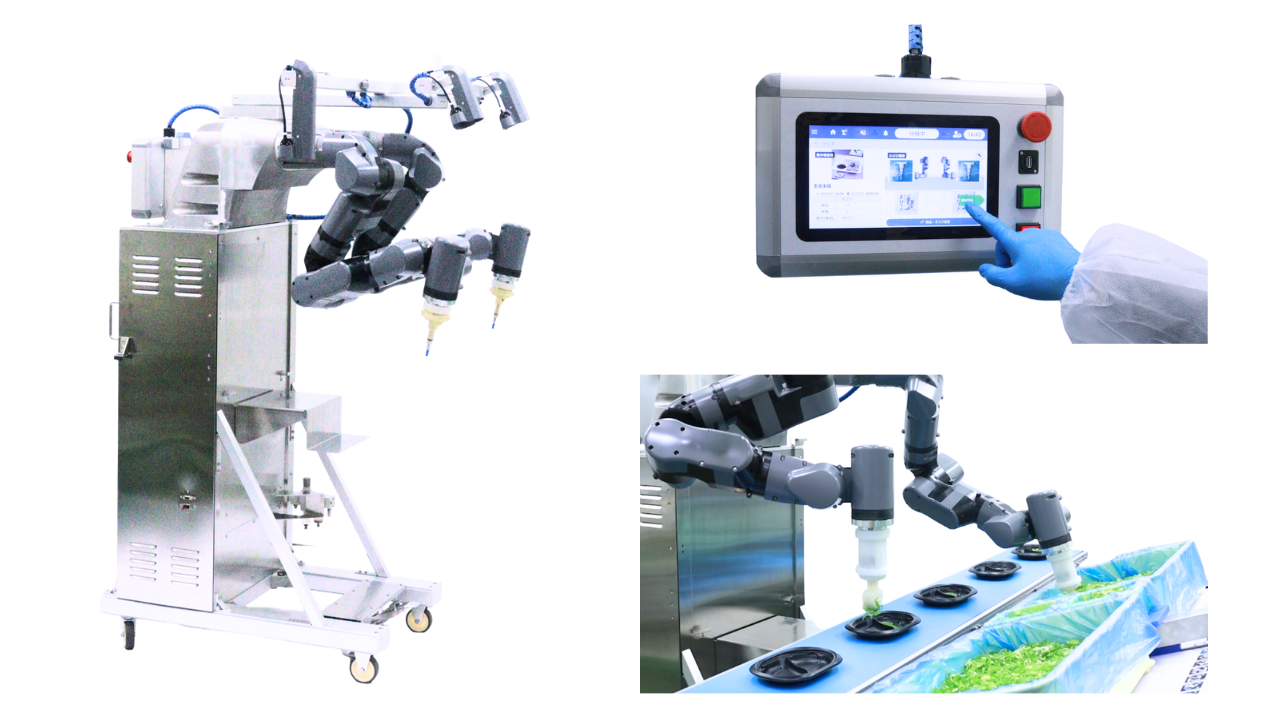
In this article, using Bizen®’s UI design as an example, we will cover the following:
- The software architecture of the device UI
- GUI implementation using Flutter
- Component communication via gRPC
- Real-time communication with bidirectional streaming
Software Architecture of Bizen®
#The software of Bizen® is composed of multiple components, each separated by role. By having each component carry a clear responsibility, the maintainability and extensibility of the entire system are enhanced.
The main components are the following three:
-
GUI Application
The entry point for user interactions. Responsible for displaying device status and handling user input; it never accesses the core logic directly but always operates through the API. -
Controller API
The interface layer that exposes the controller application’s functions and state externally. External applications, such as the GUI, use this API to access device features. -
Controller Application
The central component of Bizen®. Responsible for device state control, management of registered data, image processing, and more.
The system configuration is shown in the following diagram:
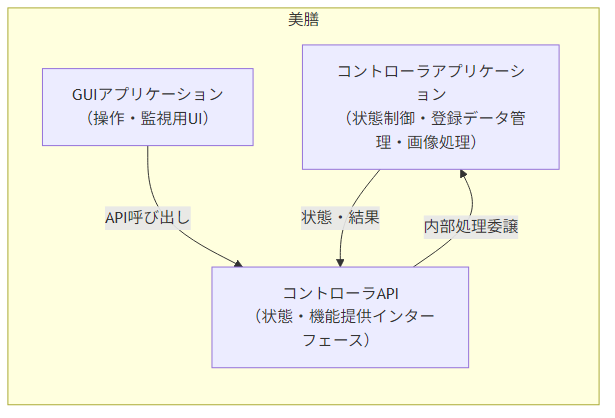
In this way, the GUI application does not access the controller application directly but communicates via the API. This allows for independent development and maintenance of the UI and core logic.
Component Communication
#In Bizen®, we use gRPC for communication between the GUI application and the controller application. The Controller API is implemented with gRPC, with the controller application running as a gRPC server. The GUI application connects as a gRPC client and consumes various services.
This configuration enables the UI and control logic to connect independently of language or implementation.
The Controller API defines its public interface using the Interface Definition Language (Protocol Buffers), and generates language-specific bindings for both server and client.
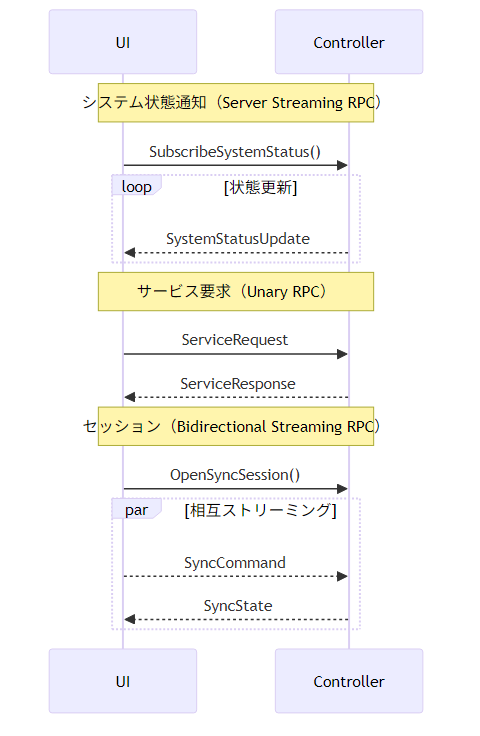
There are three primary use cases for this communication:
System Status Notifications
#While the GUI application is connected to the server, it continuously receives system status updates. This is implemented using server streaming RPC. The GUI display is updated according to the controller’s state changes, keeping the device status and UI in sync at all times.
Service Requests
#One-off processing requests triggered by user operations are implemented using Unary RPC. A request is sent from the GUI application and the server responds with the result.
Synchronous Sessions
#For operations requiring real-time interaction, we use bidirectional streaming RPC. Since the client and server can both send messages simultaneously, we can achieve real-time communication sessions.
For example, it is used in scenarios such as:
- Parameter adjustment while monitoring camera footage
- Pre-operation confirmation steps
- Robot status monitoring
The communication flow is shown in the following diagram:
Technical Overview
#About Flutter
#The GUI application of Bizen® is implemented using Flutter, the UI framework provided by Google. In Flutter, applications are developed using the Dart language.
Flutter is a cross-platform framework that can generate applications for multiple OSes from a single codebase. It also provides a rich set of UI components, making GUI development for control panels efficient.
Additionally, it features high compatibility with other technologies provided by Google.
About gRPC
#gRPC is an open-source Remote Procedure Call (RPC) framework developed by Google. It uses Protocol Buffers (Protobuf) to define APIs and perform high-speed data serialization.
By defining APIs with Protobuf, the same interface can be used from multiple programming languages. This makes it easy to connect systems implemented in different languages, such as a Flutter (Dart) GUI and a controller application in C++.
At Mamezou, we also have a track record of using gRPC in past robotics development projects.
Sample Application
#Real-Time Communication with Bidirectional Streaming
#gRPC’s bidirectional streaming is a communication method that allows the client and server to send messages simultaneously. By leveraging this mechanism, you can implement UI interactions with high real-time responsiveness.
Here, through a simple sample application using Flutter and gRPC, we will introduce the mechanism of real-time communication with bidirectional streaming.
In the actual Bizen® system, the UI is implemented in Flutter and the core application in C++ communicate with each other, but here, for ease of understanding, we will create a sample in which both the server and client are implemented in Dart.
In this sample, the server manages a shared counter, and multiple clients can send counter update operations. Operations sent from the clients are processed by the server, and the results are distributed in real time to all connected clients.
Below, we present the implementation steps for this sample application.
Directory Structure
#In this sample, we will consolidate multiple projects under the working directory Examples (you can create the Examples directory wherever you like).
The directory structure we will create looks as follows:
Examples/
|
+-- counter_server/
|     Project directory for the server program
|
+-- counter_client/
|     Project directory for the client program
|
+-- counter_api/
      Stores the API definitions used by gRPC
This sample was created and tested in the following environment:
- OS: Ubuntu 22.04 LTS
- Flutter: 3.24.2 / Dart: 3.5.2
Defining the API with gRPC
#First, define the API to be used between the client and server using Protocol Buffers.
In the terminal, navigate to the Examples directory and run the following:
mkdir counter_api
cd counter_api
touch counter_api.proto
Open counter_api.proto in your editor, define the gRPC messages and service, and save:
syntax = "proto3";

package counter_api;

/// Counter service definition
service CounterService {
  /// Bidirectional streaming
  /// Client sends operations
  /// Server returns the latest count value as a stream
  rpc SyncCounter(stream CounterRequest) returns (stream CounterResponse);
}

/// Operation request from the client
message CounterRequest {
  string client_id = 1;   // Client identifier

  oneof action {
    Increment increment = 2;
    Decrement decrement = 3;
    Reset reset = 4;
  }
}

/// Increment operation
message Increment {
  int32 amount = 1; // Usually 1
}

/// Decrement operation
message Decrement {
  int32 amount = 1; // Usually 1
}

/// Reset operation
message Reset {}

/// Current state delivered by the server
message CounterResponse {
  int32 current_value = 1;   // Current count value
  string updated_by = 2;     // ID of the client that performed the update
  int64 timestamp = 3;       // Update timestamp (Unix ms)
}
Creating the Dart Project for the Server
#Run the following in the terminal from the Examples directory:
dart create counter_server
cd counter_server
Next, compile the previously defined counter_api.proto and add the generated code to the counter_server source:
dart pub global activate protoc_plugin 21.1.2  # <-- Install protoc_plugin
export PATH="$PATH":"$HOME/.pub-cache/bin"     # <-- Temporarily add protoc (Protocol Buffers compiler) to PATH
mkdir -p lib/src/generated
protoc --dart_out=grpc:lib/src/generated -I../counter_api counter_api.proto # <-- Compile counter_api.proto
Upon successful compilation of counter_api.proto, the following files will be generated under Examples/counter_server/lib/src/generated:
Examples/counter_server/lib/src/generated
|
+-- counter_api.pb.dart
|     Definition of message types
|
+-- counter_api.pbenum.dart
|     Enum definitions (not used in this example)
|
+-- counter_api.pbgrpc.dart
|     Code for gRPC services
|
+-- counter_api.pbjson.dart
      JSON metadata (not used in this example)
Edit counter_server/pubspec.yaml to configure the project:
name: counter_server
description: "gRPC bidirectional streaming counter server"
version: 1.0.0

environment:
  sdk: ^3.5.2

dependencies:
  grpc: ^3.2.4
  protobuf: ^3.1.0
  protoc_plugin: ^21.1.2
  fixnum: ^1.1.1

dev_dependencies:
  lints: ^4.0.0
  test: ^1.24.0
Edit counter_server/lib/counter_server.dart to implement the server:
import 'dart:async';
import 'package:grpc/grpc.dart';
import 'package:fixnum/fixnum.dart';
import 'src/generated/counter_api.pb.dart';
import 'src/generated/counter_api.pbgrpc.dart';
class CounterServiceImpl extends CounterServiceBase {
int _currentValue = 0;
// List of controllers for broadcasting to connected clients
final List<StreamController<CounterResponse>> _clients = [];
Stream<CounterResponse> syncCounter(
ServiceCall call, Stream<CounterRequest> requestStream) {
final controller = StreamController<CounterResponse>();
_clients.add(controller);
print("Client connected");
// Send the current value immediately after connection
controller.add(_createResponse("server"));
requestStream.listen(
(request) {
_handleRequest(request);
},
onDone: () {
print("Client disconnected");
_clients.remove(controller);
controller.close();
},
onError: (e) {
print("Stream error: $e");
_clients.remove(controller);
controller.close();
},
);
return controller.stream;
}
void _handleRequest(CounterRequest request) {
if (request.hasIncrement()) {
_currentValue += request.increment.amount;
_broadcast(request.clientId);
} else if (request.hasDecrement()) {
_currentValue -= request.decrement.amount;
_broadcast(request.clientId);
} else if (request.hasReset()) {
_currentValue = 0;
_broadcast(request.clientId);
}
}
void _broadcast(String updatedBy) {
final response = _createResponse(updatedBy);
print("Broadcast: $_currentValue (by $updatedBy)");
for (final client in _clients) {
client.add(response);
}
}
CounterResponse _createResponse(String updatedBy) {
return CounterResponse()
..currentValue = _currentValue
..updatedBy = updatedBy
..timestamp = Int64(DateTime.now().millisecondsSinceEpoch);
}
}
Future<void> main() async {
final server = Server.create(
services: [CounterServiceImpl()],
interceptors: const <Interceptor>[],
);
await server.serve(port: 50051);
print('Counter Server listening on port ${server.port}');
}
Creating the Flutter Project for the Client
#Run the following in the terminal from the Examples directory:
flutter create counter_client
cd counter_client
Next, as with the server, compile counter_api.proto and add the generated code to the counter_client source:
dart pub global activate protoc_plugin 21.1.2  # <-- Install protoc_plugin
export PATH="$PATH":"$HOME/.pub-cache/bin"     # <-- Temporarily add protoc (Protocol Buffers compiler) to PATH
mkdir -p lib/src/generated
protoc --dart_out=grpc:lib/src/generated -I../counter_api counter_api.proto # <-- Compile counter_api.proto
Edit counter_client/pubspec.yaml to configure the project:
name: counter_client
description: "gRPC bidirectional streaming counter client"
publish_to: 'none'

version: 1.0.0+1

environment:
  sdk: ^3.5.2

dependencies:
  flutter:
    sdk: flutter
  cupertino_icons: ^1.0.8
  grpc: ^3.2.4
  protobuf: ^3.1.0
  uuid: ^4.4.0

dev_dependencies:
  flutter_test:
    sdk: flutter
  flutter_lints: ^4.0.0

flutter:
  uses-material-design: true
Edit counter_client/lib/main.dart to implement the client:
import 'dart:async';
import 'package:flutter/material.dart';
import 'package:grpc/grpc.dart';
import 'package:uuid/uuid.dart';
import 'src/generated/counter_api.pb.dart';
import 'src/generated/counter_api.pbgrpc.dart';
void main() {
runApp(const MyApp());
}
class MyApp extends StatelessWidget {
const MyApp({super.key});
Widget build(BuildContext context) {
return const MaterialApp(
home: CounterPage(),
);
}
}
class CounterPage extends StatefulWidget {
const CounterPage({super.key});
State<CounterPage> createState() => _CounterPageState();
}
class _CounterPageState extends State<CounterPage> {
late ClientChannel _channel;
late CounterServiceClient _stub;
late StreamController<CounterRequest> _requestController;
Stream<CounterResponse>? _responseStream;
final String _clientId = const Uuid().v4();
int _currentValue = 0;
String _lastUpdatedBy = "-";
void initState() {
super.initState();
_initGrpc();
}
void _initGrpc() {
_channel = ClientChannel(
'localhost', // Server address
port: 50051,
options: const ChannelOptions(
credentials: ChannelCredentials.insecure(),
),
);
_stub = CounterServiceClient(_channel);
_requestController = StreamController<CounterRequest>();
_responseStream = _stub.syncCounter(_requestController.stream);
_responseStream!.listen((response) {
setState(() {
_currentValue = response.currentValue;
_lastUpdatedBy = response.updatedBy;
});
});
}
void _sendIncrement() {
final request = CounterRequest(
clientId: _clientId,
increment: Increment()..amount = 1,
);
_requestController.add(request);
}
void _sendDecrement() {
final request = CounterRequest(
clientId: _clientId,
decrement: Decrement()..amount = 1,
);
_requestController.add(request);
}
void _sendReset() {
final request = CounterRequest(
clientId: _clientId,
reset: Reset(),
);
_requestController.add(request);
}
void dispose() {
_requestController.close();
_channel.shutdown();
super.dispose();
}
Widget build(BuildContext context) {
final isMe = _lastUpdatedBy == _clientId;
return Scaffold(
appBar: AppBar(
title: const Text("gRPC Bidirectional Streaming Counter"),
),
body: Center(
child: Column(
mainAxisAlignment: MainAxisAlignment.center,
children: [
Text(
'Current Value',
style: Theme.of(context).textTheme.titleLarge,
),
const SizedBox(height: 16),
Text(
'$_currentValue',
style: const TextStyle(
fontSize: 60,
fontWeight: FontWeight.bold,
),
),
const SizedBox(height: 20),
Text(
'Last updated: ${isMe ? "You" : _lastUpdatedBy}',
),
const SizedBox(height: 40),
Row(
mainAxisAlignment: MainAxisAlignment.center,
children: [
ElevatedButton(
onPressed: _sendIncrement,
child: const Text("+1"),
),
const SizedBox(width: 20),
ElevatedButton(
onPressed: _sendDecrement,
child: const Text("-1"),
),
const SizedBox(width: 20),
ElevatedButton(
onPressed: _sendReset,
child: const Text("Reset"),
),
],
),
],
),
),
);
}
}
Running the Sample Program
#Here, we will run the sample program and verify client-side state synchronization using gRPC bidirectional streaming.
In this sample, multiple clients connect to a single server and share the counter state in real time.
The server is implemented to listen on localhost:50051.
Therefore, it is assumed that the server and clients run on the same machine.
Start the server and clients in the following order:
1. Server Side
#Open a terminal, navigate to the counter_server project directory, and run the Dart program:
cd counter_server
dart run
When the server starts, you will see a log like this:
Counter Server listening on port 50051
At this point, the server is ready to accept client connections.
2. Client Side
#Open another terminal, navigate to the counter_client project directory, and launch the Flutter application:
cd counter_client
flutter run
Once the client application launches, it will automatically connect to the server via gRPC.
Results
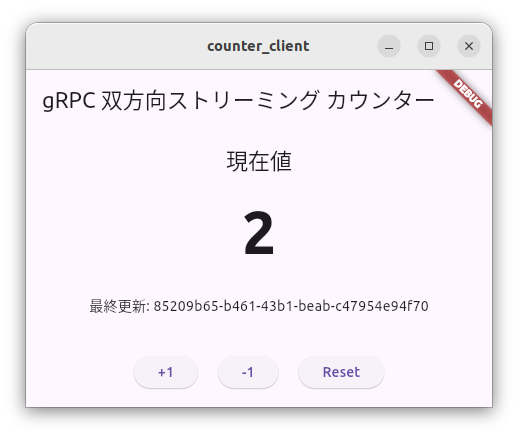
#When the client taps the [+1] / [-1] buttons, the operation is sent to the server via bidirectional streaming RPC.
The server updates the counter state and streams the result to all connected clients.
Each client updates its display based on the received state.
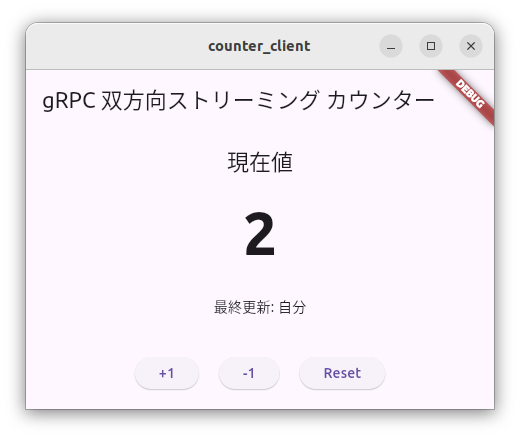
The above image shows the client after counting up to “2” (hereafter referred to as Client A).
At the bottom of the screen, [Last updated] displays the client that last updated the counter.
In this case, since Client A performed the update, it displays “You”.
Next, open another terminal to launch a second client.
We will refer to this as Client B.
Client B is also subscribed to the state stream from the server, so it shows the current counter value of “2”.
However, under [Last updated], it displays the identifier of Client A, the one that performed the update.
In this state, when Client B updates the counter, the following sequence occurs:
- Client B sends an update operation
- The server updates the counter value
- The server broadcasts the updated state to all clients
- Clients A and B update their screens simultaneously
As a result:
- On Client B, [Last updated] = You
- On Client A, [Last updated] = Client B's ID
In this way, you can see that multiple clients are sharing the same state in real time.
Discussion
#In this sample, we implemented client-server communication using bidirectional streaming RPC.
However, looking only at this counter example, using bidirectional streaming is not strictly necessary. You could achieve the same functionality with a structure like the following:
-
Counter updates
→ Unary RPC -
State update notifications
→ Server streaming RPC
This approach also enables client-side state synchronization.
However, in real equipment software, requirements often arise such as:
- Sending input operations in real time
- Continuously receiving data such as camera footage
- Synchronizing operations and state updates within the same session
In such cases, bidirectional streaming RPC, which allows clients and servers to simultaneously send and receive data, is effective.
In the Bizen® system, this mechanism is used to implement the following operations:
- Parameter adjustment while monitoring camera footage
- Robot operation confirmation sessions
- Real-time synchronization between the UI and device status
By using bidirectional streaming, you can implement complex operation sessions while maintaining real-time responsiveness.
Conclusion
#In this article, we introduced the UI architecture of the food plating robot Bizen® and outlined the key implementation technologies.
Bizen® adopts a structure that clearly separates the user interface from the robot control logic. The GUI application is implemented with Flutter and communicates with the controller application using gRPC.
This architecture allows the UI and control logic to be developed and maintained independently, resulting in improved maintainability and extensibility of the equipment software.
Moreover, by leveraging gRPC’s streaming capabilities, you can flexibly implement communication models suited to different use cases, such as device status notifications and real-time operation sessions.
The key points of Bizen®’s software design are as follows:
- Separation of UI and Control Logic
By structuring the GUI application and the controller application as independent components, responsibilities are clarified and development and maintenance become easier. - Component Integration via API
By exposing the controller application’s functionality as an API, access from the UI is safely controlled and system boundaries are clearly defined. - Multi-Language Communication Foundation
We adopt a communication framework using gRPC and Protocol Buffers to connect applications implemented in different languages, such as Flutter (Dart) and C++. - Real-Time Synchronization via Streaming Communication
We efficiently implement the real-time communication required for device UIs, including system state delivery and operation sessions.
In robot and equipment software, multiple elements such as UI, communication, and control logic are closely interconnected. The architecture introduced in this article is just one example, but we hope it serves as a reference when designing your own equipment software.
