I Created a CLI Tool That Automatically Generates Matrix Diagrams from YAML Because Maintaining Them with Drawing Tools Is Painful
Back to Top
To reach a broader audience, this article has been translated from Japanese.
You can find the original version here.
Introduction
#Two-dimensional matrix diagrams are often used to represent an overall picture of development plans and similar initiatives. In many cases, they are created using office software or drawing tools.
That is sufficient for diagrams that are self-contained within a document or do not require ongoing maintenance. However, when continuous updates and publication are needed, continually updating image files can be burdensome.
To address this, I released a Node.js CLI tool called matrix-renderer that generates image files from matrix data defined in YAML.
This article introduces the background behind creating this tool and how to use it.
Output example
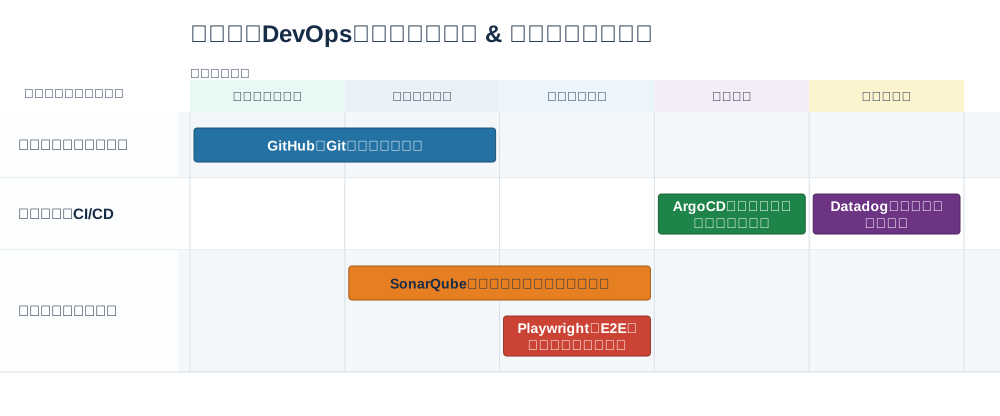
What Inspired Its Creation
#In one task, a matrix was created to clearly show the availability of guides and tools. The X-axis represented phases, while the Y-axis represented technical areas of interest, such as applications, infrastructure, and processes.
There was a request to publish this on an internal site, update it according to the development status of guides and tools, and allow users to navigate from items to the relevant sites.
Because this matrix was created using office software, it had to be exported as an image and re-uploaded to the publication destination every time it was changed.
This is sufficient when continuous updates are not required, but I thought it would become a burden in cases that require ongoing changes and publication, so I quietly developed a tool outside the project.
I considered rolling it out to the project, but unfortunately SVG could not be used, meaning the link requirement could not be met, so I abandoned the rollout.
However, I believe there are other cases with similar challenges, so I decided to release it as OSS that can be used easily.
Differences from Similar Tools
#What it does well and poorly compared with office software and drawing tools.
What It Does Well
#- Easy to update continuously
- Since the content to update is YAML, it is easy to modify and manage differences.
- Can be published in conjunction with updates
- Because it is a CLI tool, image generation can be triggered by YAML file updates by incorporating it into build scripts or CI/CD pipelines.
- By incorporating deployment into a CI/CD pipeline as well, the entire process from updating the YAML file to publishing the image can be automated.
- Layout is primarily automatic
- The X-axis and Y-axis are automatically set at equal intervals.
- Items are placed in the specified X-axis start/end columns and Y-axis rows.
- If there is available space within the same Y-axis row, items are placed automatically.
- When item periods overlap within the same row, they are positioned vertically to prevent display overlap.
- Links from items
- SVG only, but URLs can be embedded in items.
What It Does Poorly
#- Limited layout flexibility
- The width of specific X-axis or Y-axis sections cannot be customized independently from the equal spacing.
- Because items are automatically placed within the same Y-axis row, it is not possible to establish predecessor/successor relationships between items.
- It does not support drawing with a variety of shapes.
Use Cases
#It is ideal for cases where you want to “categorize and map things along two axes, then continuously publish them as documentation,” such as the following:
- Managing tools and guides by phase × technical category
- Managing technology stack maturity by organizational technical area × maturity/adoption phase, such as Adopt, Trial, Assess, and Hold
- Mapping incident response procedures and tools by response stage—normal operation, detection, initial response, root cause investigation, recovery, and retrospective—× responsible area
- Lists of systems and features by department × category
How to Use
#Runtime Environment
#Node.js 24+
Prepare the YAML
#The following is an example input file that places guides and tools for each development phase.
For template details, see here.
title: Internal Standard DevOps Toolchain & Development Guide Map
width: 1000
xAxis:
  label: Development Phase
  values:
    - label: Requirements Definition & Planning
      color: "#e8f8f5"
    - label: Design & Build
      color: "#eaf2f8"
    - label: Testing & Validation
      color: "#ebf5fb"
    - label: Deployment
      color: "#f4ecf7"
    - label: Operations & Monitoring
      color: "#fcf3cf"
yAxis:
  label: Technology Stack
  values:
    - label: Application Development
      color: "#fdfefe"
    - label: Infrastructure & CI/CD
      color: "#fdfefe"
    - label: Security & Quality
      color: "#fdfefe"
items:
  - id: git-guide
    label: GitHub and Git Terms of Use Guide
    lane: Application Development
    from: Requirements Definition & Planning
    to: Design & Build
    url: https://your-wiki.internal
    color: "#2471a3"
  - id: sonar-qube
    label: SonarQube (Static Analysis Code Review)
    lane: Security & Quality
    from: Design & Build
    to: Testing & Validation
    url: https://internal.net
    color: "#e67e22"
  - id: play-wright
    label: Playwright (E2E Automated Test Execution Environment)
    lane: Security & Quality
    from: Testing & Validation
    to: Testing & Validation
    url: https://your-wiki.internal
    color: "#cb4335"
  - id: argo-cd
    label: ArgoCD (Production Environment Deployment Flow)
    lane: Infrastructure & CI/CD
    from: Deployment
    to: Deployment
    url: https://internal.net
    color: "#1e8449"
  - id: datadog-ops
    label: Datadog Monitoring Dashboard
    lane: Infrastructure & CI/CD
    from: Operations & Monitoring
    to: Operations & Monitoring
    url: https://internal.net
    color: "#6c3483"
| Item | Description |
|---|---|
| Title | Matrix title |
| Width | Width of the output image |
| X-axis | Label, display order, and color |
| Y-axis | Label, display order, and color |
| Item | ID, display name, row to place it in, start column, end column, color, and URL |
- Use
laneto specify the row in which an item is placed, andfromandtoto specify its start and end columns. - When item periods overlap within the same row, they are positioned vertically to prevent display overlap.
- The order in which items are written in
xAxis.valuesandyAxis.valuesbecomes the display order in the image. - Image width (
width), color (color), and URL (url) are optional.
Generate Image Files
#Examples of commands to generate image files from a YAML file are shown below.
For command details, see here.
# 1. Specify only the input file
npx matrix-renderer render -- docs/matrices/matrix.yaml

# 2. Specify the output file name
npx matrix-renderer render -- docs/matrices/matrix.yaml --out public/images/development-guide

# 3. Specify the output file type
npx matrix-renderer render -- docs/matrices/matrix.yaml --out public/images/development-guide --out-type svg
- 1: Generates images in the same folder as the input file.
docs/matrices/matrix.pngdocs/matrices/matrix.svg
- 2: Generates images with the specified directory/file name.
public/images/development-guide.pngpublic/images/development-guide.svg
- 3: Generates only the specified file type.
public/images/development-guide.svg
Integrate with CI/CD
#By adding the generation command to a CI/CD workflow such as GitHub Actions, images can be regenerated whenever the YAML is changed.
The following is an example GitHub Actions workflow.
name: Build documentation

on:
  push:
    branches: [main]
    paths:
      - "docs/matrices/**"
      - ".github/workflows/docs.yml"

jobs:
  build:
    runs-on: ubuntu-latest
    steps:
      - uses: actions/checkout@v7
      - uses: actions/setup-node@v7
        with:
          node-version: 24
      - name: Render matrix images
        run: npx --yes matrix-renderer@0.1.2 render -- docs/matrices/development-guide.yaml --out public/images/development-guide
      # Deploy after this
Summary
#With matrix-renderer, you can generate PNG and SVG files from matrix data defined in YAML.
Compared with creating diagrams using office software and similar tools, there is less flexibility in visual adjustments. However, changes to the data can be checked as diffs, and it becomes easier to connect this process to regeneration through CI/CD.
The tool itself does not deploy to a public site, but by incorporating it into CI/CD, the entire process from YAML updates to deployment can be automated.
When you want to continuously update a matrix rather than prioritize a free-form layout, it can be used as a Docs as Code option.
More detailed commands, YAML templates, and samples are available on GitHub, so please take a look as well.