Understand with Interactive Samples! An Introduction to C# Delegates: Differences and Use Cases of Func/Action/Event
Back to Top
To reach a broader audience, this article has been translated from Japanese.
You can find the original version here.
I love C#, but I realized I've never actually used delegates.
I've seen delegates in projects I worked on before and watched my seniors use them. However, I've never used them myself, and I think I might have been biased against them without even trying.
So for this article, I decided to learn about delegates by writing code. I’ll explain using code that I wrote and ran myself.
What Is a Delegate?
#A delegate means delegation.
According to Kotobank, delegation is “to transfer or entrust rights, authority, etc., to another person or organization.” In other words, it means entrusting what you would do to someone else. For example, when a boss assigns work to a subordinate.
https://kotobank.jp/word/%E5%A7%94%E8%AD%B2-432326
In programming, the “thing” being done is processing. It means entrusting the execution of processing to another function.
However, that alone is still vague. To put it more concretely, by assigning a reference to a processing method instead of a value and passing that reference, you allow other functions (classes) to execute that method.
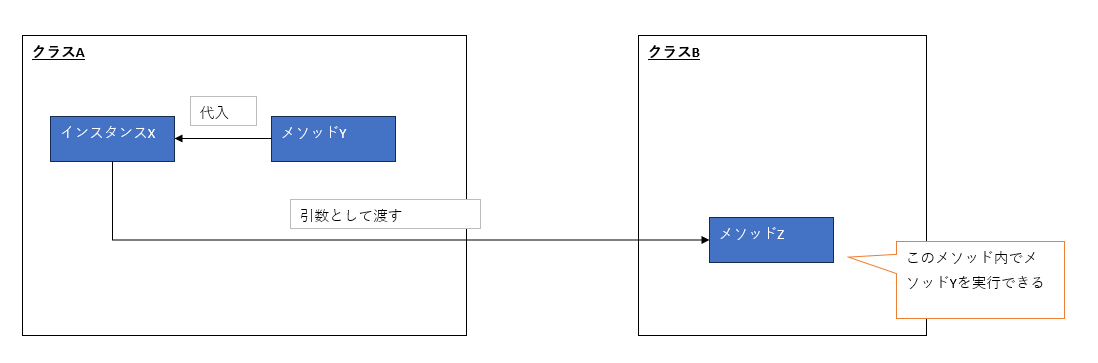
For example, you can use this when you want a callback to be invoked once some process completes.
Prerequisites
#To run the sample code in this article, set up your environment for C# development with Visual Studio or Visual Studio Code. For instructions on setting up Visual Studio Code, refer to this article:
Once your IDE is set up, create a console app project. The sample code in this article uses a console app for easy testing.
Explaining the Basics of Delegates with Sample Code
#Basic Delegate Syntax
#Let’s jump right in and write some code to see how it behaves.
Here’s runnable sample code. Create a class named DelegateSample and write the following:
using System;
using System.Collections.Generic;
using System.Linq;
using System.Text;
using System.Threading.Tasks;

namespace DelegateApp
{
    internal class DelegateSample
    {
        // Declare a delegate
        // It's like declaring a method type for the delegate
        delegate void SampleDelegate(string message);

        // Execute the sample
        public void ExecSample()
        {
            // Create an instance of the declared delegate type, passing a method as an argument
            // It might look odd, but think of it as creating an instance of a method type and assigning the method to it
            SampleDelegate sampleDelegate = new SampleDelegate(Console.WriteLine);

            // Try outputting a message
            // Since we assigned Console.WriteLine, invoking the delegate runs Console.WriteLine
            sampleDelegate("This is a test message");

            // Next, assign a custom method (just outputs a string to the console)
            sampleDelegate = TestMessage;
            sampleDelegate("curry and salad");

            Console.WriteLine();
        }

        void TestMessage(string message)
        {
            Console.WriteLine($"Tonight's dinner is planned to be {message}.");
        }
    }
}
And in Program.cs, write:
using DelegateApp;
using DelegateApp.Models;

Console.WriteLine("Starting delegate demo");

DelegateSample delegateSample = new DelegateSample();
delegateSample.ExecSample();
When you run this code, the following messages are displayed:

If you’re new to delegates, you might find this confusing or feel something’s off.
Declaring a delegate defines a method of the delegate type. Next, you create an instance using that declared method as the type. It might feel strange that the type is a method.
You can then assign methods to the delegate instance. Since this is the mechanism for invoking those methods, it works this way. Assigning a method to a variable is an unfamiliar action at first.
But you can see that as long as the parameters match, you can assign and invoke any compatible method.
There’s also something called a multicast delegate, which lets you combine multiple methods. For example, let’s add the following code to the DelegateSample class from before:
using System;
using System.Collections.Generic;
using System.Linq;
using System.Text;
using System.Threading.Tasks;

namespace DelegateApp
{
    internal class DelegateSample
    {
        // Declare a delegate
        // It's like declaring a method type for the delegate
        delegate void SampleDelegate(string message);

        // Execute the sample
        public void ExecSample()
        {
            // Create an instance of the declared delegate type, passing a method as an argument
            // It might look odd, but think of it as creating an instance of a method type and assigning the method to it
            SampleDelegate sampleDelegate = new SampleDelegate(Console.WriteLine);

            // Try outputting a message
            // Since we assigned Console.WriteLine, invoking the delegate runs Console.WriteLine
            sampleDelegate("This is a test message");

            // Next, assign a custom method (just outputs a string to the console)
            sampleDelegate = TestMessage;
            sampleDelegate("curry and salad");

            Console.WriteLine();

            // Starting additions
            // Actually, you can add methods
            sampleDelegate += TestMessageLunch;
            sampleDelegate("curry and salad");

            Console.WriteLine();

            // You can also remove previously added methods
            sampleDelegate -= TestMessage;
            sampleDelegate("curry and salad");
            // End of additions
        }

        void TestMessage(string message)
        {
            Console.WriteLine($"Tonight's dinner is planned to be {message}.");
        }

        // Add a method for lunch
        void TestMessageLunch(string message)
        {
            Console.WriteLine($"Tonight's lunch was {message}.");
        }
    }
}
When you run Program.cs, you’ll see:

In this code, we’re adding and removing methods on the delegate. Remarkably, a delegate instance can have multiple methods added, and you can remove methods you’ve added.
This is called a multicast delegate.
Understanding the Evolution of Delegates
#In fact, the way we wrote delegates above is the old-fashioned approach. It evolved, and in the C# 2.0 era, anonymous methods became available.
Here’s sample code using an anonymous method. Create a class called DelegateSampleAnonymous and write the following:
using System;
using System.Collections.Generic;
using System.Linq;
using System.Text;
using System.Threading.Tasks;

namespace DelegateApp
{
    internal class DelegateSampleAnonymous
    {
        // Declare a delegate
        // It's like declaring a method type for the delegate
        delegate void SampleDelegate(string message);

        // Execute the sample
        public void ExecSample()
        {
            // Now assign an anonymous method (in addition to named methods, you can assign anonymous methods)
            SampleDelegate sampleDelegate = delegate(string message)
            {
                Console.WriteLine($"Tonight's dinner is planned to be {message}.");
            };
            sampleDelegate("curry and salad");

            Console.WriteLine();

            // Try adding another anonymous method
            sampleDelegate += delegate(string message)
            {
                Console.WriteLine($"Tonight's lunch was {message}.");
            };
            sampleDelegate("curry and salad");

            Console.WriteLine();

            // Note that you can't remove an anonymous method once added
            // To remove it, you must first assign it to an instance and then add it
            SampleDelegate workDelegate = delegate(string message)
            {
                Console.WriteLine($"Tonight's breakfast was {message}.");
            };
            sampleDelegate += workDelegate;
            sampleDelegate("curry and salad");


            Console.WriteLine();
            sampleDelegate -= workDelegate;
            sampleDelegate("curry and salad");
        }
    }
}
And in Program.cs, write:
using DelegateApp;
using DelegateApp.Models;

Console.WriteLine("Starting delegate demo");

Console.WriteLine();
Console.WriteLine("Anonymous method example");
Console.WriteLine();

DelegateSampleAnonymous delegateSampleAnonymous = new DelegateSampleAnonymous();
delegateSampleAnonymous.ExecSample();
When you run it, you get:
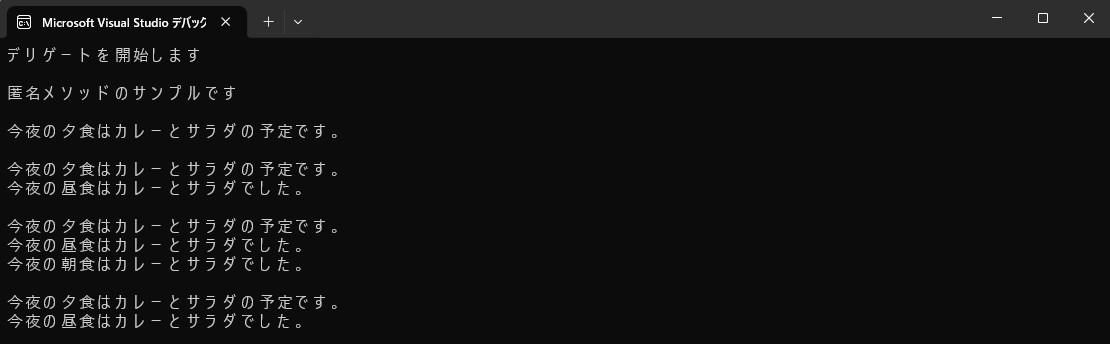
One tricky point here is that you cannot remove an anonymous method once it’s added. If you really need to remove it, you must assign it to an instance first before adding it. In the sample above, that’s workDelegate.
Nowadays, using lambda expressions is the mainstream approach. Here’s sample code using a lambda. Create a class called DelegateSampleLambda and write the following:
using System;
using System.Collections.Generic;
using System.Linq;
using System.Text;
using System.Threading.Tasks;

namespace DelegateApp
{
    internal class DelegateSampleLambda
    {
        // Declare a delegate
        // It's like declaring a method type for the delegate
        delegate void SampleDelegate(string message);

        // Execute the sample
        public void ExecSample()
        {
            // Now assign a lambda expression (in addition to named methods, you can assign lambdas)
            SampleDelegate sampleDelegate = (string message) =>
            {
                Console.WriteLine($"Tonight's dinner is planned to be {message}.");
            };
            sampleDelegate("curry and salad");

            Console.WriteLine();

            // Try adding another lambda expression
            sampleDelegate += (string message) =>
            {
                Console.WriteLine($"Tonight's lunch was {message}.");
            };
            sampleDelegate("curry and salad");

            Console.WriteLine();

            // Note that you can't remove a lambda once added
            // To remove it, you must first assign it to an instance and then add it
            SampleDelegate workDelegate = (string message) =>
            {
                Console.WriteLine($"Tonight's breakfast was {message}.");
            };
            sampleDelegate += workDelegate;
            sampleDelegate("curry and salad");


            Console.WriteLine();
            sampleDelegate -= workDelegate;
            sampleDelegate("curry and salad");
        }
    }
}
And in Program.cs, write:
using DelegateApp;
using DelegateApp.Models;

Console.WriteLine("Starting delegate demo");

Console.WriteLine();
Console.WriteLine("Lambda expression example");
Console.WriteLine();

DelegateSampleLambda delegateSampleLambda = new DelegateSampleLambda();
delegateSampleLambda.ExecSample();
When you run it, you get:
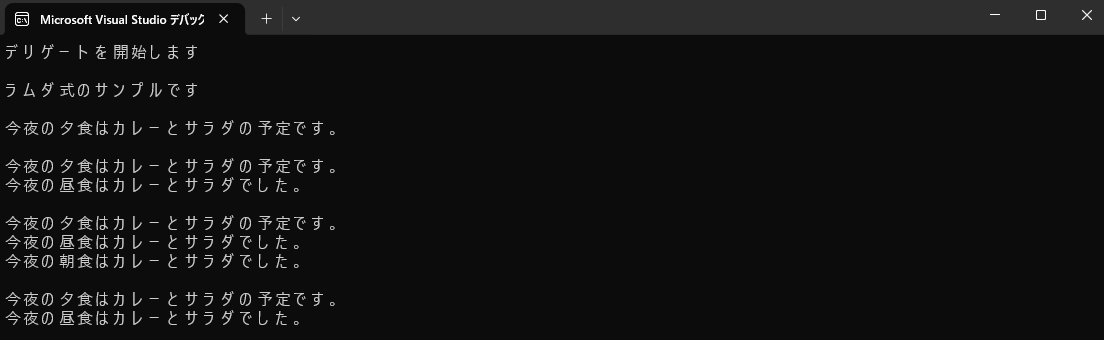
With lambda expressions, you don’t even need the delegate keyword anymore. This is the simplest way to write it.
No Declaration Needed with Func and Action
#Use Action for Methods with No Return Value
#Up to now, we’ve been declaring a delegate type method and assigning methods to its instance. Because you have to declare each delegate explicitly, you end up creating delegates for each use case.
As a generic solution, Action was introduced for cases with no return value, and Func for cases with a return value.
Here’s sample code using Action. Create a class called DelegateSampleAction and write the following. You specify argument types generically. Since you don’t have to declare a separate delegate type, the code becomes simpler.
using System;
using System.Collections.Generic;
using System.Linq;
using System.Text;
using System.Threading.Tasks;

namespace DelegateApp
{
    internal class DelegateSampleAction
    {
        public void ExecSample()
        {
            // Sample using an Action delegate
            // Action delegate has a void return type and allows specifying argument types
            Action<string> actionDelegate = (message) =>
            {
                Console.WriteLine($"Tonight's dinner is planned to be {message}.");
            };
            actionDelegate("curry and salad");
        }
    }
}
And in Program.cs, write:
using DelegateApp;
using DelegateApp.Models;

Console.WriteLine("Starting delegate demo");

Console.WriteLine();
Console.WriteLine("Action example");
Console.WriteLine();

DelegateSampleAction delegateSampleAction = new DelegateSampleAction();
delegateSampleAction.ExecSample();
When you run it, you get:

For adding or removing methods, use the + and - operators just as with delegate. Also, as with anonymous methods and lambdas, you can’t remove them once added, so if you need to remove one, assign it to an instance first before adding it.
Use Func for Methods with a Return Value
#Here’s sample code using Func. Create a class called DelegateSampleFunc and write the following. In the generic type specification, specify <argumentType, returnType>.
using System;
using System.Collections.Generic;
using System.Linq;
using System.Text;
using System.Threading.Tasks;

namespace DelegateApp
{
    internal class DelegateSampleFunc
    {
        public void ExecSample()
        {
            // Sample using an Action delegate
            // Action delegate has a void return type and allows specifying argument types
            Func<int, string> funcDelegate = (num) =>
            {
                return $"The entered value is {num}.";
            };
            Console.WriteLine(funcDelegate(5));
        }
    }
}
And in Program.cs, write:
using DelegateApp;
using DelegateApp.Models;

Console.WriteLine("Starting delegate demo");

Console.WriteLine();
Console.WriteLine("Func example");
Console.WriteLine();

DelegateSampleFunc delegateSampleFunc = new DelegateSampleFunc();
delegateSampleFunc.ExecSample();
When you run it, you get:

With Func as well, adding and removing methods works the same as when using delegate.
Actual Use Cases for Delegates
#Callback Processing
#Here’s sample code for callback processing. Create a class called CallbackSample and write the following:
using System;
using System.Collections.Generic;
using System.Linq;
using System.Text;
using System.Threading.Tasks;

namespace DelegateApp
{
    internal class CallbackSample
    {
        // Sample for callbacks
        // Here, we pass a method as a delegate to be called after the processing is done
        // By using a delegate, you can freely change which method is called after processing is complete
        public void ExecSample(string message, Action<string> callback)
        {
            Console.WriteLine($"Processing: {message}");
            // Invoke the callback after processing completes
            callback?.Invoke($"Processing completed: {message}");
        }
    }
}
And in Program.cs, write:
using DelegateApp;
using DelegateApp.Models;

Console.WriteLine("Starting delegate demo");

Console.WriteLine();
Console.WriteLine("Callback example");
Console.WriteLine();

CallbackSample callbackSample = new CallbackSample();
callbackSample.ExecSample("curry and salad", (result) =>
{
    Console.WriteLine(result);
});
When you run it, you get:

In this way, by defining Func or Action in a method’s arguments, you can receive processing logic. Then you use the Invoke method to execute it.
Switching Processing Logic Based on Conditions
#Actually, LINQ’s Where takes a Func as its argument. In other words, Where uses delegates under the hood.
Let’s create an example where the result changes depending on the Func you pass. Create a class called DelegateSampleLinq and write the following:
using System;
using System.Collections.Generic;
using System.Linq;
using System.Text;
using System.Threading.Tasks;

namespace DelegateApp
{
    internal class DelegateSampleLinq
    {
        public void ExecSample()
        {
            List<int> numbers = new List<int> { 1, 2, 3, 4, 5, 6, 7, 8, 9, 10 };

            // First, extract only even numbers
            var evenNumbers = FilterNumbers(numbers, (num) => num % 2 == 0);
            Console.WriteLine("List of even numbers:");
            Console.WriteLine(evenNumbers.Count > 0 ? string.Join(", ", evenNumbers) : "No matching values.");

            // Next, extract odd numbers
            var oddNumbers = FilterNumbers(numbers, (num) => num % 2 != 0);
            Console.WriteLine("List of odd numbers:");
            Console.WriteLine(oddNumbers.Count > 0 ? string.Join(", ", oddNumbers) : "No matching values.");
        }

        /// <summary>
        /// Executes the passed-in Func and returns only values that match the condition
        /// </summary>
        /// <param name="numbers"></param>
        /// <param name="predicate"></param>
        /// <returns></returns>
        static List<int> FilterNumbers(List<int> numbers, Func<int, bool> predicate)
        {
            List<int> resultList = new List<int>();
            foreach (var number in numbers)
            {
                if (predicate(number))
                {
                    resultList.Add(number);
                }
            }
            return resultList;
        }
    }
}
And in Program.cs, write:
using DelegateApp;
using DelegateApp.Models;

Console.WriteLine("Starting delegate demo");

Console.WriteLine();
Console.WriteLine("Condition switching example");
Console.WriteLine();

DelegateSampleLinq delegateSampleLinq = new DelegateSampleLinq();
delegateSampleLinq.ExecSample();
When you run it, you get:

Using event to Address the Vulnerabilities of Delegates
#So far, we’ve looked at various ways to use delegates.
However, while they’re convenient, they also come with risks. You can change the processing logic to anything just by reassigning it, and you can execute it anywhere using Invoke. It’s undeniable that this makes them vulnerable.
At worst, this can lead to bugs or even security vulnerabilities. By adding the event keyword, you prevent assignment and invocation from external classes.
Here’s sample code using event. Create a class called DelegateSampleEvent and write the following:
using System;
using System.Collections.Generic;
using System.Linq;
using System.Text;
using System.Threading.Tasks;

namespace DelegateApp
{
    internal class DelegateSampleEvent
    {
        // It's public, so other classes can access it
        public event Func<int, string> SampleEvent;
    }

    internal class DelegateSampleExternal
    {
        public void ExecSample()
        {
            DelegateSampleEvent sample = new DelegateSampleEvent();

            // Delegate assignment from external classes is not allowed
            sample.SampleEvent = (int x) => $"The entered value is {x}.";

            // Adding and removing delegates from external classes is allowed
            sample.SampleEvent += (int x) => $"The entered value is {x}.";
            Func<int, string> func = (int x) => $"Today I drank {x} cups of coffee.";
            sample.SampleEvent += func;
            sample.SampleEvent -= func;

            // Invocation from external classes is not allowed
            sample.SampleEvent.Invoke(99);
        }
    }
}
If you write the code as above, you’ll get compile errors at the assignment and Invoke method lines, as shown in the screenshot below.
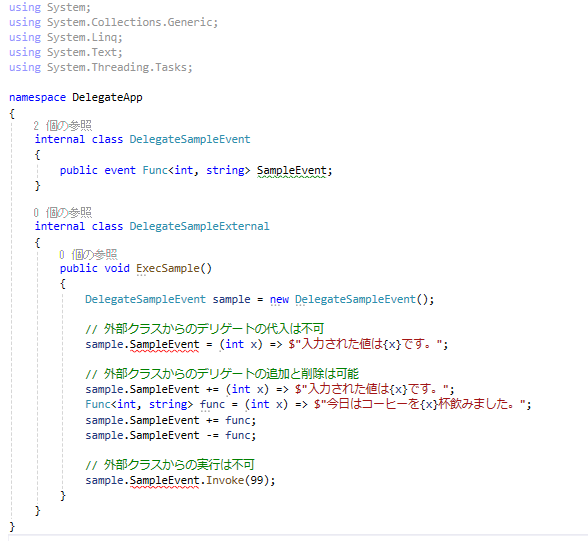
For now, please comment out the parts of the code that cause compile errors.
Practicing Delegates with a Food Court Order Example
#Now that we’ve understood how delegates work, let’s practice by imagining a real-world scenario. We’ll use a sweets shop in a food court as the theme. I thought it would be more fun than just displaying text or doing calculations, and that it would make the concept of delegation easier to visualize.
The business flow is shown in the diagram below:
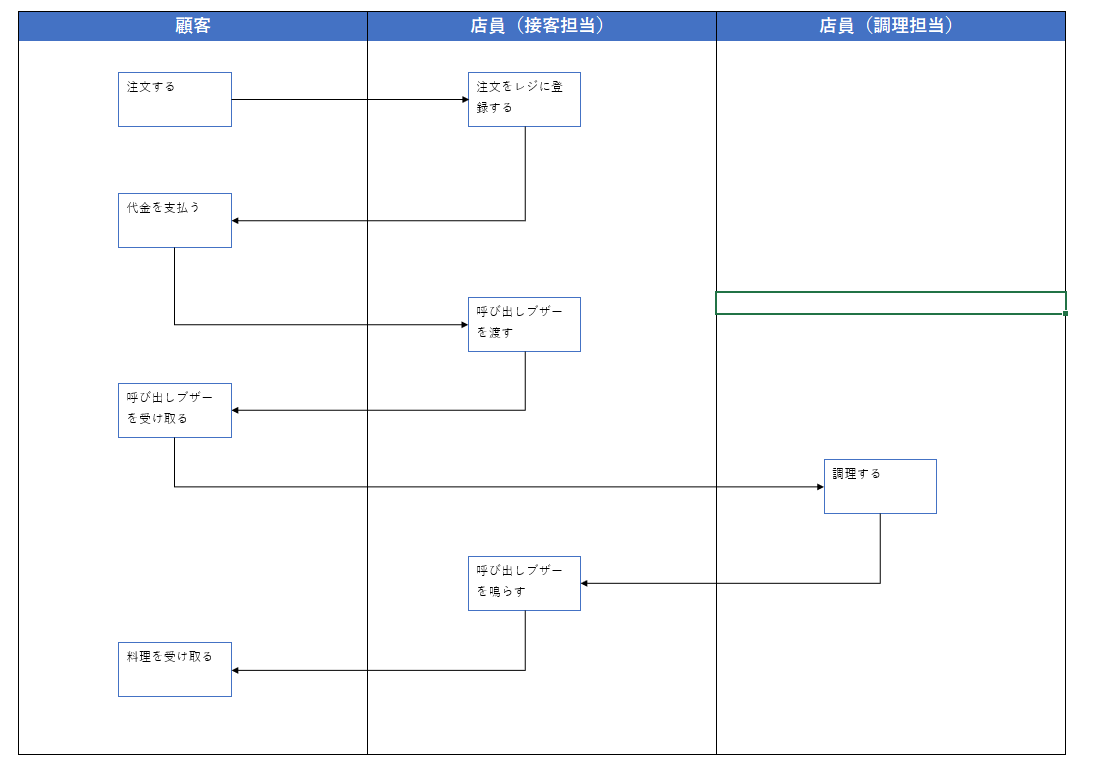
Here, I’ll skip over many details in the code explanation. Ideally, you’d want to have order details and make the order contents dynamic, but since that’s not the main focus here, we’ll suffice with simple messages.
Now, here’s the source code. Create a folder named Models, and inside it create the following five classes:
using System;
using System.Collections.Generic;
using System.Linq;
using System.Text;
using System.Threading.Tasks;

namespace DelegateApp.Models
{
    internal class Buzzer
    {
        public int No { get; set; }

        public Buzzer(int no)
        {
            No = no;
        }

        public void Ring()
        {
            Console.WriteLine($"Beep! Beep! Beep! Buzzer number {No} is ringing!");
        }
    }
}
using System;
using System.Collections.Generic;
using System.Linq;
using System.Text;
using System.Threading.Tasks;

namespace DelegateApp.Models
{
    internal class Cook
    {
        public void CookOrder(Order order)
        {
            Console.WriteLine($"The cook received the order: {order.OrderContent}");
            Console.WriteLine("Cooking the order...");
            Console.WriteLine("The dish is ready!");
        }
    }
}
using System;
using System.Collections.Generic;
using System.Linq;
using System.Text;
using System.Threading.Tasks;

namespace DelegateApp.Models
{
    internal class Customer
    {
        private Buzzer Buzzer { get; set; }

        public Order MakeOrder()
        {
            Console.WriteLine("Customer placed the order.");
            return new Order("Pancake and coffee set");
        }

        public void Pay()
        {
            Console.WriteLine("Customer has paid.");
        }

        public void PickUpBuzzer(Buzzer buzzer)
        {
            Buzzer = buzzer;
            Console.WriteLine($"Customer picked up buzzer number {buzzer.No}.");
        }

        public void PickUpFood()
        {
            Console.WriteLine($"Customer handed over buzzer number {Buzzer.No}.");
            Console.WriteLine("Customer picked up the food.");
        }
    }
}
using System;
using System.Collections.Generic;
using System.Linq;
using System.Text;
using System.Threading.Tasks;

namespace DelegateApp.Models
{
    internal class Order
    {
        public string? OrderContent { get; set; }
        public Order(string? orderContent)
        {
            OrderContent = orderContent;
        }
    }
}
using System;
using System.Collections.Generic;
using System.Linq;
using System.Text;
using System.Threading.Tasks;

namespace DelegateApp.Models
{
    internal class Staff
    {
        private delegate void BuzzerRingHandler();
        private IDictionary<int, BuzzerRingHandler> _buzzerHandlers = new Dictionary<int, BuzzerRingHandler>();

        public void TakeOrder(Order order)
        {
            Console.WriteLine($"Staff received the order: {order.OrderContent}");
            Console.WriteLine("The total is 1,500 yen.");
        }

        public Buzzer HandOverBuzzer(int no)
        {
            Buzzer buzzer = new Buzzer(no);
            Console.WriteLine($"Staff handed over buzzer number {no}.");
            _buzzerHandlers.Add(no, buzzer.Ring);
            return buzzer;
        }

        public void RingBuzzer(int no)
        {
            if (_buzzerHandlers.TryGetValue(no, out var buzzer))
            {
                buzzer.Invoke();
                _buzzerHandlers.Remove(no);
            }
        }
    }
}
And in Program.cs, write:
using DelegateApp;
using DelegateApp.Models;

Console.WriteLine("Starting delegate demo");

Console.WriteLine();
Console.WriteLine("Food court sample: ring a buzzer when the order is ready");
Console.WriteLine();

Customer customer = new Customer();
Staff staff = new Staff();
Cook cook = new Cook();

Order order = customer.MakeOrder();
// Place order and payment
staff.TakeOrder(order);
customer.Pay();

// Hand over the buzzer
int no = 1;
Buzzer buzzer = staff.HandOverBuzzer(no);
customer.PickUpBuzzer(buzzer);

// Cook
cook.CookOrder(order);

// Ring the buzzer and hand over the food
staff.RingBuzzer(no);
customer.PickUpFood();
When you run it, you get:
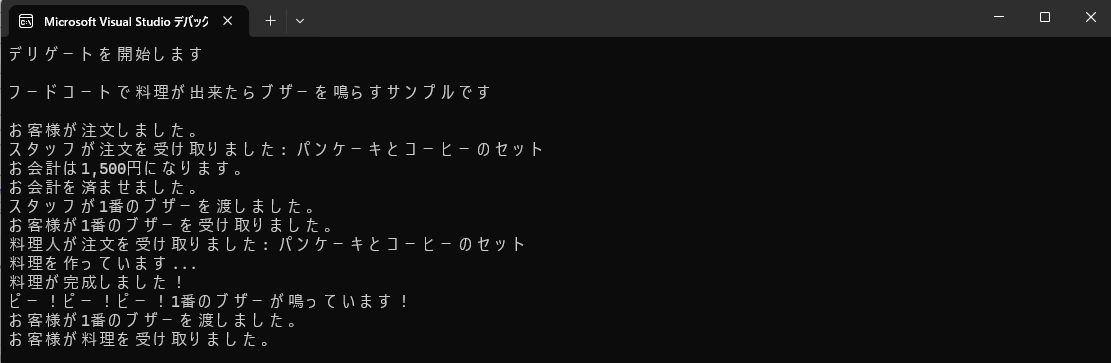
The key point is that the staff tracks which customer received which buzzer number.
In the program, the Staff class holds a dictionary mapping buzzer numbers to the method that rings that buzzer.
This allows the staff to ring the buzzer that the customer is holding when the order is ready.
Conclusion
#By writing code and running it, I learned a bit about what delegates are. As expected, writing and running code is the best way to understand things.
If you’re having trouble understanding delegates, try creating something like the food court example from this article.