Leveraging yalc for Library Development
Back to Top
To reach a broader audience, this article has been translated from Japanese.
You can find the original version here.
Introduction
#When you turn common functionality or API schemas into libraries for use, you typically publish the modularized components and integrate them into each application.
You should verify operations with test code, but when actually integrating, minor tweaks often arise.
Using relative file references can lead to issues like changes in the dist directory structure shifting the entry point file location.
This article explains how to solve these troubles by leveraging yalc.
What is yalc?
#yalc is a tool that allows you to publish npm packages you're developing locally to your local environment and integrate them into applications just like packages published to GitHub Packages or other registries.
Differences from similar mechanisms npm link / npm pack
#| Aspect | yalc | npm link | npm pack |
|---|---|---|---|
| Actual dependency reference | Unpacks into .yalc and node_modules (close to normal usage) |
Symbolic links | Manually create/distribute tarballs |
| Ease of reflecting changes | Propagates to consumers with yalc push |
Environment inconsistencies due to linked modules | Requires pack/install each time |
| Suitable for operations | Easy to verify across multiple apps simultaneously | Suitable for small-scale or one-off verification | Suitable for reviewing distribution artifacts |
| Accident prevention | Can detect contamination with yalc check |
No contamination detection by default | Watch out for procedure being person-dependent |
Usage Steps
#This section describes the development flow using yalc.
We will use the following setup:
- Library
- Directory: packages/math-utils
- Package name: @sample-yalc/math-utils
- Version: 1.0.0
- Project using the library
- Directory: demo-app
Commonly used commands
| Command | Description |
|---|---|
yalc publish |
Publish the package to the yalc store |
yalc push |
Republish the package and propagate changes to consumers |
yalc add <package> |
Add a package |
yalc update |
Update an added package |
yalc remove <package> |
Remove a package |
yalc remove --all |
Remove all yalc packages |
yalc installations show <package> |
Show package installations |
yalc installations clean <package> |
Clean package installations |
Quick Start (3 minutes)
#- Publish on the library side
cd packages/math-utils yalc publish - Add on the consumer side
cd demo-app yalc add @sample-yalc/math-utils - Reflect library changes
cd packages/math-utils
yalc push
That's basically it.
In the following sections, we explain the detailed flow with diagrams, so please also take a look.
Prerequisites
#First, install yalc.
- Installation
npm install -g yalc
Flow from local publishing of the library to usage
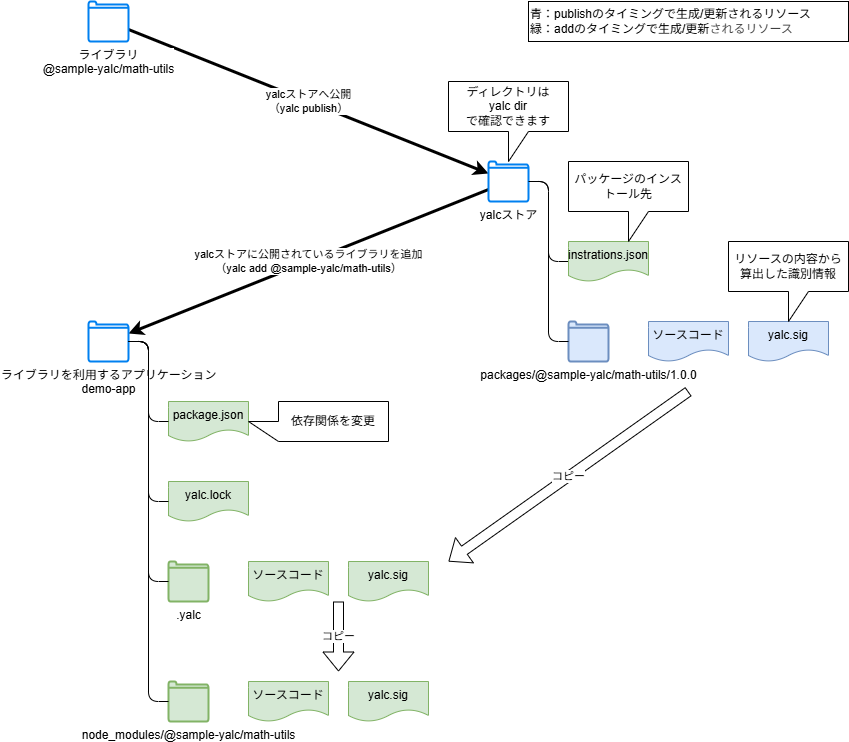
#The flow to publish a library you're developing locally to your local environment and then use it is as follows.
-
Publish the package locally (Library side)
When you run publish, the package is stored in your local yalc store.
- Copy the package to the yalc store
- yalc.sig: Identifier calculated from the package contents. Used to determine whether the library has changed.
- package.json in the yalc store: The yalcSig is appended
$ cd packages/math-utils $ yalc publish @sample-yalc/math-utils@1.0.0 published in store.Informationyalc store
This is the location where packages published with yalc are stored.- Windows:
%LOCALAPPDATA%\Yalc(e.g.C:\Users\sample-user\AppData\Local\Yalc) - mac/Linux:
~/.yalc
You can check the actual directory with:
$ yalc dir C:\Users\sample-user\AppData\Local\Yalc -
Add the package to the project (Consumer side)
When you run add, it imports the package and updates dependencies.
- installations.json: Adds an entry as an installation target
- package.json: Adds/updates dependencies
"dependencies": { // The package reference path is changed to .yalc "@sample-yalc/math-utils": "file:.yalc/@sample-yalc/math-utils" }, - .yalc: The package is copied from the yalc store
- node_modules/{package scope/package name}: The package is copied from .yalc
- yalc.lock: A new file is created
$ cd demo-app
$ yalc add @sample-yalc/math-utils
Package @sample-yalc/math-utils@1.0.0 added ==> C:\Users\sample-user\demo-app\node_modules\@sample-yalc\math-utils
At this point, you can use it just like a package published remotely.
Propagate library changes
#
-
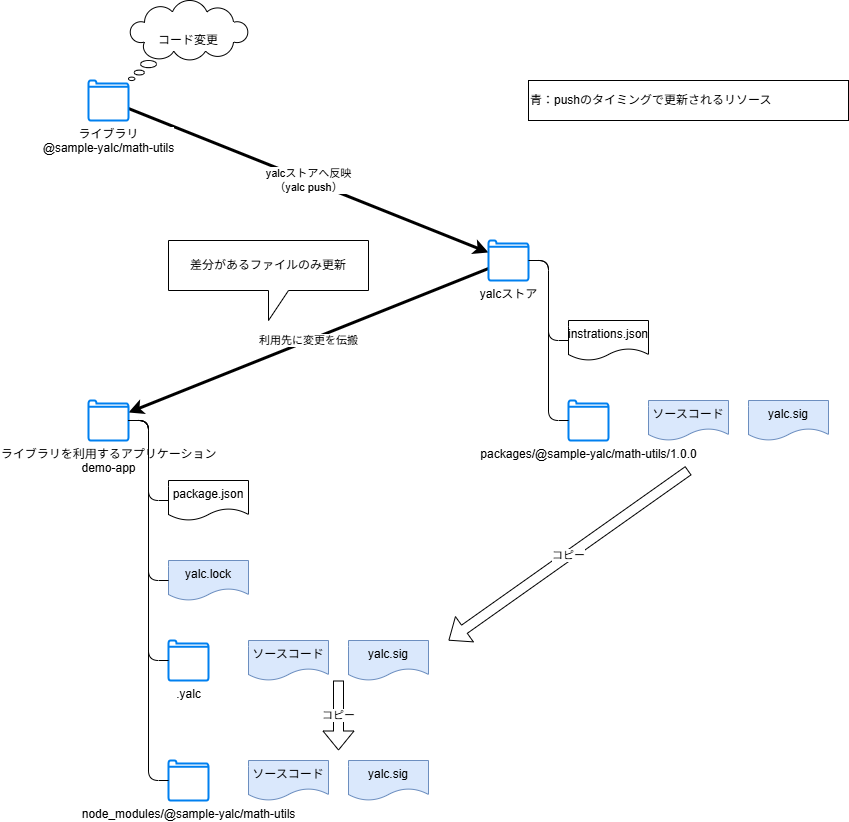
Modify the library code (Library side)
-
Propagate changes (Library side)
When you run push, it propagates the changes to consumers.
- Republish the package to the yalc store
- Reflect the updated package in consumers (may fail due to misconfiguration)
$ cd packages/math-utils
$ yalc push
Uninstalling the library
#
-
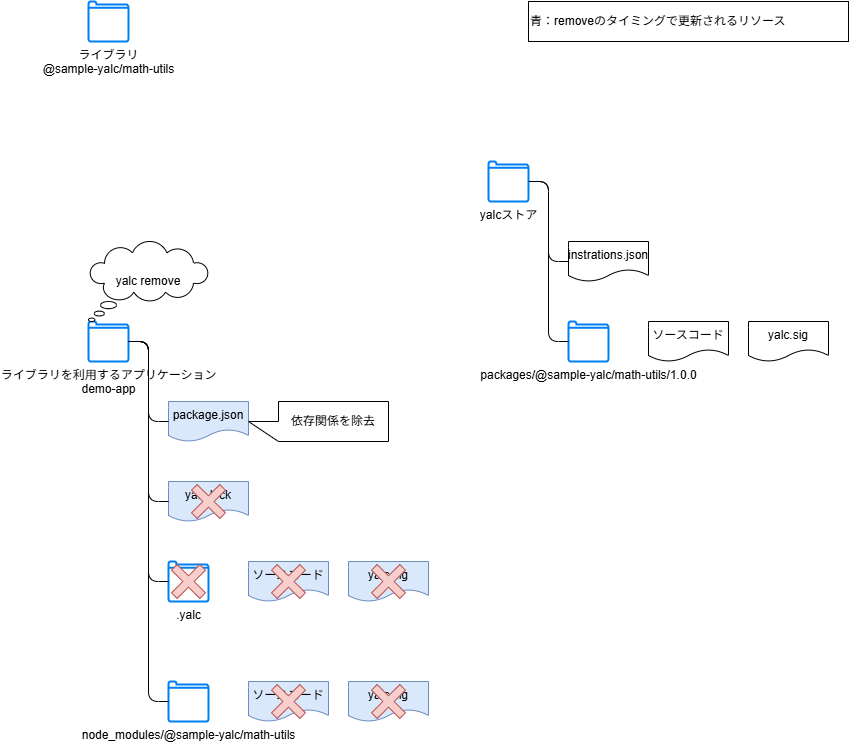
Remove the yalc package (Consumer side)
When you run remove, the library copied on the consumer side is deleted.
package.json: Removes the dependency.yalc: Deletes the directorynode_modules/{package scope/package name}: Deletes the directoryyalc.lock: Removes the dependency- If there are no locked yalc packages left, the file is deleted entirely.
- yalc store packages: are not deleted
$ cd demo-app
$ yalc remove @sample-yalc/math-utils # To remove a specific yalc package
$ yalc remove --all # To remove all yalc packages
Appendix: Usage Notes
#Exclude yalc-related files from git tracking
#- Since this is a tool only for development, when using yalc, register the relevant files in .gitignore.
# yalc
.yalc/
yalc.lock
Prevent contamination before committing with yalc check
#If .yalc references (file:.yalc/... or link:.yalc/...) remain in package.json when committing, it can cause issues in CI or other environments.
# Check if any yalc dependencies remain in package.json
yalc check
Configuring this to run in a pre-commit hook helps prevent accidental commits.
Package does not update
#- Remove the yalc package once, then re-add it.
# Clear the cache and re-add yalc remove @sample-yalc/math-utils yalc add @sample-yalc/math-utils - (If removing the yalc package doesn't work) remove node_modules, then re-add.
# Remove node_modules and reinstall rm -rf node_modules # Remove-Item -Recurse -Force node_modules # For PowerShell npm install yalc add @sample-yalc/math-utils - (If that still doesn't work) The installation path may be incorrect. Check and correct the path if it's wrong.
# Information about a specific package
yalc installations show @sample-yalc/math-utils
Summary
#Being able to test functionality while developing the library is extremely helpful.
If you have faced similar challenges, why not incorporate it into your development process?
