Tried the Ralph Loop with Kiro CLI
Back to Top
To reach a broader audience, this article has been translated from Japanese.
You can find the original version here.
Introduction
#Autonomous development with AI agents is appealing, but there's an issue where prolonged processing leads to context degradation and reduced accuracy. One notable approach to address this challenge is the Ralph Loop (an autonomous development method that discards context each time and continues processing in a new session). In this article, we share our evaluation results of the Ralph Loop using Kiro CLI[1] (a CLI tool that supports autonomous development with AI agents) and the lessons learned from practice.
Background: Context Management Challenges and the Ralph Loop
#A traditional challenge in AI chat is that with long conversations, the context gets compressed or degraded, leading to a drop in accuracy[2].
The core principle of the Ralph Loop is avoiding context corruption[3]. After each task is completed, the context is discarded and the next task begins in a new session, forming a loop structure. It may seem like a simple technique, but it is believed to enable long-running task execution while maintaining stable accuracy.
In our evaluation, instead of the classic setup of Claude Code + PRD.md (Product Requirements Document), we replaced it with the three specification deliverables from Kiro IDE[4] (an IDE that interactively supports everything from specification creation to task management)—requirements.md, design.md, and tasks.md. We aimed to improve accuracy through structured directives.
Test Subject: Spreadsheet Application
#For this evaluation, we developed a lightweight spreadsheet application that runs in a web browser.
Application Specifications
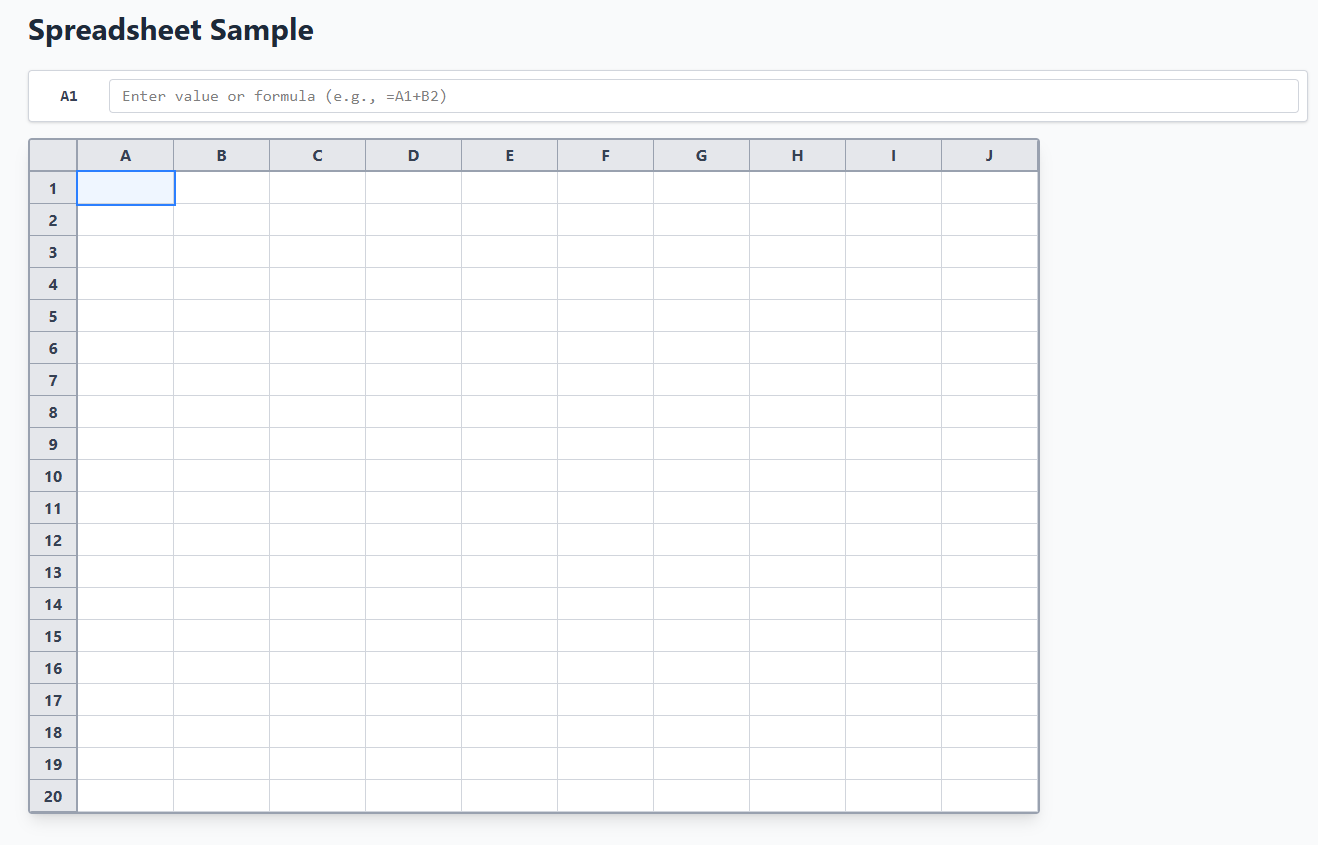
#- A 10×20 grid with cell references and basic arithmetic operations
- SUM/AVG functions and circular reference error detection
- Tech stack: React + TypeScript + Vite + Vitest
The selection criteria focused on an application that is relatively complex and likely to push the context to its limits, causing processing to go off track. By combining multiple intertwined concepts—formula parsing, dependency graphs, and circular reference detection—it served as a suitable subject to test the practical viability of the Ralph Loop.
Completed Application
#Let us first introduce the spreadsheet application we developed.
On the initial screen, a 10×20 grid and a formula bar are displayed, as shown below.
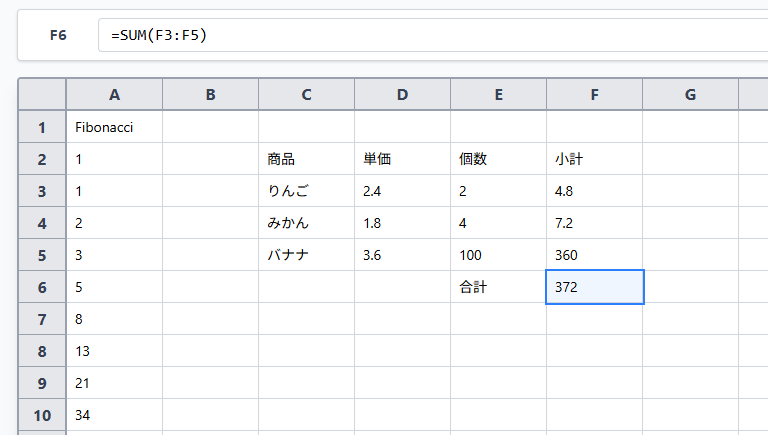
Cell references, basic arithmetic operations, and SUM/AVG functions are implemented, allowing automatic calculations via formulas. As an input example, we performed a simple numerical calculation using the SUM function.
Test Quality
#Through autonomous execution, the following tests were automatically generated and implemented.
- Total test cases: 126 tests
- Unit tests: 101 tests
- Property-based tests (a testing approach that verifies specification properties using random inputs): 25 tests
Kiro CLI autonomously built a test suite following a test-driven development approach, including property-based tests for random input verification. It generated tests that efficiently validate circular reference detection and formula evaluation accuracy, even for input patterns that are difficult for humans to predict, thereby contributing to quality assurance.
Implementation Steps
#We proceeded with the Ralph Loop implementation in the following two steps:
Step 1: Preparation Phase with Kiro IDE
#Project Structure
#First, prepare the project directory structure as follows.
project/
├── .kiro/specs/spreadsheet-sample/
│   ├── requirements.md      # Requirements definition using the EARS notation
│   ├── design.md            # System design document
│   └── tasks.md             # Implementation task list
├── progress.txt             # Records implementation progress (carried over between iterations)
├── ralph-once.sh            # Script for one-off execution
└── afk-ralph.sh             # Ralph Loop control script
1-1. Creating Specification Deliverables
#Define the specifications for the spreadsheet application using Kiro IDE.
In Spec mode, generate the following three specification deliverables in the .kiro/specs/spreadsheet-sample/ directory.
- requirements.md: Requirements definition using the EARS notation (a syntax rule for requirement definitions). Acceptance criteria are clearly described.
- design.md: System design document. Includes architecture and component design.
- tasks.md: Implementation task list. Kiro CLI reads this and implements incomplete tasks.
Through interaction with the Kiro IDE, convey the application requirements and complete these specification deliverables. At this stage, no code is generated yet.
1-2. Creating the Shell Script
#Next, create the shell script afk-ralph.sh to control the Ralph Loop. The implementation of the shell script was based on the AIHero.dev guide[5].
Main Loop
#for ((i=1; i<=${1}; i++)); do
echo "loop iteration $i"
# Read the three spec files and progress.txt
req="$(cat "${SPEC_DIR}/requirements.md")"
des="$(cat "${SPEC_DIR}/design.md")"
tasks="$(cat "${SPEC_DIR}/tasks.md")"
progress="$(cat progress.txt 2>/dev/null || echo 'No progress yet')"
# Replace placeholders with actual content
prompt="$(build_prompt)"
prompt="${prompt/__REQ__/$req}"
prompt="${prompt/__DES__/$des}"
prompt="${prompt/__TASKS__/$tasks}"
prompt="${prompt/__PROGRESS__/$progress}"
logfile="/tmp/kiro-iteration-${i}.log"
kiro-cli chat --no-interactive --trust-all-tools "$prompt" 2>&1 | tee "$logfile"
# Determine exit condition based on number of incomplete tasks in tasks.md and COMPLETE output
uncompleted=$(grep -cE '^\- \[ \]' "${SPEC_DIR}/tasks.md" 2>/dev/null || echo "0")
has_promise=$(grep -q "<promise>COMPLETE</promise>" "$logfile" && echo "yes" || echo "no")
if [ "$uncompleted" -eq 0 ] && [ "$has_promise" = "yes" ]; then
echo "All tasks verified complete after $i iterations."
exit 0
fi
done
Execution Options and Risks
#The following two important options are specified for running Kiro CLI:
--no-interactive: Disables interactive mode and automatically runs without waiting for user input--trust-all-tools: Automatically approves all tool executions and does not prompt for command execution confirmation
These options enable fully autonomous execution, but they carry the risk of executing unintended commands. Therefore, it is essential to run in an isolated environment such as a devcontainer. As discussed later in the "Insights and Lessons Learned" section, we do not recommend running without environment isolation.
Prompt to the AI Agent
#build_prompt() {
cat <<'PROMPT'
[Requirements]__REQ__
[Design]__DES__
[Task List]__TASKS__
[Progress]__PROGRESS__
1. Understand requirements and design
2. Review the task list and progress, and find the next incomplete task
3. Execute that task
4. Commit changes
5. After completion, update the checkbox in tasks.md from [ ] to [x] (mandatory)
6. Append the completed work to progress.txt (mandatory)
Implement only one task per run
Using npm run test is prohibited; always use npm run test:unit or npm run test -- --run
Persistent processes are prohibited; only execute commands that terminate in a single run
(...)
Only output <promise>COMPLETE</promise> when all tasks are complete
Never output <promise>COMPLETE</promise> if any [ ] incomplete tasks remain in tasks.md
PROMPT
}
Step 2: Running the Ralph Loop with Kiro CLI
#Run the shell script in a devcontainer (container-based development with VS Code) environment to start the Ralph Loop.
$ ./afk-ralph.sh 10
START afk-ralph.sh
loop iteration 1
# ... kiro-cli implements and commits task 1 ...
loop iteration 2
# ... kiro-cli implements and commits task 2 ...
...
All tasks verified complete after 7 iterations.
The argument 10 specifies the maximum number of iterations. In each iteration, Kiro CLI starts with a new context and executes a task.
The figure above shows the transition to iteration 2 after completing tasks 2.2 and 2.3.
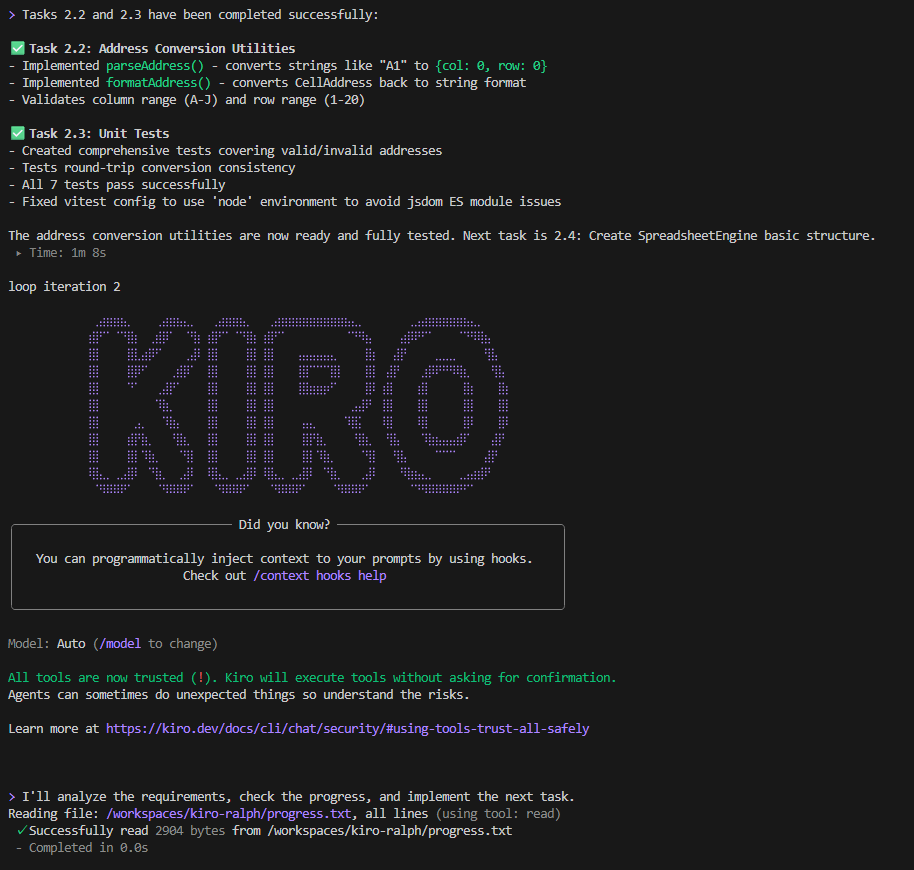
In each iteration, the following steps are executed:
- Load the three specification deliverables and progress
- Identify the next incomplete task
- Implement the task and run tests
- Commit the changes
- Update the checkbox in tasks.md
- Record progress in progress.txt
Insights and Lessons Learned
#Environment Isolation is Essential
#Autonomous execution assumes full auto-approval of execution commands, so you never know what might happen. This time, we ran it in a devcontainer environment. We felt how difficult it is to predict AI behavior—for example, progress files can end up in multiple locations.
Eliminate Wait Modes and Interactive Prompts
#For autonomous execution, it is necessary to avoid interruptions. In this case, we instructed the AI via the prompt to prohibit any commands that involve interactive confirmations or wait states.
High Token Consumption
#Because each process starts a new session and re-inputs everything from scratch, token consumption increases compared to traditional methods. It is necessary to run in an environment with sufficient resources.
Conclusion
#The basic functionality of the completed application worked without issues, but the feature gap compared to commercial products was evident. Nevertheless, the experience of starting the script at night and waking up to a working application made us realize the potential of AI agents.
This time, it was a simple subject that could be completed in a few dozen iterations, but we are considering taking on the challenge of developing a complex application that requires several hundred iterations.
The repository developed for this project is available at the link below (it may be taken down without notice):
AWS. Introducing Kiro CLI. ↩︎
16x Engineer. LLM Context Management Guide: Performance degrades with more context. ↩︎
The Ralph Wiggum Loop from 1st principles (by the creator of Ralph). YouTube. ↩︎
AWS. Introducing Kiro. ↩︎
AIHero.dev. Getting Started with Ralph: Create your script. ↩︎
