Getting Started with SysML v2 Modeling Using the Free OSS Tool SysON (1) ~ Introduction to SysON
Back to Top
To reach a broader audience, this article has been translated from Japanese.
You can find the original version here.
SysML Version 2.0 (SysML v2) was officially released in September 2025.
Have you ever wanted to try out SysML v2 only to find that the supporting tools are expensive, or that using a general-purpose drawing tool to create SysML v2 models just doesn't quite click? In this article, we'll introduce SysON, a tool we recommend for those who want to experiment with SysML v2's graphical notation.
What is SysON
#SysON (pronounced sis-on or syson) is a tool for primarily creating and editing SysML v2's graphical notation. The name derives from the ideas of “switching on the system” and “a new season of system modeling” (since “season” and “syson” sound somewhat alike).
SysON's source code is published on GitHub. The license is EPL-2.0. As you can see from the GitHub repository name (eclipse-syson/syson), this tool is developed and maintained by the SysON project of the Eclipse Foundation. The SysON project is led by OBEO (France) and CEA (French Alternative Energies and Atomic Energy Commission), with the actual development work carried out by OBEO.
By the way, when you think of “an OSS tool from France under the Eclipse Foundation,” you might think of Papyrus, a UML2 modeling tool. Since it's not well known in Japan, many may be unaware of it. In fact, OBEO, the same company behind SysON, is also responsible for Papyrus's development. Papyrus supports SysML v1, so the division seems to be: Papyrus for SysML v1, and SysON for SysML v2.
SysON Architecture
#SysON is a web application. Users access the SysON server with a web browser on a client PC. Any modeling operations performed by the user in the browser are executed on the SysON server.
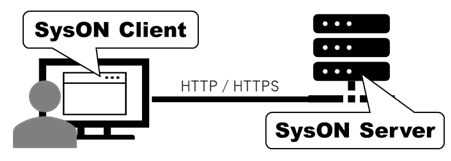
Modeling by multiple users is possible, and since the SysML v2 specification also requires a REST API, a web application is a reasonable choice. However, the downside is that depending on network conditions, performance may be slow and updates may not be displayed immediately, which could become frustrating once you get used to modeling operations.
The supported web browsers listed in the manual are the latest stable versions of Google Chrome and Firefox. If you intend to use other browsers such as Safari, Microsoft Edge, or Opera, it's best to test compatibility first.
An English user manual for SysON is also available.
Installation
#Prerequisites
#First, decide which release to install.
The releases are listed on the Eclipse SysON website. If you check the GitHub tags, you'll see many tags, but those ending in “.0” are considered stable releases.
In this article, we'll install the stable release v2025.8.0.
The installation methods are described in the manual (v2025.8.0). The manual lists four installation methods, which can be broadly categorized into two types: local test setup and production setup. If you don't care about security, choose the local test setup; for environments where security is a concern, use the production setup.
This article assumes you want to try out SysML v2, so we'll perform the installation using the Basic Local Test Setup.
The local test installation of SysON uses Docker Engine. While Docker Desktop is commercial, Docker Engine is available under the Apache License 2.0, so it's free. We will omit the Docker Engine installation steps here. I installed Docker Engine on Windows 11 with WSL2 (Debian/Linux).
Once Docker Engine is installed, we can begin installing SysON.
Downloading docker-compose.yml
#Using your web browser, navigate to the SysON web page on GitHub and download docker-compose.yml.
If you prefer to use curl to download docker-compose.yml, use the following command.
curl -OL https://raw.githubusercontent.com/eclipse-syson/syson/refs/tags/v2025.8.0/docker-compose.yml
Starting Docker
#Let's check the current status before starting the Docker Engine service.
Check the status of the docker service with the service command.
sudo service docker status
If the docker service is not running, you will see the following message.
Docker is not running ... failed!
Start the Docker Engine service.
sudo service docker start
Check the service status again.
Docker is running.
The docker service has started.
In the folder containing the docker-compose.yml file you just downloaded, run the following command.
docker compose up
When the SysON server boots, you will see the following logo in the console log:
app-1       |     _____               ____   _   __
app-1       |    / ___/ __  __ _____ / __ \ / | / /
app-1       |    \__ \ / / / // ___// / / //  |/ /
app-1       |   ___/ // /_/ /(__  )/ /_/ // /|  /
app-1       |  /____/ \__, //____/ \____//_/ |_/
app-1       |        /____/
app-1       |
app-1       |  :: Spring Boot ::         (v3.5.0)
app-1       |
When the startup completes successfully, the following messages are displayed:
app-1       | 2025-12-01T06:45:59.914Z  INFO 1 --- [           main] o.s.b.w.embedded.tomcat.TomcatWebServer  : Tomcat started on port 8080 (http) with context path '/'
app-1       | 2025-12-01T06:45:59.937Z  INFO 1 --- [           main] org.eclipse.syson.SysONApplication       : Started SysONApplication in 18.896 seconds (process running for 19.808)
Tomcat started on port 8080 (http) indicates that the Apache Tomcat web server has started.
Once the SysON server has started, let's finally access it from a web browser.
Initial Screen
#Launch your web browser and navigate to http://localhost:8080.
If the following home screen appears, you are ready to go.
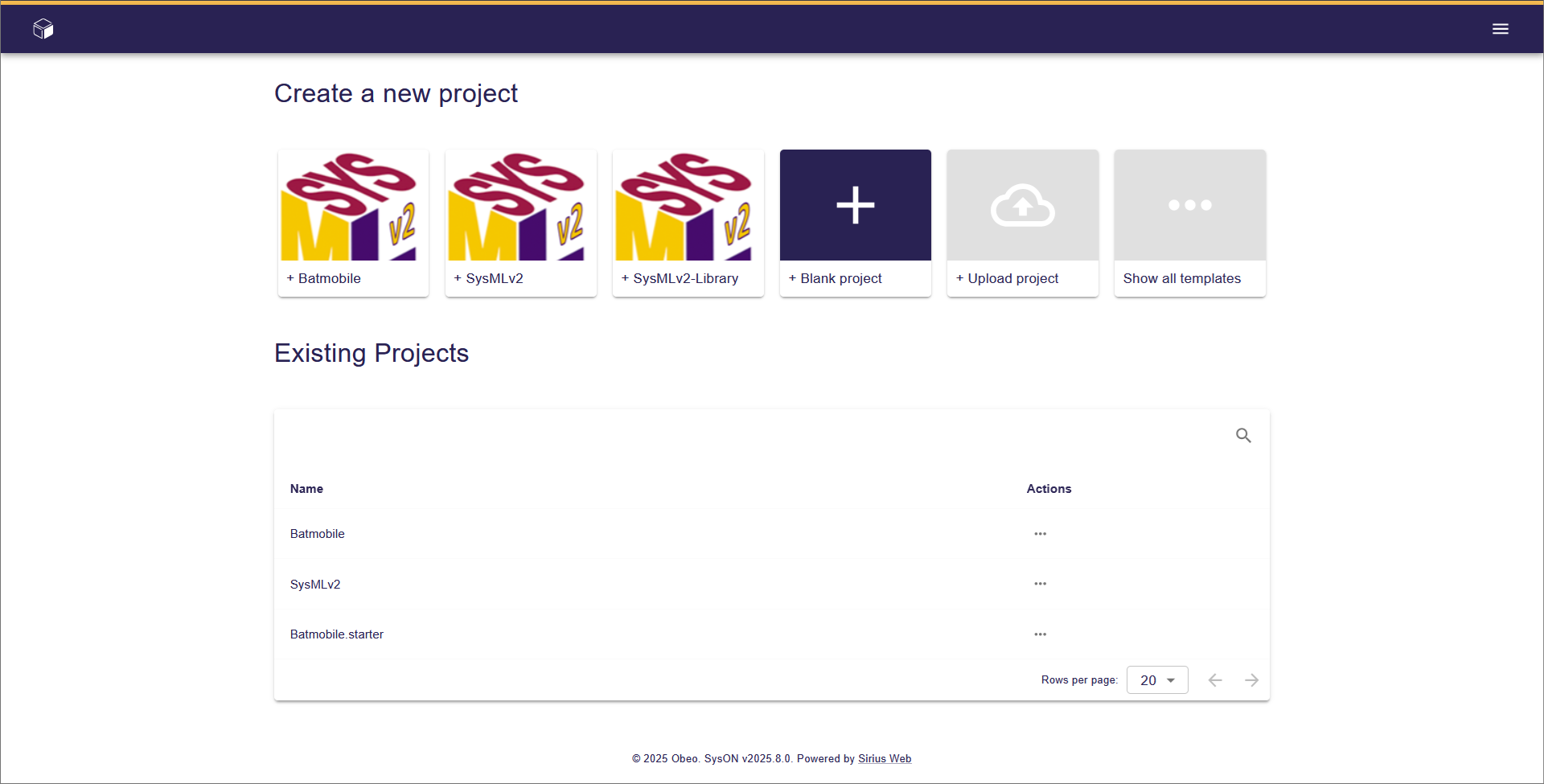
By the way, the "Batmobile" in the Existing Projects list on this screen is a sample based on the vehicle used by that American comic book hero.
Shutting Down
#To stop the SysON server, press Ctrl + C in the shell where it is running.
To stop the docker service, use the following command.
sudo service docker stop
Next Time Preview
#With this, the setup for modeling with SysON is complete.
Next time, we'll dive into modeling with SysML v2 using SysON.
