To You in the User Department - 'Don't Let Them Say “The IS Department Already Tested It…”! Learning the True Meaning of “User Testing” from a Bear'
Back to Top
 アドベントカレンダー2025
To reach a broader audience, this article has been translated from Japanese.
You can find the original version here.
This is Day 19 of the Mamezou Developer Site Advent Calendar 2025.
Hello & nice to meet you—I’m Onodera, also known as Yasagure Mamepanda from the Education Group.
To everyone in the user (business) department: every time you receive a user test (acceptance test) request, have you honestly ever thought this?
"The IS Department should have tested this properly, so why do we have to test it again?"
The test tasks squeezed into your already busy schedule.
"I wish the professionals in the Information Systems Department (hereafter IS Department) could just handle bug checks."
"Isn't this just redundant work?"
…I completely understand these feelings.
However, there is actually a reason why you must do it and no one else can.
To let you experience that reason, please join me for a brief “two checks.”
Check 1: Spot the Differences
#First, compare the following two images:
the "Bear Design Document and Finished Image"[1] and the "actual completed bear (deliverable)" made from it.
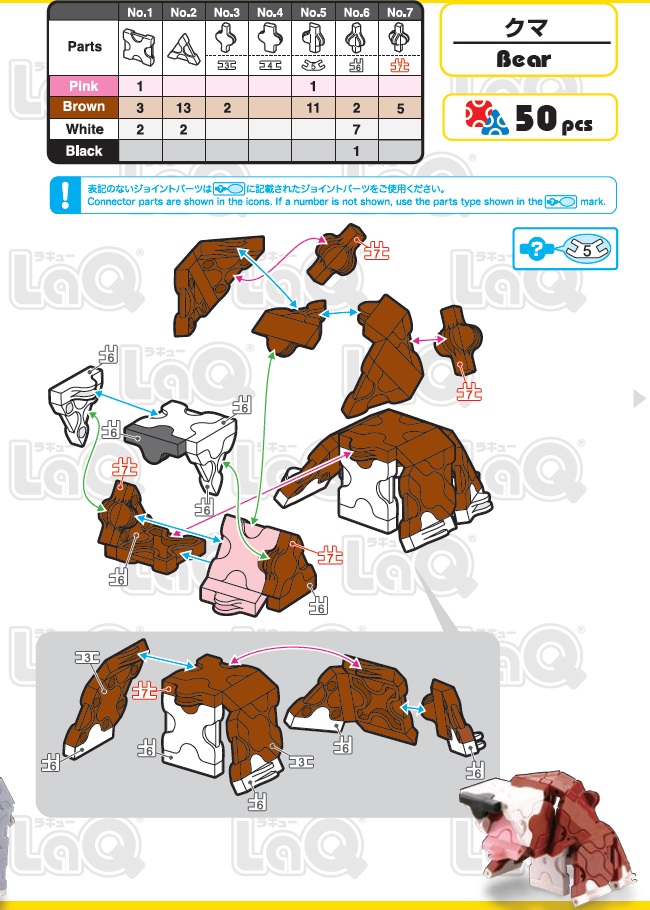
(↑Bear design document)
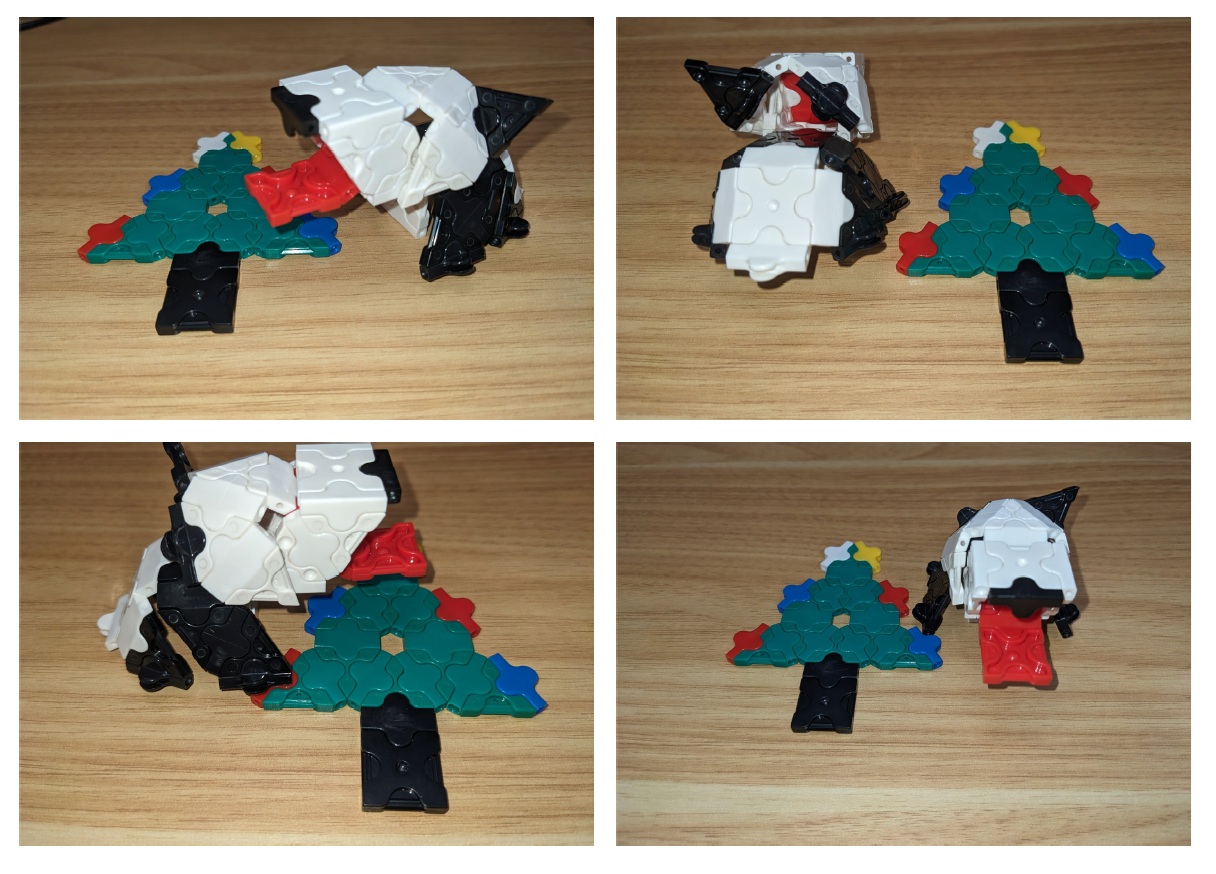
(↑Completed bear (deliverable))
Compare the two and try to spot what's different.
"This part is different," "the color over there is different"… did you spot a few?
If you did, mentally note where the differences are.
Check 2: Confirm the Purpose
#Now, let's think from a completely different perspective.
After all, for what purpose was this "bear" created?
Let’s say there was the following requirement (purpose):
[Purpose]
To place at the company reception and serve as a mascot to increase visiting customers’ "favorability toward the company" and "brand awareness."
With this purpose in mind, look again at the earlier "block bear."
Then, decide whether this should be placed at your company's reception.
How is it?
- Would placing a toy-like block at the reception clash with the company's image?
- Wouldn't a more sophisticated design be better for the goal of increasing favorability?
- Why a bear? Actually, it's a panda, right? And why is there an unrequested Christmas tree?
- No, we already have a mascot character.
Chances are, many of you felt 'this is not suitable for the purpose.'
Now for the reveal: The difference between the two tests
#So, you’ve just performed two types of checks.
These two directly represent the roles of the IS Department and the user department.
First Check = "System Test (IS Department)"
#The initial "spot the differences" is the system test conducted by the Information Systems Department.
This is the process of comparing against the original design document to confirm that it has been built correctly according to that design.
The IS Department can perfectly check whether the blocks are assembled according to the design document (i.e., free of bugs). However, they cannot judge whether it is "appropriate to place at reception."
Second Check = "User Test (You)"
#The next check, "confirming the purpose," is exactly the user test you, in the user department, perform.
What’s important in user testing is not checking whether it matches the design document. It’s confirming "whether the requirement-defined challenge (increasing favorability) is truly solved" and "whether this system is suitable for current work and objectives."
- The mouth color is red instead of pink
- The body color is black and white instead of brown (i.e., it’s a panda, not a bear)
- The tongue is long
- The left ear is long
- A "Christmas tree" not in the design document has been built (who was it that added that requirement halfway through!?)
Summary: This is why your "perspective" is needed
#Even if the first check produces a "perfect bear according to the design," if in the second check it’s judged "unsuitable for reception," then from a business standpoint it’s a failure.
And the only ones who can decide "we can't place this at reception" are you in the user department, who carry out that work daily and interact with customers.
You might sometimes feel "The IS Department tested this..." But in future user tests, please value "your perspective as professionals in your business."
Rather than "looking for bugs," approaching it from the viewpoint of "Will this system truly improve our work?" is the key to project success.
The 'bear example' introduced this time is just a small part of what is covered in our training for the user department.
In this training, instead of merely technical talks like "test procedures" or "tips for requirements definition,"
- Why the user department needs to be involved in the project
- Why leaving it all to the IS department causes project failure
we delve deep into the 'fundamental roles and responsibilities.'
Of course, it's content we want everyone in the user department who feels "forced every time a system is introduced" to see, and also those in the Information Systems Department who feel "I want the user department to have more ownership."
Aligning each other's "perspectives" to lead the project to success.
Please check the link below for details.
▼ Click here for training details and to sign up
* The images in this article were created using Yoshiritsu Co., Ltd.'s educational toy “[LaQ]”.
↩︎
