【Agent Skills】Bring 'That Vibe' to VSCode. I Want to Make Markdown Preview an Anthropic Theme! - Complete Guide to brand-guidelines -
Back to Top
 アドベントカレンダー2025
To reach a broader audience, this article has been translated from Japanese.
You can find the original version here.
This is the Day 3 article of the Mamezou Developer Site Advent Calendar 2025!
Introduction
#Have you ever seen the official Anthropic website?
I really love the beautiful color scheme and overall atmosphere.
Furthermore, I’ve been doing a lot of pair programming with Claude Code lately, and I find myself previewing markdown files very frequently—for writing requirements definitions, ADRs, technical articles, and so on.
Since I'm handling markdown files so frequently, I'd love to preview them in my favorite style. If I could build a preview environment that's as readable and beautiful as the official Anthropic site, writing would become much more comfortable!
However, thinking up the styling from scratch is incredibly challenging...
There are so many elements to consider—color palettes, typography, component styles—and it takes a lot of time.
At that moment, Anthropic released a feature called Agent Skills.
Agent Skills is a mechanism to extend Claude’s capabilities; it's a toolset to give Claude specific tasks (“skills”).
Moreover, if you use the official brand-guidelines skill provided by Anthropic, it will style things based on the Anthropic theme. I realized that this means I wouldn't have to think of everything from scratch and could easily leverage the official sophisticated design.
In this article, I’ll explain how to leverage Claude’s Agent Skills to apply Anthropic’s brand guidelines to the Markdown Preview Enhanced extension.
Goals of This Article
#By reading this article, you’ll be able to:
- Understand Claude’s Agent Skills
- Learn what Agent Skills are and how to enable and use them
- Know how to use the brand-guidelines skill
- This skill styles artifacts based on Anthropic’s brand guidelines
- Understand how to integrate with Markdown Preview Enhanced
- Learn the steps to combine the VSCode extension with Anthropic’s brand guidelines
Before Applying Styles
#Here’s an example of the preview before applying styles:
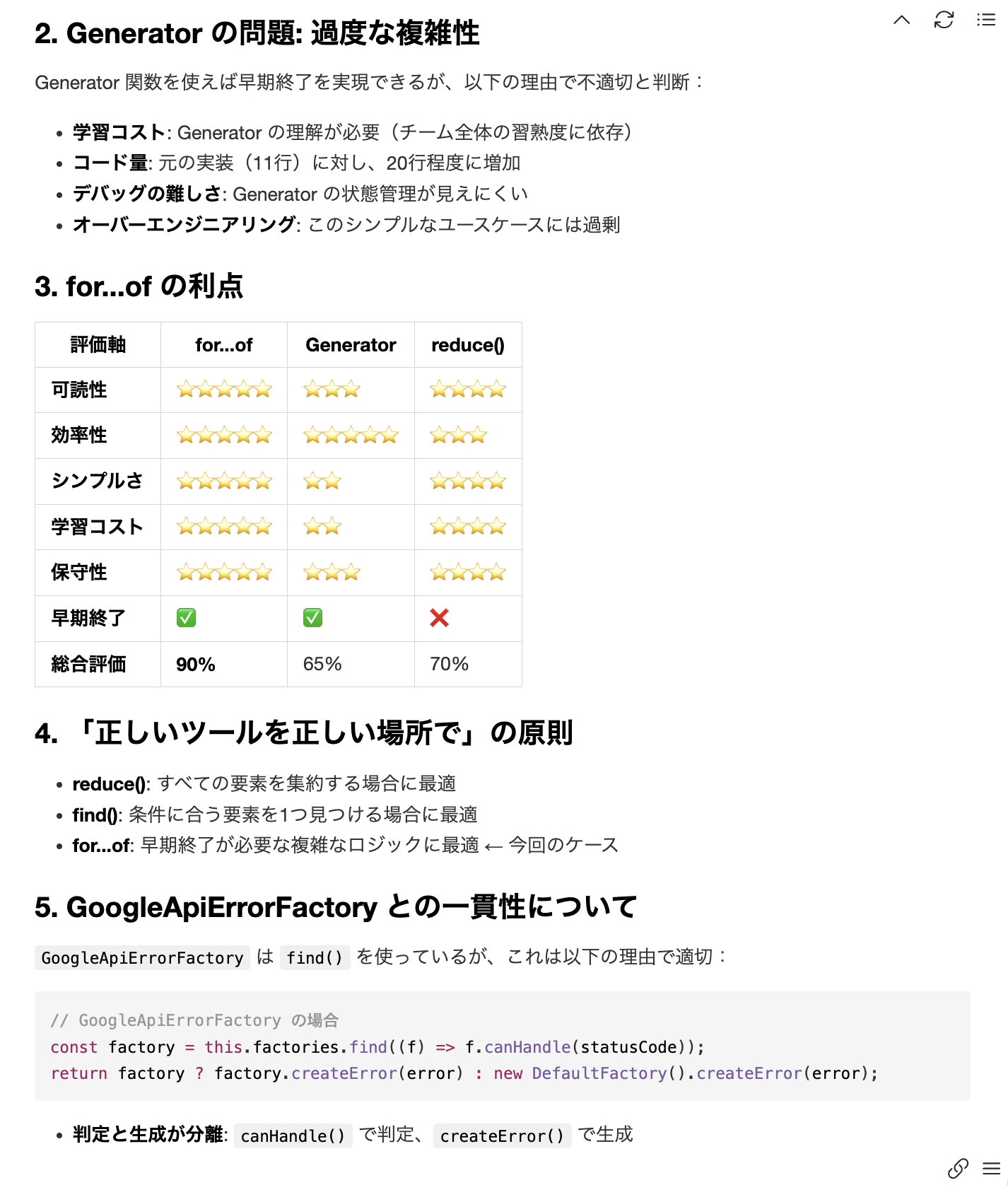
Example preview before styling
After Applying Styles
#Here’s an example of the preview after applying styles:
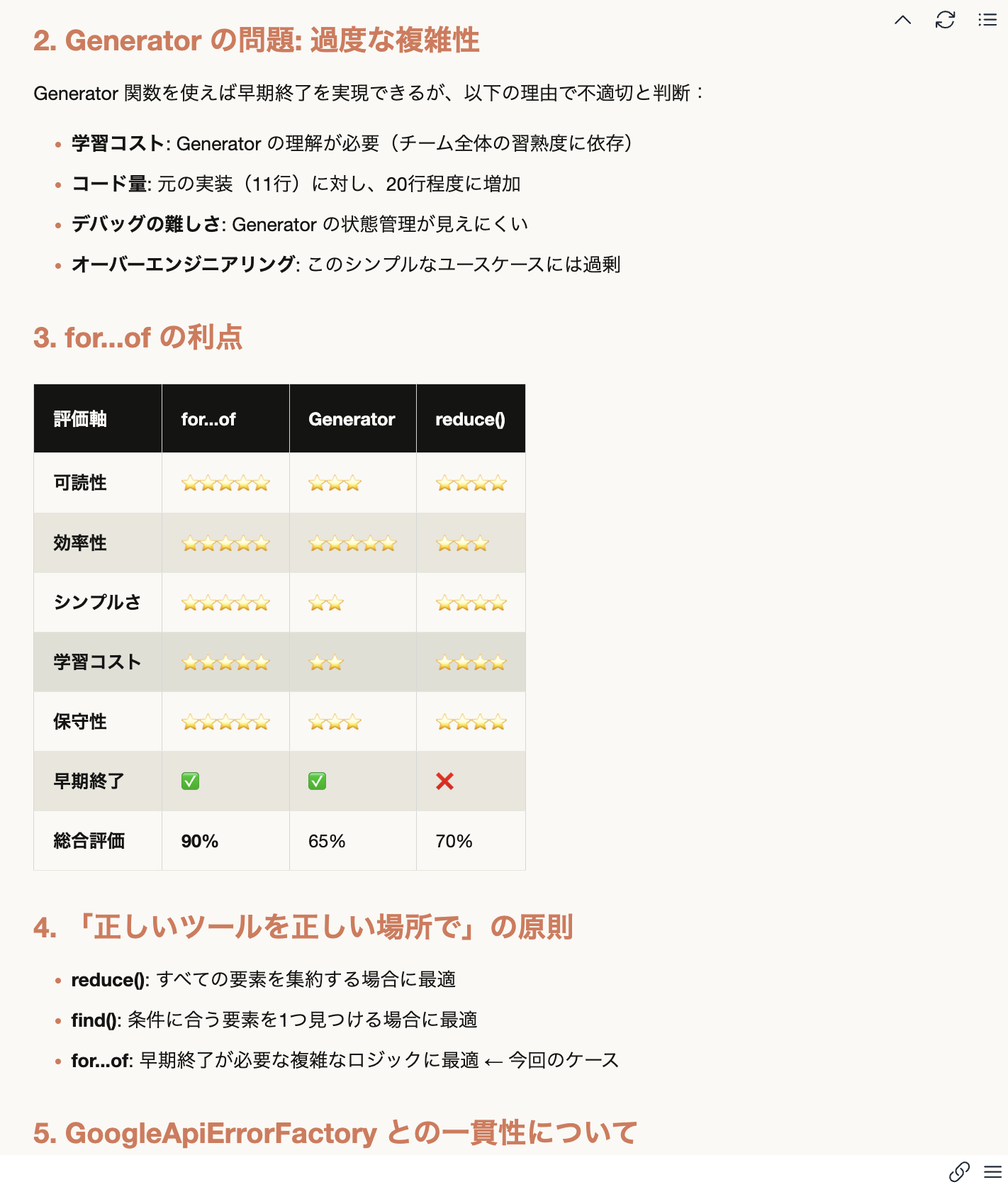
Example preview after styling
Prerequisites
#This article assumes the following environment:
Environment
#- OS: MacOS, Windows 11
- VSCode: Latest version (as of writing: 1.106.2)
- Claude account: Access to claude.ai
Required Background Knowledge
#- Basic VSCode operations (opening files, changing settings, etc.)
- Basic use of claude.ai (experience with the chat feature)
- Basic Markdown knowledge (headings, lists, code blocks, etc.)
Detailed Steps
#0. Key Concepts Used in This Procedure
#What Are Agent Skills?
Agent Skills is a mechanism to extend Claude's capabilities; it's a toolset that gives Claude specific tasks ("skills"). In this procedure, you need to enable Agent Skills to use the brand-guidelines skill. Agent Skills are experimental and available to Pro plan users and above.
Available Official Skills
Anthropic provides the following official skills:
Check the latest list of skills in the Anthropic Official Skills Repository.
✅ Documentation Skills
| Skill Name | Description |
|---|---|
| docx | Create/edit Word documents (track changes, formatting support) |
| Manipulate PDFs (extract, create, merge, form handling) | |
| pptx | Create PowerPoint presentations (layout, templates, charts) |
| xlsx | Create Excel spreadsheets (formulas, formatting, data analysis) |
✅ Creative/Design Skills
| Skill Name | Description |
|---|---|
| brand-guidelines | Apply Anthropic’s official brand colors and typography to artifacts (used in this article) |
| theme-factory | Style artifacts with 10 preset themes or custom themes |
| canvas-design | Create visual art in .png/.pdf format using design philosophy |
| algorithmic-art | Create generative art using p5.js (seeded randomness, flow fields, particle systems) |
| slack-gif-creator | Create animated GIFs optimized for Slack’s size limits |
✅ Development/Technical Skills
| Skill Name | Description |
|---|---|
| artifacts-builder | Build complex HTML artifacts using React, Tailwind CSS, and shadcn/ui |
| mcp-builder | Guide to creating high-quality MCP servers integrating external APIs and services |
| webapp-testing | Test local web applications using Playwright |
✅ Enterprise/Communication Skills
| Skill Name | Description |
|---|---|
| internal-comms | Create internal communication documents like status reports, newsletters, FAQs |
✅ Meta Skills (For Skill Creation)
| Skill Name | Description |
|---|---|
| skill-creator | Guide to creating effective skills to extend Claude’s capabilities |
| template-skill | Basic template to kickstart creating a new skill |
How to Invoke Skills
To invoke Agent Skills, specify the skill name in natural language in the chat:
# Basic Invocation
Use the brand-guidelines skill to create ○○

# Explicitly Specify the Skill Name
Use skill: brand-guidelines to generate a CSS file
Once Claude recognizes the skill, it will automatically perform the necessary operations.
What Is the brand-guidelines Skill?
The brand-guidelines skill is an Agent Skill for generating Anthropic’s official theme files. By using this skill, you can generate a CSS file that includes the color palettes and typography used in Anthropic’s official UI.
Contents of the Generated CSS File
The generated CSS file includes the following elements:
- Color Palette: Primary colors, background colors, text colors, etc.
- Typography: Font families, sizes, line heights, etc.
- Component Styles: Buttons, links, code blocks, etc.
- Dark Mode Support: Support for both Light and Dark themes
What Is Markdown Preview Enhanced?
Markdown Preview Enhanced is a VSCode extension.
VSCode comes with a built-in Markdown preview, but you might use this extension for the following reasons:
- Easy Custom CSS Application: You can easily load your own CSS files
- Rich Features: Lots of features not available in the standard preview, like math formulas, diagrams, and table of contents
- High Customizability: You can tweak detailed settings
Features related to custom style application include:
- Editing style.less: The extension has its own style file from which you can import external CSS
- Real-time Preview: Style changes are reflected instantly
- Multiple Preview Modes: Supports export in various formats
In this procedure, you’ll apply Anthropic’s official theme by importing the CSS file generated by the brand-guidelines skill into the style.less file of Markdown Preview Enhanced.
1. Enabling Agent Skills
#-
Access claude.ai
-
Open the settings page
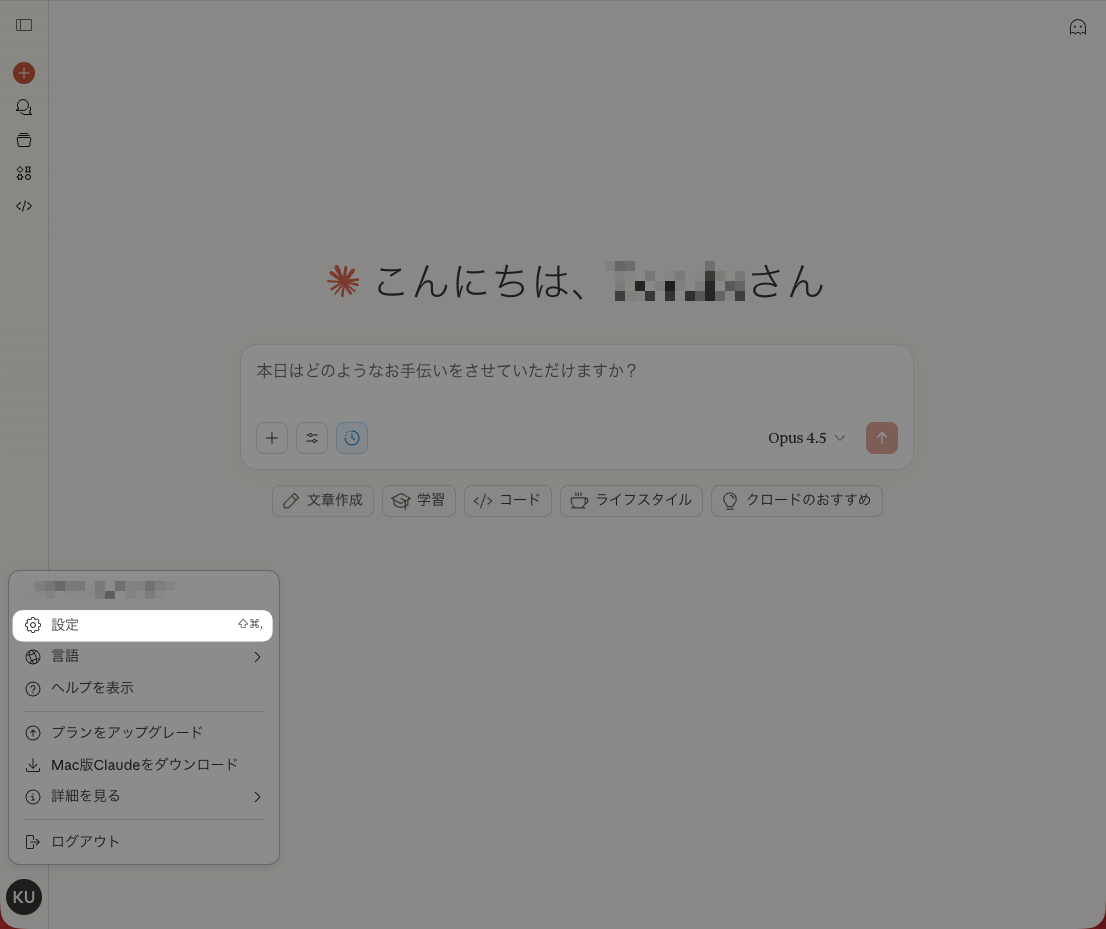
-
Enable Features > Code Execution & File Creation
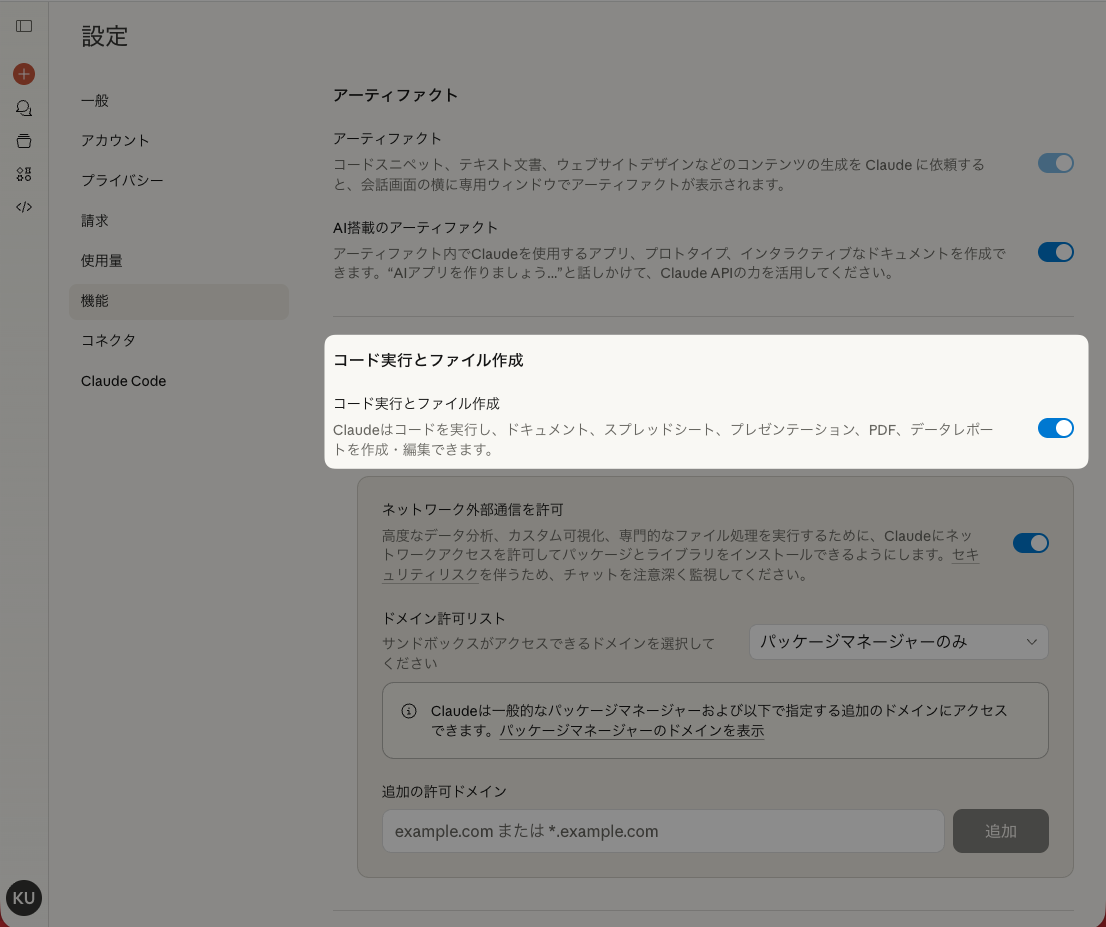
-
On the same screen, enable the skill you want to use (brand-guidelines)
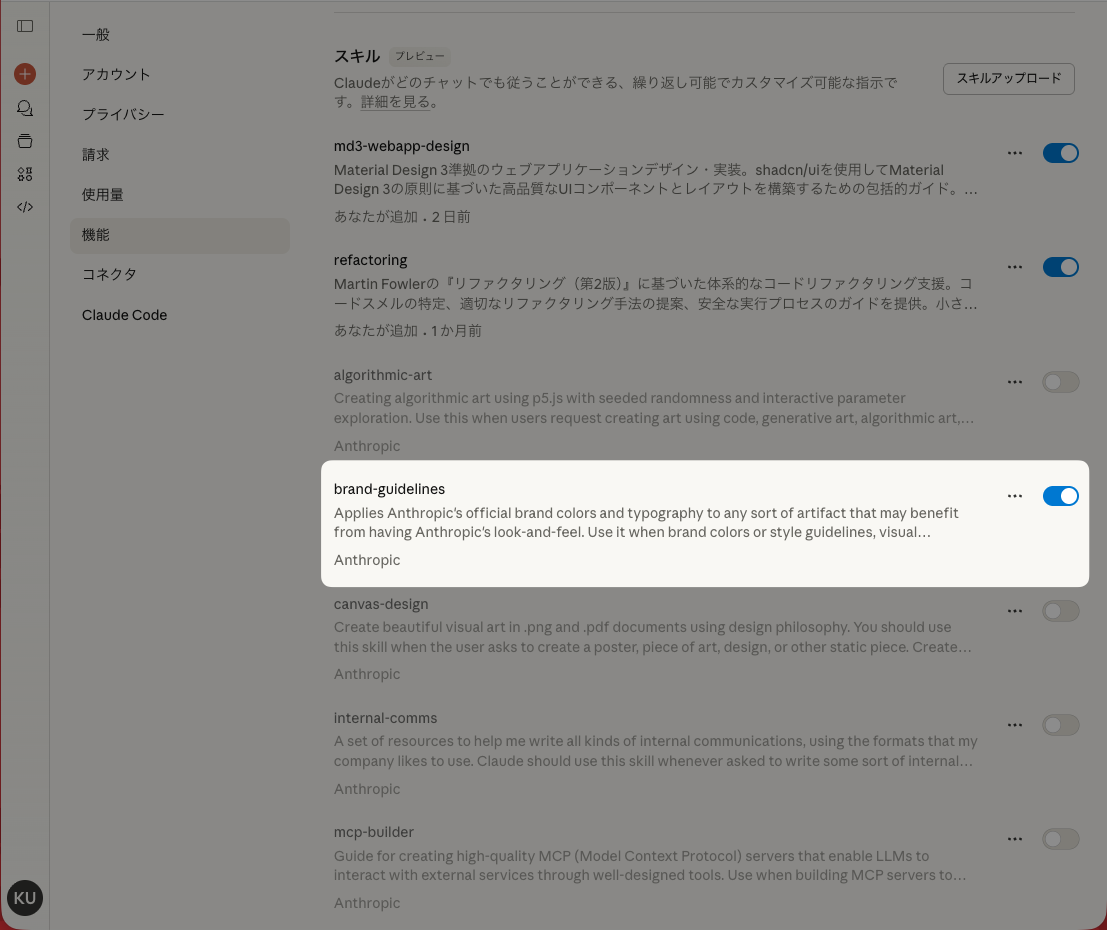
-
Confirm that it’s enabled
In the Claude.ai chat, ask which skills are available.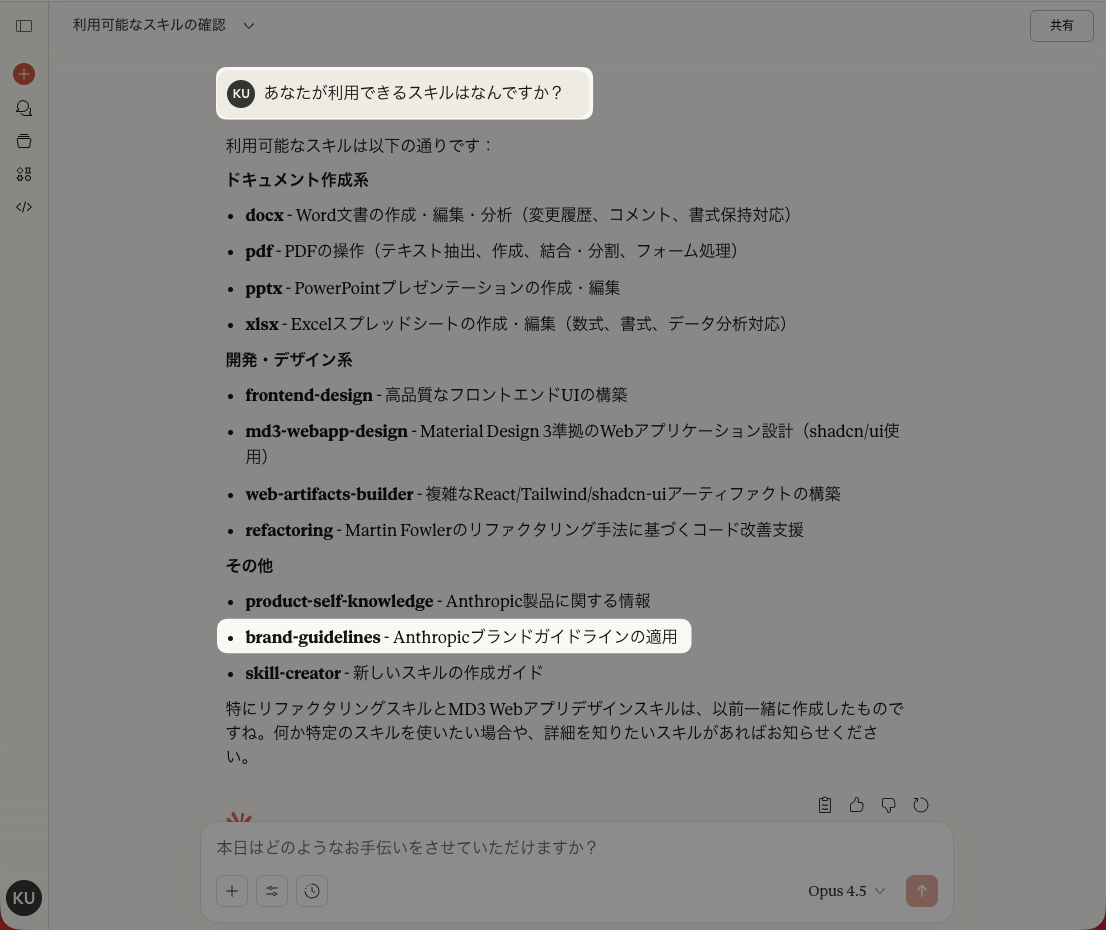
2. Install the Markdown Preview Enhanced Extension
#Install Markdown Preview Enhanced from the VSCode Extension Marketplace.
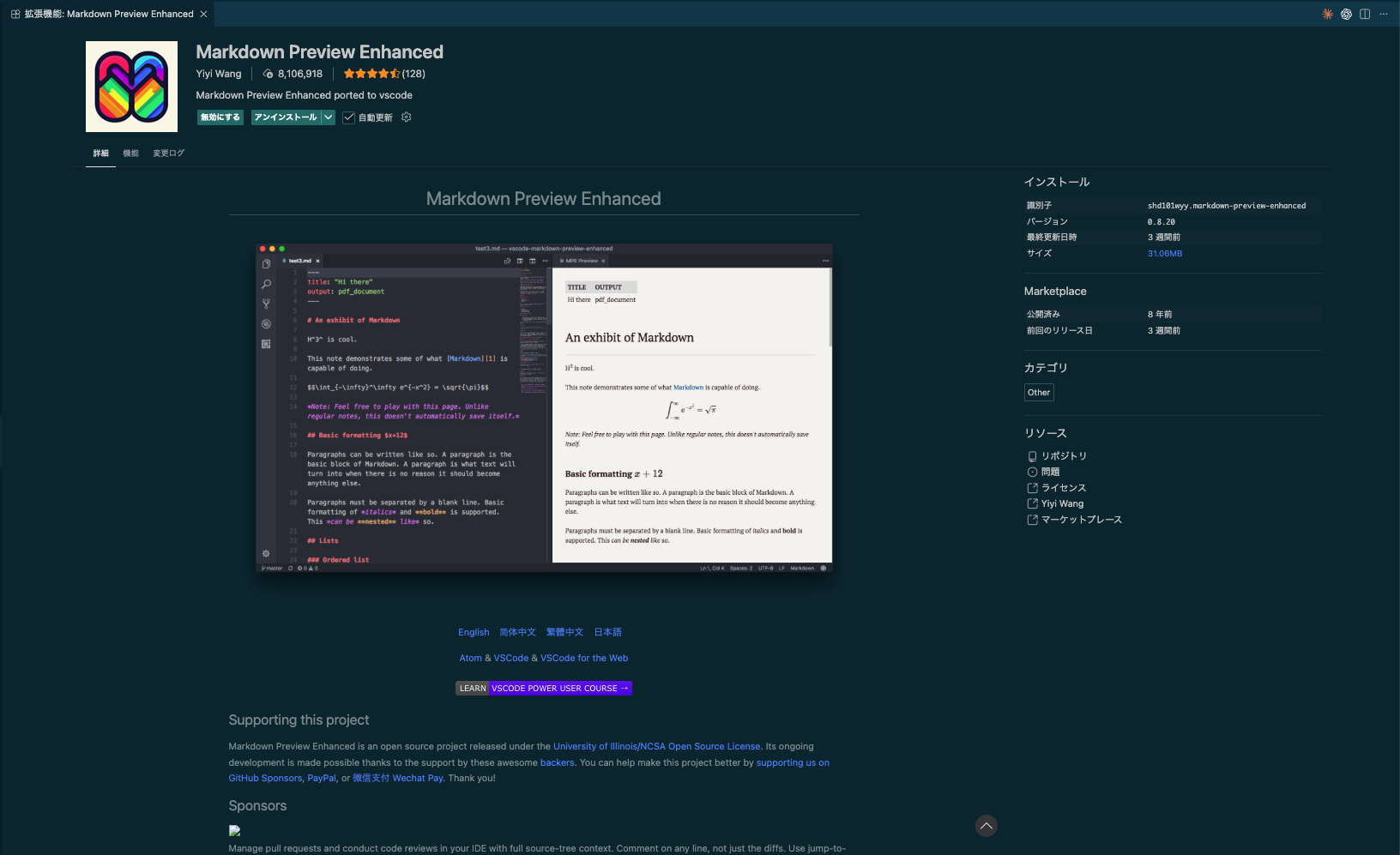
3. Generating Styles with the brand-guidelines Skill
#In the claude.ai chat, request the brand-guidelines skill to generate a CSS file.
The prompt can be free-form, but here’s an example of what I used:
I want to apply the official Anthropic theme to the styling when previewing markdown files in VSCode.
Assuming the preview uses the Markdown Preview Enhanced extension.
Please generate a custom CSS file.
The output is as follows:
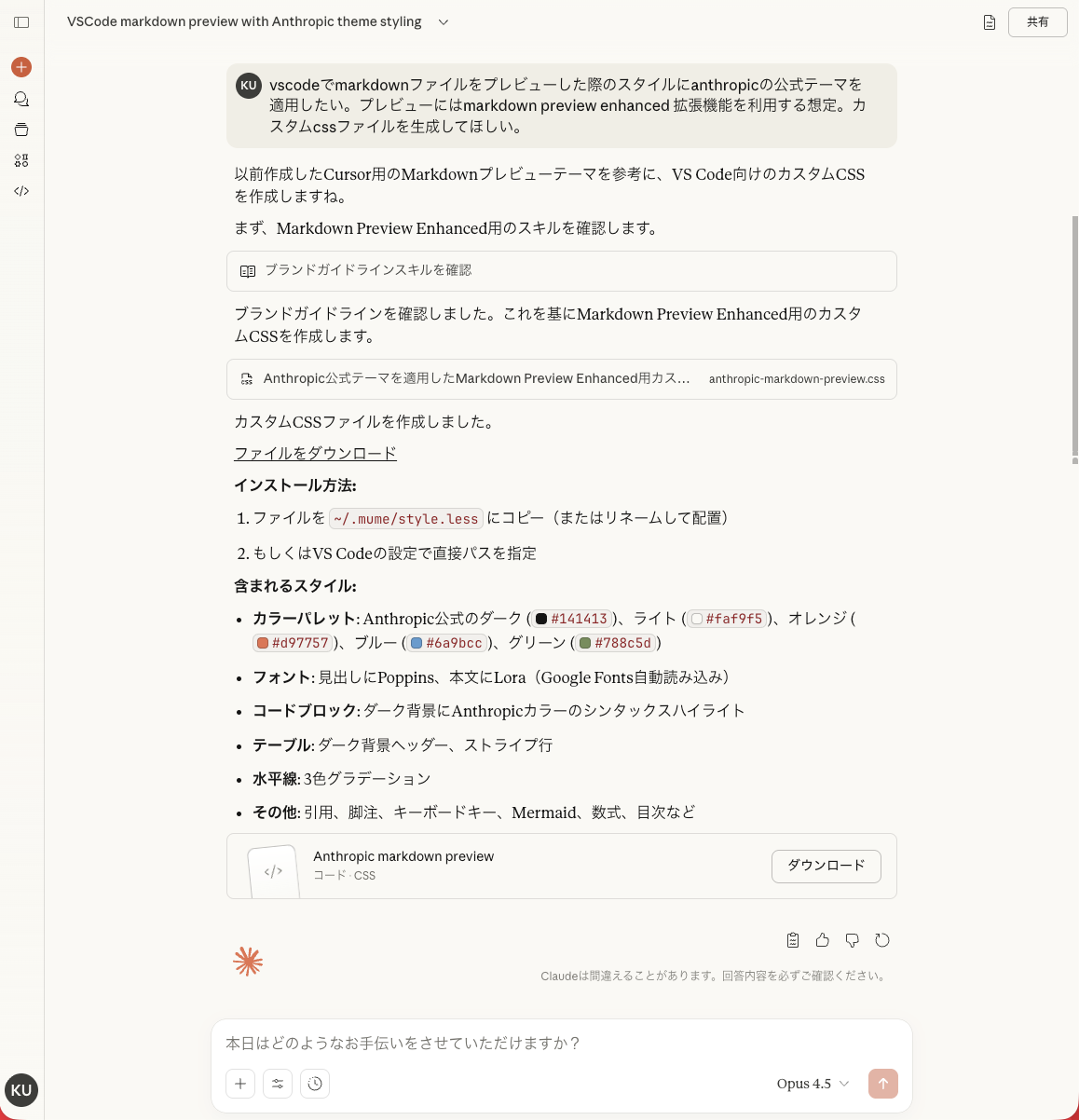
4. Reviewing the Generated Styles
#The CSS file generated this time is as follows:
/*
 * Anthropic Brand Theme for Markdown Preview Enhanced
 * VS Code Extension Custom CSS
 *
 * Installation:
 * 1. Open VS Code Settings (Cmd/Ctrl + ,)
 * 2. Search for "Markdown Preview Enhanced: Style"
 * 3. Add the path to this file, or
 * 4. Copy this content to ~/.mume/style.less (or style.css)
 */

/* ============================================
   Import Google Fonts
   ============================================ */
@import url('https://fonts.googleapis.com/css2?family=Poppins:wght@400;500;600;700&family=Lora:ital,wght@0,400;0,500;0,600;0,700;1,400;1,500&display=swap');

/* ============================================
   CSS Variables - Anthropic Brand Colors
   ============================================ */
:root {
  /* Main Colors */
  --anthropic-dark: #141413;
  --anthropic-light: #faf9f5;
  --anthropic-mid-gray: #b0aea5;
  --anthropic-light-gray: #e8e6dc;

  /* Accent Colors */
  --anthropic-orange: #d97757;
  --anthropic-blue: #6a9bcc;
  --anthropic-green: #788c5d;

  /* Typography */
  --font-heading: 'Poppins', Arial, sans-serif;
  --font-body: 'Lora', Georgia, serif;
  --font-code: 'JetBrains Mono', 'Fira Code', 'SF Mono', Consolas, monospace;
}

/* ============================================
   Base Styles
   ============================================ */
.markdown-preview.markdown-preview {
  font-family: var(--font-body);
  font-size: 16px;
  line-height: 1.7;
  color: var(--anthropic-dark);
  background-color: var(--anthropic-light);
  padding: 2rem 3rem;
  max-width: 900px;
  margin: 0 auto;
}

/* ============================================
   Headings - Poppins Font
   ============================================ */
.markdown-preview h1,
.markdown-preview h2,
.markdown-preview h3,
.markdown-preview h4,
.markdown-preview h5,
.markdown-preview h6 {
  font-family: var(--font-heading);
  font-weight: 600;
  color: var(--anthropic-dark);
  margin-top: 1.5em;
  margin-bottom: 0.5em;
  line-height: 1.3;
}

.markdown-preview h1 {
  font-size: 2.25rem;
  font-weight: 700;
  border-bottom: 3px solid var(--anthropic-orange);
  padding-bottom: 0.4em;
  margin-top: 0;
}

.markdown-preview h2 {
  font-size: 1.75rem;
  border-bottom: 2px solid var(--anthropic-light-gray);
  padding-bottom: 0.3em;
}

.markdown-preview h3 {
  font-size: 1.4rem;
  color: var(--anthropic-dark);
}

.markdown-preview h4 {
  font-size: 1.2rem;
  color: var(--anthropic-mid-gray);
}

.markdown-preview h5,
.markdown-preview h6 {
  font-size: 1rem;
  color: var(--anthropic-mid-gray);
  text-transform: uppercase;
  letter-spacing: 0.05em;
}

/* ============================================
   Paragraphs and Body Text
   ============================================ */
.markdown-preview p {
  margin: 1em 0;
  text-align: justify;
  hyphens: auto;
}

/* ============================================
   Links
   ============================================ */
.markdown-preview a {
  color: var(--anthropic-orange);
  text-decoration: none;
  border-bottom: 1px solid transparent;
  transition: border-color 0.2s ease, color 0.2s ease;
}

.markdown-preview a:hover {
  color: var(--anthropic-blue);
  border-bottom-color: var(--anthropic-blue);
}

.markdown-preview a:visited {
  color: var(--anthropic-green);
}

/* ============================================
   Lists
   ============================================ */
.markdown-preview ul,
.markdown-preview ol {
  margin: 1em 0;
  padding-left: 1.5em;
}

.markdown-preview li {
  margin: 0.4em 0;
  line-height: 1.6;
}

.markdown-preview ul li::marker {
  color: var(--anthropic-orange);
}

.markdown-preview ol li::marker {
  color: var(--anthropic-blue);
  font-weight: 600;
}

/* Nested lists */
.markdown-preview ul ul,
.markdown-preview ol ol,
.markdown-preview ul ol,
.markdown-preview ol ul {
  margin: 0.3em 0;
}

/* Task lists */
.markdown-preview input[type="checkbox"] {
  accent-color: var(--anthropic-orange);
  margin-right: 0.5em;
}

/* ============================================
   Blockquotes
   ============================================ */
.markdown-preview blockquote {
  margin: 1.5em 0;
  padding: 1em 1.5em;
  border-left: 4px solid var(--anthropic-orange);
  background-color: var(--anthropic-light-gray);
  color: var(--anthropic-dark);
  font-style: italic;
  border-radius: 0 8px 8px 0;
}

.markdown-preview blockquote p {
  margin: 0.5em 0;
}

.markdown-preview blockquote p:first-child {
  margin-top: 0;
}

.markdown-preview blockquote p:last-child {
  margin-bottom: 0;
}

/* Nested blockquotes */
.markdown-preview blockquote blockquote {
  border-left-color: var(--anthropic-blue);
  margin: 1em 0;
}

/* ============================================
   Code - Inline and Blocks
   ============================================ */
.markdown-preview code {
  font-family: var(--font-code);
  font-size: 0.9em;
}

/* Inline code */
.markdown-preview :not(pre) > code {
  background-color: var(--anthropic-light-gray);
  color: var(--anthropic-dark);
  padding: 0.2em 0.4em;
  border-radius: 4px;
  border: 1px solid var(--anthropic-mid-gray);
}

/* Code blocks */
.markdown-preview pre {
  background-color: var(--anthropic-dark);
  color: var(--anthropic-light);
  padding: 1.25em 1.5em;
  border-radius: 8px;
  overflow-x: auto;
  margin: 1.5em 0;
  border: 1px solid var(--anthropic-mid-gray);
}

.markdown-preview pre code {
  background: none;
  border: none;
  padding: 0;
  color: inherit;
  font-size: 0.875em;
  line-height: 1.6;
}

/* ============================================
   Syntax Highlighting (Custom Theme)
   ============================================ */
.markdown-preview pre .hljs-keyword,
.markdown-preview pre .hljs-selector-tag,
.markdown-preview pre .hljs-built_in {
  color: var(--anthropic-orange);
}

.markdown-preview pre .hljs-string,
.markdown-preview pre .hljs-attr {
  color: var(--anthropic-green);
}

.markdown-preview pre .hljs-number,
.markdown-preview pre .hljs-literal {
  color: var(--anthropic-blue);
}

.markdown-preview pre .hljs-comment {
  color: var(--anthropic-mid-gray);
  font-style: italic;
}

.markdown-preview pre .hljs-function,
.markdown-preview pre .hljs-title {
  color: var(--anthropic-blue);
}

.markdown-preview pre .hljs-variable,
.markdown-preview pre .hljs-params {
  color: var(--anthropic-light);
}

.markdown-preview pre .hljs-type,
.markdown-preview pre .hljs-class {
  color: var(--anthropic-orange);
}

/* ============================================
   Tables
   ============================================ */
.markdown-preview table {
  width: 100%;
  border-collapse: collapse;
  margin: 1.5em 0;
  font-size: 0.95em;
}

.markdown-preview table th,
.markdown-preview table td {
  padding: 0.75em 1em;
  text-align: left;
  border: 1px solid var(--anthropic-light-gray);
}

.markdown-preview table th {
  font-family: var(--font-heading);
  font-weight: 600;
  background-color: var(--anthropic-dark);
  color: var(--anthropic-light);
  border-color: var(--anthropic-dark);
}

.markdown-preview table tr:nth-child(even) {
  background-color: var(--anthropic-light-gray);
}

.markdown-preview table tr:hover {
  background-color: rgba(217, 119, 87, 0.1);
}

/* ============================================
   Horizontal Rules
   ============================================ */
.markdown-preview hr {
  border: none;
  height: 2px;
  background: linear-gradient(
    90deg,
    var(--anthropic-orange),
    var(--anthropic-blue),
    var(--anthropic-green)
  );
  margin: 2em 0;
  border-radius: 1px;
}

/* ============================================
   Images
   ============================================ */
.markdown-preview img {
  max-width: 100%;
  height: auto;
  border-radius: 8px;
  margin: 1em 0;
  box-shadow: 0 4px 12px rgba(20, 20, 19, 0.1);
}

/* ============================================
   Footnotes
   ============================================ */
.markdown-preview .footnotes {
  margin-top: 3em;
  padding-top: 1.5em;
  border-top: 2px solid var(--anthropic-light-gray);
  font-size: 0.9em;
  color: var(--anthropic-mid-gray);
}

.markdown-preview .footnote-ref {
  color: var(--anthropic-orange);
  font-weight: 600;
}

/* ============================================
   Definition Lists
   ============================================ */
.markdown-preview dl {
  margin: 1em 0;
}

.markdown-preview dt {
  font-family: var(--font-heading);
  font-weight: 600;
  color: var(--anthropic-dark);
  margin-top: 1em;
}

.markdown-preview dd {
  margin-left: 1.5em;
  color: var(--anthropic-mid-gray);
}

/* ============================================
   Keyboard Keys
   ============================================ */
.markdown-preview kbd {
  font-family: var(--font-code);
  font-size: 0.85em;
  padding: 0.2em 0.5em;
  background-color: var(--anthropic-light-gray);
  border: 1px solid var(--anthropic-mid-gray);
  border-radius: 4px;
  box-shadow: 0 2px 0 var(--anthropic-mid-gray);
}

/* ============================================
   Mark / Highlight
   ============================================ */
.markdown-preview mark {
  background-color: rgba(217, 119, 87, 0.3);
  color: var(--anthropic-dark);
  padding: 0.1em 0.3em;
  border-radius: 2px;
}

/* ============================================
   Abbreviations
   ============================================ */
.markdown-preview abbr {
  text-decoration: underline dotted var(--anthropic-blue);
  cursor: help;
}

/* ============================================
   Selection
   ============================================ */
.markdown-preview ::selection {
  background-color: rgba(106, 155, 204, 0.3);
  color: var(--anthropic-dark);
}

/* ============================================
   Scrollbar Styling
   ============================================ */
.markdown-preview ::-webkit-scrollbar {
  width: 8px;
  height: 8px;
}

.markdown-preview ::-webkit-scrollbar-track {
  background: var(--anthropic-light-gray);
  border-radius: 4px;
}

.markdown-preview ::-webkit-scrollbar-thumb {
  background: var(--anthropic-mid-gray);
  border-radius: 4px;
}

.markdown-preview ::-webkit-scrollbar-thumb:hover {
  background: var(--anthropic-orange);
}

/* ============================================
   Print Styles
   ============================================ */
@media print {
  .markdown-preview.markdown-preview {
    background-color: white;
    color: black;
    padding: 0;
  }

  .markdown-preview a {
    color: var(--anthropic-dark);
    text-decoration: underline;
  }

  .markdown-preview pre {
    border: 1px solid var(--anthropic-mid-gray);
    background-color: var(--anthropic-light-gray);
    color: var(--anthropic-dark);
  }
}

/* ============================================
   Mermaid Diagrams
   ============================================ */
.markdown-preview .mermaid {
  background-color: var(--anthropic-light);
  padding: 1em;
  border-radius: 8px;
  text-align: center;
}

/* ============================================
   Math (KaTeX/MathJax)
   ============================================ */
.markdown-preview .katex,
.markdown-preview .MathJax {
  font-size: 1.1em;
}

.markdown-preview .katex-display,
.markdown-preview .MathJax_Display {
  margin: 1.5em 0;
  padding: 1em;
  background-color: var(--anthropic-light-gray);
  border-radius: 8px;
  overflow-x: auto;
}

/* ============================================
   Admonitions / Callouts
   ============================================ */
.markdown-preview .admonition,
.markdown-preview .callout {
  margin: 1.5em 0;
  padding: 1em 1.5em;
  border-radius: 8px;
  border-left: 4px solid;
}

.markdown-preview .admonition.note,
.markdown-preview .callout.note {
  background-color: rgba(106, 155, 204, 0.1);
  border-left-color: var(--anthropic-blue);
}

.markdown-preview .admonition.warning,
.markdown-preview .callout.warning {
  background-color: rgba(217, 119, 87, 0.1);
  border-left-color: var(--anthropic-orange);
}

.markdown-preview .admonition.tip,
.markdown-preview .callout.tip {
  background-color: rgba(120, 140, 93, 0.1);
  border-left-color: var(--anthropic-green);
}

/* ============================================
   TOC (Table of Contents)
   ============================================ */
.markdown-preview .md-toc {
  background-color: var(--anthropic-light-gray);
  padding: 1.5em;
  border-radius: 8px;
  margin: 1.5em 0;
}

.markdown-preview .md-toc-content {
  font-family: var(--font-heading);
}

.markdown-preview .md-toc a {
  color: var(--anthropic-dark);
}

.markdown-preview .md-toc a:hover {
  color: var(--anthropic-orange);
}
5. Applying to Markdown Preview Enhanced
#- From the Command Palette, run
Markdown Preview Enhanced: Customize CSS (Global) - In the displayed
style.lessfile, append the contents of the generated CSS file and save it
6. Verification and Fine-tuning
#Check the preview styles and fine-tune any areas of concern.
You can fine-tune styles by directly editing the style.less file.
Alternatively, you can ask in the claude.ai chat to modify the contents of the style.less file.
I made a slight change to the font.
Markdown Preview Enhanced offers a feature in the extension settings to specify preview themes (Markdown Preview Enhanced: Preview Theme / Markdown-preview-enhanced: Code Block Theme settings). If these settings conflict with your style.less content, the intended styles may not be applied.
If your styles aren’t reflecting as expected, try changing these settings.
Conclusion
#In this article, I explained how to apply Anthropic’s style to Markdown previews by leveraging Claude’s Agent Skills.
Achievements
#With this setup, we achieved the following:
- Understanding Agent Skills: Learned how to enable and use Claude’s Agent Skills
- Using the brand-guidelines Skill: Became able to easily generate the official style CSS file
- Unified Writing Environment: Built a preview environment with Anthropic’s official style
Next Steps: Creating Custom Skills
#In this article we used the official brand-guidelines skill, but by using another official skill, skill-creator, you can create your own original skills.
For example, you could create custom skills like:
- A CSS generation skill based on your company's brand guidelines
- A component generation skill for a specific framework
- A document template generation skill tailored to a specific project
To use the skill-creator skill, just ask in the claude.ai chat as follows:
Use the skill-creator skill to create a custom skill that performs ○○
For details, refer to the Anthropic Official Skills Repository. You can create effective skills by referring to the official skill-creator and template-skill.
Also, remember to enable the skill-creator skill just like you enabled the brand-guidelines skill!
Thank you for reading to the end. I hope this article helps make your writing environment more comfortable. 🎨✨
